Solved Computer will not restart after win update

Nelson35

New member
Member
Local time
2:12 PM
Messages
91
After winupdate completes and tries to restart the computer, it will log off and the screen will go black but the fan and lights stay on until I finally held the power button to shut it down. When I powered it back up it came on normally and the update finished without a problem. I've included the dm log. Also when ever I have windows media player open the computer will not go into sleep mode. I not sure if the two probs are connected. Thanks
 

Attachments

My Computer

Computer type
PC/Desktop
Computer Manufacturer/Model Number
Puget Systems
OS
Windows 7 Home Premium 64bit
CPU
Intel core i5
Motherboard
ASUSTeK Computer INC. P8Z68-V PRO GEN3 (LGA1155)
Memory
8GB
Graphics Card(s)
AMD Radeo HD 7700 series
Sound Card
Realtek High Definition Audio
Monitor(s) Displays
Acer Al2002W
Screen Resolution
1680x1050
Hard Drives
500GB
298GB Western Digital WD 3200AAJ External
2794GB Western Digital WD My Book 1230
PSU
Antec TruePower New Series 650W
Case
Lancool C-K7B
Cooling
Cooler Master Hyper TX3
Antivirus
windows security essentials
Browser
IE10, Firefox
Did you try to uninstall the Win Update that you believe is causing your problem?
start orb, type cmd
right click cmd, choose run as administrator
at the prompt > enter
wusa /uninstall /KB:number goes here
yes, you need the : between KB and #
 

My Computer

Computer type
PC/Desktop
Computer Manufacturer/Model Number
HP Desktop & Compaq Laptop
OS
Win 10 x64, Linux Lite, Win 7 x64, BlackArch, & Kali
Hard Drives
Samsung 850 Pro 256Gb,
Hitachi HDD 1Tb,
Crucial MX SSD 250Gb
Segate 3Tb USB 3.0 Ext. Backup HDD
Internet Speed
150Mbps dn, 20Mbps up
Antivirus
Avast Free, Malwarebytes Anti-Exploit & Anti-Ransomware
Browser
Firefox, Chrome, Opera, & VPN
Did you try to uninstall the Win Update that you believe is causing your problem?
start orb, type cmd
right click cmd, choose run as administrator
at the prompt > enter
wusa /uninstall /KB:number goes here
yes, you need the : between KB and #

It had been doing this before this particular update. I'm trying to remember exactly when it started.
 

My Computer

Computer type
PC/Desktop
Computer Manufacturer/Model Number
Puget Systems
OS
Windows 7 Home Premium 64bit
CPU
Intel core i5
Motherboard
ASUSTeK Computer INC. P8Z68-V PRO GEN3 (LGA1155)
Memory
8GB
Graphics Card(s)
AMD Radeo HD 7700 series
Sound Card
Realtek High Definition Audio
Monitor(s) Displays
Acer Al2002W
Screen Resolution
1680x1050
Hard Drives
500GB
298GB Western Digital WD 3200AAJ External
2794GB Western Digital WD My Book 1230
PSU
Antec TruePower New Series 650W
Case
Lancool C-K7B
Cooling
Cooler Master Hyper TX3
Antivirus
windows security essentials
Browser
IE10, Firefox
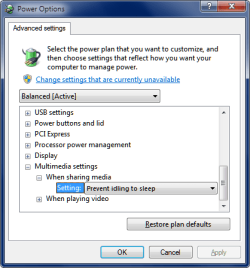
Also when ever I have windows media player open the computer will not go into sleep mode.

Check your power options settings.

Sleep.png
 

My Computer

Computer type
PC/Desktop
Computer Manufacturer/Model Number
home built
OS
Multi-Boot W7_Pro_x64 W8.1_Pro_x64 W10_Pro_x64 +Linux_VMs +Chromium_VM
CPU
AMD Athlon II x4 620
Motherboard
Gigabyte GA-MA785G-UD3H
Memory
6GB GSkill DDR2 800
Graphics Card(s)
AMD 4670 GPU + AMD 4200 IGP
Sound Card
on board Realtek ALC889A
Monitor(s) Displays
RCA 40" LCD TV, Insignia 32" LCD TV, HP 15" LCD monitor
Screen Resolution
1680 x 1050
Hard Drives
OCZ Vertex 3 120GB,
Samsung F3 1TB (3),
Several others - WD, Seagate, Hitachi, ...
PSU
Corsair 500 W
Case
Rosewill mid tower
Cooling
CM 90mm rifle
Keyboard
Gyration wireless, Logitech wireless, Dell USB wired
Mouse
Gyration wireless, Logitech wireless, V7 USB wired
Internet Speed
Spectrum - 100Mbps D / 10Mbps U
Antivirus
Avast, MBAM3, EMET, WinPatrol
Browser
Pale Moon, Firefox, IE
Other Info
2 multi-boot PC's
Mainly HTPC/Office/Gen purpose (no gaming).
Trendnet USB KVM.
LG DVD burner/Blue Ray Player.
Tray system for removable SATA backup drives.

Not currently OCd, under-volted.
I use Hybrid sleep, rarely re-boot or shutdown.

Hauppauge HD-PVR, Avermedia PCIe TV Tuner, Hauppauge PCI TV Tuner.
Check for system file corruption
at CMD type
sfc /scannow

If you have files that sfc /scannow cannot repair,
Download and Run SURT Tool
Logs located at:
C:\Windows\Logs\CBS
attach CheckSUR.log
 

My Computer

Computer type
PC/Desktop
Computer Manufacturer/Model Number
HP Desktop & Compaq Laptop
OS
Win 10 x64, Linux Lite, Win 7 x64, BlackArch, & Kali
Hard Drives
Samsung 850 Pro 256Gb,
Hitachi HDD 1Tb,
Crucial MX SSD 250Gb
Segate 3Tb USB 3.0 Ext. Backup HDD
Internet Speed
150Mbps dn, 20Mbps up
Antivirus
Avast Free, Malwarebytes Anti-Exploit & Anti-Ransomware
Browser
Firefox, Chrome, Opera, & VPN
Back
Top