Solved Windows Update will not stop running after Win 10 install failure

nitram

New member
Local time
11:38 PM
Messages
7
Hello everyone.

I need some assistance in getting Windows Update working properly again in my Win 7 machine.

I attempted to upgrade to Windows 10 on this particular machine. The upgrade failed due to something called the "AMD K8 trap" or something similar. I tried both the update and clean install methods. At one point, Windows 10 was installed apparantly, but then crashed (the K8 trap message again) and I had to try again. Nothing was successful in this upgrade attempt. When I tried to roll back to Windows 7 after the numerous failed upgrade attempts, I was left with some issues. I have managed to resolve most of the issues except the Windows Update. My computer was fully updated when I attempted to upgrade.

I even tried to restore my hard drive to a brand new drive using Macrium Reflect but that failed as well; another sad story..:(:cry:

So... I need assistance from someone way more knowledgeable about this than I.

Currently, I get a notification in the task bar telling me that there are updates available for Windows 7.

When I click on the update icon, either I get a windows update message that Windows 10 update failed and asks me to try again (There is an error code but I forgot to write it down) or, I get a different message telling me that there are updates available and asking me if I want to download and install them.

If I accept the invitation to download and install them, Windows Update begins to download the updates (there are many now apparantly) except there is no downloading happening (at least it does not seem that it is happening), nor is there any other message telling me that Windows Update has found any number of updates to download and install. If I don't accept the inviation - sometimes Windows 7 will just begin to run on its own and continue to run and run, and run...

All Windows Update does is continue to run - for seven days now - with nothing happening at all.

If I reboot the computer - Windows Update exhbits the same behaviour.

At this writing, I have turned Windows Update service off.

As I will be keeping Window 7 on this machine, I would like to have it updated automatically as it was previous to the upgrade attemps. I really don't wan't to do a clean install of Windows 7 if I can avoid it. Does anyone have any remedy for this issue?

Thank you for your thoughts and ideas.
 

My Computer My Computer

OS
Windows 7
Hi,
Use option 3 here to reset everything
http://www.sevenforums.com/tutorials/91738-windows-update-reset.html

When manually installing updates you need to switch your update settings to Never check for updates and restart the machine first.

Make sure KB3020369 is installed if not manually install it,
Win-7 32 bit
https://www.microsoft.com/en-us/download/details.aspx?id=46827
Win-7 64 bit
https://www.microsoft.com/en-us/download/details.aspx?id=46817

Then manually install KB3172605
https://support.microsoft.com/en-us/kb/3172605
Win-7 32 bit,
https://www.microsoft.com/en-us/download/details.aspx?id=53335
Win-7 64 bit,
https://www.microsoft.com/en-us/download/details.aspx?id=53332

After switch your windows update settings back to what you had prior and manually check for updates and the rest should show up shortly.
 

My Computer My Computer

Computer type
PC/Desktop
Computer Manufacturer/Model Number
Custom assembled by me :}
OS
Win-7-Pro64bit 7-H-Prem-64bit
CPU
i7-5930K 2nd i9-9940x both water blocked VRM's too
Motherboard
ASUS SABERTOOTH X99 2nd ASUS x299 Apex
Memory
Trident-z 3200C14 2nd Trident-z 3600C16
Graphics Card(s)
EVGA 1080ti ftw3 2nd Titan Xp both water blocked
Sound Card
Built-in Realtek
Monitor(s) Displays
1-AOC G2460PG 24"G-Sync 144Hz/ 2nd 1-ASUS VG248QE 24" 144Hz
Screen Resolution
1920 x 1080 144Hz
Hard Drives
2-Samsung M.2 Evo & Evo Plus
2-Samsung 850 EVO 500GB SSD's/ 3-2.5 W.D. Black 1tb-&3-1tb/3-3.5 WD Black 1tb hdd's
PSU
EVGA SuperNOVA 1000-P2 2nd 1200-P2
Case
2-Corsair Obsidian Series 450D Black ATX Mid Tower
Cooling
Custom water loops
Keyboard
Logitech G710+/ 2nd Logitech G910
Mouse
2-RedDragon M901 Perdition 16400 dpi Gaming mouse = wired
Internet Speed
Comcast Ping 19ms 89.31mbps download speed 6.12mbps upload
Antivirus
Malwarebytes Pro/ Superantispyware Pro
Browser
FireFox & Pale moon
Other Info
2nd ASUS X299 Apex/Intel i9-9940x with Custom water loop/7H-Prem-x64/Corsair 450D case/Ram Trident-z 3600C16 4x8gb / Samsung970Evo plus 500gb SSD/Dual ssd EZ swap evo/PSU EVGA SuperNova 1200w-P2 80+Platinum/GPU Titan Xp /8-ML-140 on push-pull on 2-280GTX rads
Hello Thrashzone..

Thank you for your message and the information on how to get my Windows Update running correctly again. Unfortunately, Oprion 3 did not work. I am still getting the aformentioned behaviour.

Now, I am getting some information that there has never been any updates to my Windows 7 operating system. However, when I check the loaded updates, there are LOTS of them - beginning in June 2010 up to March, 2016. I know that I updated the system just before attempting to upgrade to Win 10. Those recent updates have vanished. When I manually attempted to install KB3020369, I got the message it was already installed. When I manually attempted to install KB3172605 - Windows Update downloaded and installed the update.

After manually installing the abovementioned udate, Windows Update began running again - searching for updates and reported that there were 48 updates that needed to be installed. I thought "hooray!! it is fixed". Too soon!! When I clicked to install the updates, Windows update said I did not need to update my machine as everything is updated! ??? :( Then...Windows update began searching for updates again - has not stopped since this morning.

I am open to any other thoughts on how to fix this...
 

My Computer My Computer

OS
Windows 7
Hi,
Bummer that is usually all it takes,
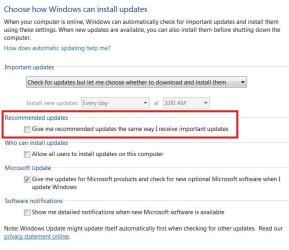
Did you exclude Recommended updates from be listed with and installing with Important updates
Then just install the actual Important updates first ?
Uncheck the Recommended updates box
update settings.JPG

You can try again by manually installing this update
https://support.microsoft.com/en-us/kb/3177725
 

My Computer My Computer

Computer type
PC/Desktop
Computer Manufacturer/Model Number
Custom assembled by me :}
OS
Win-7-Pro64bit 7-H-Prem-64bit
CPU
i7-5930K 2nd i9-9940x both water blocked VRM's too
Motherboard
ASUS SABERTOOTH X99 2nd ASUS x299 Apex
Memory
Trident-z 3200C14 2nd Trident-z 3600C16
Graphics Card(s)
EVGA 1080ti ftw3 2nd Titan Xp both water blocked
Sound Card
Built-in Realtek
Monitor(s) Displays
1-AOC G2460PG 24"G-Sync 144Hz/ 2nd 1-ASUS VG248QE 24" 144Hz
Screen Resolution
1920 x 1080 144Hz
Hard Drives
2-Samsung M.2 Evo & Evo Plus
2-Samsung 850 EVO 500GB SSD's/ 3-2.5 W.D. Black 1tb-&3-1tb/3-3.5 WD Black 1tb hdd's
PSU
EVGA SuperNOVA 1000-P2 2nd 1200-P2
Case
2-Corsair Obsidian Series 450D Black ATX Mid Tower
Cooling
Custom water loops
Keyboard
Logitech G710+/ 2nd Logitech G910
Mouse
2-RedDragon M901 Perdition 16400 dpi Gaming mouse = wired
Internet Speed
Comcast Ping 19ms 89.31mbps download speed 6.12mbps upload
Antivirus
Malwarebytes Pro/ Superantispyware Pro
Browser
FireFox & Pale moon
Other Info
2nd ASUS X299 Apex/Intel i9-9940x with Custom water loop/7H-Prem-x64/Corsair 450D case/Ram Trident-z 3600C16 4x8gb / Samsung970Evo plus 500gb SSD/Dual ssd EZ swap evo/PSU EVGA SuperNova 1200w-P2 80+Platinum/GPU Titan Xp /8-ML-140 on push-pull on 2-280GTX rads
Hello again TrashZone...

Thank you for responding again to my request for assistance.

Well.....SUCCESS!!!!. I followed your suggestions in your second message and things seem to have worked out - at least at this point. Windows Update has downloaded and updated my Win7 machine and searched again (for a short time) and downloaded and installed a few more needed updates in short order and then stopped - as it should.

At this point in time, things seem to be OK on this side of the screen.

Thank you again for your assistance with this issue. Much appreciated.
 

My Computer My Computer

OS
Windows 7
Hi,
Good news
Can you check something real quick
Go to Uninstall a program
See which version of Microsoft Net Framework is installed.
 

My Computer My Computer

Computer type
PC/Desktop
Computer Manufacturer/Model Number
Custom assembled by me :}
OS
Win-7-Pro64bit 7-H-Prem-64bit
CPU
i7-5930K 2nd i9-9940x both water blocked VRM's too
Motherboard
ASUS SABERTOOTH X99 2nd ASUS x299 Apex
Memory
Trident-z 3200C14 2nd Trident-z 3600C16
Graphics Card(s)
EVGA 1080ti ftw3 2nd Titan Xp both water blocked
Sound Card
Built-in Realtek
Monitor(s) Displays
1-AOC G2460PG 24"G-Sync 144Hz/ 2nd 1-ASUS VG248QE 24" 144Hz
Screen Resolution
1920 x 1080 144Hz
Hard Drives
2-Samsung M.2 Evo & Evo Plus
2-Samsung 850 EVO 500GB SSD's/ 3-2.5 W.D. Black 1tb-&3-1tb/3-3.5 WD Black 1tb hdd's
PSU
EVGA SuperNOVA 1000-P2 2nd 1200-P2
Case
2-Corsair Obsidian Series 450D Black ATX Mid Tower
Cooling
Custom water loops
Keyboard
Logitech G710+/ 2nd Logitech G910
Mouse
2-RedDragon M901 Perdition 16400 dpi Gaming mouse = wired
Internet Speed
Comcast Ping 19ms 89.31mbps download speed 6.12mbps upload
Antivirus
Malwarebytes Pro/ Superantispyware Pro
Browser
FireFox & Pale moon
Other Info
2nd ASUS X299 Apex/Intel i9-9940x with Custom water loop/7H-Prem-x64/Corsair 450D case/Ram Trident-z 3600C16 4x8gb / Samsung970Evo plus 500gb SSD/Dual ssd EZ swap evo/PSU EVGA SuperNova 1200w-P2 80+Platinum/GPU Titan Xp /8-ML-140 on push-pull on 2-280GTX rads
Back
Top