Computer will not sleep

Narf the Mouse

New member
Local time
10:37 AM
Messages
11
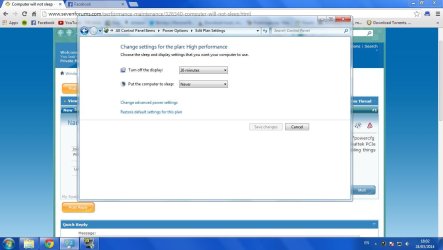
It turns off the monitor at 10 minutes, but at 30, it just keeps on running. Sleep setting in the BIOS is s3. "powercfg -devicequery wake_armed" reports: Standard PS/2 Keyboard HID Keyboard Device HID-compliant mouse Realtek PCIe GBE Family Controller And that's as far as I've gotten from Googling. I'm not sure I want to go around disabling things on the advice of Google searches.
 

My Computer

Computer type
PC/Desktop
OS
Windows 7 Ultimate x64
CPU
i5
Memory
16 GB
Graphics Card(s)
GeForce 250 gts
Hard Drives
Patriot Pyro 240 GB
barracuda 2 TB
Have you looked in control panel in power options?
 

Attachments

  • Dwm 2014-03-24 18-02-24-74.jpg
    Dwm 2014-03-24 18-02-24-74.jpg
    79.8 KB · Views: 2

My Computer

Computer type
PC/Desktop
Computer Manufacturer/Model Number
Custom Build
OS
Windows 7 Ultimate 64-bit
CPU
Intel G3420 3.2GHZ Dual Core
Motherboard
Gigabyte H87-HD3
Memory
Kingson 8GB 1600mhz
Graphics Card(s)
MSI R7970 TF 3GD5/OC BE
Monitor(s) Displays
21" LG & "19 Vertical Samsung
Hard Drives
120GB SSD - Boot
1TB WD
350GB External
2TB External (Wireless)
PSU
Corsair CX 500 modular
Case
Zalman Z11 Plus (modified)
Cooling
Corsair H55, 2x 120mm SP Corsair, 1x 140 Coolermaster
Keyboard
Corsair K50
Mouse
CSL Gaming
Internet Speed
164Mbps
Antivirus
Avast, Malwarebytes
Browser
Google Chrome, IE, Firefox
Have you looked in control panel in power options?

Well, the forum killed my formatting, but to make things more clear, the power plan in power options is set to sleep at 30 minutes. That's literally the first thing I checked.
 

My Computer

Computer type
PC/Desktop
OS
Windows 7 Ultimate x64
CPU
i5
Memory
16 GB
Graphics Card(s)
GeForce 250 gts
Hard Drives
Patriot Pyro 240 GB
barracuda 2 TB
Had similar problem. Did the powercfg -requests but is clean. Went to device manager to update all drivers. All drivers were OK. Microsoft is wrong about that. Long story told short. The wireless keyboard (Microsoft 1000) did not have the proper driver. I had to download and install the specific software package.

The lesson is to check the manufacturer's site for the latest software. In this case the Microsoft WHQL driver set did not work on its own hardware. Who knew?
 

My Computer

Computer Manufacturer/Model Number
Homebuilt
OS
Windows Home Premium x64
CPU
AMD Phenom
Motherboard
Gigabyte MA-78GM-S2H
Memory
4 GB
Graphics Card(s)
ATI Radeon HD 3200
Sound Card
Realtek HD Audio
Monitor(s) Displays
Dual Acer AL2216W
Hard Drives
ST3250410AS
ST3250620NS
PSU
LOGISYS PS480D
Case
Antec Two Hundred
Cooling
Standard
Windows 7 Updates should of picked up the Microsoft keyboard and offered a driver if a newer one was available.

Jack
 

My Computer

Computer type
PC/Desktop
Computer Manufacturer/Model Number
Home made Desktop
OS
Windows 10 Pro. 64/ version 1709 Windows 7 Pro/64
CPU
Intel i7-6800K @ 4.3
Motherboard
ASUS X-99 Deluxe II
Memory
Corsair Platinum 16 gig @2400
Graphics Card(s)
EVGA GTX 1070 OC
Monitor(s) Displays
Asus 27" LED LCD/VE278Q
Screen Resolution
1920-1080 or 1280-720 HDMI
Hard Drives
INTEL SSD 730-240 Gb Sata 3.0/
PSU
EVGA Platium 1200W
Case
Phanteks Luxe Tempered Glass 8 fans/ one radiator
Cooling
XSPC/ Water Cooled CPU
Keyboard
Das 4 Professional
Mouse
Logitech M705/MX Anywhere 2-S
Internet Speed
100 mbits
Antivirus
Microsoft Security Essentials/ Malwarebytes Premium 3.0/ SAS
Browser
I.E. 11 default/Firefox/ ISP Time Warner Cable/Spectrum
Other Info
LG BluRay Burner/
Sound system-KLipsch-THX/
Icy Dock ssd Hot Swap bays.
That is what I am trying to say. Update did NOT pick it up and when I tried to update from Device Manager the response was I had the best driver (or whatever). Was the keyboard plug n play? Not really
 

My Computer

Computer Manufacturer/Model Number
Homebuilt
OS
Windows Home Premium x64
CPU
AMD Phenom
Motherboard
Gigabyte MA-78GM-S2H
Memory
4 GB
Graphics Card(s)
ATI Radeon HD 3200
Sound Card
Realtek HD Audio
Monitor(s) Displays
Dual Acer AL2216W
Hard Drives
ST3250410AS
ST3250620NS
PSU
LOGISYS PS480D
Case
Antec Two Hundred
Cooling
Standard
Back
Top