'Computer' window loads on startup - How do I switch this off?

Anthony30

New member
Local time
5:43 AM
Messages
2
The 'Computer' window (the one that shows the hard drives on the system etc.) always loads on startup on my Windows 7 PC. I've tried switching off various startup, programs in System Configuration to see if this solves the problem but with no luck so far. Any advice would be appreciated!
 

My Computer My Computer

OS
Windows 7 Home Premium 32bit
Install CodeStuff Starter.
Run it then click on All Sections.
Click on File then Save as Plain Text.
Open the file with Notepad or Wordpad then copy and paste the info in a post here please.
 

My Computer My Computer

Computer type
PC/Desktop
Computer Manufacturer/Model Number
Lenovo IdeaCenter 450
OS
Windows 10 Pro X64
CPU
Intel Quad Core i7-4770 @ 3.4Ghz
Memory
16.0GB PC3-12800 DDR3 SDRAM 1600 MHz
Graphics Card(s)
Intel Integrated HD Graphics
Sound Card
Realtek HD Audio
Monitor(s) Displays
HP 22" LCD
Screen Resolution
1680 x 1050
Hard Drives
250GB Samsung EVO SATA-3 SSD
2TB Seagate ST2000DM001 SATA-2
1.5TB Seagate ST3150041AS SATA
Keyboard
Dell USB
Mouse
Lenovo USB
Internet Speed
Cable via Road Runner 3MB Upload, 30MB Download
Antivirus
Windows Defender, MBAM Pro, MBAE
Browser
Seamonkey
Other Info
UEFI/GPT
PLDS DVD-RW DH16AERSH
Welcome to Seven Forums Anthony30. There are 2 things I have seen causing this. 1st try this:

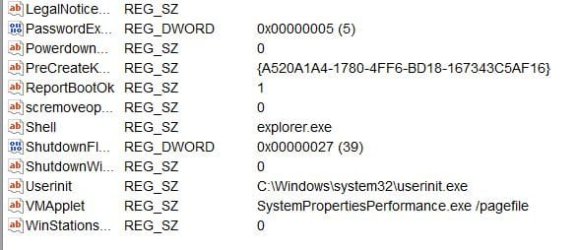
Start> In search box type regedit> Enter> When regedit opens navigate to

HKEY_LOCAL_MACHINE\SOFTWARE\Microsoft\Windows NT\CurrentVersion\Winlogon

In the right pane, look for Userinit

The value of Userinit should be C:\Windows\system32\userinit.exe

Reg.jpg

Let us know if it is now. You will want to backup the registry, then rename it correctly.

If that is not it, often it is Adobe software running at startup. You can perform a clean start to see if anything is interfering

http://www.sevenforums.com/tutorial...ation-conflicts-performing-clean-startup.html

If you have CCleaner, you can go to Tools> Startup and disable the items to test as well. Let us know. A Guy
 

My Computer My Computer

Computer type
PC/Desktop
OS
Windows 10 Home x64
CPU
INTEL Core i5-750 Quad-Core 3.37GHz
Motherboard
ASUS P7P55D
Memory
HyperX Fury Black Series 8GB (2 x 4GB) 1866Mhz
Graphics Card(s)
EVGA GeForce GTX 750 Superclocked 1GB 128-Bit GDDR5
Monitor(s) Displays
LG 32MA68HY 32" IPS
Screen Resolution
1920 x 1080
Hard Drives
Samsung 840 Evo 120GB, SEAGATE 500GB Barracuda® 7200.12, SATA 3 Gb/s, 7200 RPM, 16MB cache
PSU
ANTEC TruePower New TP-550, 80 PLUS, 550W
Case
ANTEC Three Hundred Illusion
Cooling
COOLER MASTER Hyper 212 Plus, 4 x 120mm 1 x 140mm Noctua's
Internet Speed
85 + Mbps
Antivirus
Avast
Browser
Vivaldi
Hi Ztruker

Thanks for your response! I've run the startup software you suggested and the information I got from it is as follows:

Name,Value,Section,Enabled,Description,Company
"","","Registry - User Run","1","",""
"Adobe ARM",""C:\Program Files (x86)\Common Files\Adobe\ARM\1.0\AdobeARM.exe"","Registry - Machine Run","1","Adobe Reader and Acrobat Manager","Adobe Systems Incorporated"
"APSDaemon",""C:\Program Files (x86)\Common Files\Apple\Apple Application Support\APSDaemon.exe"","Registry - Machine Run","1","Apple Push","Apple Inc."
"BrMfcWnd","C:\Program Files (x86)\Brother\Brmfcmon\BrMfcWnd.exe /AUTORUN","Registry - Machine Run","1","Brother Status Monitor Application","Brother Industries, Ltd."
"CAPOSD","C:\PROGRA~2\Lenovo\LENOVO~2\CAPOSD.exe","Registry - Machine Run","1","CAPOSD","LENOVO"
"ControlCenter3","C:\Program Files (x86)\Brother\ControlCenter3\brctrcen.exe /autorun","Registry - Machine Run","1","ControlCenter Program (ControlCenter)","Brother Industries, Ltd."
"Dolby Home Theater v4",""C:\Program Files (x86)\Dolby Home Theater v4\pcee4.exe" -autostart","Registry - Machine Run","1","Dolby Profile Selector","Dolby Laboratories Inc."
"Intelligent Touchpad","C:\Program Files\Lenovo\Intelligent Touchpad\TouchZone.exe","Registry - Machine Run","1"," ",""
"iTunesHelper",""C:\Program Files (x86)\iTunes\iTunesHelper.exe"","Registry - Machine Run","1","iTunesHelper (iTunes)","Apple Inc."
"Sidebar","C:\Program Files\Windows Sidebar\sidebar.exe /autoRun","Registry - User Run","1","Windows Desktop Gadgets (Microsoft® Windows® Operating System)","Microsoft Corporation"
"Smart Update","C:\Program Files (x86)\Lenovo\Lenovo Smart Update\SmartUpdate.exe -autorun","Registry - Machine Run","1","Lenovo Smart Update","Lenovo"
"Spotify Web Helper",""C:\Users\catherine\AppData\Roaming\Spotify\Data\SpotifyWebHelper.exe"","Registry - User Run","1","SpotifyWebHelper (Spotify)","Spotify Ltd"
"swg",""C:\Program Files (x86)\Google\GoogleToolbarNotifier\GoogleToolbarNotifier.exe"","Registry - User Run","1","GoogleToolbarNotifier","Google Inc."
"UpdatePRCShortCut",""C:\Program Files\Lenovo\OneKey App\OneKey Recovery\MUITransfer\MUIStartMenu.exe" "C:\Program Files\Lenovo\OneKey App\OneKey Recovery" UpdateWithCreateOnce "Software\Lenovo\OneKey App\OneKey Recovery"","Registry - Machine Run","1","",""
"USB3MON",""C:\Program Files (x86)\Intel\Intel(R) USB 3.0 eXtensible Host Controller Driver\Application\iusb3mon.exe"","Registry - Machine Run","1","Intel(R) USB 3.0 Monitor","Intel Corporation"
"VeriFaceManager","C:\Program Files (x86)\Lenovo\VeriFace\PManage.exe","Registry - Machine Run","1","VeriFace Tray Icon Manager (Lenovo VeriFace)","Lenovo"
"YouCam Mirage",""C:\Program Files (x86)\Lenovo\YouCam\YCMMirage.exe"","Registry - Machine Run","1","YouCam Mirage (YCMMirag Application)","CyberLink"
"YouCam Tray",""C:\Program Files (x86)\Lenovo\YouCam\YouCam.exe" /s","Registry - Machine Run","1","YouCam","CyberLink Corp."

Hope this gives you something to go on - many thanks.

 

My Computer My Computer

OS
Windows 7 Home Premium 32bit
Try disabling Spotify Web Helper and swg in msconfig (see below for how to do this), see if that helps. If not and the suggestion from A Guy doesn't help then try this:

How does it behave if you boot to Safe Mode with Networking? If better then something is starting at boot that is causing the problem.

Advanced startup options - XP
Advanced startup options - Vista
Advanced startup options - Windows 7

Use msconfig to determine what is causing the problem

These are good tutorials on using msconfig in XP, Vista or Windows 7:
How to use msconfig in Windows XP
How to use msconfig in Windows Vista
How to use msconfig in Windows 7

Click on Start then Run, type msconfig and press Enter.
Click on the Startup tab, record what is currently starting then click the Disable All button.
Reboot and see if it runs better.
If yes then use msconfig to enable several items at a time till you find the culprit.

If no, start msconfig and click on the Services tab.
Check the Hide All Microsoft Services box, record what is currently starting then click the Disable All button.
Again, do a regular boot, see if it runs normal.
If yes then use msconfig to enable services till you find the culprit.

Once you've found the culprit, uninstall it or find out how to eliminate it from your system. Simply disabling it in msconfig is a temporary fix at best.
Enable everything else you disabled.
 

My Computer My Computer

Computer type
PC/Desktop
Computer Manufacturer/Model Number
Lenovo IdeaCenter 450
OS
Windows 10 Pro X64
CPU
Intel Quad Core i7-4770 @ 3.4Ghz
Memory
16.0GB PC3-12800 DDR3 SDRAM 1600 MHz
Graphics Card(s)
Intel Integrated HD Graphics
Sound Card
Realtek HD Audio
Monitor(s) Displays
HP 22" LCD
Screen Resolution
1680 x 1050
Hard Drives
250GB Samsung EVO SATA-3 SSD
2TB Seagate ST2000DM001 SATA-2
1.5TB Seagate ST3150041AS SATA
Keyboard
Dell USB
Mouse
Lenovo USB
Internet Speed
Cable via Road Runner 3MB Upload, 30MB Download
Antivirus
Windows Defender, MBAM Pro, MBAE
Browser
Seamonkey
Other Info
UEFI/GPT
PLDS DVD-RW DH16AERSH
Back
Top