Computer won't boot now after installing windows 10

I checked, nothing on favorites :(
 

My Computer My Computer

Computer type
PC/Desktop
Computer Manufacturer/Model Number
Prebuilt
OS
Windows10 home 64 bit
CPU
I7-6700k
Motherboard
Z170A gaming pro
Memory
16gb ram
Graphics Card(s)
Gtx 970
Hard Drives
2tb hdd tobisha
Ssd 120gb
By default, Windows 8.1/ 10 WHQL Support is disabled so it will install as Legacy. I suggest you to follow my recommendations to install as UEFI.
 

My Computers My Computers

System One System Two

  • Computer type
    PC/Desktop
    Computer Manufacturer/Model Number
    custom build
    OS
    Windows 7 HP 64
    CPU
    i5 6600K - 800MHz to 4200MHz
    Motherboard
    GA-Z170-HD3P
    Memory
    4+4G GSkill DDR4 3000
    Graphics Card(s)
    IG - Intel 530
    Monitor(s) Displays
    Samsung 226BW
    Screen Resolution
    1680x1050
    Hard Drives
    (1) -1 SM951 – 128GB M.2 AHCI PCIe SSD drive for Windows 7 and Lubuntu
    (2) -1 WD SATA 3 - 1T for Data
    (3) -1 WD SATA 3 - 1T for backup
    PSU
    Thermaltake 450W TR2 gold
    Keyboard
    Old and good Chicony mechanical keyboard
    Mouse
    Logitech mX performance - 9 buttons (had to disable some)
    Internet Speed
    500Mb/s
    Browser
    Firefox 64
    Other Info
    TinyWall firewall
  • Computer type
    Laptop
    System Manufacturer/Model Number
    Asus Q550LF
    OS
    Windows 7 Pro
    CPU
    i7-4500U 800MHz to 3.0GHz
    Motherboard
    Asus Q550LF
    Memory
    (4+4)G DDR3 1600
    Graphics Card(s)
    IG intel 4400 + NVIDIA GeForce GT 745M
    Sound Card
    Realtek
    Monitor(s) Displays
    LG Display LP156WF4-SPH1
    Screen Resolution
    1920 x 1080
    Hard Drives
    BX500 120G SSD for Windows and programs +
    1T HDD for data
    Internet Speed
    500 Mb/s
    Browser
    Firefox
    Other Info
    TinyWall firewall
Okay I'll reinstall again with that option enabled. lol
u415y97pv

https://postimg.org/image/u415y97pv/

What does that mean? And where is my hdd? Everything is plugged in

Edit: After reading lehacy and UEFI people say there is no difference, do you think I have to reinstall?
 

My Computer My Computer

Computer type
PC/Desktop
Computer Manufacturer/Model Number
Prebuilt
OS
Windows10 home 64 bit
CPU
I7-6700k
Motherboard
Z170A gaming pro
Memory
16gb ram
Graphics Card(s)
Gtx 970
Hard Drives
2tb hdd tobisha
Ssd 120gb
As your image shows, your memory is running at 2400 and it should be at 3000MHz. You didn't follow my instructions. Pres XMP to run at 3000.
On a UEFI it doesn't show the boot drive as on Legacy. It shows the boot loaders available. Press F11 during POST and select Windows Boot Manager on Sandisk.
Please, follow my instructions step by step.
 

My Computers My Computers

System One System Two

  • Computer type
    PC/Desktop
    Computer Manufacturer/Model Number
    custom build
    OS
    Windows 7 HP 64
    CPU
    i5 6600K - 800MHz to 4200MHz
    Motherboard
    GA-Z170-HD3P
    Memory
    4+4G GSkill DDR4 3000
    Graphics Card(s)
    IG - Intel 530
    Monitor(s) Displays
    Samsung 226BW
    Screen Resolution
    1680x1050
    Hard Drives
    (1) -1 SM951 – 128GB M.2 AHCI PCIe SSD drive for Windows 7 and Lubuntu
    (2) -1 WD SATA 3 - 1T for Data
    (3) -1 WD SATA 3 - 1T for backup
    PSU
    Thermaltake 450W TR2 gold
    Keyboard
    Old and good Chicony mechanical keyboard
    Mouse
    Logitech mX performance - 9 buttons (had to disable some)
    Internet Speed
    500Mb/s
    Browser
    Firefox 64
    Other Info
    TinyWall firewall
  • Computer type
    Laptop
    System Manufacturer/Model Number
    Asus Q550LF
    OS
    Windows 7 Pro
    CPU
    i7-4500U 800MHz to 3.0GHz
    Motherboard
    Asus Q550LF
    Memory
    (4+4)G DDR3 1600
    Graphics Card(s)
    IG intel 4400 + NVIDIA GeForce GT 745M
    Sound Card
    Realtek
    Monitor(s) Displays
    LG Display LP156WF4-SPH1
    Screen Resolution
    1920 x 1080
    Hard Drives
    BX500 120G SSD for Windows and programs +
    1T HDD for data
    Internet Speed
    500 Mb/s
    Browser
    Firefox
    Other Info
    TinyWall firewall
I'm really sorry if Im stressing you out but XMP says it's not available. I'll follow them now step by step, I thought I could skip ahead by not having to reinstall but I will.
 

My Computer My Computer

Computer type
PC/Desktop
Computer Manufacturer/Model Number
Prebuilt
OS
Windows10 home 64 bit
CPU
I7-6700k
Motherboard
Z170A gaming pro
Memory
16gb ram
Graphics Card(s)
Gtx 970
Hard Drives
2tb hdd tobisha
Ssd 120gb
You do want me reinstall again right? Since I installed it before I enabled W8/10 support.
 

My Computer My Computer

Computer type
PC/Desktop
Computer Manufacturer/Model Number
Prebuilt
OS
Windows10 home 64 bit
CPU
I7-6700k
Motherboard
Z170A gaming pro
Memory
16gb ram
Graphics Card(s)
Gtx 970
Hard Drives
2tb hdd tobisha
Ssd 120gb
If I select boot manager on san disjk it loads my ssd with windows
 

My Computer My Computer

Computer type
PC/Desktop
Computer Manufacturer/Model Number
Prebuilt
OS
Windows10 home 64 bit
CPU
I7-6700k
Motherboard
Z170A gaming pro
Memory
16gb ram
Graphics Card(s)
Gtx 970
Hard Drives
2tb hdd tobisha
Ssd 120gb
Okay, I think I won't reinstall anymore because it causes a huge hassle with everything overall (redownloading programs, etc). It's working now and I am very happy with the result. So far no errors and everything seems under control. It might be a legacy OS format but it's alright as I am having no issues.

I want to thank you both for your time and effort. Without you guys this wouldn't have been possible.
 

My Computer My Computer

Computer type
PC/Desktop
Computer Manufacturer/Model Number
Prebuilt
OS
Windows10 home 64 bit
CPU
I7-6700k
Motherboard
Z170A gaming pro
Memory
16gb ram
Graphics Card(s)
Gtx 970
Hard Drives
2tb hdd tobisha
Ssd 120gb
Hi,
As you can see legacy works too uefi is not mandatory :)

I would go into boot option in bios and disable fast or quick startup,
Also since you have a ssd disable hibernation too,
Right click the start button and click on Command prompt as administrator
Type or paste this into the cmd line and hit the enter key
powercfg -h off

Then type in exit and the enter key to exit cmd.
 

My Computer My Computer

Computer type
PC/Desktop
Computer Manufacturer/Model Number
Custom assembled by me :}
OS
Win-7-Pro64bit 7-H-Prem-64bit
CPU
i7-5930K 2nd i9-9940x both water blocked VRM's too
Motherboard
ASUS SABERTOOTH X99 2nd ASUS x299 Apex
Memory
Trident-z 3200C14 2nd Trident-z 3600C16
Graphics Card(s)
EVGA 1080ti ftw3 2nd Titan Xp both water blocked
Sound Card
Built-in Realtek
Monitor(s) Displays
1-AOC G2460PG 24"G-Sync 144Hz/ 2nd 1-ASUS VG248QE 24" 144Hz
Screen Resolution
1920 x 1080 144Hz
Hard Drives
2-Samsung M.2 Evo & Evo Plus
2-Samsung 850 EVO 500GB SSD's/ 3-2.5 W.D. Black 1tb-&3-1tb/3-3.5 WD Black 1tb hdd's
PSU
EVGA SuperNOVA 1000-P2 2nd 1200-P2
Case
2-Corsair Obsidian Series 450D Black ATX Mid Tower
Cooling
Custom water loops
Keyboard
Logitech G710+/ 2nd Logitech G910
Mouse
2-RedDragon M901 Perdition 16400 dpi Gaming mouse = wired
Internet Speed
Comcast Ping 19ms 89.31mbps download speed 6.12mbps upload
Antivirus
Malwarebytes Pro/ Superantispyware Pro
Browser
FireFox & Pale moon
Other Info
2nd ASUS X299 Apex/Intel i9-9940x with Custom water loop/7H-Prem-x64/Corsair 450D case/Ram Trident-z 3600C16 4x8gb / Samsung970Evo plus 500gb SSD/Dual ssd EZ swap evo/PSU EVGA SuperNova 1200w-P2 80+Platinum/GPU Titan Xp /8-ML-140 on push-pull on 2-280GTX rads
Hate to jump in late but.... There`s no reason to reinstall, you just have to get your bios back to how it was.
 

My Computer My Computer

Computer type
PC/Desktop
Computer Manufacturer/Model Number
Skylake Special #666
OS
Windows 10 Pro x64
CPU
Intel Core i7 6700K
Motherboard
Asus Sabertooth Z170 Mark 1
Memory
GSkill TridentZ RGB 16GB 3600 16-16-16-36
Graphics Card(s)
EVGA GTX 980 Ti SC x2
Sound Card
Realtek High Definition
Monitor(s) Displays
AOC G2460PG
Screen Resolution
1920 x 1080 144Hz
Hard Drives
Samsung 860 Pro 256GB, Seagate Barracuda 4TB x2
PSU
EVGA 1000 P2, EVGA White Custom Braided Cables
Case
Corsair Vengeance C70 Gunmetal Black
Cooling
Corsair H100i v2, Corsair ML120 x2, Thermal Grizzly Kryonaut
Keyboard
Logitech G910 Orion Spectrum
Mouse
Logitech G700s
Internet Speed
Verizon Fios Quantum Gateway 75/75
Antivirus
Windows Defender, Malwarebytes Free 3.8.3
Browser
Chrome
Other Info
Corsair SP120 x4, LG Blu-ray Drive, Durabrand HT-395 100 Watt Dolby Digital Amp, Corsair H2100 Wireless 7.1 Headset
Hi,
As you can see legacy works too uefi is not mandatory :)

I would go into boot option in bios and disable fast or quick startup,
Also since you have a ssd disable hibernation too,
Right click the start button and click on Command prompt as administrator
Type or paste this into the cmd line and hit the enter key
powercfg -h off

Then type in exit and the enter key to exit cmd.

Will do! Also just wondering is there actually a major difference in between both?

Hate to jump in late but.... There`s no reason to reinstall, you just have to get your bios back to how it was.

All good and yeah I emailed them and they responded by saying I have to call since it deals with bios. So I'll call tomorrow most likely.
 

My Computer My Computer

Computer type
PC/Desktop
Computer Manufacturer/Model Number
Prebuilt
OS
Windows10 home 64 bit
CPU
I7-6700k
Motherboard
Z170A gaming pro
Memory
16gb ram
Graphics Card(s)
Gtx 970
Hard Drives
2tb hdd tobisha
Ssd 120gb
Only problem that is left is when I reset my bios it gave me the 1024 resolution. I looked around on the web but couldn't find anything to change the resolution. Do you know any fixes?

I`ve never known a Bios to be a certain resolution, a bios loads and it is what it is.
 

My Computer My Computer

Computer type
PC/Desktop
Computer Manufacturer/Model Number
Skylake Special #666
OS
Windows 10 Pro x64
CPU
Intel Core i7 6700K
Motherboard
Asus Sabertooth Z170 Mark 1
Memory
GSkill TridentZ RGB 16GB 3600 16-16-16-36
Graphics Card(s)
EVGA GTX 980 Ti SC x2
Sound Card
Realtek High Definition
Monitor(s) Displays
AOC G2460PG
Screen Resolution
1920 x 1080 144Hz
Hard Drives
Samsung 860 Pro 256GB, Seagate Barracuda 4TB x2
PSU
EVGA 1000 P2, EVGA White Custom Braided Cables
Case
Corsair Vengeance C70 Gunmetal Black
Cooling
Corsair H100i v2, Corsair ML120 x2, Thermal Grizzly Kryonaut
Keyboard
Logitech G910 Orion Spectrum
Mouse
Logitech G700s
Internet Speed
Verizon Fios Quantum Gateway 75/75
Antivirus
Windows Defender, Malwarebytes Free 3.8.3
Browser
Chrome
Other Info
Corsair SP120 x4, LG Blu-ray Drive, Durabrand HT-395 100 Watt Dolby Digital Amp, Corsair H2100 Wireless 7.1 Headset
Only problem that is left is when I reset my bios it gave me the 1024 resolution. I looked around on the web but couldn't find anything to change the resolution. Do you know any fixes?

I`ve never known a Bios to be a certain resolution, a bios loads and it is what it is.


Before I messed with bios the resolution when booting up would be 1920x1080 because I remember the circle for windows 10 loading being small like it would when I am on windows. After I reset my bios it changed to 1024x768 (i think its 768) and the circle thingy is bigger.

It's nothing major but a small annoyance as it frustrates me how I can't do anything about it.

Or maybe I am turning crazy and its always been the same because I am actually in the process of convincing my self theres no major change haha
 

My Computer My Computer

Computer type
PC/Desktop
Computer Manufacturer/Model Number
Prebuilt
OS
Windows10 home 64 bit
CPU
I7-6700k
Motherboard
Z170A gaming pro
Memory
16gb ram
Graphics Card(s)
Gtx 970
Hard Drives
2tb hdd tobisha
Ssd 120gb
Then you are talking about Windows, not the bios.

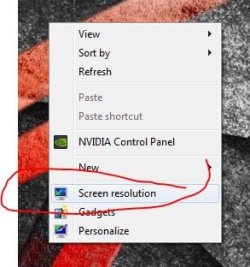
You can easily change the resolution in windows, just right click the desktop. As long as you`ve set windows to 1920 x 1080 there`s nothing more to do.
 

Attachments

  • Capture.JPG
    Capture.JPG
    25.7 KB · Views: 4

My Computer My Computer

Computer type
PC/Desktop
Computer Manufacturer/Model Number
Skylake Special #666
OS
Windows 10 Pro x64
CPU
Intel Core i7 6700K
Motherboard
Asus Sabertooth Z170 Mark 1
Memory
GSkill TridentZ RGB 16GB 3600 16-16-16-36
Graphics Card(s)
EVGA GTX 980 Ti SC x2
Sound Card
Realtek High Definition
Monitor(s) Displays
AOC G2460PG
Screen Resolution
1920 x 1080 144Hz
Hard Drives
Samsung 860 Pro 256GB, Seagate Barracuda 4TB x2
PSU
EVGA 1000 P2, EVGA White Custom Braided Cables
Case
Corsair Vengeance C70 Gunmetal Black
Cooling
Corsair H100i v2, Corsair ML120 x2, Thermal Grizzly Kryonaut
Keyboard
Logitech G910 Orion Spectrum
Mouse
Logitech G700s
Internet Speed
Verizon Fios Quantum Gateway 75/75
Antivirus
Windows Defender, Malwarebytes Free 3.8.3
Browser
Chrome
Other Info
Corsair SP120 x4, LG Blu-ray Drive, Durabrand HT-395 100 Watt Dolby Digital Amp, Corsair H2100 Wireless 7.1 Headset
Then you are talking about Windows, not the bios.

You can easily change the resolution in windows, just right click the desktop. As long as you`ve set windows to 1920 x 1080 there`s nothing more to do.

I did :/ through the NVIDIA control panel so in my windows everything is fine, its just that bios splash screen and bios itself.

Is your boot screen like that too? Where it goes a smaller resolution then back to 1920?
 

My Computer My Computer

Computer type
PC/Desktop
Computer Manufacturer/Model Number
Prebuilt
OS
Windows10 home 64 bit
CPU
I7-6700k
Motherboard
Z170A gaming pro
Memory
16gb ram
Graphics Card(s)
Gtx 970
Hard Drives
2tb hdd tobisha
Ssd 120gb
Hi,
Photo op time turn off the flash and the pictures will turn out better :)
I believe you might be talking about the bios flash screen where it shows the keys to use to get into setup or bios and I suppose the msi logo ?
 

My Computer My Computer

Computer type
PC/Desktop
Computer Manufacturer/Model Number
Custom assembled by me :}
OS
Win-7-Pro64bit 7-H-Prem-64bit
CPU
i7-5930K 2nd i9-9940x both water blocked VRM's too
Motherboard
ASUS SABERTOOTH X99 2nd ASUS x299 Apex
Memory
Trident-z 3200C14 2nd Trident-z 3600C16
Graphics Card(s)
EVGA 1080ti ftw3 2nd Titan Xp both water blocked
Sound Card
Built-in Realtek
Monitor(s) Displays
1-AOC G2460PG 24"G-Sync 144Hz/ 2nd 1-ASUS VG248QE 24" 144Hz
Screen Resolution
1920 x 1080 144Hz
Hard Drives
2-Samsung M.2 Evo & Evo Plus
2-Samsung 850 EVO 500GB SSD's/ 3-2.5 W.D. Black 1tb-&3-1tb/3-3.5 WD Black 1tb hdd's
PSU
EVGA SuperNOVA 1000-P2 2nd 1200-P2
Case
2-Corsair Obsidian Series 450D Black ATX Mid Tower
Cooling
Custom water loops
Keyboard
Logitech G710+/ 2nd Logitech G910
Mouse
2-RedDragon M901 Perdition 16400 dpi Gaming mouse = wired
Internet Speed
Comcast Ping 19ms 89.31mbps download speed 6.12mbps upload
Antivirus
Malwarebytes Pro/ Superantispyware Pro
Browser
FireFox & Pale moon
Other Info
2nd ASUS X299 Apex/Intel i9-9940x with Custom water loop/7H-Prem-x64/Corsair 450D case/Ram Trident-z 3600C16 4x8gb / Samsung970Evo plus 500gb SSD/Dual ssd EZ swap evo/PSU EVGA SuperNova 1200w-P2 80+Platinum/GPU Titan Xp /8-ML-140 on push-pull on 2-280GTX rads
Back
Top