The "Set as Default Audio Device" button is grayed out. I'm not able to update the drivers either. The headset will still appear in skype and all, but wont let me use it.
It did this with my previous headset too, but I took that as my old headset as breaking and bought this new pair.
My Computer
Computer type
PC/Desktop
OS
Microsoft Windows 7 Professional 64-bit 7601 Multiprocessor Free Service Pack 1
CPU
Intel(R) Core(TM) i5-3470 CPU @ 3.20GHz
Motherboard
Dell Inc. 0GY6Y8
Memory
8.00 GB
Graphics Card(s)
None
Sound Card
(1) AMD High Definition Audio Device (2) Realtek High Defi
Hiyya Humerus mate where are you trying to set the phones as the default device?? and can you confirm you have a dedicated sound card in that machine if so can you give us the make and model of it and just what are the jacks for it??
My Computer
Computer type
PC/Desktop
Computer Manufacturer/Model Number
Own build (new) Desk1 / Asus ROG Win 7 / Desk2 1st build
OS
Desk1 7 Home Prem / Desk2 10 Pro / Main lap Asus ROG 10 Pro 2 laptop Toshiba 7 Pro Asus P2520 7 & 10
One other Desktop (tester) and spare Toshba laptop both with SSD's
Running Kaspersky 2016 ISS on all machines config'd identically
Logitec audio stereo systems on each machine (x3)
Canon MG5250MFC
Router/modem TP-Link running WPA2SK
Where on my pc? A USB port that goes directly to what I assume is my motherboard. Im fairly certain that I don't have a dedicated sound card, this pc was made for office use.
If you mean where in my computer, the Manage Audio Devices area.
My Computer
Computer type
PC/Desktop
OS
Microsoft Windows 7 Professional 64-bit 7601 Multiprocessor Free Service Pack 1
CPU
Intel(R) Core(TM) i5-3470 CPU @ 3.20GHz
Motherboard
Dell Inc. 0GY6Y8
Memory
8.00 GB
Graphics Card(s)
None
Sound Card
(1) AMD High Definition Audio Device (2) Realtek High Defi
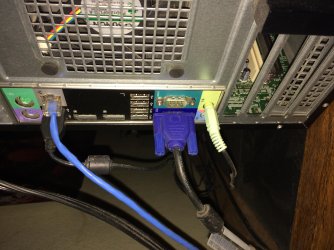
I cannot understand what that part in your specs quotes an AMD sound device - if you look at the back of the machine are there two green sockets for a sound system?? The board will have one in the back panel and if there is another green socket lower down then that will be a sound card. If indeed there is a sound card then it will automatically shut off the motherboard back panel socket - you cannot use both at the same time. sO if you wnat to use the motherbaord sound output then you would have to remove the sound card.
In the pic (just for an example) you can see the mobo green audio outlet an like I say if there is another oe like that somewhere on the back of the machine it means there is a sound card. A pic of the back of your machine would be really handy.
Also can you look in the Device Manager and see if any audio card is installed please.
My Computer
Computer type
PC/Desktop
Computer Manufacturer/Model Number
Own build (new) Desk1 / Asus ROG Win 7 / Desk2 1st build
OS
Desk1 7 Home Prem / Desk2 10 Pro / Main lap Asus ROG 10 Pro 2 laptop Toshiba 7 Pro Asus P2520 7 & 10
One other Desktop (tester) and spare Toshba laptop both with SSD's
Running Kaspersky 2016 ISS on all machines config'd identically
Logitec audio stereo systems on each machine (x3)
Canon MG5250MFC
Router/modem TP-Link running WPA2SK
USB headphones require their own drivers. Have you tried downloading the drivers from the manufacturer's website? Have you followed the setup instructions?
USB headphones require their own drivers. Have you tried downloading the drivers from the manufacturer's website? Have you followed the setup instructions?
One other Desktop (tester) and spare Toshba laptop both with SSD's
Running Kaspersky 2016 ISS on all machines config'd identically
Logitec audio stereo systems on each machine (x3)
Canon MG5250MFC
Router/modem TP-Link running WPA2SK
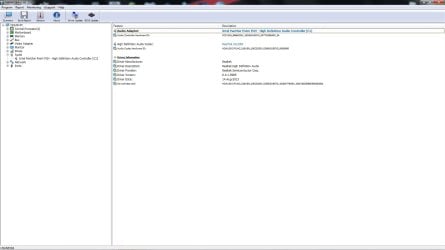
Under Sound and Video in device manager, it says "Realtek High Definition Audio" Which seems kind of vague.
The instructions that came with the headset just shows a diagram of what-to-plug-into-what and then to set the default playback to the headset in 11 different languages. But I'll look for some driver updates on their website
My Computer
Computer type
PC/Desktop
OS
Microsoft Windows 7 Professional 64-bit 7601 Multiprocessor Free Service Pack 1
CPU
Intel(R) Core(TM) i5-3470 CPU @ 3.20GHz
Motherboard
Dell Inc. 0GY6Y8
Memory
8.00 GB
Graphics Card(s)
None
Sound Card
(1) AMD High Definition Audio Device (2) Realtek High Defi
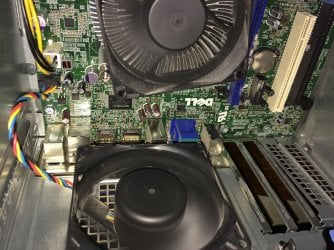
Ok mate well from the pics there has been some cards of some wort inserted at some stage you can see the gaps in the back of the case where the outputs would have been.
Now the Realtek would be the motherboard device and we need the driver for it but I cannot find any links for that board what we need to do is find the Realtek device model and I am not quite sure how we are going to do that apart form running some other software that I will have to get when I get back to my Windows machine I shouldn't be long.
- I am currently on one of my Linux machines - sorry but if I could have accessed the motherboard site it would have been ok but I cannot.
My Computer
Computer type
PC/Desktop
Computer Manufacturer/Model Number
Own build (new) Desk1 / Asus ROG Win 7 / Desk2 1st build
OS
Desk1 7 Home Prem / Desk2 10 Pro / Main lap Asus ROG 10 Pro 2 laptop Toshiba 7 Pro Asus P2520 7 & 10
One other Desktop (tester) and spare Toshba laptop both with SSD's
Running Kaspersky 2016 ISS on all machines config'd identically
Logitec audio stereo systems on each machine (x3)
Canon MG5250MFC
Router/modem TP-Link running WPA2SK
looks like it could just be a standard convertor using software assumed to be present in PC, does this headset support Windows 7?
There have been some advances in USB technology since the release of Windows 7 - which may be a cause of your issue - Not likely but possible
PDF Manual linked to appears to show Windows 7 dialogue boxes so should be OK
Are your USB ports working Correctly? - plug in other devices to test
Have you tried plugging into the green speaker out socket? - Is this active and working? - If you use this method you should not need to change the output from standard but will not get the fancy artificial sound modes
Windows 11 Pro x64 [Latest Release and Release Preview]
CPU
Ryzen 9 5950X, 3.8 - 5.2 MHz
Motherboard
Asus Prime X570-Pro
Memory
64GB [2 x 32GB] DDR4 3200MHz
Graphics Card(s)
4GB NVIDIA GEFORCE GTX 1650 Ti
Sound Card
On-board SPDIF to 5.1 System + HDMI [5.1 system]
Monitor(s) Displays
32" UHD 32 Bit HDR Monitor + 43" UHD 4K 32Bit HDR TV
Screen Resolution
2 x 3840 x 2160 @60Hz
Hard Drives
1TB M2 SSD OS, 500GB Fast Access SSD, 2 x 8TB Data + Various Externals from 1TB to 4TB, 10TB NAS
PSU
NZXT C750 80 PLUS Gold 750W Modular PSU
Case
Workstation Case [Matt Black]
Cooling
NZXT Kraken X63 280mm CPU Cooler +2x Quiet Case fans
Keyboard
Logitech Wireless MX Keys & K400 + others
Mouse
Logitech Wireless MX Master 3S
Internet Speed
920 MB Down 50 MB Up
Antivirus
BitDefender Total Security Pro
Browser
Chrome (always run latest Non-Beta)
Other Info
Also run ...
Laptop - Quad 8GB - Windows 10 Pro x64
Nexus 7 Android tablet x2
Samsung 10.2" tablet
Blackview TAB 8 4G Android Tablet c/w Keyboard
Wacom Intuos Pro Medium Pen Pad
Wacom Intuos Pro Small Pen Pad
Wacom Expresskeys Remote
Loopdeck+ Graphics Controller
Shuttle Pro v2 Control
Computer type
Laptop
System Manufacturer/Model Number
Dell XPS 17 10750H
OS
Windows 11 Pro x64 Latest RP
CPU
Intel I7 10750H 5.0GHz
Motherboard
Dell XPS
Memory
32GB [2x16GB] DDR4 2933 MHz
Graphics Card(s)
nVidia GTX1650Ti 4 GB GDDR6
Sound Card
Stock [Realtek] 4 Speaker
Monitor(s) Displays
17" IPS UHD+ Infinity Edge Touchscreen
Screen Resolution
3840 x 2400
Hard Drives
2TB M2 NVMe, 4TB External + various 500GB & 1TB External NVMe (also have access to spinner HDD from
PSU
Stock
Case
Stock XPS Aluminium & Carbon Fibre
Cooling
Stock - Active Fan Control
Keyboard
Backlit + Various Logitech
Mouse
Stock Track Pad + Logitech MX Trackball
Internet Speed
72 MB Down 18MB Up
Browser
Chrome
Other Info
Also run ...
Laptop - Quad 8GB - Windows 10 Pro x64
Nexus 7 Android tablet x2
10.2" tablet
Sony Z3 Android Smartphone
Wacom Intuos Pro Medium Pen Pad
Wacom Intuos Pro Small Pen Pad
Wacom Expresskeys Remote
Loopdeck+ Graphics Controller
Shuttle Pro v2 Control Pad
10TB NAS
Yes, they do support windows 7. My ports are working normally, I have plugged my keyboard and mouse plugged in via usb.
the green socket does work; It gives my monitor its sound
My Computer
Computer type
PC/Desktop
OS
Microsoft Windows 7 Professional 64-bit 7601 Multiprocessor Free Service Pack 1
CPU
Intel(R) Core(TM) i5-3470 CPU @ 3.20GHz
Motherboard
Dell Inc. 0GY6Y8
Memory
8.00 GB
Graphics Card(s)
None
Sound Card
(1) AMD High Definition Audio Device (2) Realtek High Defi
Try disconnecting the monitor connector from the Green socket and plug in the headset directly, (this will probably not be 100% compatible PCs have separate MIC & Headphone Jacks Your Headset has a dual purpose Jack for Mic and Sound so will be longer than standard but should give some sound out in one or the other speakers - If you get something that it could be a fault with the adaptor (could also plug headset into a smartphone to test as these have the correct socket)
If you do not see an additional option in the control panel sound applet when you plug in the box to the USB then you could have a faulty box
Check the exact instructions in the PDF in the Link I provided or direct one below
Windows 11 Pro x64 [Latest Release and Release Preview]
CPU
Ryzen 9 5950X, 3.8 - 5.2 MHz
Motherboard
Asus Prime X570-Pro
Memory
64GB [2 x 32GB] DDR4 3200MHz
Graphics Card(s)
4GB NVIDIA GEFORCE GTX 1650 Ti
Sound Card
On-board SPDIF to 5.1 System + HDMI [5.1 system]
Monitor(s) Displays
32" UHD 32 Bit HDR Monitor + 43" UHD 4K 32Bit HDR TV
Screen Resolution
2 x 3840 x 2160 @60Hz
Hard Drives
1TB M2 SSD OS, 500GB Fast Access SSD, 2 x 8TB Data + Various Externals from 1TB to 4TB, 10TB NAS
PSU
NZXT C750 80 PLUS Gold 750W Modular PSU
Case
Workstation Case [Matt Black]
Cooling
NZXT Kraken X63 280mm CPU Cooler +2x Quiet Case fans
Keyboard
Logitech Wireless MX Keys & K400 + others
Mouse
Logitech Wireless MX Master 3S
Internet Speed
920 MB Down 50 MB Up
Antivirus
BitDefender Total Security Pro
Browser
Chrome (always run latest Non-Beta)
Other Info
Also run ...
Laptop - Quad 8GB - Windows 10 Pro x64
Nexus 7 Android tablet x2
Samsung 10.2" tablet
Blackview TAB 8 4G Android Tablet c/w Keyboard
Wacom Intuos Pro Medium Pen Pad
Wacom Intuos Pro Small Pen Pad
Wacom Expresskeys Remote
Loopdeck+ Graphics Controller
Shuttle Pro v2 Control
Computer type
Laptop
System Manufacturer/Model Number
Dell XPS 17 10750H
OS
Windows 11 Pro x64 Latest RP
CPU
Intel I7 10750H 5.0GHz
Motherboard
Dell XPS
Memory
32GB [2x16GB] DDR4 2933 MHz
Graphics Card(s)
nVidia GTX1650Ti 4 GB GDDR6
Sound Card
Stock [Realtek] 4 Speaker
Monitor(s) Displays
17" IPS UHD+ Infinity Edge Touchscreen
Screen Resolution
3840 x 2400
Hard Drives
2TB M2 NVMe, 4TB External + various 500GB & 1TB External NVMe (also have access to spinner HDD from
PSU
Stock
Case
Stock XPS Aluminium & Carbon Fibre
Cooling
Stock - Active Fan Control
Keyboard
Backlit + Various Logitech
Mouse
Stock Track Pad + Logitech MX Trackball
Internet Speed
72 MB Down 18MB Up
Browser
Chrome
Other Info
Also run ...
Laptop - Quad 8GB - Windows 10 Pro x64
Nexus 7 Android tablet x2
10.2" tablet
Sony Z3 Android Smartphone
Wacom Intuos Pro Medium Pen Pad
Wacom Intuos Pro Small Pen Pad
Wacom Expresskeys Remote
Loopdeck+ Graphics Controller
Shuttle Pro v2 Control Pad
10TB NAS
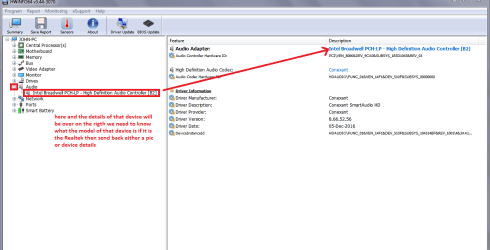
Ok mate now to find that Realtek device please read this and follow Using HW Info PART A: You can test the volts on the PSU with HW Info https://www.hwinfo.com/download.php < download the right bit version and close the right hand window select Sensors and scroll down to the power section where you will see what the volts are doing see my pic. In my pic the section (Nuvoton) with VBATT as a dead give away you are in the section for the rail voltages. There are other section titles and one that pops up often is ITE (sometimes the usual one for Gigabyte boards) Now the voltage on the different rails have to be within 5% =+/- of what is required or the machine will not work properly if at all. Limits +/- (minimum - correct - maximum) 12v1 = 11.4 - 12 - 12.6v 12v2 = 11.4 - 12- 12.6v 5v = 4.75 – 5 - 5.25v 3.3v = 3.135 – 3 – 3.465v -12v = -10.80 - -12 - -13.20v +5VSB = 4.75 – 5 - 5.25v The Power good signal voltage at pin 8 on the 24 pin plug (grey cable) should be the same as the 5v rail reading/s See this for the rail voltage info http://www.tomshardware.com/reviews/power-supply-specifications-atx-reference,3061.html (Section 2.) The original right hand window shows the machine running and is handy for that but for looking at the components in some detail close it and use the main left hand side panel FOR OTHER COMPONENTS PART B: Open each small square with + in it on the section the components are in and then click on the individual component/s (it will highlight in blue) - in the right hand side will appear all sorts of details including brands speeds and other essential info that particular device. See pic for example.
Sorry about the font something has not gone quite right but follow PART B: and open up see my pic for what you are looking for
In my pic is the device in this machine we need to get the details of the device in yours
Attachments
HWX.PNG
29.6 KB
· Views: 2
My Computer
Computer type
PC/Desktop
Computer Manufacturer/Model Number
Own build (new) Desk1 / Asus ROG Win 7 / Desk2 1st build
OS
Desk1 7 Home Prem / Desk2 10 Pro / Main lap Asus ROG 10 Pro 2 laptop Toshiba 7 Pro Asus P2520 7 & 10
One other Desktop (tester) and spare Toshba laptop both with SSD's
Running Kaspersky 2016 ISS on all machines config'd identically
Logitec audio stereo systems on each machine (x3)
Canon MG5250MFC
Router/modem TP-Link running WPA2SK
One other Desktop (tester) and spare Toshba laptop both with SSD's
Running Kaspersky 2016 ISS on all machines config'd identically
Logitec audio stereo systems on each machine (x3)
Canon MG5250MFC
Router/modem TP-Link running WPA2SK
USB headphones create their own "card" and therefore require their own drivers. It is completely different from an onboard card. It literally adds another device to the system. To the OP have you tried the headphones in another computer? What is the name and model number of the headphones?
Yes OP you most probably need to download dedicated drivers, what is the headphones brand and model?
My Computer
Computer type
PC/Desktop
Computer Manufacturer/Model Number
Custom build
OS
Windows 7 Ultimate x64
CPU
Intel i5-6600K 3.50GHz
Motherboard
Asus Pro Z170 Gaming
Memory
Corsair DDR4 2x8GB
Graphics Card(s)
MSI GeForce GTX1070 Gaming X
Sound Card
On board Realtek
Monitor(s) Displays
Dell SP2309W
Screen Resolution
1920x1080
Hard Drives
OS Samsung 850 EVO 500GB SATA III SSD
2x Hitachi Deskstar 1GB SATA data drives
1x Western Digital Caviar Black 1TB SATA data drive
PSU
Corsair HX650W
Case
CoolerMaster CM 690 III
Cooling
Coolermaster Hyper 212 EVO 1x200mm 1x140mm 2x120mm case fan
Keyboard
Logitech usb keyboard
Mouse
Logitech G500 $27 bargain :)
Internet Speed
ADSL2
Antivirus
Microsoft Security Essential, MalwareBytes
Browser
SRWare Iron, Internet Explorer
Other Info
Very happy with this buid.
I struggled a lot to find all compatible parts since I wanted an Intel 1151 based motherboard so to be able to install Windows 7.
I chose this case because it has amazing air flow, it's sturdy and looks good.
The case included 1x 200mm front and 1x 120mm back fans, I added 1x 200mm on the top and 1x120 bottom fans and modded the panels with black stockings for women s
OP already stated they have a Cloud 2 and it uses an on-board dac. This firmware update is for PS4 compatibility but perhaps update it anyway to make sure you have not missed another crucial one.