
Solved computers networking is not working

sferguson98

New member
Local time
5:31 PM
Messages
18
Sorry to bother, but it's beyond my experience.

After replacing a failing hard drive. The computers networking is not working. It can see my internet connection, but will not connect past the router. "Not connected. No internet connections are available". So I removed Avast totally. I reset the adapter. Probed with various utilities, which say, can't start DHCP, but see's my router, pulls an IP address. It figured out the I'm on tampabay.rr.com, etc. So, I ran sfc /scannow and got the usual error about can't complete and see log file. Log file says (among other things),

014-07-18 23:12:36, Info CBS Scavenge: Starts
2014-07-18 23:12:36, Info CSI 00000320@2014/7/19:03:12:36.147 CSI Transaction @0x1a63460 initialized for deployment engine {d16d444c-56d8-11d5-882d-0080c847b195} with flags 00000002 and client id [10]"TI6.0_0:0/"

2014-07-18 23:12:36, Info CBS Scavenge: Begin CSI Store
2014-07-18 23:12:36, Info CSI 00000321 Performing 1 operations; 1 are not lock/unlock and follow:
Scavenge (8): flags: 00000017
2014-07-18 23:12:37, Info CSI 00000322 Creating NT transaction (seq 3), objectname [6]"(null)"
2014-07-18 23:12:37, Info CSI 00000323 Created NT transaction (seq 3) result 0x00000000, handle @0xa0
2014-07-18 23:12:37, Info CSI 00000324@2014/7/19:03:12:37.795 CSI perf trace:
CSIPERF:TXCOMMIT;4
2014-07-18 23:12:40, Info CSI 00000325 Couldn't mark for pending delete: [ml:78{39},l:76{38}]"\SystemRoot\WinSxS\Temp\PendingDeletes"\[l:88{44}]"$$DeleteMe.sortkey.nlp.01cf27ce25a26540.000b". Reason: [13]"Cannot Delete"
2014-07-18 23:12:40, Info CSI 00000326 Couldn't mark for pending delete: [ml:78{39},l:76{38}]"\SystemRoot\WinSxS\Temp\PendingDeletes"\[l:90{45}]"$$DeleteMe.sorttbls.nlp.01cf27ce255d5d58.000a". Reason: [13]"Cannot Delete"
2014-07-18 23:12:40, Info CSI 00000327 ICSITransaction::Commit calling IStorePendingTransaction::Apply - coldpatching=FALSE applyflags=7
2014-07-18 23:12:40, Info CSI 00000328 Creating NT transaction (seq 4), objectname [6]"(null)"
2014-07-18 23:12:40, Info CSI 00000329 Created NT transaction (seq 4) result 0x00000000, handle @0xa0
2014-07-18 23:12:40, Info CSI 0000032a@2014/7/19:03:12:40.463 CSI perf trace:
CSIPERF:TXCOMMIT;9949
2014-07-18 23:12:40, Info CBS Scavenge: Completed, disposition: 0X1
2014-07-18 23:12:40, Info CSI 0000032b@2014/7/19:03:12:40.464 CSI Transaction @0x1a63460 destroyed

I've tried to isolate the error. I don't know what to do to fix it though. The complete log file attached.

Thanks for any help.:)
 

My Computer My Computer

At a glance

Windows 7 Home Premium 64bitI5
Computer type
PC/Desktop
Computer Manufacturer/Model Number
Dell
OS
Windows 7 Home Premium 64bit
CPU
I5
Hard Drives
Crucial 512gb
Antivirus
deleted while fixing will replace with Bitdefender
Have you tried something as simple as opening a command prompt as a administrator; and doing a ipconfig /release; then a ipconfig /renew? Try doing that and see what happens. If it doesnt do anything; or if you have tried that already; post back and we can go from there.

On another note; one thing you can try; try power cycling both the modem and router and see what happens: unplug the power cords from both the router and modem and wait about a minute or so for them to reset; then plug the modem back in first and let that fully boot; then plug the router back in and let that fully boot and see what happens.
 
Last edited:

My Computer My Computer

At a glance

Windows 7 ultimate 64-bitIntel I7 2600K 3.4ghzCorsair 16gb ddr3 1600mhzNvidia Geforce gt 430
Computer type
PC/Desktop
Computer Manufacturer/Model Number
custom built
OS
Windows 7 ultimate 64-bit
CPU
Intel I7 2600K 3.4ghz
Motherboard
Asus Evo P8P67
Memory
Corsair 16gb ddr3 1600mhz
Graphics Card(s)
Nvidia Geforce gt 430
Sound Card
Sound Blaster Titanium x-fi pci express
Monitor(s) Displays
Dell E198WFP
Hard Drives
1 western digital 2TB drive.
PSU
Antec 1200 watt
Case
Inwin Dragon Rider
Cooling
6 case supplied cooling fans
Keyboard
logitech mk700
Mouse
logitech m705
Internet Speed
25-50mbps download; 10mbps upload(i think)
Antivirus
avg free 2014
Browser
mozilla firefox
Other Info
Also have a pretty bad speaker setup which is a klipsch promedia 5.1 surround speaker setup with huge subwoofer and lg blu ray player/writer. Also a hp officejet pro 8600 plus wireless all in one and a logitech s7500 webcam.
Both command prompt commands respond with, "RPC Server is not available". Well that gives me a direction, to look in.
 

My Computer My Computer

At a glance

Windows 7 Home Premium 64bitI5
Computer type
PC/Desktop
Computer Manufacturer/Model Number
Dell
OS
Windows 7 Home Premium 64bit
CPU
I5
Hard Drives
Crucial 512gb
Antivirus
deleted while fixing will replace with Bitdefender
You say "The computers networking is not working. It can see my internet connection, but will not connect past the router. "Not connected. No internet connections are available"." But what do you mean when you say you can see your internet connection but it won't connect past the router? It is unusual wording for Windows as it would usually say "Not connected. No network connections available." as against "No internet connections available.".

Do you mean your computer won't see other computers on the network and you can only communicate with the internet? Or do you mean it doesn't work at all and your router shows that you have an internet connection?

As for DHCP not being able to start, it could be that it is disabled or set to manual start in the services, click the Windows Orb and type "services.msc" into the search bar (without quotes), sort by name A>Z and find DHCP Client. Make sure it is set to Automatic start and it is running.

If DHCP is set correctly and your computer still won't get an IP address etc then there could be a problem with your router, it could have DHCP turned off for example.

As a last resort you could just assign it a fixed IP address, to do this go to Control Panel, under where it says "Network and Internet" click "View network status and tasks", in the column down the left hand side click "Change adapter settings", right click whichever adapter you are trying to use to connect to your router and click Properties, you will likely get a User Account Control popup asking if you want to let the program change settings, click Yes to this. Once you have clicked yes to the UAC popup another little window will open, in here is a list of things that the network adapter can use, we are interested in "Internet Protocol Version 4 (TCP/IPv4)", left click that once then left click the "Properties" button. Another window will open and the settings inside will most likely be set to "Obtain an IP Address Automatically" and "Obtain DNS server address automatically", you can change these to "Use the following ...".

Now for the tricky part: assuming your router is set up like most other routers, set the "IP Address" to 192.168.1.100, the "Subnet Mask" to 255.255.255.0 and the "Default Gateway" to 192.168.1.1. There are two things we can do for the DNS servers, we can assume your router is going to use the ones provided by your ISP, or we can just set them to public servers like Google. For simplicity we'll just use your router so type 192.168.1.1 into the "Preferred DNS Server".

Click OK and then click close, with any luck you will now have an IP Address in which you can access the internet and the rest of your network, and if you couldn't access the config page of your router before then you should be able to now.

Hope this is of some help to you, let me know if you don't understand my instructions as I'm not always the best at explaining things simply ;)

EDIT: Hadn't seen other posts, RPC Server could be the Remote Procedure Call, which again like DHCP is a service that can be disabled, follow my above instructions and look for "RpcSs" under the Name column, or look for "Remote Procedure Call (RPC)" under Description.
 

My Computer My Computer

At a glance

Windows 7 Ultimate x64Intil i7-86016Gb Corsair XMS3 1600MHzMSI N470GTXTwin FrozR II
Computer type
PC/Desktop
Computer Manufacturer/Model Number
Self Built
OS
Windows 7 Ultimate x64
CPU
Intil i7-860
Motherboard
Gigabyte GA-P55a-UD6
Memory
16Gb Corsair XMS3 1600MHz
Graphics Card(s)
MSI N470GTXTwin FrozR II
Monitor(s) Displays
Samsung S23A700D
Hard Drives
1x Samsung 840Pro SSD 256Gb for Windows
2x WD Green 2Tb (for Storage)
1x Western Digital Caviar Black 2 TB 7200 RPM (also for storage)
1x Samsung HD501LJ 500Gb for Ubuntu
PSU
Antec TruePower New Blue Modular 750W
Case
Antec 300
Cooling
Cosair H70
Internet Speed
60Mb/s DL, 3Mb/s UL
Antivirus
Norton Internet Security
Browser
IE, FF, Chrome
I'm sorry for not being clear enough. I was too focused on the sfc.

That computer, will not see the internet. The router acknowledges its existence, but not by giving it an ip address! In the DHCP list, it shows it as FE80::B544:7DF4:8EDA:3C84, and all of the others with a 192.168.0.etc.

I have just reset the modem/router and switch. But no good.

DHCP client service. As Sergeant Steve suggested. It was set to automatic, BUT not started. So I selected start service, but IT REFUSED. It says, "Windows could not start the DHCP client service on Local Computer. Error 5: Access is Denied".

Also, RPC says Automatic and Started.
 

My Computer My Computer

At a glance

Windows 7 Home Premium 64bitI5
Computer type
PC/Desktop
Computer Manufacturer/Model Number
Dell
OS
Windows 7 Home Premium 64bit
CPU
I5
Hard Drives
Crucial 512gb
Antivirus
deleted while fixing will replace with Bitdefender
The FE80... it likely the "Link-Local IPv6 address" which unfortunately doesn't give you internet access (as you have found), unusual for a Router to show such an IP address, normally they just show the IPv4 address (192.168.0.x).

Going to copy what another member (Jacee) posted in a similar thread from 2011:

Backup the Registry: Back up the registry - Windows Help

To use Registry editor to resolve this problem, follow these steps:

1. Click Start, type regedit in the Search box, and then click Regedit.

2. Locate and then right-click the following registry subkey:
HKEY_LOCAL_MACHINE\SYSTEM\CurrentControlSet\Services\Dhcp

3. R/Click and select Permissions, click Add, type network service, and then click OK .

4. Click to select the Full Control check box in the Allow column of the Permissions for NETWORK SERVICE box, and then click OK (Repeat for all subkeys).

5. Locate and then right-click the following registry subkey:
HKEY_LOCAL_MACHINE\SYSTEM\CurrentControlSet\Services\Tcpip

6. R/Click and select Permissions, click Add, type network service, and then click OK.

7. Click to select the Full Control check box in the Allow column of the Permissions for NETWORK SERVICE box, and then click OK (Repeat for all subkeys)
Obviously if you already have NETWORK SERVICE in the list of permissions, just set them according to the above.

In my computer NETWORK SERVICE has Read permissions on the Dhcp folder, and Read and Special Permissions on the Tcpip folder. The Special Permissions are as follows: Query Value, Create Subkey, Enumerate Subkeys, Notify and Read Control. The "Repeat for all subkeys" I feel is redundant because it all subkeys should inherit from the parent (which is certainly the case in my PC), so if you look at the permissions of a subkey and find the checked boxes are a) the same as what was checked on the parent folder (Dhcp or Tcpip) and are also greyed out then there's nothing you need to do to the rest of them.

This MAY or MAY NOT work, it was NOT the solution for that thread starter, his solution was to disable DHCP on the Router and assign a manual IP etc (not really advisable if you have multiple computers or are not greatly tech savvy).
 

My Computer My Computer

At a glance

Windows 7 Ultimate x64Intil i7-86016Gb Corsair XMS3 1600MHzMSI N470GTXTwin FrozR II
Computer type
PC/Desktop
Computer Manufacturer/Model Number
Self Built
OS
Windows 7 Ultimate x64
CPU
Intil i7-860
Motherboard
Gigabyte GA-P55a-UD6
Memory
16Gb Corsair XMS3 1600MHz
Graphics Card(s)
MSI N470GTXTwin FrozR II
Monitor(s) Displays
Samsung S23A700D
Hard Drives
1x Samsung 840Pro SSD 256Gb for Windows
2x WD Green 2Tb (for Storage)
1x Western Digital Caviar Black 2 TB 7200 RPM (also for storage)
1x Samsung HD501LJ 500Gb for Ubuntu
PSU
Antec TruePower New Blue Modular 750W
Case
Antec 300
Cooling
Cosair H70
Internet Speed
60Mb/s DL, 3Mb/s UL
Antivirus
Norton Internet Security
Browser
IE, FF, Chrome
Didn't work. I'm still getting, not connected no connections are available.

So, I set it manually. 192.168.0.21. Well in the routers DHCP table it shows 192.168.0.21 and the hexadecimal one! Well it's nice to know I am also connected with IP6, but I would really like some internet! Also note that the diagnostic for internet won't work either and when trying to start DHCP Client, it still says Permission Denied.

Also, remember this started, because the hard drive was going bad. So I imaged it over to a new one. Then I found the problem, and the SFC still can't fix that problem.
 

My Computer My Computer

At a glance

Windows 7 Home Premium 64bitI5
Computer type
PC/Desktop
Computer Manufacturer/Model Number
Dell
OS
Windows 7 Home Premium 64bit
CPU
I5
Hard Drives
Crucial 512gb
Antivirus
deleted while fixing will replace with Bitdefender
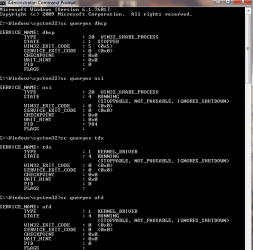
Let's have a look at the DHCP service...
Please open an Elevated Command Prompt, and run the following commands.

SC QUERYEX DHCP
SC QUERYEX NSI
SC QUERYEX Tdx
SC QUERYEX Afd
SC QC DHCP
REG QUERY HKU

Post the results.


Here are some instructions to make life easier :)
1) To open an Elevated Command Prompt Window (the ECP window), click on Start, All Programs, Accessories – then right-click on Command Prompt, and select Run as Administrator. Accept the UAC prompt.
2) To run the commands easier, highlight the block of commands, and right-click on the highlight – select Copy. In the CP Window, click on the black/white icon at top left – select Paste. The commands will run but may not complete the last command, so hit the Enter Key once.
3) To copy the results... click on the Black/White icon in the top left, and select Edit... 'Select All', and hit the Enter key - then use Ctrl+V or r-click+Paste to paste it into your response.
 

My Computer My Computer

At a glance

Win 7 x64 Home Premium (and x86 VirtualBox VM...i3 370M/i7 6500U8GB - finally :)/8GBit's an i3, dude!/dual Intel&nVidia
Computer type
Laptop
Computer Manufacturer/Model Number
Asus K52F or Lenovo B51-80
OS
Win 7 x64 Home Premium (and x86 VirtualBox VM)/Win10
CPU
i3 370M/i7 6500U
Motherboard
Asus/Lenovo
Memory
8GB - finally :)/8GB
Graphics Card(s)
it's an i3, dude!/dual Intel&nVidia
Sound Card
onboard
Monitor(s) Displays
15.6" built-in
Screen Resolution
1366x768/1920x1080
Hard Drives
750GB Seagate internal
Sundry external drives attached to other computers on the local network
1TB SSD on the Lenovo
PSU
n/a
Internet Speed
as much as I can get - usually on a dongle/phone, so <1MB/s
Antivirus
MSE/Defender
Browser
IE11/12/Edge/Chrome/FF(if I must)
Your SFC scan shows one problem -
Code:
 Line 3548: 2014-07-18 23:02:34, Info                  CSI    00000314 [SR] Repairing 1 components
 Line 3549: 2014-07-18 23:02:34, Info                  CSI    00000315 [SR] Beginning Verify and Repair transaction
 Line 3550: 2014-07-18 23:02:35, Info                  CSI    00000316 [SR] Cannot repair member file [l:24{12}]"tssecsrv.sys" of Microsoft-Windows-TerminalServices-Drivers, Version = 6.1.7601.18186, pA = PROCESSOR_ARCHITECTURE_AMD64 (9), Culture neutral, VersionScope = 1 nonSxS, PublicKeyToken = {l:8 b:31bf3856ad364e35}, Type neutral, TypeName neutral, PublicKey neutral in the store, file is missing
 Line 3551: 2014-07-18 23:02:35, Info                  CSI    00000317 [SR] Cannot repair member file [l:24{12}]"tssecsrv.sys" of Microsoft-Windows-TerminalServices-Drivers, Version = 6.1.7601.18186, pA = PROCESSOR_ARCHITECTURE_AMD64 (9), Culture neutral, VersionScope = 1 nonSxS, PublicKeyToken = {l:8 b:31bf3856ad364e35}, Type neutral, TypeName neutral, PublicKey neutral in the store, file is missing
 Line 3552: 2014-07-18 23:02:35, Info                  CSI    00000318 [SR] This component was referenced by [l:154{77}]"Package_1_for_KB2861855~31bf3856ad364e35~amd64~~6.1.1.0.2861855-2_neutral_GDR"
 Line 3557: 2014-07-18 23:02:35, Info                  CSI    0000031a [SR] Repair complete

I'llposta fix protocol for that in a bit.
 

My Computer My Computer

At a glance

Win 7 x64 Home Premium (and x86 VirtualBox VM...i3 370M/i7 6500U8GB - finally :)/8GBit's an i3, dude!/dual Intel&nVidia
Computer type
Laptop
Computer Manufacturer/Model Number
Asus K52F or Lenovo B51-80
OS
Win 7 x64 Home Premium (and x86 VirtualBox VM)/Win10
CPU
i3 370M/i7 6500U
Motherboard
Asus/Lenovo
Memory
8GB - finally :)/8GB
Graphics Card(s)
it's an i3, dude!/dual Intel&nVidia
Sound Card
onboard
Monitor(s) Displays
15.6" built-in
Screen Resolution
1366x768/1920x1080
Hard Drives
750GB Seagate internal
Sundry external drives attached to other computers on the local network
1TB SSD on the Lenovo
PSU
n/a
Internet Speed
as much as I can get - usually on a dongle/phone, so <1MB/s
Antivirus
MSE/Defender
Browser
IE11/12/Edge/Chrome/FF(if I must)
I've uploaded a file - sf9aa.zip - to my OneDrive at Noel's OneDrive
Please download and save it.

Right-click on the saved file and select Extract all...
Change the target to C:\ and click on Extract
Close all windows (it would be a good idea to print these instructions!)

Now reboot to the Repair Environment - as soon as the machine restarts, start tapping F8 - this should bring up the Advanced Boot Menu, at the top of which should be the option 'Repair my Computer'
Pick that
You'll have to log in with your username and password.

Pick the option to use a Command Prompt
At the prompt type
DIR C:\sf9aa
hit the enter key - if you get a 'Not Found' error try
DIR D:\sf9aa
or
DIR E:\sf9aa


The drive letter in use when you find the folder will need to be substituted (for<drive>) into the following command...


XCOPY <drive>:\sf9aa <drive>:\windows\winsxs /y /i /s /v /h


(e.g. XCOPY P:\wfire P:\windows\winsxs /y /i /s /v /h )


run the command (it should take almost no time) and when the prompt returns, type
EXIT
and hit the Enter key to exit Command Prompt - reboot to Normal Mode Windows.

Now run SFC /SCANNOW in an Elevated Command Prompt
then reboot and upload the new CBS.log file to your reply
 

My Computer My Computer

At a glance

Win 7 x64 Home Premium (and x86 VirtualBox VM...i3 370M/i7 6500U8GB - finally :)/8GBit's an i3, dude!/dual Intel&nVidia
Computer type
Laptop
Computer Manufacturer/Model Number
Asus K52F or Lenovo B51-80
OS
Win 7 x64 Home Premium (and x86 VirtualBox VM)/Win10
CPU
i3 370M/i7 6500U
Motherboard
Asus/Lenovo
Memory
8GB - finally :)/8GB
Graphics Card(s)
it's an i3, dude!/dual Intel&nVidia
Sound Card
onboard
Monitor(s) Displays
15.6" built-in
Screen Resolution
1366x768/1920x1080
Hard Drives
750GB Seagate internal
Sundry external drives attached to other computers on the local network
1TB SSD on the Lenovo
PSU
n/a
Internet Speed
as much as I can get - usually on a dongle/phone, so <1MB/s
Antivirus
MSE/Defender
Browser
IE11/12/Edge/Chrome/FF(if I must)
I've followed the instructions. I didn't remember how to copy, out of notepad, so I printed screen. Also, please see attached report from minitoolkit, it has a lot of details about the connection. All attached.
 

Attachments

  • MiniToolbox Report.txt
    MiniToolbox Report.txt
    42.2 KB · Views: 1
  • Query pic 1.png
    Query pic 1.png
    14.7 KB · Views: 23
  • Query pic 2.png
    Query pic 2.png
    391.9 KB · Views: 3

My Computer My Computer

At a glance

Windows 7 Home Premium 64bitI5
Computer type
PC/Desktop
Computer Manufacturer/Model Number
Dell
OS
Windows 7 Home Premium 64bit
CPU
I5
Hard Drives
Crucial 512gb
Antivirus
deleted while fixing will replace with Bitdefender
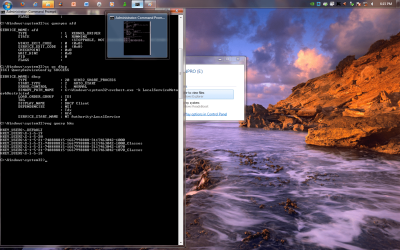
All the Command Prompt data looks normal - apart from the obvious 0x5 error in DHCP
I suspect that it's a permissions error somewhere, so the trick will be to find out where (could be either in the filesystem or the registry)
 

My Computer My Computer

At a glance

Win 7 x64 Home Premium (and x86 VirtualBox VM...i3 370M/i7 6500U8GB - finally :)/8GBit's an i3, dude!/dual Intel&nVidia
Computer type
Laptop
Computer Manufacturer/Model Number
Asus K52F or Lenovo B51-80
OS
Win 7 x64 Home Premium (and x86 VirtualBox VM)/Win10
CPU
i3 370M/i7 6500U
Motherboard
Asus/Lenovo
Memory
8GB - finally :)/8GB
Graphics Card(s)
it's an i3, dude!/dual Intel&nVidia
Sound Card
onboard
Monitor(s) Displays
15.6" built-in
Screen Resolution
1366x768/1920x1080
Hard Drives
750GB Seagate internal
Sundry external drives attached to other computers on the local network
1TB SSD on the Lenovo
PSU
n/a
Internet Speed
as much as I can get - usually on a dongle/phone, so <1MB/s
Antivirus
MSE/Defender
Browser
IE11/12/Edge/Chrome/FF(if I must)
Okay, I followed instructions and attached is the new CBS.log. It had to be zipped, because of forum size limit.
 

My Computer My Computer

At a glance

Windows 7 Home Premium 64bitI5
Computer type
PC/Desktop
Computer Manufacturer/Model Number
Dell
OS
Windows 7 Home Premium 64bit
CPU
I5
Hard Drives
Crucial 512gb
Antivirus
deleted while fixing will replace with Bitdefender
Still the same - which means either I posted the wrong files, or you misread the instructions (or something unexpected happened)

I think I got the file right - so it's something at your end...
Let's see if I can work out what...

Please open an Elevated Command prompt and run the following commands...

DIR C:\sf9aa
DIR C:\Windows\sf9aa /S


Post the results, and I'll look at them in the morning. :sleepy:
 

My Computer My Computer

At a glance

Win 7 x64 Home Premium (and x86 VirtualBox VM...i3 370M/i7 6500U8GB - finally :)/8GBit's an i3, dude!/dual Intel&nVidia
Computer type
Laptop
Computer Manufacturer/Model Number
Asus K52F or Lenovo B51-80
OS
Win 7 x64 Home Premium (and x86 VirtualBox VM)/Win10
CPU
i3 370M/i7 6500U
Motherboard
Asus/Lenovo
Memory
8GB - finally :)/8GB
Graphics Card(s)
it's an i3, dude!/dual Intel&nVidia
Sound Card
onboard
Monitor(s) Displays
15.6" built-in
Screen Resolution
1366x768/1920x1080
Hard Drives
750GB Seagate internal
Sundry external drives attached to other computers on the local network
1TB SSD on the Lenovo
PSU
n/a
Internet Speed
as much as I can get - usually on a dongle/phone, so <1MB/s
Antivirus
MSE/Defender
Browser
IE11/12/Edge/Chrome/FF(if I must)
Okay, I redid the last process, with the sf9aa file, just in case. Also, here is a new CBS.log, with the directory listings you requested.
 

Attachments

  • the requested screen shot.png
    the requested screen shot.png
    24.1 KB · Views: 21

My Computer My Computer

At a glance

Windows 7 Home Premium 64bitI5
Computer type
PC/Desktop
Computer Manufacturer/Model Number
Dell
OS
Windows 7 Home Premium 64bit
CPU
I5
Hard Drives
Crucial 512gb
Antivirus
deleted while fixing will replace with Bitdefender
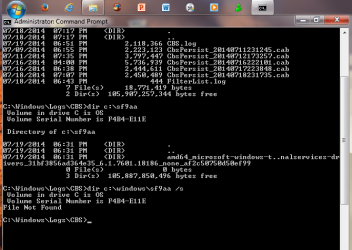
The error is still there...
There are no significant background errors in the CBS.log file, and the results from the command prompt are as expected.

This may mean that there is a problem in the registry.


Please download and save the CheckSUR tool from http://support.microsoft.com/kb/947821
(you'll need to look in the details for Windows 7, downloading from the Microsoft Download Center)

Run it - The tool can take anywhere from 5 mins to a couple of hours to run (or 'Install') depending on how much it has to do, and may exit silently - it may appear to freeze for most of that time, but be patient.
The result is logged in the C:\Windows\Logs\CBS\CheckSUR.log file - and an archive …\checksur.persist.log file

Then zip the CheckSUR.log and upload it to your reply.
 

My Computer My Computer

At a glance

Win 7 x64 Home Premium (and x86 VirtualBox VM...i3 370M/i7 6500U8GB - finally :)/8GBit's an i3, dude!/dual Intel&nVidia
Computer type
Laptop
Computer Manufacturer/Model Number
Asus K52F or Lenovo B51-80
OS
Win 7 x64 Home Premium (and x86 VirtualBox VM)/Win10
CPU
i3 370M/i7 6500U
Motherboard
Asus/Lenovo
Memory
8GB - finally :)/8GB
Graphics Card(s)
it's an i3, dude!/dual Intel&nVidia
Sound Card
onboard
Monitor(s) Displays
15.6" built-in
Screen Resolution
1366x768/1920x1080
Hard Drives
750GB Seagate internal
Sundry external drives attached to other computers on the local network
1TB SSD on the Lenovo
PSU
n/a
Internet Speed
as much as I can get - usually on a dongle/phone, so <1MB/s
Antivirus
MSE/Defender
Browser
IE11/12/Edge/Chrome/FF(if I must)
Sorry, "Installer encountered an error: 0xc8000247". So, I tried to run Windows Update and it doesn't work either.
 

My Computer My Computer

At a glance

Windows 7 Home Premium 64bitI5
Computer type
PC/Desktop
Computer Manufacturer/Model Number
Dell
OS
Windows 7 Home Premium 64bit
CPU
I5
Hard Drives
Crucial 512gb
Antivirus
deleted while fixing will replace with Bitdefender
That one may be easy enough to fix - let's check it's what I think it is...

we need to see a full copy of the report produced by the MGADiag tool
(download and save to desktop - http://go.microsoft.com/fwlink/?linkid=52012 )
Once saved, run the tool.
Click on the Continue button, which will produce the report.
To copy the report to your response, click on the Copy button in the tool (ignore any error messages at this point), and then paste (using either r-click/Paste, or Ctrl+V ) into your response.
 

My Computer My Computer

At a glance

Win 7 x64 Home Premium (and x86 VirtualBox VM...i3 370M/i7 6500U8GB - finally :)/8GBit's an i3, dude!/dual Intel&nVidia
Computer type
Laptop
Computer Manufacturer/Model Number
Asus K52F or Lenovo B51-80
OS
Win 7 x64 Home Premium (and x86 VirtualBox VM)/Win10
CPU
i3 370M/i7 6500U
Motherboard
Asus/Lenovo
Memory
8GB - finally :)/8GB
Graphics Card(s)
it's an i3, dude!/dual Intel&nVidia
Sound Card
onboard
Monitor(s) Displays
15.6" built-in
Screen Resolution
1366x768/1920x1080
Hard Drives
750GB Seagate internal
Sundry external drives attached to other computers on the local network
1TB SSD on the Lenovo
PSU
n/a
Internet Speed
as much as I can get - usually on a dongle/phone, so <1MB/s
Antivirus
MSE/Defender
Browser
IE11/12/Edge/Chrome/FF(if I must)
Here is the report. I've just been busy this week. Please don't give up on me.
 

Attachments

My Computer My Computer

At a glance

Windows 7 Home Premium 64bitI5
Computer type
PC/Desktop
Computer Manufacturer/Model Number
Dell
OS
Windows 7 Home Premium 64bit
CPU
I5
Hard Drives
Crucial 512gb
Antivirus
deleted while fixing will replace with Bitdefender

My Computer My Computer

At a glance

Win 7 x64 Home Premium (and x86 VirtualBox VM...i3 370M/i7 6500U8GB - finally :)/8GBit's an i3, dude!/dual Intel&nVidia
Computer type
Laptop
Computer Manufacturer/Model Number
Asus K52F or Lenovo B51-80
OS
Win 7 x64 Home Premium (and x86 VirtualBox VM)/Win10
CPU
i3 370M/i7 6500U
Motherboard
Asus/Lenovo
Memory
8GB - finally :)/8GB
Graphics Card(s)
it's an i3, dude!/dual Intel&nVidia
Sound Card
onboard
Monitor(s) Displays
15.6" built-in
Screen Resolution
1366x768/1920x1080
Hard Drives
750GB Seagate internal
Sundry external drives attached to other computers on the local network
1TB SSD on the Lenovo
PSU
n/a
Internet Speed
as much as I can get - usually on a dongle/phone, so <1MB/s
Antivirus
MSE/Defender
Browser
IE11/12/Edge/Chrome/FF(if I must)
Back
Top