Solved Configuring Updates got stuck, now can't boot up!

blue skies

New member
Member
VIP
Local time
7:28 AM
Messages
117
Hello. My Windows 7 Home Edition laptop has always been set to only notify me of updates but to let me download and apply them. For what I think is the third time since I've been using Windows 7, when I restarted my computer today, it began "configuring" windows updates, even though I hadn't downloaded any.

Then it got stuck on the Configuring Updates screen, saying it was 100% complete. I waited a long time, but when it wouldn't start, I had to power it off. When I started it again, it was now stuck on 35% complete. I get that same screen now whether I start it in Safe Mode, Safe Mode with networking. or Start Windows Normally. The 35% never changes and I can't get past that screen.

Choosing Safe Mode with Command Prompt also gets me stuck on this same Configuring Windows Updates; 35% Complete; Do Not Turn Off Your Computer screen.

Pressing F8 only gives me those options, and does not show any Repair or other Advanced Recovery Options like System Restore (which is what I had planned to do when it started up because I don't trust any updates I didn't personally allow.)

My laptop has no DVD Drive, but I inserted my Windows 7 recovery USB flashdrive and restarted, but I can't get it to boot from USB and can't get into windows to change that setting.

My laptop is a Toshiba Satellite. I have no idea how to fix this since I can't get past this screen and can't access any repair or recovery options.

Can anyone please help me? Thank you in advance! :)
 

My Computer My Computer

Computer type
Laptop
Computer Manufacturer/Model Number
Toshiba Satellite U845W-S410
OS
Windows 7 Home Premium 64 bit
CPU
Intel ® Core™ i5-3317U Processor
Memory
6GB DDR3 1600MHz
Graphics Card(s)
Mobile Intel ® HD Graphics with 64MB-1696MB dynamically allo
Monitor(s) Displays
All-in-one -- Generic PnP Monitor
Screen Resolution
14.4” diagonal widescreen TruBrite ® TFT display at 1792 x 7
Hard Drives
500GB (5400 RPM, Serial ATA) with dedicated 32GB mSATA SSD disk
cache
Keyboard
Logitech
Mouse
Logitech
As I was typing the previous post, I turned it on again (for about the 20th time) and pressed F8 to double check the options that were showing. I didn't choose any and it started trying to start up again normally. After I posted, I looked at the screen and now it is showing "Cleaning up; Do not turn off your computer."

Is it possible it will repair itself? If it does somehow start up, I will still want to System Restore back to a restore point from yesterday or a couple days ago. I restored it pretty recently after an unauthorized automatic update. Is this something Windows is doing now? I know they pushed Windows 10 upgrades without permission last year, which I managed to avoid... is this a similar thing for certain updates?

Cleaning up is still going on. I wonder how long that would normally take if it's not to messed up to complete? Fingers crossed it will somehow start up.
 

My Computer My Computer

Computer type
Laptop
Computer Manufacturer/Model Number
Toshiba Satellite U845W-S410
OS
Windows 7 Home Premium 64 bit
CPU
Intel ® Core™ i5-3317U Processor
Memory
6GB DDR3 1600MHz
Graphics Card(s)
Mobile Intel ® HD Graphics with 64MB-1696MB dynamically allo
Monitor(s) Displays
All-in-one -- Generic PnP Monitor
Screen Resolution
14.4” diagonal widescreen TruBrite ® TFT display at 1792 x 7
Hard Drives
500GB (5400 RPM, Serial ATA) with dedicated 32GB mSATA SSD disk
cache
Keyboard
Logitech
Mouse
Logitech
It just started up and seems to be working okay. I don't know if I should go ahead and use System Restore, or just leave it and be grateful it's working. Any advice?

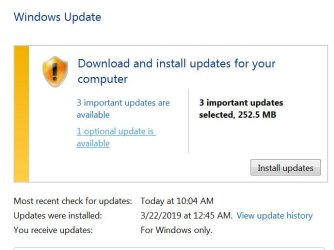
It says I need to update Windows, and this is the screen I get showing that it was updated on March 22nd:
win-updates 4-25-19.JPG


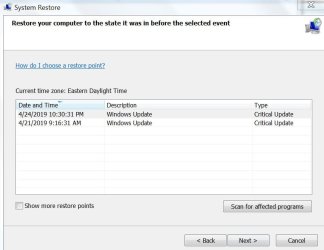
But the System Restore shows restore points created before Critical Updates yesterday April 24th, and April 21st., which I didn't choose:
system restore options.JPG


Does Windows push Critical Updates through on Windows 7 even if it's set to ask first?


Oh, and while it's working... is there something I can easily change somewhere so that I will be able to have the option to boot from USB sometime in the future if I need to? (A setting so it will check for USB and consider that the priority if there's a flashdrive with the OS on it, otherwise just boot normally?)
 

My Computer My Computer

Computer type
Laptop
Computer Manufacturer/Model Number
Toshiba Satellite U845W-S410
OS
Windows 7 Home Premium 64 bit
CPU
Intel ® Core™ i5-3317U Processor
Memory
6GB DDR3 1600MHz
Graphics Card(s)
Mobile Intel ® HD Graphics with 64MB-1696MB dynamically allo
Monitor(s) Displays
All-in-one -- Generic PnP Monitor
Screen Resolution
14.4” diagonal widescreen TruBrite ® TFT display at 1792 x 7
Hard Drives
500GB (5400 RPM, Serial ATA) with dedicated 32GB mSATA SSD disk
cache
Keyboard
Logitech
Mouse
Logitech
Oh, and while it's working... is there something I can easily change somewhere so that I will be able to have the option to boot from USB sometime in the future if I need to? (A setting so it will check for USB and consider that the priority if there's a flashdrive with the OS on it, otherwise just boot normally?)

Yes, when you power on your computer start pressing <F9> every second until the boot menu appears, choose USB or DVD. This does not change the boot priority other than the current one. If you shut down the computer and start, or restart, the default boot device is the same. You have to go into the boot options menu in the bios <F10>, and I wouldn't change that to USB or DVD, I'd use the one time boot with <F9>. <F8> to options menu for among other choices Last Known Good Configuration if your stuck and your computer won't boot.

I'd still invest in an external hard drive (they are getting less expensive all the time) and use either AOMEI Backupper free or Macrium Reflect free to backup your computer (read blue text in my footer)
 

My Computer My Computer

Computer type
PC/Desktop
Computer Manufacturer/Model Number
HP Desktop & Compaq Laptop
OS
Win 10 x64, Linux Lite, Win 7 x64, BlackArch, & Kali
Hard Drives
Samsung 850 Pro 256Gb,
Hitachi HDD 1Tb,
Crucial MX SSD 250Gb
Segate 3Tb USB 3.0 Ext. Backup HDD
Internet Speed
150Mbps dn, 20Mbps up
Antivirus
Avast Free, Malwarebytes Anti-Exploit & Anti-Ransomware
Browser
Firefox, Chrome, Opera, & VPN
Yes, when you power on your computer start pressing <F9> every second until the boot menu appears, choose USB or DVD. This does not change the boot priority other than the current one. If you shut down the computer and start, or restart, the default boot device is the same. You have to go into the boot options menu in the bios <F10>, and I wouldn't change that to USB or DVD, I'd use the one time boot with <F9>. <F8> to options menu for among other choices Last Known Good Configuration if your stuck and your computer won't boot.

I'd still invest in an external hard drive (they are getting less expensive all the time) and use either AOMEI Backupper free or Macrium Reflect free to backup your computer (read blue text in my footer)
Thank you. I will have to write a note somewhere about F9 so I can actually find that info if it ever happens again.

I used to make backup images on my previous computer but I stopped doing that when I bought this Toshiba laptop because it has a separate 32gb SSD, which is where I thought the OS was located, but it seems to be hidden and there was a lot of confusion about how the whole thing is set up... so I just have a copy of Windows 7 on the flashdrive and backup all of my files on external drives. (And important files on Dropbox.)

I'm still wondering if I should risk a system restore now. But if it's just going to push the same "critical" updates, I'm not sure I want to risk having it freeze up again. I guess I'll try to find out more about that tomorrow. Has anybody else had problems like this? Does Windows force-install critical updates but not list them in Windows Update History? I'm still confused about that.

Also, is there an easy way to check the OS and repair any problems at this point? Maybe that would be better than System Restore?
 

My Computer My Computer

Computer type
Laptop
Computer Manufacturer/Model Number
Toshiba Satellite U845W-S410
OS
Windows 7 Home Premium 64 bit
CPU
Intel ® Core™ i5-3317U Processor
Memory
6GB DDR3 1600MHz
Graphics Card(s)
Mobile Intel ® HD Graphics with 64MB-1696MB dynamically allo
Monitor(s) Displays
All-in-one -- Generic PnP Monitor
Screen Resolution
14.4” diagonal widescreen TruBrite ® TFT display at 1792 x 7
Hard Drives
500GB (5400 RPM, Serial ATA) with dedicated 32GB mSATA SSD disk
cache
Keyboard
Logitech
Mouse
Logitech
[FONT=&quot]Try this for Windows Updates
Dism++ | New Windows Utility.
Direct Download DISM++
Yes, it's from Chinese firm! When you run it, click on Updates, then Scan, Choose the updates you wish to install, and then click Install updates.
[/FONT]
Also, is there an easy way to check the OS and repair any problems at this point? Maybe that would be better than System Restore?

Yes, to check OS and attempt to repair problems, if any:
Click :orb: in searchbox type cmd
right-click cmd, choose Run as Administrator
copy and paste below bold text with mouse
sfc /scannow
If error are/were reported that couldn't be repaired, run
SURTx64
Post CBS.log & CheckSUR.log when it completes. Location: C:\Windows\Logs\CBS
 

My Computer My Computer

Computer type
PC/Desktop
Computer Manufacturer/Model Number
HP Desktop & Compaq Laptop
OS
Win 10 x64, Linux Lite, Win 7 x64, BlackArch, & Kali
Hard Drives
Samsung 850 Pro 256Gb,
Hitachi HDD 1Tb,
Crucial MX SSD 250Gb
Segate 3Tb USB 3.0 Ext. Backup HDD
Internet Speed
150Mbps dn, 20Mbps up
Antivirus
Avast Free, Malwarebytes Anti-Exploit & Anti-Ransomware
Browser
Firefox, Chrome, Opera, & VPN
Yes, to check OS and attempt to repair problems, if any:
Click :orb: in searchbox type cmd
right-click cmd, choose Run as Administrator
copy and paste below bold text with mouse
sfc /scannow
If error are/were reported that couldn't be repaired, run
SURTx64
Post CBS.log & CheckSUR.log when it completes. Location: C:\Windows\Logs\CBS
I ran it and... "Windows Resource Protection found corrupt files and successfully repaired them."
Thank you for your post and advice! :)
 

My Computer My Computer

Computer type
Laptop
Computer Manufacturer/Model Number
Toshiba Satellite U845W-S410
OS
Windows 7 Home Premium 64 bit
CPU
Intel ® Core™ i5-3317U Processor
Memory
6GB DDR3 1600MHz
Graphics Card(s)
Mobile Intel ® HD Graphics with 64MB-1696MB dynamically allo
Monitor(s) Displays
All-in-one -- Generic PnP Monitor
Screen Resolution
14.4” diagonal widescreen TruBrite ® TFT display at 1792 x 7
Hard Drives
500GB (5400 RPM, Serial ATA) with dedicated 32GB mSATA SSD disk
cache
Keyboard
Logitech
Mouse
Logitech
You are most Welcome!
If your issue is resolved, please mark your post as such.
Happy Computing!
 

My Computer My Computer

Computer type
PC/Desktop
Computer Manufacturer/Model Number
HP Desktop & Compaq Laptop
OS
Win 10 x64, Linux Lite, Win 7 x64, BlackArch, & Kali
Hard Drives
Samsung 850 Pro 256Gb,
Hitachi HDD 1Tb,
Crucial MX SSD 250Gb
Segate 3Tb USB 3.0 Ext. Backup HDD
Internet Speed
150Mbps dn, 20Mbps up
Antivirus
Avast Free, Malwarebytes Anti-Exploit & Anti-Ransomware
Browser
Firefox, Chrome, Opera, & VPN
Back
Top