

Hi All!
After seeing glowing reports about Win7 backup on this forum, I thought I would give it a try, even though I've used Symantec GHOST for years and years.
I connected one of my 500 GB external drives that I have used reliably with GHOST for about 6 months, ran through the initial wizard setup, let it do a system image backup and then a files backup where I told it to backup the entire contents of my Win7 drive. It worked OK and reported that about 100GB was free. I keep my backup drive(s) at other locations in case of fire or theft, so I disconnected it and turned off the schedule.
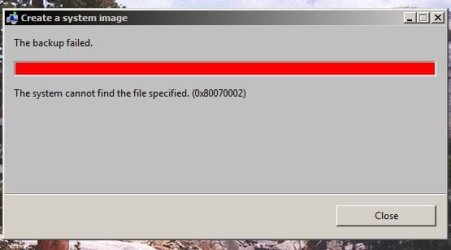
Last night I wanted to refresh the backup. I innocently assumed it would do an incremental. I had not added many files so there should have been plenty of space. I re-connected it and hit the Backup Now button and the backup started. After a few hours it failed, complaining there was not enough space. I deleted all the backup files and folders from the external drive and tried again. It kept failing with a cryptic error code:
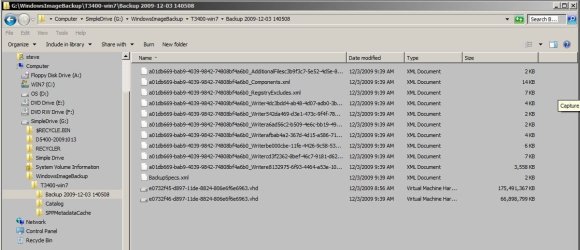
So, thought I would try to do a system image backup from scratch. That completed OK, and there are files on the external drive that look OK from my ignorant viewpoint:
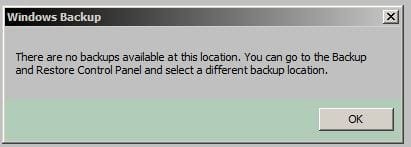
I want to see what is in them, perhaps test a restore of a file or two, yes? The Microsoft KB says the way to do this is to use Restore. But when I click on the "restore my files button:
It fails with this error window:
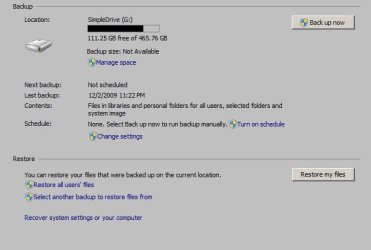
I have no idea how to specify another location, or edit the options that were setup with the Wizzer last week. Manage Space shows this:
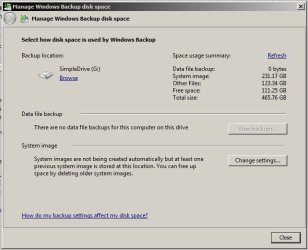
I'm frustrated with the dumbed-down interface - is there an "Advanced" option? Perhaps I'm asking too much for Windows 7 restore to be able to look inside an image backup the way GHOST has always been able to do. But, if the only way to see individual files is to do both a system image and then a files backup, and they both won't fit on a 500 GB drive - then I'm not sure how useful Win7 backup really is ... that combined with the cryptic error is not giving me a lot of confidence...
Thanks,
Raargh
After seeing glowing reports about Win7 backup on this forum, I thought I would give it a try, even though I've used Symantec GHOST for years and years.
I connected one of my 500 GB external drives that I have used reliably with GHOST for about 6 months, ran through the initial wizard setup, let it do a system image backup and then a files backup where I told it to backup the entire contents of my Win7 drive. It worked OK and reported that about 100GB was free. I keep my backup drive(s) at other locations in case of fire or theft, so I disconnected it and turned off the schedule.
Last night I wanted to refresh the backup. I innocently assumed it would do an incremental. I had not added many files so there should have been plenty of space. I re-connected it and hit the Backup Now button and the backup started. After a few hours it failed, complaining there was not enough space. I deleted all the backup files and folders from the external drive and tried again. It kept failing with a cryptic error code:
So, thought I would try to do a system image backup from scratch. That completed OK, and there are files on the external drive that look OK from my ignorant viewpoint:
I want to see what is in them, perhaps test a restore of a file or two, yes? The Microsoft KB says the way to do this is to use Restore. But when I click on the "restore my files button:
It fails with this error window:
I have no idea how to specify another location, or edit the options that were setup with the Wizzer last week. Manage Space shows this:
I'm frustrated with the dumbed-down interface - is there an "Advanced" option? Perhaps I'm asking too much for Windows 7 restore to be able to look inside an image backup the way GHOST has always been able to do. But, if the only way to see individual files is to do both a system image and then a files backup, and they both won't fit on a 500 GB drive - then I'm not sure how useful Win7 backup really is ... that combined with the cryptic error is not giving me a lot of confidence...
Thanks,
Raargh
My Computer
- Computer Manufacturer/Model Number
- Dell T3400
- OS
- Windows 7 Pro x64 (dual-booting XPSP3 and Win7)
- CPU
- Intel Core-2 Quad
- Memory
- 4GB 800 Mhz PC2 unbuffered ECC
- Graphics Card(s)
- NVIDIA Quadro FX 570
- Sound Card
- Creative SB X-Fi model SB0770
- Monitor(s) Displays
- Dell 19" FP
- Screen Resolution
- 1680x1050
- Hard Drives
- SATA disk0 250GB disk1 500GB
- Internet Speed
- TW RR
- Other Info
- Just a baby compared to my work box!

