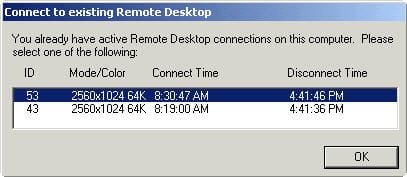
Connect to existing remote desktop message

seektruth786

New member
Local time
5:58 AM
Messages
1
I'm trying to figure out what this means, can anyone provide any insight? Does this mean that 2 other systems are remotely connected my computer??
 

Attachments

  • connect-to-existing-remote-desktop-message.jpg
    connect-to-existing-remote-desktop-message.jpg
    13.9 KB · Views: 4

My Computer My Computer

Computer type
PC/Desktop
Computer Manufacturer/Model Number
Dell
OS
Windows 7 Professional 64 bit
CPU
Intel(R) Core(TM) i5-3570 CPU @ 3.4GHz
Memory
4.00 GB
Graphics Card(s)
NVIDIA Quadro NVS 290
Hard Drives
WDC WD2500AAKX-75U6AA0 250GB
Browser
Google Chrome, Mozilla Firefox, Microsoft Internet Explorer
Hello Seektruth -

This means there was a previous connection but you didn't logoff correctly, you just disconnected the session. To remove these, click 'Ok' - then logoff correctly. You won't see this message again.

Thanks,
 

My Computer My Computer

Computer type
PC/Desktop
Computer Manufacturer/Model Number
Custom Build
OS
Windows 7 Professional x64
CPU
Intel Core i5 Second Generation
Motherboard
MSI h67ma-e35
Memory
8GB DDR3
Monitor(s) Displays
LG Flatron W2253TQ
Screen Resolution
1920x1080
Hard Drives
2x 1TB Western Digital 7200rpm
Keyboard
Logitech K360
Mouse
Logitech M325
Internet Speed
10mb Leased Line
Antivirus
Trend Micro Worry-Free Advanced Business Security
Browser
Internet Explorer 10
Seektruth787, welcome to the windows 7 forum.

Each machine unless it is a terminal server, has a limit of 2 simultaneous remote sessions authorized.
Clicking the red X in the top right of a RDP session just closes the screen. It does not log you off and
when you reconnect as the same user, it just continues where you left off.

You must use the logoff selection to stop the session and release the connection.

Many of the sysadmins setup the terminal server to automatically log the user off after either some period of inactivity or a disconnect (which is what the red x does)

Rich

 

My Computer My Computer

Computer type
Laptop
Computer Manufacturer/Model Number
Toshiba Laptop Qosimo X870
OS
Windows 7 Pro x64 SP1
CPU
Intel Core I7
Motherboard
Toshiba Qosmio
Memory
16 Gigs
Graphics Card(s)
NVIDIA GeForce GTX 670M
Monitor(s) Displays
17.7" laptop
Screen Resolution
1600 x 900
Hard Drives
256 Gig SanDisk SSD for C
256 Gig Intel SSD for D
Internet Speed
50/25 FIOS
Antivirus
Vipre (all you can eat for 10 machines)
Browser
IE and FF
Other Info
I have dos 6.22, wfwg 3.11, win98, 2000 and xp VHD's available for testing. MS's Virtual PC works great.
Back
Top