Solved Connected but with no internet !

ermns

New member
Local time
12:07 AM
Messages
45
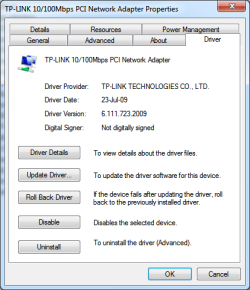
This is a continuation from a previous thread.
If you would like to know what I have done so far please read this thread :

http://www.sevenforums.com/network-...net-access-again-eth-cable-3.html#post2863011

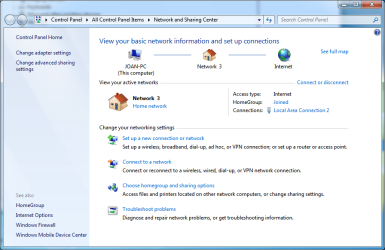
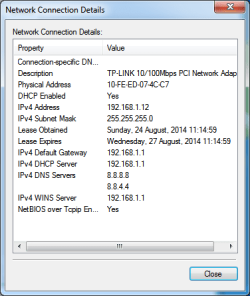
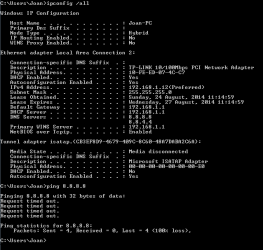
In the following two posts I am going to try to describe the situation to the best of my ability.

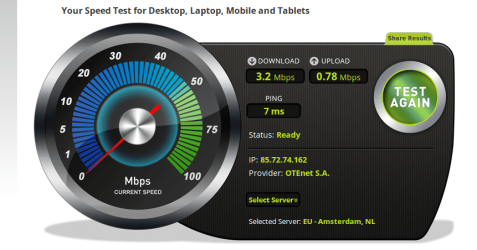
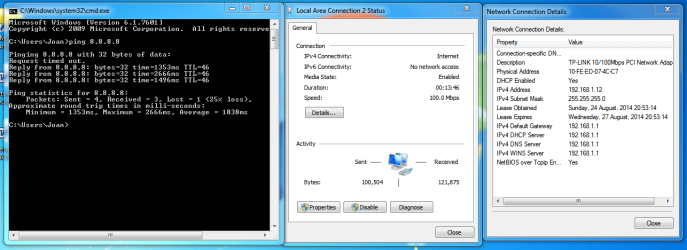
The problem is that although I am connected to the Internet.. I have no Internet, as my ping attempts show...
 

Attachments

  • Capture 01.PNG
    Capture 01.PNG
    2 KB · Views: 44
  • Capture 02.PNG
    Capture 02.PNG
    13.9 KB · Views: 44
  • Capture 03.PNG
    Capture 03.PNG
    40.3 KB · Views: 1
  • Capture 04.PNG
    Capture 04.PNG
    10.9 KB · Views: 44
  • Capture 05.PNG
    Capture 05.PNG
    11.1 KB · Views: 44

My Computer

Computer type
PC/Desktop
OS
Windows 7 Pro, 32 bit
CPU
AMD Athlon 64 x2 3800+
Motherboard
ASRock 939N98PV-GLAN
Memory
DDR Dual Channel 4 Gbytes
Graphics Card(s)
Nvidia GeForce GT440
Antivirus
Avast
Browser
Chrome
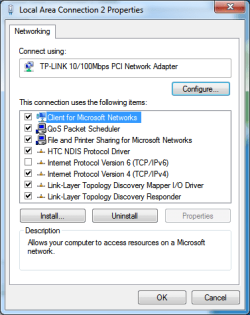
These are the rest of the screenshots

The last one is from my router.
The computer has got an automatic ip.
 

Attachments

  • Capture 09.png
    Capture 09.png
    2.7 KB · Views: 43
  • Capture 08.PNG
    Capture 08.PNG
    6.9 KB · Views: 43
  • Capture 07.PNG
    Capture 07.PNG
    13.7 KB · Views: 43
  • Capture 06.PNG
    Capture 06.PNG
    13.2 KB · Views: 43

My Computer

Computer type
PC/Desktop
OS
Windows 7 Pro, 32 bit
CPU
AMD Athlon 64 x2 3800+
Motherboard
ASRock 939N98PV-GLAN
Memory
DDR Dual Channel 4 Gbytes
Graphics Card(s)
Nvidia GeForce GT440
Antivirus
Avast
Browser
Chrome
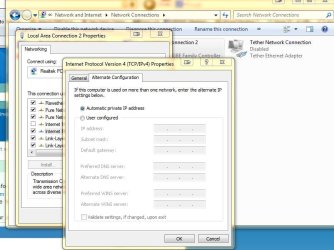
in your network adapter settings , do you have anything in the alternate connection ? See pic
 

Attachments

  • rrr.JPG
    rrr.JPG
    67.4 KB · Views: 1

My Computer

Computer type
PC/Desktop
Computer Manufacturer/Model Number
Custom Build
OS
Windows 10 Pro - 64 bit
CPU
Intel i7 2600K
Motherboard
Asus P8P67
Memory
8 Gig ddr3 1600 mhz - viper extreme (Patriot)
Graphics Card(s)
EVGA 980 TI
Monitor(s) Displays
2 - Lg 21" LED , sony 48 " bravia LED
Hard Drives
one - samsung 840 series 465.76 GB SSD
two - wd 2 tB black
one - wd 1.5 tb black
one - wb 1 tb black
PSU
1000 Watt Coolmaster : Silent Pro Gold
Case
antec 1200
Cooling
watercooled
Mouse
logitech wireless
Antivirus
Norton Security 2015
Other Info
powerware 3.1 KVA FERRUPS with 4 - 1000 Amp Deep cycle batteries ...
No nothing...
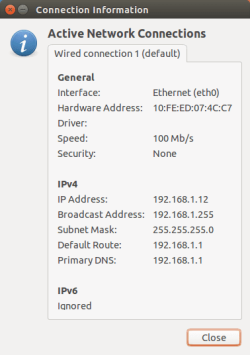
But smt happened that makes me think positively that I will be able to solve this...

I booted with linux...
 

Attachments

  • Capture 10.png
    Capture 10.png
    71.9 KB · Views: 1
  • Capture 11.png
    Capture 11.png
    11.6 KB · Views: 42

My Computer

Computer type
PC/Desktop
OS
Windows 7 Pro, 32 bit
CPU
AMD Athlon 64 x2 3800+
Motherboard
ASRock 939N98PV-GLAN
Memory
DDR Dual Channel 4 Gbytes
Graphics Card(s)
Nvidia GeForce GT440
Antivirus
Avast
Browser
Chrome
Just booted with Windows again... Back to square one...
Unidentified Network, No Internet connection... lol... this is hilarious !!

Windows ... blows !!
 

My Computer

Computer type
PC/Desktop
OS
Windows 7 Pro, 32 bit
CPU
AMD Athlon 64 x2 3800+
Motherboard
ASRock 939N98PV-GLAN
Memory
DDR Dual Channel 4 Gbytes
Graphics Card(s)
Nvidia GeForce GT440
Antivirus
Avast
Browser
Chrome
Ok I changed a couple of thinks...

This is what i got now...

The thing that is interesting is that the connection as you can see, is receiving all the time!
As if it is downloading smt...
In reality, I believe, it is not downloading... it just sends packets and they collide somewhere inside the LAN...
Maybe there is a conflict in the ip address? But then it gets always the same ip.
Both in windows and linux... But Linux had no problems...

I just don't get it :(
 

Attachments

  • Capture 12.PNG
    Capture 12.PNG
    44.6 KB · Views: 2

My Computer

Computer type
PC/Desktop
OS
Windows 7 Pro, 32 bit
CPU
AMD Athlon 64 x2 3800+
Motherboard
ASRock 939N98PV-GLAN
Memory
DDR Dual Channel 4 Gbytes
Graphics Card(s)
Nvidia GeForce GT440
Antivirus
Avast
Browser
Chrome
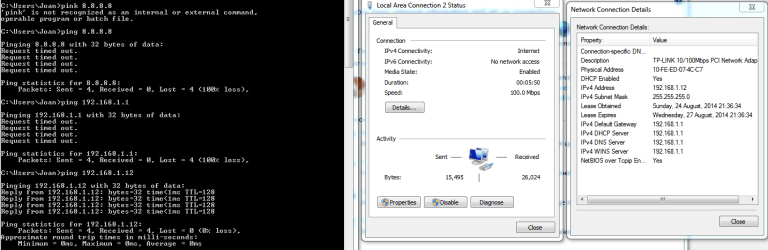
Maybe this will give some idea to someone...

It seems that it can't even ping the router although it can ping itself. :(
 

Attachments

  • Capture 13.PNG
    Capture 13.PNG
    32.1 KB · Views: 4

My Computer

Computer type
PC/Desktop
OS
Windows 7 Pro, 32 bit
CPU
AMD Athlon 64 x2 3800+
Motherboard
ASRock 939N98PV-GLAN
Memory
DDR Dual Channel 4 Gbytes
Graphics Card(s)
Nvidia GeForce GT440
Antivirus
Avast
Browser
Chrome
look the stack of things done by me for the same problem.

It's possible that it works for you.
 

My Computer

Computer type
PC/Desktop
OS
Windows 7 Professional
So, I went through both threads to see what you've done. This is just a shot in the dark, but have you tired uninstalling the Network Adapter from the Device Manager? Make sure the box to delete the drive is unchecked before clicking okay, reboot the machine, and the Network Adapter should re-install.
 
Last edited:

My Computer

Computer type
PC/Desktop
Computer Manufacturer/Model Number
Self Built
OS
Windows 7 Home Premium 64bit
CPU
AMD Phenom II X3 740
Motherboard
ASUS Crosshair IV Formula
Memory
Mushkin Enhanced Silverline
Graphics Card(s)
ASUS CuCore Series EAH5770 CuCore/2DI/1GD5
Sound Card
SupremeFX X-Fi 8-Ch audio with EAX Advanced HD 4.0 support
Hard Drives
Western Digital WD Black WD6402AAEX 640GB 7200 RPM SATA 6.0Gb/s 3.5"
PSU
Antec EarthWatts EA750 750W
Case
Antec Nine Hundred Two Black Steel ATX Mid Tower
Cooling
Scythe YASYA SCYS-1000 120mm
Mouse
Old as dirt Logitech, but its still kickin'
Antivirus
Microsoft Security Essentials and Malware Bytes
Browser
Google Chrome, IE10, and Firefox
So, I went through both threads to see what you've done. This is just a shot in the dark, but have you tired uninstalling the Network Adapter from the Device Manager? Make sure the box to delete the drive is unchecked before clicking okay, reboot the machine, and the Network Adapter should re-install.

P.S. - You may loose all settings that you've changed thus far.
 

My Computer

Computer type
PC/Desktop
Computer Manufacturer/Model Number
Self Built
OS
Windows 7 Home Premium 64bit
CPU
AMD Phenom II X3 740
Motherboard
ASUS Crosshair IV Formula
Memory
Mushkin Enhanced Silverline
Graphics Card(s)
ASUS CuCore Series EAH5770 CuCore/2DI/1GD5
Sound Card
SupremeFX X-Fi 8-Ch audio with EAX Advanced HD 4.0 support
Hard Drives
Western Digital WD Black WD6402AAEX 640GB 7200 RPM SATA 6.0Gb/s 3.5"
PSU
Antec EarthWatts EA750 750W
Case
Antec Nine Hundred Two Black Steel ATX Mid Tower
Cooling
Scythe YASYA SCYS-1000 120mm
Mouse
Old as dirt Logitech, but its still kickin'
Antivirus
Microsoft Security Essentials and Malware Bytes
Browser
Google Chrome, IE10, and Firefox
These are the rest of the screenshots
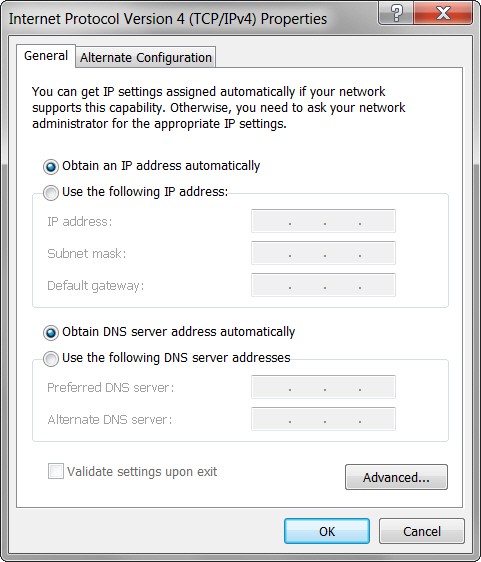
Why do you have your DNS manually set to 8.8.8.8?

Have you tried "obtain automatically" for DNS? That's really how it should be set, same as for the IP address.

MXgJt4.jpg


And don't forget to re-boot after you make this change. That should get everything cleanly starting anew.
 

My Computer

Computer type
PC/Desktop
Computer Manufacturer/Model Number
Home-built, two systems (1) and (2)
OS
Windows 7 Pro x64 (1), Win7 Pro X64 (2)
CPU
i5-3350p 3.1Ghz/6MB-cache (1); E8400 3.0Ghz/6MB-cache (2)
Motherboard
ASUS P8Z77-V Pro (1); ASUS P5Q3 (2)
Memory
8GB PC3-12800 DDR3 (1); 4GB PC3-10600 DDR3 (2)
Graphics Card(s)
ATI HD7750 (1), (see TV cards); ATI R7 250 (2)
Sound Card
Realtek ALC892 HD Audio (1); Realtek ALC1200 HD Audio (2)
Monitor(s) Displays
Eizo HD2441W LCD, Eizo S2433W (1); Eizo 24" S2433W (2)
Screen Resolution
1920x1200, 1920x1200 (1); 1920x1200 (2)
Hard Drives
(1) 1TB SATA-II (7200RPM), 2x2TB SATA-III (7200RPM), 250GB SATA-III (10000RPM) for OS; 2x2TB external USB 3.0

(2) 320GB SATA-II (7200RPM), 750GB SATA-II (7200RPM), 150GB SATA-II (10000RPM) for OS; 2TB external USB 3.0
PSU
Nesteq ECS-6001 600W (1); Nesteq ECS-5001 500W (2)
Case
Acousti-Case 360 (1) and (2)
Cooling
Noctua NH-U12P SE2 for CPU, 2x120mm case fans (1) and (2)
Keyboard
IBM PS/2 (1) and (2)
Mouse
Logitech MX Revolution wireless (1); Microsoft wired (2)
Internet Speed
100mbps down / 10mbps up
Antivirus
Microsoft Security Essentials; Malwarebyte Anti-Malware Pro
Browser
Firefox
Other Info
Ceton InfiniTV 4-tuner cablecard-enabled TV card as well as Hauppauge HVR-2250 OTA/ATSC 2-tuner TV card in (1), running under Win7 WMC
So, I went through both threads to see what you've done. This is just a shot in the dark, but have you tired uninstalling the Network Adapter from the Device Manager? Make sure the box to delete the drive is unchecked before clicking okay, reboot the machine, and the Network Adapter should re-install.

P.S. - You may loose all settings that you've changed thus far.

Thank you so much for your suggestion :-)
I have done this at least three times, afai remember :(
 

My Computer

Computer type
PC/Desktop
OS
Windows 7 Pro, 32 bit
CPU
AMD Athlon 64 x2 3800+
Motherboard
ASRock 939N98PV-GLAN
Memory
DDR Dual Channel 4 Gbytes
Graphics Card(s)
Nvidia GeForce GT440
Antivirus
Avast
Browser
Chrome
These are the rest of the screenshots
Why do you have your DNS manually set to 8.8.8.8?

Have you tried "obtain automatically" for DNS? That's really how it should be set, same as for the IP address.

MXgJt4.jpg


And don't forget to re-boot after you make this change. That should get everything cleanly starting anew.

Thank you for your suggestions :-)

I have done this a million times. Tried to change DNS to 8.8.8.8 then back to automatic, and rebooted a dozen times...

The REALLY strange thing is that booting on Linux from the USB, everything works great ! I just don't get it !!
Could it be some kind of weird virus?

I am going to buy a new 1Gbps Net card, but I am sure this is not the problem...
I am just so much out of options !!
 

My Computer

Computer type
PC/Desktop
OS
Windows 7 Pro, 32 bit
CPU
AMD Athlon 64 x2 3800+
Motherboard
ASRock 939N98PV-GLAN
Memory
DDR Dual Channel 4 Gbytes
Graphics Card(s)
Nvidia GeForce GT440
Antivirus
Avast
Browser
Chrome
No problem, the adapter is under automatic address.
 

My Computer

Computer type
PC/Desktop
OS
Windows 7 Professional
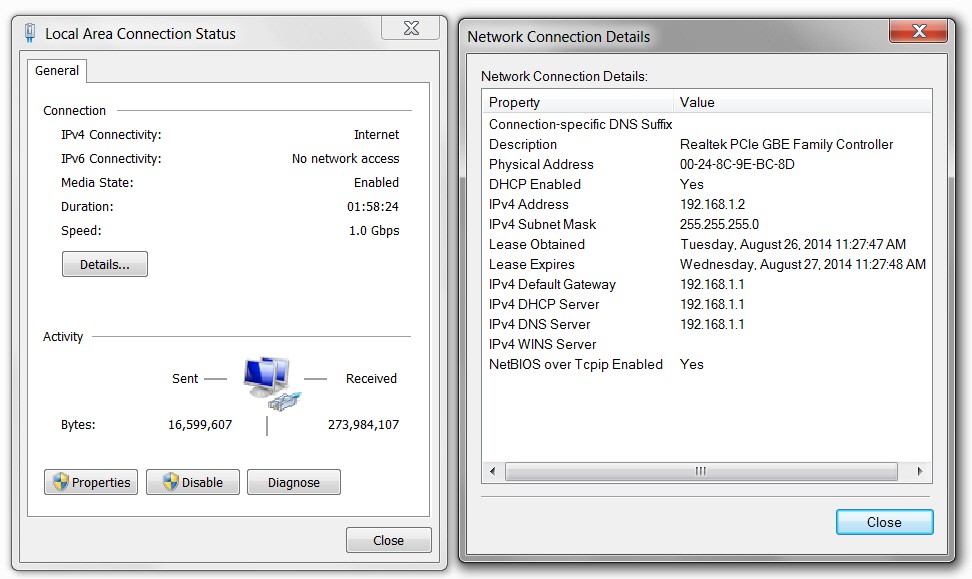
I'm still not happy with your network status/details, that shows a strange DNS address rather than your router's IP address.

Also, there's something very suspicious about the fact that you also have a WINS server in your details.

All of this is very non-standard in my own experience. I have AUTO for both IP and DNS, and also have no WINS server. This is how ALL of my machines and network connections appear.

xvalfM.jpg
 

My Computer

Computer type
PC/Desktop
Computer Manufacturer/Model Number
Home-built, two systems (1) and (2)
OS
Windows 7 Pro x64 (1), Win7 Pro X64 (2)
CPU
i5-3350p 3.1Ghz/6MB-cache (1); E8400 3.0Ghz/6MB-cache (2)
Motherboard
ASUS P8Z77-V Pro (1); ASUS P5Q3 (2)
Memory
8GB PC3-12800 DDR3 (1); 4GB PC3-10600 DDR3 (2)
Graphics Card(s)
ATI HD7750 (1), (see TV cards); ATI R7 250 (2)
Sound Card
Realtek ALC892 HD Audio (1); Realtek ALC1200 HD Audio (2)
Monitor(s) Displays
Eizo HD2441W LCD, Eizo S2433W (1); Eizo 24" S2433W (2)
Screen Resolution
1920x1200, 1920x1200 (1); 1920x1200 (2)
Hard Drives
(1) 1TB SATA-II (7200RPM), 2x2TB SATA-III (7200RPM), 250GB SATA-III (10000RPM) for OS; 2x2TB external USB 3.0

(2) 320GB SATA-II (7200RPM), 750GB SATA-II (7200RPM), 150GB SATA-II (10000RPM) for OS; 2TB external USB 3.0
PSU
Nesteq ECS-6001 600W (1); Nesteq ECS-5001 500W (2)
Case
Acousti-Case 360 (1) and (2)
Cooling
Noctua NH-U12P SE2 for CPU, 2x120mm case fans (1) and (2)
Keyboard
IBM PS/2 (1) and (2)
Mouse
Logitech MX Revolution wireless (1); Microsoft wired (2)
Internet Speed
100mbps down / 10mbps up
Antivirus
Microsoft Security Essentials; Malwarebyte Anti-Malware Pro
Browser
Firefox
Other Info
Ceton InfiniTV 4-tuner cablecard-enabled TV card as well as Hauppauge HVR-2250 OTA/ATSC 2-tuner TV card in (1), running under Win7 WMC
Ok I will try to match your Details...
btw.. I bought a new network card.
Now it has different behaviour...

It connects, gets ip, and access to the internet, and after a few seconds it disconnects, and then all over again..
 

My Computer

Computer type
PC/Desktop
OS
Windows 7 Pro, 32 bit
CPU
AMD Athlon 64 x2 3800+
Motherboard
ASRock 939N98PV-GLAN
Memory
DDR Dual Channel 4 Gbytes
Graphics Card(s)
Nvidia GeForce GT440
Antivirus
Avast
Browser
Chrome
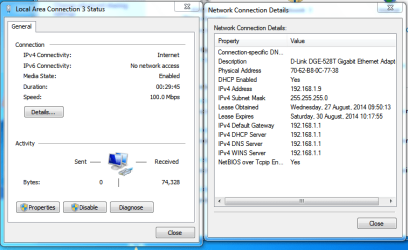
For the few seconds that it connects and for a fact I know that it gets an ip I get the following...

Please advice as to how I "get rid" of the Wins Server... although it was working without problem before.
 

Attachments

  • Capture 14.PNG
    Capture 14.PNG
    26.5 KB · Views: 0

My Computer

Computer type
PC/Desktop
OS
Windows 7 Pro, 32 bit
CPU
AMD Athlon 64 x2 3800+
Motherboard
ASRock 939N98PV-GLAN
Memory
DDR Dual Channel 4 Gbytes
Graphics Card(s)
Nvidia GeForce GT440
Antivirus
Avast
Browser
Chrome
For the few seconds that it connects and for a fact I know that it gets an ip I get the following...

Please advice as to how I "get rid" of the Wins Server... although it was working without problem before.

Have you tried to set up a new profile and see how things work ?
 

My Computer

Computer type
PC/Desktop
Computer Manufacturer/Model Number
Custom Build
OS
Windows 10 Pro - 64 bit
CPU
Intel i7 2600K
Motherboard
Asus P8P67
Memory
8 Gig ddr3 1600 mhz - viper extreme (Patriot)
Graphics Card(s)
EVGA 980 TI
Monitor(s) Displays
2 - Lg 21" LED , sony 48 " bravia LED
Hard Drives
one - samsung 840 series 465.76 GB SSD
two - wd 2 tB black
one - wd 1.5 tb black
one - wb 1 tb black
PSU
1000 Watt Coolmaster : Silent Pro Gold
Case
antec 1200
Cooling
watercooled
Mouse
logitech wireless
Antivirus
Norton Security 2015
Other Info
powerware 3.1 KVA FERRUPS with 4 - 1000 Amp Deep cycle batteries ...
Make sure your Antivirus firewall don't block your outbound ! even you are connected to internet, firewall can block all ports ! Disable it for a while !

Cheers!
 

My Computer

Computer type
PC/Desktop
Computer Manufacturer/Model Number
Gigabyte
OS
Windows 7 Ultimate x64
CPU
Intel Core 2 Duo 3 Ghz
Internet Speed
14,4 Mbps
Antivirus
F-Secure
Browser
Firefox 31
For the few seconds that it connects and for a fact I know that it gets an ip I get the following...

Please advice as to how I "get rid" of the Wins Server... although it was working without problem before.

Have you tried to set up a new profile and see how things work ?

What do you mean a new profile?

Could you please guide me as to how I can do that?
 

My Computer

Computer type
PC/Desktop
OS
Windows 7 Pro, 32 bit
CPU
AMD Athlon 64 x2 3800+
Motherboard
ASRock 939N98PV-GLAN
Memory
DDR Dual Channel 4 Gbytes
Graphics Card(s)
Nvidia GeForce GT440
Antivirus
Avast
Browser
Chrome
Back
Top