Solved Connected to one network but showing two connections!

Deepu513

New member
Local time
12:14 PM
Messages
3
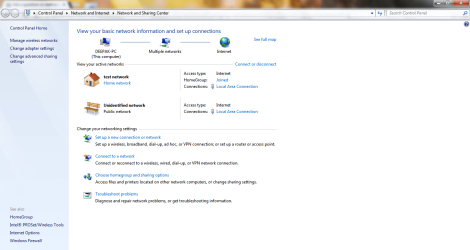
I am facing a weird problem, i am connected to only one network via Ethernet cable, but it shows that i am connected to two and one is unidentified.
I am attaching the screenshot below
when i did "ipconfig" i saw that there are "two default gateways"
Thats weird! Please tell me how to delete the unidentified network? I would also uninstall drivers if necessary, but there might be some other solution.
 

Attachments

  • Capture.JPG
    Capture.JPG
    17.7 KB · Views: 34
  • Untitled.png
    Untitled.png
    60 KB · Views: 7

My Computer My Computer

At a glance

Windows 7 Home Premium 64 bit3rd gen intel core i54 gbATI 7730m
Computer type
Laptop
Computer Manufacturer/Model Number
Dell
OS
Windows 7 Home Premium 64 bit
CPU
3rd gen intel core i5
Memory
4 gb
Graphics Card(s)
ATI 7730m
I am facing a weird problem, i am connected to only one network via Ethernet cable, but it shows that i am connected to two and one is unidentified.
I am attaching the screenshot below
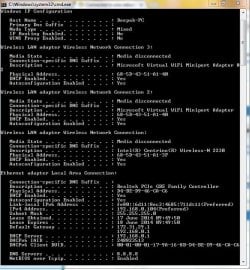
when i did "ipconfig" i saw that there are "two default gateways"
Thats weird! Please tell me how to delete the unidentified network? I would also uninstall drivers if necessary, but there might be some other solution.

Are you using a static IP address?

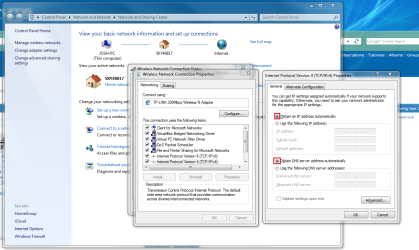
In your TCP/IP settings can you make sure that your local area connection is obtaining an address automatically.

Untitled.png

If that doesn't resolve your issue then can you please upload a full ipconfig screenshot (ipconfig /all) so we can look further into this.

Also, do any other machines on the network experience this symptom?

Many Thanks,
Josh :)
 

My Computer My Computer

At a glance

Windows 7 Professional x64 SP1 ; Windows Serv...Intel Core i5 2400 @ 3.10GHz8.0GB DDR3 @ 665MHz (2GBx4)AMD Radeon HD 6870
Computer type
PC/Desktop
Computer Manufacturer/Model Number
Custom Built
OS
Windows 7 Professional x64 SP1 ; Windows Server 2012 R2 Standard
CPU
Intel Core i5 2400 @ 3.10GHz
Motherboard
Foxconn H67MP-S/-V/H67MP
Memory
8.0GB DDR3 @ 665MHz (2GBx4)
Graphics Card(s)
AMD Radeon HD 6870
Sound Card
Realtek High Definition Audio
Monitor(s) Displays
AOC 2243W & SMB1930NW
Screen Resolution
1440x900 & 1920x1080
Hard Drives
977GB Seagate ST31000524AS ATA Drive (SATA)
250GB WD iSCSI attached Drive
PSU
750W Gaming PSU
Case
Novatech Night
Cooling
Fan
Keyboard
Dell Standard PS/2 Keyboard
Mouse
R.A.T 07 Gaming Mouse
Internet Speed
Download: 10 Mbps Ping: 30ms Upload: 0.81 Mbps
Browser
Google Chrome
Other Info
Optiarc DVD RW AD-5260S ATA Device
Thanks for the fast reply :)
In TCP/IP settings, its obtaining IP automatically but i think my ISP has provided static IP from their side because whenever i google for "whats my ip" i get same result unless there is problem on their side(router)
And also i have windows 8 dual boot in my laptop, but i dont see two networks over there; it just shows 1 network and 1 default gateway!
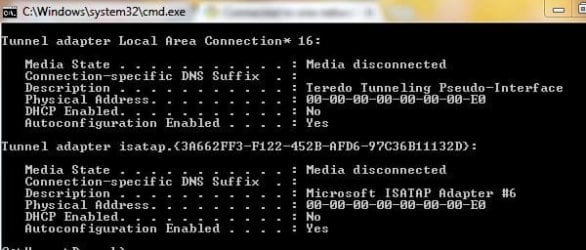
Here is the screenshot for "ipconfig /all"
 

Attachments

  • ipconfig1.JPG
    ipconfig1.JPG
    91 KB · Views: 16
  • ipconfig2.JPG
    ipconfig2.JPG
    34.9 KB · Views: 28

My Computer My Computer

At a glance

Windows 7 Home Premium 64 bit3rd gen intel core i54 gbATI 7730m
Computer type
Laptop
Computer Manufacturer/Model Number
Dell
OS
Windows 7 Home Premium 64 bit
CPU
3rd gen intel core i5
Memory
4 gb
Graphics Card(s)
ATI 7730m
Okay i got the solution, i opened cmd and did "route delete 172.31.29.1" and that worked, now i dont have two connections :)
 

My Computer My Computer

At a glance

Windows 7 Home Premium 64 bit3rd gen intel core i54 gbATI 7730m
Computer type
Laptop
Computer Manufacturer/Model Number
Dell
OS
Windows 7 Home Premium 64 bit
CPU
3rd gen intel core i5
Memory
4 gb
Graphics Card(s)
ATI 7730m
Okay i got the solution, i opened cmd and did "route delete 172.31.29.1" and that worked, now i dont have two connections :)

I am glad that you have found a solution to your problem! Out of curiosity did you place the static route yourself? Typically, multiple default gateways are given in IPv4 from a static configuration... I didn't expect a static route to result in this... Learned something new!

Have a nice day!

Josh :)
 

My Computer My Computer

At a glance

Windows 7 Professional x64 SP1 ; Windows Serv...Intel Core i5 2400 @ 3.10GHz8.0GB DDR3 @ 665MHz (2GBx4)AMD Radeon HD 6870
Computer type
PC/Desktop
Computer Manufacturer/Model Number
Custom Built
OS
Windows 7 Professional x64 SP1 ; Windows Server 2012 R2 Standard
CPU
Intel Core i5 2400 @ 3.10GHz
Motherboard
Foxconn H67MP-S/-V/H67MP
Memory
8.0GB DDR3 @ 665MHz (2GBx4)
Graphics Card(s)
AMD Radeon HD 6870
Sound Card
Realtek High Definition Audio
Monitor(s) Displays
AOC 2243W & SMB1930NW
Screen Resolution
1440x900 & 1920x1080
Hard Drives
977GB Seagate ST31000524AS ATA Drive (SATA)
250GB WD iSCSI attached Drive
PSU
750W Gaming PSU
Case
Novatech Night
Cooling
Fan
Keyboard
Dell Standard PS/2 Keyboard
Mouse
R.A.T 07 Gaming Mouse
Internet Speed
Download: 10 Mbps Ping: 30ms Upload: 0.81 Mbps
Browser
Google Chrome
Other Info
Optiarc DVD RW AD-5260S ATA Device
I had the exact same problem. However, what worked for me is different.

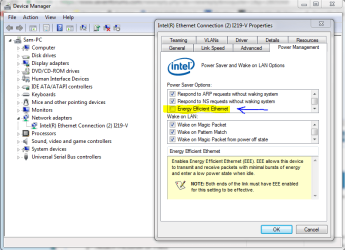
About half the time I'd boot up my desktop, the ethernet adapter would display two networks and I'd be unable to get to the internet. The only work-around I found that worked was disabling/re-enabling the network adapter to get it functioning again (back to one network). But this only treated the symptom and not the problem as I'd be right back where I was if I rebooted the system. So I started digging around in the adapter properties under device manager (see attachment).

From a similar issue I had prior with a USB port not staying powered, I thought that maybe some quirkiness could also be happening here and interrupt the flow of things. So I went to the power management tab and turned off Energy Efficiency Ethernet (EEE). I have now rebooted over a half-dozen times or more and I have yet to see the issue return.

So, hopefully this helps the next person that has this issue.

Drew
 

Attachments

  • EEE.PNG
    EEE.PNG
    35.1 KB · Views: 5

My Computer My Computer

At a glance

Windows 7 Home Premium x64Intel i7-4790K @ 4.4Ghz16GB DDR3 @ 2400MhzGeForce GTX 780 Ti EVGA Superclocked w/ACX
Computer type
PC/Desktop
Computer Manufacturer/Model Number
Custom Build
OS
Windows 7 Home Premium x64
CPU
Intel i7-4790K @ 4.4Ghz
Motherboard
ASUS Z97-Pro(WiFi ac)
Memory
16GB DDR3 @ 2400Mhz
Graphics Card(s)
GeForce GTX 780 Ti EVGA Superclocked w/ACX
Hard Drives
Samsung 850 EVO 500GB
WD Black 1TB
Cooling
Corsair H80i-v2 Liquid Cooler
Antivirus
AVG
Browser
Google Chrome
Back
Top