
Hello Everyone o/ UPDATED SEE BELOW!!!
I have had a 27" ASUS monitor and 2 tv's (32" and 55") hooked up to my pc. Today I replaced the 32" tv with another 27" ASUS monitor. After the installation, there were MANY problems with my PC. Please read details below. I did not get to do much troubleshooting because I had to leave for work, I would like to get some ideas now and I will update this post after I get home tonight.
INSTALLATION: (how the monitor was installed)
-PC was left on (ooops)
-32" tv was turned off and unplugged from PC
-Monitor cables installed to PC in order: Power (wall), DVI.
-Monitor cables installed to monitor in order: Power, DVI, sound.
-Monitor cable installed to PC: Sound (used double headphone jack to share sound with other monitor ooops)
-Verified sound still worked on original monitor
-New Monitor did not work, restart>> See below for errors after restart.
-New Monitor works 4.0
I know I made some mistakes and this is not the proper way to install a monitor, I was in a hurry. I'm posting these steps to see if this could be the cause of my issues, not so you can bash me for being an idiot, so please don't, although I do deserve it.
ERRORS: What happened.
-First and most noticably, Windows was very different. It looked as if it was an old version of Windows. The normal circle start button was replaced with a grey, square button that said START. The taskbar was also grey and square, not blue as usual. Desktop background and shortcuts were all correct.
-Sound was disabled and would not activate. All sound devices were missing.
-No internet. Ethernet connection was completely missing from tray.
-Windows would not restore. When trying to to go to a restore point, Windows stated System Restore was never activated. I have used it before so it's definitely been setup. When trying to setup Windows Restore again, Windows stated it could not be activated.
-NVIDIA tray tool was missing, as well as a few other tray icons.
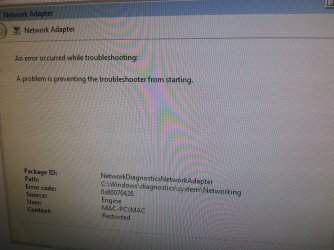
UPDATE: Please see the attached picture. It is the error I received when trying to activate/troubleshoot my ethernet.
PC SPECS:
Windows 7 64 bit
http://www.newegg.com/Product/Product.aspx?Item=N82E16832116992
MOBO: ASROCK Z77
http://www.newegg.com/Product/Product.aspx?Item=N82E16813157293
CPU: i5-3570K Ivy
http://www.newegg.com/Product/Product.aspx?Item=N82E16819116504
GRAPHICS: GTX 680
http://www.newegg.com/Product/Product.aspx?Item=N82E16814130798
RAM: GSkill 8GB x4
http://www.newegg.com/Product/Product.aspx?Item=N82E16820231314
POWER SUPPLY: COOLER MASTER 850W
http://www.newegg.com/Product/Product.aspx?Item=N82E16817171048
MONITORS: ASUS VK278Q x2
http://www.newegg.com/Product/Product.aspx?Item=N82E16824236101
HDD x2:
Windows
http://www.newegg.com/Product/Product.aspx?Item=N82E16822136792
MISC HDD
Some old piece of crap I use for misc files.
I have had a 27" ASUS monitor and 2 tv's (32" and 55") hooked up to my pc. Today I replaced the 32" tv with another 27" ASUS monitor. After the installation, there were MANY problems with my PC. Please read details below. I did not get to do much troubleshooting because I had to leave for work, I would like to get some ideas now and I will update this post after I get home tonight.
INSTALLATION: (how the monitor was installed)
-PC was left on (ooops)
-32" tv was turned off and unplugged from PC
-Monitor cables installed to PC in order: Power (wall), DVI.
-Monitor cables installed to monitor in order: Power, DVI, sound.
-Monitor cable installed to PC: Sound (used double headphone jack to share sound with other monitor ooops)
-Verified sound still worked on original monitor
-New Monitor did not work, restart>> See below for errors after restart.
-New Monitor works 4.0
I know I made some mistakes and this is not the proper way to install a monitor, I was in a hurry. I'm posting these steps to see if this could be the cause of my issues, not so you can bash me for being an idiot, so please don't, although I do deserve it.
ERRORS: What happened.
-First and most noticably, Windows was very different. It looked as if it was an old version of Windows. The normal circle start button was replaced with a grey, square button that said START. The taskbar was also grey and square, not blue as usual. Desktop background and shortcuts were all correct.
-Sound was disabled and would not activate. All sound devices were missing.
-No internet. Ethernet connection was completely missing from tray.
-Windows would not restore. When trying to to go to a restore point, Windows stated System Restore was never activated. I have used it before so it's definitely been setup. When trying to setup Windows Restore again, Windows stated it could not be activated.
-NVIDIA tray tool was missing, as well as a few other tray icons.
UPDATE: Please see the attached picture. It is the error I received when trying to activate/troubleshoot my ethernet.
PC SPECS:
Windows 7 64 bit
http://www.newegg.com/Product/Product.aspx?Item=N82E16832116992
MOBO: ASROCK Z77
http://www.newegg.com/Product/Product.aspx?Item=N82E16813157293
CPU: i5-3570K Ivy
http://www.newegg.com/Product/Product.aspx?Item=N82E16819116504
GRAPHICS: GTX 680
http://www.newegg.com/Product/Product.aspx?Item=N82E16814130798
RAM: GSkill 8GB x4
http://www.newegg.com/Product/Product.aspx?Item=N82E16820231314
POWER SUPPLY: COOLER MASTER 850W
http://www.newegg.com/Product/Product.aspx?Item=N82E16817171048
MONITORS: ASUS VK278Q x2
http://www.newegg.com/Product/Product.aspx?Item=N82E16824236101
HDD x2:
Windows
http://www.newegg.com/Product/Product.aspx?Item=N82E16822136792
MISC HDD
Some old piece of crap I use for misc files.
Attachments
Last edited:
My Computer
At a glance
Windows 7 Pro 64bit
- OS
- Windows 7 Pro 64bit
