
Connecting PC to TV and home theatre system

kimboy

New member
Member
Local time
6:30 AM
Messages
53
Hi, I wish to connect my PC to the tv in the living room which is connected to the home theatre system. I havn't played around with it yet but wanted some advice what needs to be connected to which part.

I don't have a sound card (just integrated one i think?) and my video card is geforce gtx260.

Currently my computer is connected to the TV using the old VGA cable (i think thats what its called) with an adaptor attached to it. My PC doesn't have HDMI port so I think i would need to get like a converter or something.

My TV = Sony 55" Full High Definition 3D Ready LED Model: KDL55EX720
Home Theatre system = Sony Blu-Ray Home Theatre System BDVE980W 112602

I just need my PC to use the home theatre system for sound at this point. I'm using my PC speakers for sound (since Tv isnt connected to PC with HDMI cable).

So my question is once i get PC connected to TV via HDMI and have the TV connected to home theatre system via HDMI, will this get it working? or would the home theatre system need to be connected to the PC via HDMI?

EDIT: i think the VGA cable is connected to the PC via DVI adaptor and VGA is directly connected to the TV. or it could be the vice versa, i'm not sure lol
 

My Computer My Computer

At a glance

Microsoft Windows 7 Ultimate 64-bit 7601 Mult...Intel(R) Core(TM) i5-2500K CPU @ 3.30GHz8.00 GBAMD Radeon HD 7900 Series
Computer type
PC/Desktop
OS
Microsoft Windows 7 Ultimate 64-bit 7601 Multiprocessor Free Service Pack 1
CPU
Intel(R) Core(TM) i5-2500K CPU @ 3.30GHz
Motherboard
ASUSTeK Computer INC. P8Z68-V
Memory
8.00 GB
Graphics Card(s)
AMD Radeon HD 7900 Series
Sound Card
(1) Microsoft LifeCam VX-5000. (2) Realtek High Definition
Screen Resolution
1920 x 1080 x 32 bits (4294967296 colors) @ 60 Hz
Hard Drives
ST31000524AS ATA Device
PSU
Cooler Master GX 750W PSU SLI Ready Single +12V Rail 60A PS
Case
NZXT Lexa S Black Steel Mid Tower Chassis
I don't have a sound card (just integrated one i think?) and my video card is geforce gtx260.

My PC doesn't have HDMI port

The 260 does do DVI>HDMI via an adapter, but not all adapters support audio pass through.

I just need my PC to use the home theatre system for sound at this point. I'm using my PC speakers for sound (since Tv isnt connected to PC with HDMI cable).

The quickest way would be to grab either a coax (s/pdif) or optical cable to connect to your PC's onboard sound and plug it into the amps coax/optical input.
 

My Computer My Computer

At a glance

8 Pro x64i7 3770K 4.6GHz16GB G.Skill Trident X 2666mhzx2 EVGA 780 Ti Superclocked SLI
Computer type
PC/Desktop
Computer Manufacturer/Model Number
Systems by SmartEyeball
OS
8 Pro x64
CPU
i7 3770K 4.6GHz
Motherboard
ASUS P8Z77 WS
Memory
16GB G.Skill Trident X 2666mhz
Graphics Card(s)
x2 EVGA 780 Ti Superclocked SLI
Sound Card
SB X-FI Surround 5.1 PRO USB / ATH-AD900 Headphones
Monitor(s) Displays
x3 Dell U2410 / 58" Samsung
Screen Resolution
5760*1200/ 1920*1200
Hard Drives
2x Intel 520 240GB (RAID 0) * 2x WD Caviar Blacks 2TB (RAID 0) * 2TB WD Caviar Black * Sony Optirac DVD
PSU
Silverstone Strider Evolution 1200W
Case
Thermaltake Level 10 GT Snow Edition
Cooling
Noctua NH-D14
Keyboard
Topre Realforce // Ducky Shine MX Black // Filco Ninja TKL
Mouse
Thermaltake Theron (Highly Recommended) + Razer Imperator
Antivirus
MSE
Browser
IE, FF, WaterFox
Other Info
GT Extreme V2 Sim Racing Cockpit + 40" LCD and K/B Mouse stand ▼
Fanatec CSR Elite Wheel + Clubsport V1 Pedals + CSR shifter/7G-H ▼Saitek X52 Pro ▼ TrackIR 5 Pro
Buttkicker v2 Seat Rumbler with Dedicated 5.1 and Sub Woofer attached to frame ▼
=
Bloody Big Grin
If i do get the right adaptor that supports audio pass through then would the home theatre system work?
 

My Computer My Computer

At a glance

Microsoft Windows 7 Ultimate 64-bit 7601 Mult...Intel(R) Core(TM) i5-2500K CPU @ 3.30GHz8.00 GBAMD Radeon HD 7900 Series
Computer type
PC/Desktop
OS
Microsoft Windows 7 Ultimate 64-bit 7601 Multiprocessor Free Service Pack 1
CPU
Intel(R) Core(TM) i5-2500K CPU @ 3.30GHz
Motherboard
ASUSTeK Computer INC. P8Z68-V
Memory
8.00 GB
Graphics Card(s)
AMD Radeon HD 7900 Series
Sound Card
(1) Microsoft LifeCam VX-5000. (2) Realtek High Definition
Screen Resolution
1920 x 1080 x 32 bits (4294967296 colors) @ 60 Hz
Hard Drives
ST31000524AS ATA Device
PSU
Cooler Master GX 750W PSU SLI Ready Single +12V Rail 60A PS
Case
NZXT Lexa S Black Steel Mid Tower Chassis
Yep.

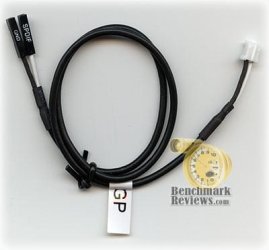
Although since the 260 doesn't process audio itself, you'll have to also ensure that the s/pdif header on the motherboard is connected the GPU to allow the sound to 'pass-through' from the onboard audio.

The cable should have come with your card. It looks something like this:
ZT-88TES3P-FCP_Digital_Audio.jpg

The adapter should be a 'male' DVI-D (Dual Link) with a 'female' HDMI output plug.

(It needs to be dual link to allow both audio and video to travel to your amp)
 

My Computer My Computer

At a glance

8 Pro x64i7 3770K 4.6GHz16GB G.Skill Trident X 2666mhzx2 EVGA 780 Ti Superclocked SLI
Computer type
PC/Desktop
Computer Manufacturer/Model Number
Systems by SmartEyeball
OS
8 Pro x64
CPU
i7 3770K 4.6GHz
Motherboard
ASUS P8Z77 WS
Memory
16GB G.Skill Trident X 2666mhz
Graphics Card(s)
x2 EVGA 780 Ti Superclocked SLI
Sound Card
SB X-FI Surround 5.1 PRO USB / ATH-AD900 Headphones
Monitor(s) Displays
x3 Dell U2410 / 58" Samsung
Screen Resolution
5760*1200/ 1920*1200
Hard Drives
2x Intel 520 240GB (RAID 0) * 2x WD Caviar Blacks 2TB (RAID 0) * 2TB WD Caviar Black * Sony Optirac DVD
PSU
Silverstone Strider Evolution 1200W
Case
Thermaltake Level 10 GT Snow Edition
Cooling
Noctua NH-D14
Keyboard
Topre Realforce // Ducky Shine MX Black // Filco Ninja TKL
Mouse
Thermaltake Theron (Highly Recommended) + Razer Imperator
Antivirus
MSE
Browser
IE, FF, WaterFox
Other Info
GT Extreme V2 Sim Racing Cockpit + 40" LCD and K/B Mouse stand ▼
Fanatec CSR Elite Wheel + Clubsport V1 Pedals + CSR shifter/7G-H ▼Saitek X52 Pro ▼ TrackIR 5 Pro
Buttkicker v2 Seat Rumbler with Dedicated 5.1 and Sub Woofer attached to frame ▼
=
Bloody Big Grin
I can't find any plugin points on the amp itself? I think i need to plug the cords into the bluray player where everything plugs into not the amp? (speakers, amp etc r all plugged into the bluray and not to the amp). Do the HDMI connect to the tv and the two DVI points connect to the pc and the bluray player?

edit: does one end of the spif cable go into the motherboard and the other end to the graphics card? Theres a spif output port at the back of the graphics card so does that mean the cable has to connect the motherboard and come out of the computer and go into the graphics card through the back? sorry i'm just bit confused.
 

My Computer My Computer

At a glance

Microsoft Windows 7 Ultimate 64-bit 7601 Mult...Intel(R) Core(TM) i5-2500K CPU @ 3.30GHz8.00 GBAMD Radeon HD 7900 Series
Computer type
PC/Desktop
OS
Microsoft Windows 7 Ultimate 64-bit 7601 Multiprocessor Free Service Pack 1
CPU
Intel(R) Core(TM) i5-2500K CPU @ 3.30GHz
Motherboard
ASUSTeK Computer INC. P8Z68-V
Memory
8.00 GB
Graphics Card(s)
AMD Radeon HD 7900 Series
Sound Card
(1) Microsoft LifeCam VX-5000. (2) Realtek High Definition
Screen Resolution
1920 x 1080 x 32 bits (4294967296 colors) @ 60 Hz
Hard Drives
ST31000524AS ATA Device
PSU
Cooler Master GX 750W PSU SLI Ready Single +12V Rail 60A PS
Case
NZXT Lexa S Black Steel Mid Tower Chassis
I can't find any plugin points on the amp itself? I think i need to plug the cords into the bluray player where everything plugs into not the amp? (speakers, amp etc r all plugged into the bluray and not to the amp). Do the HDMI connect to the tv and the two DVI points connect to the pc and the bluray player?

Sorry for the confusion.

When I'm referring to the amp, it's what you know as the blu-ray player since the blu-ray is built into the amp itself. The blu-ray unit has all the inputs you are plugging into.

So you'd be connecting the DVI>HDMI adapter +HDMI cable from the GPU into one of the two HDMI IN inputs on the blu-ray/amp.

From there you'd then use one of the amps video outputs to connect to the TV's inputs. You can use HDMI, component etc to feed the TV it's video source.


edit: does one end of the spif cable go into the motherboard and the other end to the graphics card?

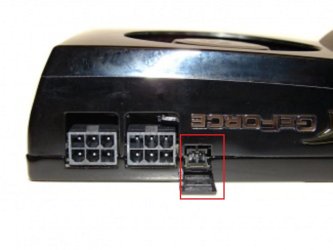
Correct. In the picture of the cable in my previous post, the 'solid' 2 pin plug (white) would connect to your card (typically located near the PCI-E power plugs.

ie:

260 spdif.jpg


The other 2 'loose plugs' are what's connected to the motherboard.
 

My Computer My Computer

At a glance

8 Pro x64i7 3770K 4.6GHz16GB G.Skill Trident X 2666mhzx2 EVGA 780 Ti Superclocked SLI
Computer type
PC/Desktop
Computer Manufacturer/Model Number
Systems by SmartEyeball
OS
8 Pro x64
CPU
i7 3770K 4.6GHz
Motherboard
ASUS P8Z77 WS
Memory
16GB G.Skill Trident X 2666mhz
Graphics Card(s)
x2 EVGA 780 Ti Superclocked SLI
Sound Card
SB X-FI Surround 5.1 PRO USB / ATH-AD900 Headphones
Monitor(s) Displays
x3 Dell U2410 / 58" Samsung
Screen Resolution
5760*1200/ 1920*1200
Hard Drives
2x Intel 520 240GB (RAID 0) * 2x WD Caviar Blacks 2TB (RAID 0) * 2TB WD Caviar Black * Sony Optirac DVD
PSU
Silverstone Strider Evolution 1200W
Case
Thermaltake Level 10 GT Snow Edition
Cooling
Noctua NH-D14
Keyboard
Topre Realforce // Ducky Shine MX Black // Filco Ninja TKL
Mouse
Thermaltake Theron (Highly Recommended) + Razer Imperator
Antivirus
MSE
Browser
IE, FF, WaterFox
Other Info
GT Extreme V2 Sim Racing Cockpit + 40" LCD and K/B Mouse stand ▼
Fanatec CSR Elite Wheel + Clubsport V1 Pedals + CSR shifter/7G-H ▼Saitek X52 Pro ▼ TrackIR 5 Pro
Buttkicker v2 Seat Rumbler with Dedicated 5.1 and Sub Woofer attached to frame ▼
=
Bloody Big Grin
Thank you so much for the clarification. But if i connect the PC to the amp and the amp is connected to the TV will the TV recognize the pc? I thought you would have to directly connect the PC to the TV and PC to the amp aswell?
 

My Computer My Computer

At a glance

Microsoft Windows 7 Ultimate 64-bit 7601 Mult...Intel(R) Core(TM) i5-2500K CPU @ 3.30GHz8.00 GBAMD Radeon HD 7900 Series
Computer type
PC/Desktop
OS
Microsoft Windows 7 Ultimate 64-bit 7601 Multiprocessor Free Service Pack 1
CPU
Intel(R) Core(TM) i5-2500K CPU @ 3.30GHz
Motherboard
ASUSTeK Computer INC. P8Z68-V
Memory
8.00 GB
Graphics Card(s)
AMD Radeon HD 7900 Series
Sound Card
(1) Microsoft LifeCam VX-5000. (2) Realtek High Definition
Screen Resolution
1920 x 1080 x 32 bits (4294967296 colors) @ 60 Hz
Hard Drives
ST31000524AS ATA Device
PSU
Cooler Master GX 750W PSU SLI Ready Single +12V Rail 60A PS
Case
NZXT Lexa S Black Steel Mid Tower Chassis
Sorry for the delay in the response.

When you set the amps 'channel' to the HDMI input that's coming from the PC, and then the input on the TV that's connected to the amp, the amps basically acting as a video source pass-through**.

Essentially, it's the amp that "sees" the PC, since it's receiving both the video/audio signal.


Hopefully this breakdown makes the whole process a little easier to understand (I'm even starting to lose myself :p ):


  • Onboard audio is 'passed through' the GPU via the 2pin cable that connects the motherboard to GPU
  • GPU with the DVI>HDMI adapter +HDMI cable transfer both the Video and Audio signals to the amp.
  • The amps 'channel' input that is selected ie HDMI 2 , processes the video and sound. Resulting in the sound playing through your Home Theatre System
  • Then that same 'channel' on the amp will then output the video signal to the TV via whatever 'video out' output you use, resulting in the Video being 'passed-through' the amp to display the signal on the TV.


Basically the biggest difference between HDMI and DVI is that HDMI is designed to carry both digital audio and video signals on the same cable. DVI cables are only designed to carry video signals. Since your GPU only has DVI-D outputs and no native HDMI outputs, the right adapter is needed.

This is why a DVI Dual Link adapter is important because there are plenty of DVI>HDMI adapters (not dual link) that will only carry the video signal and not the audio as well. By using a Dual Link adapter, this allows the 'extra' signal, in this case audio; to be transferred alongside the video signal via a HDMI cable.


**"Pass-Through" is a term used when a device allows a signal to travel through it without doing any processing. A middle man/conduit if you will.

With your setup, the sound is being 'processed' by the onboard audio - "Passed-through" the GPU and then delivered to the amp. The video is 'processed' by the GPU, "passed-through" the amp and the signal delivered to the TV.
 

My Computer My Computer

At a glance

8 Pro x64i7 3770K 4.6GHz16GB G.Skill Trident X 2666mhzx2 EVGA 780 Ti Superclocked SLI
Computer type
PC/Desktop
Computer Manufacturer/Model Number
Systems by SmartEyeball
OS
8 Pro x64
CPU
i7 3770K 4.6GHz
Motherboard
ASUS P8Z77 WS
Memory
16GB G.Skill Trident X 2666mhz
Graphics Card(s)
x2 EVGA 780 Ti Superclocked SLI
Sound Card
SB X-FI Surround 5.1 PRO USB / ATH-AD900 Headphones
Monitor(s) Displays
x3 Dell U2410 / 58" Samsung
Screen Resolution
5760*1200/ 1920*1200
Hard Drives
2x Intel 520 240GB (RAID 0) * 2x WD Caviar Blacks 2TB (RAID 0) * 2TB WD Caviar Black * Sony Optirac DVD
PSU
Silverstone Strider Evolution 1200W
Case
Thermaltake Level 10 GT Snow Edition
Cooling
Noctua NH-D14
Keyboard
Topre Realforce // Ducky Shine MX Black // Filco Ninja TKL
Mouse
Thermaltake Theron (Highly Recommended) + Razer Imperator
Antivirus
MSE
Browser
IE, FF, WaterFox
Other Info
GT Extreme V2 Sim Racing Cockpit + 40" LCD and K/B Mouse stand ▼
Fanatec CSR Elite Wheel + Clubsport V1 Pedals + CSR shifter/7G-H ▼Saitek X52 Pro ▼ TrackIR 5 Pro
Buttkicker v2 Seat Rumbler with Dedicated 5.1 and Sub Woofer attached to frame ▼
=
Bloody Big Grin
OMG the perfect answer i needed. Thanks so much smarteyeball :D

One last thing. What if i can't find the SPDIF cable thing? what is the cable called so i can buy it from somewhere.

Thanks alot
 

My Computer My Computer

At a glance

Microsoft Windows 7 Ultimate 64-bit 7601 Mult...Intel(R) Core(TM) i5-2500K CPU @ 3.30GHz8.00 GBAMD Radeon HD 7900 Series
Computer type
PC/Desktop
OS
Microsoft Windows 7 Ultimate 64-bit 7601 Multiprocessor Free Service Pack 1
CPU
Intel(R) Core(TM) i5-2500K CPU @ 3.30GHz
Motherboard
ASUSTeK Computer INC. P8Z68-V
Memory
8.00 GB
Graphics Card(s)
AMD Radeon HD 7900 Series
Sound Card
(1) Microsoft LifeCam VX-5000. (2) Realtek High Definition
Screen Resolution
1920 x 1080 x 32 bits (4294967296 colors) @ 60 Hz
Hard Drives
ST31000524AS ATA Device
PSU
Cooler Master GX 750W PSU SLI Ready Single +12V Rail 60A PS
Case
NZXT Lexa S Black Steel Mid Tower Chassis
You're welcome mate :)

As for the cable, it probably goes by a few names but this is what you'd need:

Name: nVIDIA SPDIF 2-Pin/2-Pin Audio Cable

*nb That store and cable name are just an example, but basically it's just a 2-pin SPDIF audio cable. There are some 2 x 2/3 pin or even 2x4 pin cables that will probably turn up in a search. Double check your mobo header - If will only take 2pins, avoid getting the 2x3/4 pin cables since the plug that goes into the motherboard header won't fit.


My Computer My Computer

At a glance

8 Pro x64i7 3770K 4.6GHz16GB G.Skill Trident X 2666mhzx2 EVGA 780 Ti Superclocked SLI
Computer type
PC/Desktop
Computer Manufacturer/Model Number
Systems by SmartEyeball
OS
8 Pro x64
CPU
i7 3770K 4.6GHz
Motherboard
ASUS P8Z77 WS
Memory
16GB G.Skill Trident X 2666mhz
Graphics Card(s)
x2 EVGA 780 Ti Superclocked SLI
Sound Card
SB X-FI Surround 5.1 PRO USB / ATH-AD900 Headphones
Monitor(s) Displays
x3 Dell U2410 / 58" Samsung
Screen Resolution
5760*1200/ 1920*1200
Hard Drives
2x Intel 520 240GB (RAID 0) * 2x WD Caviar Blacks 2TB (RAID 0) * 2TB WD Caviar Black * Sony Optirac DVD
PSU
Silverstone Strider Evolution 1200W
Case
Thermaltake Level 10 GT Snow Edition
Cooling
Noctua NH-D14
Keyboard
Topre Realforce // Ducky Shine MX Black // Filco Ninja TKL
Mouse
Thermaltake Theron (Highly Recommended) + Razer Imperator
Antivirus
MSE
Browser
IE, FF, WaterFox
Other Info
GT Extreme V2 Sim Racing Cockpit + 40" LCD and K/B Mouse stand ▼
Fanatec CSR Elite Wheel + Clubsport V1 Pedals + CSR shifter/7G-H ▼Saitek X52 Pro ▼ TrackIR 5 Pro
Buttkicker v2 Seat Rumbler with Dedicated 5.1 and Sub Woofer attached to frame ▼
=
Bloody Big Grin
I have found the cable in the graphics card box in the garage lol. All i need is for the hdmi cable and the adaptor to arrive and i'll connect everything like you said and i'll get back to you.

Thanks alot
 

My Computer My Computer

At a glance

Microsoft Windows 7 Ultimate 64-bit 7601 Mult...Intel(R) Core(TM) i5-2500K CPU @ 3.30GHz8.00 GBAMD Radeon HD 7900 Series
Computer type
PC/Desktop
OS
Microsoft Windows 7 Ultimate 64-bit 7601 Multiprocessor Free Service Pack 1
CPU
Intel(R) Core(TM) i5-2500K CPU @ 3.30GHz
Motherboard
ASUSTeK Computer INC. P8Z68-V
Memory
8.00 GB
Graphics Card(s)
AMD Radeon HD 7900 Series
Sound Card
(1) Microsoft LifeCam VX-5000. (2) Realtek High Definition
Screen Resolution
1920 x 1080 x 32 bits (4294967296 colors) @ 60 Hz
Hard Drives
ST31000524AS ATA Device
PSU
Cooler Master GX 750W PSU SLI Ready Single +12V Rail 60A PS
Case
NZXT Lexa S Black Steel Mid Tower Chassis
It is also worth a look to see if your amp has an "auxiliary in" port. If it does just a standard auxiliary cable will do the job :) that is how my pc sound is connected to my Sony home theater system.

Wisp
 

My Computer My Computer

At a glance

Microsoft Windows 7 Home Premium 64-bit 7601 ...Intel(R) Core(TM) i5-2450M CPU @ 2.50GHz4.00 GBIntel(R) HD Graphics Family
Computer type
Laptop
Computer Manufacturer/Model Number
Acer Aspire 5750
OS
Microsoft Windows 7 Home Premium 64-bit 7601 Multiprocessor Free Service Pack 1
CPU
Intel(R) Core(TM) i5-2450M CPU @ 2.50GHz
Motherboard
Acer JE50_HR
Memory
4.00 GB
Graphics Card(s)
Intel(R) HD Graphics Family
Sound Card
(1) Realtek High Definition Audio (2) Intel(R) Display Aud
Screen Resolution
1366 x 768 x 32 bits (4294967296 colors) @ 60 Hz
Hard Drives
WDC WD5000BPVT-22HXZT3
Antivirus
Microsoft Security Essentials
Browser
Firefox
anyone having issues with hdmi showing up in control panel to select as the source , cause I have looked all over and that option is not available , Im getting video to the tv with a dvi to hdmi adapter but no audio any suggestions?
 

My Computer My Computer

At a glance

MO
OS
MO
because the sound output of the pc is not vid the dvi port. you will still need to use the speaker output. plugging in to a tv is the same as a monitor, it only sends the visual not the audio.

hope this helps

Wisp
 

My Computer My Computer

At a glance

Microsoft Windows 7 Home Premium 64-bit 7601 ...Intel(R) Core(TM) i5-2450M CPU @ 2.50GHz4.00 GBIntel(R) HD Graphics Family
Computer type
Laptop
Computer Manufacturer/Model Number
Acer Aspire 5750
OS
Microsoft Windows 7 Home Premium 64-bit 7601 Multiprocessor Free Service Pack 1
CPU
Intel(R) Core(TM) i5-2450M CPU @ 2.50GHz
Motherboard
Acer JE50_HR
Memory
4.00 GB
Graphics Card(s)
Intel(R) HD Graphics Family
Sound Card
(1) Realtek High Definition Audio (2) Intel(R) Display Aud
Screen Resolution
1366 x 768 x 32 bits (4294967296 colors) @ 60 Hz
Hard Drives
WDC WD5000BPVT-22HXZT3
Antivirus
Microsoft Security Essentials
Browser
Firefox
I have a coaxial cable for audio , but there isnt a place to plug it on the tv or the pc ... is there a cable i need specifically and where does it go on the pc and where on the tv ... little mini jack type of plug like something you would plug into your phone or ipod for headphones ?????
 

My Computer My Computer

At a glance

MO
OS
MO
exactly that. on the back of your pc it will have an audio out port (circle in shape, same size as a headphone jack and normally coloured green) all you need is a standard auxiliary cable and there should be a slot in the back of the tv for it to go in to that pairs up with the hdmi. for example on the back of my samsung tv there is an input labeled "PC" with both a vga option and hdmi option with an audio input next to it.

Wisp
 

My Computer My Computer

At a glance

Microsoft Windows 7 Home Premium 64-bit 7601 ...Intel(R) Core(TM) i5-2450M CPU @ 2.50GHz4.00 GBIntel(R) HD Graphics Family
Computer type
Laptop
Computer Manufacturer/Model Number
Acer Aspire 5750
OS
Microsoft Windows 7 Home Premium 64-bit 7601 Multiprocessor Free Service Pack 1
CPU
Intel(R) Core(TM) i5-2450M CPU @ 2.50GHz
Motherboard
Acer JE50_HR
Memory
4.00 GB
Graphics Card(s)
Intel(R) HD Graphics Family
Sound Card
(1) Realtek High Definition Audio (2) Intel(R) Display Aud
Screen Resolution
1366 x 768 x 32 bits (4294967296 colors) @ 60 Hz
Hard Drives
WDC WD5000BPVT-22HXZT3
Antivirus
Microsoft Security Essentials
Browser
Firefox
Sorry for the delay in the response.

When you set the amps 'channel' to the HDMI input that's coming from the PC, and then the input on the TV that's connected to the amp, the amps basically acting as a video source pass-through**.

Essentially, it's the amp that "sees" the PC, since it's receiving both the video/audio signal.


Hopefully this breakdown makes the whole process a little easier to understand (I'm even starting to lose myself :p ):


  • Onboard audio is 'passed through' the GPU via the 2pin cable that connects the motherboard to GPU
  • GPU with the DVI>HDMI adapter +HDMI cable transfer both the Video and Audio signals to the amp.
  • The amps 'channel' input that is selected ie HDMI 2 , processes the video and sound. Resulting in the sound playing through your Home Theatre System
  • Then that same 'channel' on the amp will then output the video signal to the TV via whatever 'video out' output you use, resulting in the Video being 'passed-through' the amp to display the signal on the TV.

Basically the biggest difference between HDMI and DVI is that HDMI is designed to carry both digital audio and video signals on the same cable. DVI cables are only designed to carry video signals. Since your GPU only has DVI-D outputs and no native HDMI outputs, the right adapter is needed.

This is why a DVI Dual Link adapter is important because there are plenty of DVI>HDMI adapters (not dual link) that will only carry the video signal and not the audio as well. By using a Dual Link adapter, this allows the 'extra' signal, in this case audio; to be transferred alongside the video signal via a HDMI cable.


**"Pass-Through" is a term used when a device allows a signal to travel through it without doing any processing. A middle man/conduit if you will.

With your setup, the sound is being 'processed' by the onboard audio - "Passed-through" the GPU and then delivered to the amp. The video is 'processed' by the GPU, "passed-through" the amp and the signal delivered to the TV.

Everything arrived today and i've connected everything and its working!! thank you so much.
 

My Computer My Computer

At a glance

Microsoft Windows 7 Ultimate 64-bit 7601 Mult...Intel(R) Core(TM) i5-2500K CPU @ 3.30GHz8.00 GBAMD Radeon HD 7900 Series
Computer type
PC/Desktop
OS
Microsoft Windows 7 Ultimate 64-bit 7601 Multiprocessor Free Service Pack 1
CPU
Intel(R) Core(TM) i5-2500K CPU @ 3.30GHz
Motherboard
ASUSTeK Computer INC. P8Z68-V
Memory
8.00 GB
Graphics Card(s)
AMD Radeon HD 7900 Series
Sound Card
(1) Microsoft LifeCam VX-5000. (2) Realtek High Definition
Screen Resolution
1920 x 1080 x 32 bits (4294967296 colors) @ 60 Hz
Hard Drives
ST31000524AS ATA Device
PSU
Cooler Master GX 750W PSU SLI Ready Single +12V Rail 60A PS
Case
NZXT Lexa S Black Steel Mid Tower Chassis
Back
Top