Solved Connecting to Two Networks Simultaneously

EternalRZ

New member
So I need help being able to connect to a wireless network with internet access and a wired network with no internet access. Of course, being connected to both simultaneously results in no internet access. How do I go about doing this properly so I get internet connection and file sharing on the other network. Please use Layman's Terms, networking isn't my strong point. :p

Thanks!

PS: I also tried changing the interface metric but that didn't quite do the job because when I disconnected my computer from my router and reconnected, it didn't go back to normal and I lost internet access completely again.
 

My Computer

Computer type
PC/Desktop
Computer Manufacturer/Model Number
Custom
OS
Windows 7 Professional x64
CPU
AMD FX-8320 3.50 GHz
Motherboard
ASUS Sabertooth 990FX
Memory
Kingston HyperX Blu 8GB
Graphics Card(s)
EVGA GeForce GTX 660 Ti 2GB
Sound Card
Realtek High Definition Audio
Monitor(s) Displays
Acer S211HL, Samsung Series 4K/5K
Screen Resolution
1920 x 1080
Hard Drives
C: Western Digital Black WD1002FAEX (1 TB)
F/G: Western Digital Black WD1002FAEX (1 TB)
H/I: Western Digital Black WD1001FALS (1 TB)
J: Western Digital Blue WD5000AAKX (500 GB)
K: Western Digital Blue WD5000AAKX (500 GB)
PSU
Corsair Professional Series HX650
Case
Cooler Master Elite 330U ATX Mid Tower Case
Cooling
120mm Fan x5
Keyboard
Logitech MK800
Mouse
Logitech M510
Antivirus
Avira Free Antivirus
Browser
Google Chrome

My Computer

Computer Manufacturer/Model Number
HP Pavilion Elite 495UK
OS
Windows 7 Ultimate SP1 64-Bit
CPU
Intel Core i7 870 @ 2.93GHz
Motherboard
MSI 2A9C (CPU1)
Memory
8Gb Dual-Channel DDR3 @ 664MHz
Graphics Card(s)
nVidia GeForce GTX 460 1024MB dedicated RAM
Sound Card
Realtek HD Audio
Monitor(s) Displays
HP2310i
Screen Resolution
1920 x 1080
Hard Drives
1x1954GB Hitachi HDS22020ALA 330 (RAID), 1x1954GB Hitachi External for backup and storage
PSU
460W
Case
HP Elite
Cooling
Air cooled
Keyboard
Logitech K750 solar-powered keyboard
Mouse
Logitech Wireless M180 mouse
Internet Speed
2Mb
Other Info
Pure Avanti Flow Internet Radio with iPod Dock, 64Gb iPod, HP USB Speakers, Sony MDR-V500 Headphones, Sony Vaio F-Series Laptop
Yeah, I've tried that method too. It was actually the first one I tried, and it really doesn't do anything. Thanks for trying though. Any other suggestions?
 

My Computer

Computer type
PC/Desktop
Computer Manufacturer/Model Number
Custom
OS
Windows 7 Professional x64
CPU
AMD FX-8320 3.50 GHz
Motherboard
ASUS Sabertooth 990FX
Memory
Kingston HyperX Blu 8GB
Graphics Card(s)
EVGA GeForce GTX 660 Ti 2GB
Sound Card
Realtek High Definition Audio
Monitor(s) Displays
Acer S211HL, Samsung Series 4K/5K
Screen Resolution
1920 x 1080
Hard Drives
C: Western Digital Black WD1002FAEX (1 TB)
F/G: Western Digital Black WD1002FAEX (1 TB)
H/I: Western Digital Black WD1001FALS (1 TB)
J: Western Digital Blue WD5000AAKX (500 GB)
K: Western Digital Blue WD5000AAKX (500 GB)
PSU
Corsair Professional Series HX650
Case
Cooler Master Elite 330U ATX Mid Tower Case
Cooling
120mm Fan x5
Keyboard
Logitech MK800
Mouse
Logitech M510
Antivirus
Avira Free Antivirus
Browser
Google Chrome
Actually never mind. It seems that I've gotten it to work. Thanks for your help.
 

My Computer

Computer type
PC/Desktop
Computer Manufacturer/Model Number
Custom
OS
Windows 7 Professional x64
CPU
AMD FX-8320 3.50 GHz
Motherboard
ASUS Sabertooth 990FX
Memory
Kingston HyperX Blu 8GB
Graphics Card(s)
EVGA GeForce GTX 660 Ti 2GB
Sound Card
Realtek High Definition Audio
Monitor(s) Displays
Acer S211HL, Samsung Series 4K/5K
Screen Resolution
1920 x 1080
Hard Drives
C: Western Digital Black WD1002FAEX (1 TB)
F/G: Western Digital Black WD1002FAEX (1 TB)
H/I: Western Digital Black WD1001FALS (1 TB)
J: Western Digital Blue WD5000AAKX (500 GB)
K: Western Digital Blue WD5000AAKX (500 GB)
PSU
Corsair Professional Series HX650
Case
Cooler Master Elite 330U ATX Mid Tower Case
Cooling
120mm Fan x5
Keyboard
Logitech MK800
Mouse
Logitech M510
Antivirus
Avira Free Antivirus
Browser
Google Chrome
You're welcome.

It would be interesting to find out how you got it to work though. :)
 

My Computer

Computer Manufacturer/Model Number
HP Pavilion Elite 495UK
OS
Windows 7 Ultimate SP1 64-Bit
CPU
Intel Core i7 870 @ 2.93GHz
Motherboard
MSI 2A9C (CPU1)
Memory
8Gb Dual-Channel DDR3 @ 664MHz
Graphics Card(s)
nVidia GeForce GTX 460 1024MB dedicated RAM
Sound Card
Realtek HD Audio
Monitor(s) Displays
HP2310i
Screen Resolution
1920 x 1080
Hard Drives
1x1954GB Hitachi HDS22020ALA 330 (RAID), 1x1954GB Hitachi External for backup and storage
PSU
460W
Case
HP Elite
Cooling
Air cooled
Keyboard
Logitech K750 solar-powered keyboard
Mouse
Logitech Wireless M180 mouse
Internet Speed
2Mb
Other Info
Pure Avanti Flow Internet Radio with iPod Dock, 64Gb iPod, HP USB Speakers, Sony MDR-V500 Headphones, Sony Vaio F-Series Laptop
Well for some odd reason, bridging the connections doesn't really do anything to begin with. However if you go into Network and Sharing Center>Change adapter settings then right click on either your wireless or wired adapter and hit Properties, then click on Internet Protocol Version 4 (TCP/IPv4), then click the button "Properties", in the General tab, click "Advanced", uncheck Automatic metric and change the wireless adaptor to say... 10, then do the same procedure with the wired adapter but change the metric number to something higher (25 or more) and it gets it to work. Just make sure you don't unplug the router or it may screw it all up. To fix it, just disconnect from the wireless network and wait till the wired network has established and such and then reconnect to the wireless network. I can't believe I just explained that while mildly intoxicated...
 

My Computer

Computer type
PC/Desktop
Computer Manufacturer/Model Number
Custom
OS
Windows 7 Professional x64
CPU
AMD FX-8320 3.50 GHz
Motherboard
ASUS Sabertooth 990FX
Memory
Kingston HyperX Blu 8GB
Graphics Card(s)
EVGA GeForce GTX 660 Ti 2GB
Sound Card
Realtek High Definition Audio
Monitor(s) Displays
Acer S211HL, Samsung Series 4K/5K
Screen Resolution
1920 x 1080
Hard Drives
C: Western Digital Black WD1002FAEX (1 TB)
F/G: Western Digital Black WD1002FAEX (1 TB)
H/I: Western Digital Black WD1001FALS (1 TB)
J: Western Digital Blue WD5000AAKX (500 GB)
K: Western Digital Blue WD5000AAKX (500 GB)
PSU
Corsair Professional Series HX650
Case
Cooler Master Elite 330U ATX Mid Tower Case
Cooling
120mm Fan x5
Keyboard
Logitech MK800
Mouse
Logitech M510
Antivirus
Avira Free Antivirus
Browser
Google Chrome
Well, all I can say is well done.

If I'd carried out that fix I'd be more than mildly intoxicated! :)
 

My Computer

Computer Manufacturer/Model Number
HP Pavilion Elite 495UK
OS
Windows 7 Ultimate SP1 64-Bit
CPU
Intel Core i7 870 @ 2.93GHz
Motherboard
MSI 2A9C (CPU1)
Memory
8Gb Dual-Channel DDR3 @ 664MHz
Graphics Card(s)
nVidia GeForce GTX 460 1024MB dedicated RAM
Sound Card
Realtek HD Audio
Monitor(s) Displays
HP2310i
Screen Resolution
1920 x 1080
Hard Drives
1x1954GB Hitachi HDS22020ALA 330 (RAID), 1x1954GB Hitachi External for backup and storage
PSU
460W
Case
HP Elite
Cooling
Air cooled
Keyboard
Logitech K750 solar-powered keyboard
Mouse
Logitech Wireless M180 mouse
Internet Speed
2Mb
Other Info
Pure Avanti Flow Internet Radio with iPod Dock, 64Gb iPod, HP USB Speakers, Sony MDR-V500 Headphones, Sony Vaio F-Series Laptop
I doubt it. From what I remember this post was basically to just allow connection to two networks simultaneously in the case that one network has internet connection and the other is used for just file transfers and such. The risk of someone sniffing or eavesdropping would be pretty much the same with or without this method, I would imagine.
 

My Computer

Computer type
PC/Desktop
Computer Manufacturer/Model Number
Custom
OS
Windows 7 Professional x64
CPU
AMD FX-8320 3.50 GHz
Motherboard
ASUS Sabertooth 990FX
Memory
Kingston HyperX Blu 8GB
Graphics Card(s)
EVGA GeForce GTX 660 Ti 2GB
Sound Card
Realtek High Definition Audio
Monitor(s) Displays
Acer S211HL, Samsung Series 4K/5K
Screen Resolution
1920 x 1080
Hard Drives
C: Western Digital Black WD1002FAEX (1 TB)
F/G: Western Digital Black WD1002FAEX (1 TB)
H/I: Western Digital Black WD1001FALS (1 TB)
J: Western Digital Blue WD5000AAKX (500 GB)
K: Western Digital Blue WD5000AAKX (500 GB)
PSU
Corsair Professional Series HX650
Case
Cooler Master Elite 330U ATX Mid Tower Case
Cooling
120mm Fan x5
Keyboard
Logitech MK800
Mouse
Logitech M510
Antivirus
Avira Free Antivirus
Browser
Google Chrome
good, bridges are out and dual adapters in

good, bridges are out and dual adapters in...
seems to block spying, one needs a second network adapter with it's own SSID and password
 

My Computer

Computer type
PC/Desktop
OS
win7
Well, I'm not sure. The network I had going at the time when this thread was started was file networking via Ethernet and internet access via wireless. I changed it since then and got a router with DD-WRT and made the router a wireless bridge allowing me access to my file network and internet simultaneously. No need to alter adapter settings anymore unless I wanted a static IP.
 

My Computer

Computer type
PC/Desktop
Computer Manufacturer/Model Number
Custom
OS
Windows 7 Professional x64
CPU
AMD FX-8320 3.50 GHz
Motherboard
ASUS Sabertooth 990FX
Memory
Kingston HyperX Blu 8GB
Graphics Card(s)
EVGA GeForce GTX 660 Ti 2GB
Sound Card
Realtek High Definition Audio
Monitor(s) Displays
Acer S211HL, Samsung Series 4K/5K
Screen Resolution
1920 x 1080
Hard Drives
C: Western Digital Black WD1002FAEX (1 TB)
F/G: Western Digital Black WD1002FAEX (1 TB)
H/I: Western Digital Black WD1001FALS (1 TB)
J: Western Digital Blue WD5000AAKX (500 GB)
K: Western Digital Blue WD5000AAKX (500 GB)
PSU
Corsair Professional Series HX650
Case
Cooler Master Elite 330U ATX Mid Tower Case
Cooling
120mm Fan x5
Keyboard
Logitech MK800
Mouse
Logitech M510
Antivirus
Avira Free Antivirus
Browser
Google Chrome
I dunno about that. The file sharing network was an ethernet connection cause lets face it, wireless transfers are slow. The network that had internet access was via a wireless adapter. That being said, I'd imagine that just getting past the wireless connection would make getting into the file sharing network easy since you don't need an SSID or password when accessing a network via ethernet. I wouldn't worry about spying anyways since unless you have a high profile job, what reason does anyone have to watch you?
 

My Computer

Computer type
PC/Desktop
Computer Manufacturer/Model Number
Custom
OS
Windows 7 Professional x64
CPU
AMD FX-8320 3.50 GHz
Motherboard
ASUS Sabertooth 990FX
Memory
Kingston HyperX Blu 8GB
Graphics Card(s)
EVGA GeForce GTX 660 Ti 2GB
Sound Card
Realtek High Definition Audio
Monitor(s) Displays
Acer S211HL, Samsung Series 4K/5K
Screen Resolution
1920 x 1080
Hard Drives
C: Western Digital Black WD1002FAEX (1 TB)
F/G: Western Digital Black WD1002FAEX (1 TB)
H/I: Western Digital Black WD1001FALS (1 TB)
J: Western Digital Blue WD5000AAKX (500 GB)
K: Western Digital Blue WD5000AAKX (500 GB)
PSU
Corsair Professional Series HX650
Case
Cooler Master Elite 330U ATX Mid Tower Case
Cooling
120mm Fan x5
Keyboard
Logitech MK800
Mouse
Logitech M510
Antivirus
Avira Free Antivirus
Browser
Google Chrome
thank you

well thought and intelligent answer bro! i have enemies but you educated me....could you try to hack in, it will be a good test
 

My Computer

Computer type
PC/Desktop
OS
win7
No problem, but I'm not a hacker and you probably won't find anyone else here willing to do that, even if they have the capabilities to do so since it's considered a crime. Best of luck.
 

My Computer

Computer type
PC/Desktop
Computer Manufacturer/Model Number
Custom
OS
Windows 7 Professional x64
CPU
AMD FX-8320 3.50 GHz
Motherboard
ASUS Sabertooth 990FX
Memory
Kingston HyperX Blu 8GB
Graphics Card(s)
EVGA GeForce GTX 660 Ti 2GB
Sound Card
Realtek High Definition Audio
Monitor(s) Displays
Acer S211HL, Samsung Series 4K/5K
Screen Resolution
1920 x 1080
Hard Drives
C: Western Digital Black WD1002FAEX (1 TB)
F/G: Western Digital Black WD1002FAEX (1 TB)
H/I: Western Digital Black WD1001FALS (1 TB)
J: Western Digital Blue WD5000AAKX (500 GB)
K: Western Digital Blue WD5000AAKX (500 GB)
PSU
Corsair Professional Series HX650
Case
Cooler Master Elite 330U ATX Mid Tower Case
Cooling
120mm Fan x5
Keyboard
Logitech MK800
Mouse
Logitech M510
Antivirus
Avira Free Antivirus
Browser
Google Chrome

My Computer

Computer type
PC/Desktop
Computer Manufacturer/Model Number
Custom Build
OS
Windows 7 x64 Ultimate
CPU
Intel 4770k
Motherboard
Asus Maximus VI Formula
Memory
Corsair Vengance DDR3 (2x8) 16GB
Graphics Card(s)
Zotac 580 GTX (nVidia)
Sound Card
Onboard
Monitor(s) Displays
Samsung XL2370
Screen Resolution
1920x1080p
Hard Drives
1 SSD Corsair Neutron
1 WD Blue
1 Seagate
PSU
Thermaltake 1000W
Case
NZXT Phantom 530
Cooling
4 case coolers, Zalman 9900MAX CPU and GPU stock cooler
Keyboard
Microsoft X4 Sidewinder
Mouse
G700 wireless Logitech
Internet Speed
10mb/s
Antivirus
Kaspersky PURE 3
Browser
Firefox and Thor
Other Info
DVD-ROM Sony Opticarc OEM
Needed exact same thing as OP. Here is how I accomplished it...

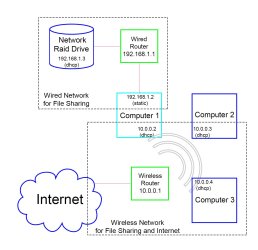
1. Router 1 - Wireless router for internet access using private 10.0.0.1 LAN. Router set as DHCP server. Win7 computer wireless adapter IP4 set to dynamic IP and dynamic Gateway (will use 10.0.0.1).
2. Router 2 - Wired router (actually wireless router, but has antenna turned off making it basically just a switch) for secondary private file sharing network using 192.168.1.1 LAN (or any other private IP4 as desired). Router set as DHCP server (for most nodes on this network). Within router setup - set Win7 computer mac address to have dedicated static 192.168.1.2 (may not be required). Win7 computer wired adapter IP4 set to static 192.168.1.2, gateway set to static but did not provide a gateway address (that way, the wireless router gateway will be used for internet. Alternatively you can also set this gateway to point to wireless router 10.0.0.1 if you wish).

This setup establishes 2 separate LANs that can be accessed by the same computer simultaneously. Both networks can share files with their respective network nodes (but not between networks), and only the wireless network will be used for internet access.

Hopefully this makes sense...

Here is a visual diagram... hopefully this is more clear than the explanation...

Of course the IP addresses that I setup for each network were just based on the default for the particular routers that I had at the time... your private networks can be any IP addresses within the accepted private ranges. For example... could be 10.0.0.x for wireless, and 10.0.1.x (rather than 192.168.1.x) for the other. Or many other choices/combinations that you prefer...
 

Attachments

  • 2 networks for same computer at same time.jpg
    2 networks for same computer at same time.jpg
    170.1 KB · Views: 1
Last edited by a moderator:

My Computer

Computer type
PC/Desktop
Computer Manufacturer/Model Number
HP
OS
Windows 7 Home Premium 64bit
Back
Top