
JerkStoreCowboy
New member
- Local time
- 5:11 AM
- Messages
- 8
Hello, I've been trying to get my computer to let me connect to two different networks at the same time.
Here's the set up I'm using an HP EliteBook laptop with Windows 7. I need to be able to connect to the internet using wifi, and to PLCs using either the built in Ethernet port or a USB to Ethernet adapter (the advantage of this last one is that I don't have to change the IP address of the Ethernet port all the time, as just about all of our PLCs use the same IP address). What happens when I try to connect to the internet via wifi and a PLC via USB to Ethernet is that the wifi adapter drops the connection to the internet.
I've tried changing the priority of my network adapters here:
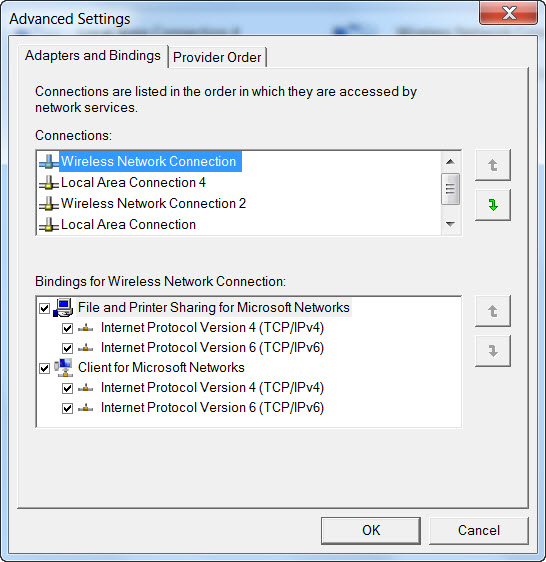 , at the suggestion of my company's IT department. However, all this did was delay the time before my computer disconnects from the internet by about ten seconds. The IT guy who was helping me was puzzled as to why I needed to be able to do this, and didn't seem to have a lot of answers. Which is why I believe he closed the ticket, despite the problem not being resolved. So, I've reopened the ticket, but I thought I'd ask around here.
Here's the set up I'm using an HP EliteBook laptop with Windows 7. I need to be able to connect to the internet using wifi, and to PLCs using either the built in Ethernet port or a USB to Ethernet adapter (the advantage of this last one is that I don't have to change the IP address of the Ethernet port all the time, as just about all of our PLCs use the same IP address). What happens when I try to connect to the internet via wifi and a PLC via USB to Ethernet is that the wifi adapter drops the connection to the internet.
I've tried changing the priority of my network adapters here:
My Computer
- Computer type
- PC/Desktop
- Computer Manufacturer/Model Number
- HP DL320 Gen8
- OS
- Windows 7 professional

