Connection doesn't have a valid IP configuration.

infiniteuse

New member
Hey guys, little problem here. I just bought my wife a new laptop with Windows 7 on it. When I first got a hold of it, I proceeded to remove all the HP bloatware that was installed. I went to Add/Remove programs and uninstalled everything that had HP beside it.

Next, I tried to have the laptop connect to my wireless router (DLINK DI-524). It found my network, but only with limited connectivity. I ran the troubleshooter and it reported back that the wireless network connection doesn't have a valid IP configuration.

I then connected my internet cable directly to the laptop and I get the same message, except it says "local area connection .......".

I have tried uninstalling/reinstalling the network adapter, but to no avail. Any other suggestions from you guys? I know it's probably something glaringly obvious that I am just overlooking...

Quick facts
1. Internet works on my desktop.
2. Desktop has Windows Vista.
3. Internet will not connect on laptop directly or through router.
4. I have reset/rolled back/reinstalled/uninstalled everything network card related.
5. At first I uninstalled all HP bloatware on laptop
 
Last edited:

My Computer

OS
Windows 7
You could always try using a static IP address

Firstly Open "control panel" click on "network and sharing center"

Click on "local area connection (1)" then follow the image clicking through to (5)
Once at 5 enter your IP address .... this will depend on what address your network is running on (I'm hoping that you know this already) I've given an example. If you router is set to eg 192.168.0.1 then you will need to enter this into the "default gateway" and "preferred DNS (6)" (I've marked the last number with an "X" as this could differ) When you enter your IP address just change the last number to anything between say 10 - 20 eg. 192.168.0.10

Do the same for your Wireless connection but change the 10 to maybe 11 ( eg 192.168.0.11)
 

Attachments

  • static_IP.jpg
    static_IP.jpg
    757.1 KB · Views: 5,505

My Computer

Computer type
PC/Desktop
Computer Manufacturer/Model Number
Self Built
OS
Windows 7 Ultimate 64bit
CPU
AMD Phenom Quad core 9950 black edition
Motherboard
Gigabyte
Memory
16Gb
Graphics Card(s)
2x XFX Radeon 5850
Sound Card
PCI Express X-Fi Titanium / Logitech G35
Monitor(s) Displays
2x HP 2410i
Screen Resolution
1920x1080
Hard Drives
2x 500Gb Seagate
1x 300Gb Seagate
1x 1Tb Seagate
2x 1Tb Hitatchi
PSU
Jean Tech Storm 700W
Case
Cooler Master COSMOS S
Cooling
Akasa Evo Blue Pro
Keyboard
Logitech G15
Mouse
Mad Catz M.M.O. 7
Internet Speed
12mb
On you desktop computer "the 1 that works " open up a command prompt (click "start" "run" type "cmd")
In the window that comes up type ipconfig /all

Post back the results it will look something like this

Ethernet adapter Local Area Connection:

Connection-specific DNS Suffix . :
Description . . . . . . . . . . . : NVIDIA nForce 10/100/1000 Mbps Ethernet
DHCP Enabled. . . . . . . . . . . : Yes
Autoconfiguration Enabled . . . . : Yes
IPv4 Address. . . . . . . . . . . : 192.168.0.3(Preferred)
Subnet Mask . . . . . . . . . . . : 255.255.255.0
Lease Obtained. . . . . . . . . . : 08 January 2010 20:29:05
Lease Expires . . . . . . . . . . : 09 January 2010 20:29:05
Default Gateway . . . . . . . . . : 192.168.0.242
DHCP Server . . . . . . . . . . . : 192.168.0.242
DNS Servers . . . . . . . . . . . : 192.168.0.242
NetBIOS over Tcpip. . . . . . . . : Enabled

Its only the

IPv4 Address. . . . . . . . . . . : 192.168.0.3(Preferred)
Subnet Mask . . . . . . . . . . . : 255.255.255.0
Default Gateway . . . . . . . . . : 192.168.0.242

that we need
 
Last edited:

My Computer

Computer type
PC/Desktop
Computer Manufacturer/Model Number
Self Built
OS
Windows 7 Ultimate 64bit
CPU
AMD Phenom Quad core 9950 black edition
Motherboard
Gigabyte
Memory
16Gb
Graphics Card(s)
2x XFX Radeon 5850
Sound Card
PCI Express X-Fi Titanium / Logitech G35
Monitor(s) Displays
2x HP 2410i
Screen Resolution
1920x1080
Hard Drives
2x 500Gb Seagate
1x 300Gb Seagate
1x 1Tb Seagate
2x 1Tb Hitatchi
PSU
Jean Tech Storm 700W
Case
Cooler Master COSMOS S
Cooling
Akasa Evo Blue Pro
Keyboard
Logitech G15
Mouse
Mad Catz M.M.O. 7
Internet Speed
12mb
Ah, ok. I'm working on what you suggested right now.

Ethernet adapter Local Area Connection:

Connection-specific DNS Suffix . : sc.charter.com
Description . . . . . . . . . . . : NVIDIA nForce 10/100/1000 Mbps Ethernet
Physical Address. . . . . . . . . : 00-1E-8C-3F-8D-D6
DHCP Enabled. . . . . . . . . . . : Yes
Autoconfiguration Enabled . . . . : Yes
Link-local IPv6 Address . . . . . : fe80::fc94:718e:2db1:e506%8(Preferred)
IPv4 Address. . . . . . . . . . . : 66.191.203.219(Preferred)
Subnet Mask . . . . . . . . . . . : 255.255.248.0

Lease Obtained. . . . . . . . . . : Friday, January 08, 2010 3:48:57 PM
Lease Expires . . . . . . . . . . : Saturday, January 09, 2010 12:03:31 AM
Default Gateway . . . . . . . . . : 66.191.200.1
DHCP Server . . . . . . . . . . . : 68.114.38.82
DHCPv6 IAID . . . . . . . . . . . : 201334412
DHCPv6 Client DUID. . . . . . . . : 00-01-00-01-0F-B4-01-88-00-1E-8C-3F-8D-D6

DNS Servers . . . . . . . . . . . : fe80::d885:5d6:747c:25ca%8
24.197.97.132
24.197.97.136
NetBIOS over Tcpip. . . . . . . . : Enabled
Connection-specific DNS Suffix Search List :
mshome.net
 

My Computer

OS
Windows 7
Hi infiniteuse, you have an issue with DNS, there isn't any from that detail.

If you know the DNS you cna append them into your DNS tab of tcp/ip4 setting.
 

My Computer

Computer Manufacturer/Model Number
Lenovo ThinkPad T60
OS
Windows 7 Ultimate 64Bit
CPU
GenuineIntel Intel(R) Core(TM) DuoCore T2400 @ 1.83GHz
Motherboard
Intel(R) 82801G (ICH7 Family)
Memory
2.00 GB
Graphics Card(s)
Mobile Intel(R) 945 Express Chipset
Sound Card
SoundMAX Integrated Digital HD Audio
Monitor(s) Displays
ThinkPad Display
Screen Resolution
1400x1050
Hard Drives
100Gb SATA
Keyboard
Standard Keyboard
Mouse
HID-compliant Mouse
Internet Speed
Cable Broadband - 54Mbps
Other Info
Intel(R) PRO/1000 PL Network Connection
11a/b/g Wireless LAN Mini PCI Express Adapter
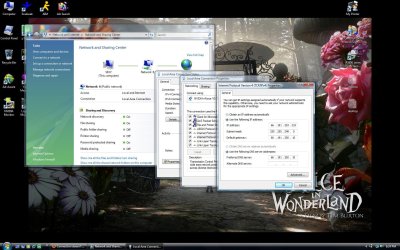
Ok, well I tried what you suggested and it did not work. I attached a screen of what my laptop looks like when I did it to make sure I did it right.

Note: The screen is actually from my desktop because I could not get [prt sc] to work on the laptop! I just copied what I did exactly on the laptop.
 

Attachments

  • screen.jpg
    screen.jpg
    258.2 KB · Views: 1,226

My Computer

OS
Windows 7
Soz mate ... I was away for a bit.

You have me totally cufuzzelled. :confused:
Is that a pic of the working machine ie. the machine that CAN connect to the internet with no problems ???
 

My Computer

Computer type
PC/Desktop
Computer Manufacturer/Model Number
Self Built
OS
Windows 7 Ultimate 64bit
CPU
AMD Phenom Quad core 9950 black edition
Motherboard
Gigabyte
Memory
16Gb
Graphics Card(s)
2x XFX Radeon 5850
Sound Card
PCI Express X-Fi Titanium / Logitech G35
Monitor(s) Displays
2x HP 2410i
Screen Resolution
1920x1080
Hard Drives
2x 500Gb Seagate
1x 300Gb Seagate
1x 1Tb Seagate
2x 1Tb Hitatchi
PSU
Jean Tech Storm 700W
Case
Cooler Master COSMOS S
Cooling
Akasa Evo Blue Pro
Keyboard
Logitech G15
Mouse
Mad Catz M.M.O. 7
Internet Speed
12mb
Ok, I noticed that I did not follow your instructions too well.

This is what it looks like now, but still isn't working. When I troubleshoot now, it tells me that Windows can not detect any problems, yet I still have the yellow ! triangle and cannot access the internet.
 

Attachments

  • screen.jpg
    screen.jpg
    253 KB · Views: 516

My Computer

OS
Windows 7
Oh, sorry for the confusion. The pictures I am attaching are from my working machine because for some reason I cannot use the [prt sc] button and paste into paint like I normally do on the Windows 7 laptop, so I am showing you what I am doing by mimicking what I am doing on the laptop through my desktop. Man, I think I just confused myself also...

From working machine.
IPv4 Address. . . . . . . . . . . : 66.191.203.219(Preferred)
Subnet Mask . . . . . . . . . . . : 255.255.248.0

Default Gateway . . . . . . . . . : 66.191.200.1
 

My Computer

OS
Windows 7
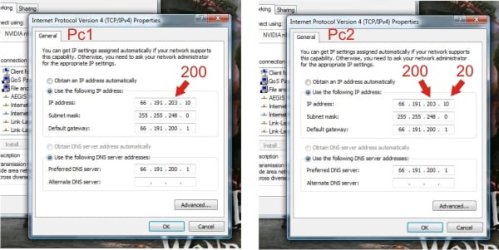
Try this pal ;)
The two machines must have the same subnet mask, gateway and dns only the ip address should differ (last three digits)
 

Attachments

  • ip.jpg
    ip.jpg
    121.7 KB · Views: 2,022

My Computer

Computer type
PC/Desktop
Computer Manufacturer/Model Number
Self Built
OS
Windows 7 Ultimate 64bit
CPU
AMD Phenom Quad core 9950 black edition
Motherboard
Gigabyte
Memory
16Gb
Graphics Card(s)
2x XFX Radeon 5850
Sound Card
PCI Express X-Fi Titanium / Logitech G35
Monitor(s) Displays
2x HP 2410i
Screen Resolution
1920x1080
Hard Drives
2x 500Gb Seagate
1x 300Gb Seagate
1x 1Tb Seagate
2x 1Tb Hitatchi
PSU
Jean Tech Storm 700W
Case
Cooler Master COSMOS S
Cooling
Akasa Evo Blue Pro
Keyboard
Logitech G15
Mouse
Mad Catz M.M.O. 7
Internet Speed
12mb
Well, I followed your instructions exactly but I still cannot connect. Do you think this computer could have shipped out with faulty hardware or should I recover the computer to an earlier date (even though I just received it today)? I've never had this difficult a problem connecting to the internet.
 

My Computer

OS
Windows 7
Ok I've just had a look and your router is not on the compatibility list *YET* ... I don't think that your lappy hardware is faulty (speculation)

Windows 7 Compatibility D-Link D-Link DI-524 High Speed 2.4GHz 802.11g Wireless Router

But in the mean time could you click "start" "run" "cmd" then type in ipconfig /all on both machines then post them back here. Give the first one the heading Working Machine and the second heading Non-Working Machine
 

My Computer

Computer type
PC/Desktop
Computer Manufacturer/Model Number
Self Built
OS
Windows 7 Ultimate 64bit
CPU
AMD Phenom Quad core 9950 black edition
Motherboard
Gigabyte
Memory
16Gb
Graphics Card(s)
2x XFX Radeon 5850
Sound Card
PCI Express X-Fi Titanium / Logitech G35
Monitor(s) Displays
2x HP 2410i
Screen Resolution
1920x1080
Hard Drives
2x 500Gb Seagate
1x 300Gb Seagate
1x 1Tb Seagate
2x 1Tb Hitatchi
PSU
Jean Tech Storm 700W
Case
Cooler Master COSMOS S
Cooling
Akasa Evo Blue Pro
Keyboard
Logitech G15
Mouse
Mad Catz M.M.O. 7
Internet Speed
12mb
Wall of text commence...

Right now, I am not trying to connect through the router. I'm manually switching the lines that physically connect on both computers while troubleshooting this. I also returned the settings back to automatically find IP address on the non-working machine before I did this.

[[[WORKING MACHINE]]]

Microsoft Windows [Version 6.0.6002]
Copyright (c) 2006 Microsoft Corporation. All rights reserved.

C:\Users\Chris>ipconfig /all

Windows IP Configuration

Host Name . . . . . . . . . . . . : Sexy
Primary Dns Suffix . . . . . . . :
Node Type . . . . . . . . . . . . : Hybrid
IP Routing Enabled. . . . . . . . : No
WINS Proxy Enabled. . . . . . . . : No
DNS Suffix Search List. . . . . . : mshome.net
sc.charter.com

Ethernet adapter Local Area Connection 2:

Media State . . . . . . . . . . . : Media disconnected
Connection-specific DNS Suffix . :
Description . . . . . . . . . . . : NVIDIA nForce 10/100/1000 Mbps Ethernet #
2
Physical Address. . . . . . . . . : 00-1E-8C-3F-8F-FE
DHCP Enabled. . . . . . . . . . . : Yes
Autoconfiguration Enabled . . . . : Yes

Ethernet adapter Local Area Connection:

Connection-specific DNS Suffix . : sc.charter.com
Description . . . . . . . . . . . : NVIDIA nForce 10/100/1000 Mbps Ethernet
Physical Address. . . . . . . . . : 00-1E-8C-3F-8D-D6
DHCP Enabled. . . . . . . . . . . : Yes
Autoconfiguration Enabled . . . . : Yes
Link-local IPv6 Address . . . . . : fe80::fc94:718e:2db1:e506%8(Preferred)
IPv4 Address. . . . . . . . . . . : 66.191.203.219(Preferred)
Subnet Mask . . . . . . . . . . . : 255.255.248.0
Lease Obtained. . . . . . . . . . : Friday, January 08, 2010 3:48:57 PM
Lease Expires . . . . . . . . . . : Saturday, January 09, 2010 12:03:33 AM
Default Gateway . . . . . . . . . : 66.191.200.1
DHCP Server . . . . . . . . . . . : 68.114.38.82
DHCPv6 IAID . . . . . . . . . . . : 201334412
DHCPv6 Client DUID. . . . . . . . : 00-01-00-01-0F-B4-01-88-00-1E-8C-3F-8D-D6

DNS Servers . . . . . . . . . . . : fe80::d885:5d6:747c:25ca%8
24.197.97.132
24.197.97.136
NetBIOS over Tcpip. . . . . . . . : Enabled
Connection-specific DNS Suffix Search List :
mshome.net

Tunnel adapter Local Area Connection* 6:

Connection-specific DNS Suffix . :
Description . . . . . . . . . . . : Teredo Tunneling Pseudo-Interface
Physical Address. . . . . . . . . : 02-00-54-55-4E-01
DHCP Enabled. . . . . . . . . . . : No
Autoconfiguration Enabled . . . . : Yes
IPv6 Address. . . . . . . . . . . : 2001:0:4137:9e50:2c07:cee:bd40:3424(Prefe
rred)
Link-local IPv6 Address . . . . . : fe80::2c07:cee:bd40:3424%10(Preferred)
Default Gateway . . . . . . . . . :
NetBIOS over Tcpip. . . . . . . . : Disabled

Tunnel adapter Local Area Connection* 7:

Media State . . . . . . . . . . . : Media disconnected
Connection-specific DNS Suffix . :
Description . . . . . . . . . . . : 6TO4 Adapter
Physical Address. . . . . . . . . : 00-00-00-00-00-00-00-E0
DHCP Enabled. . . . . . . . . . . : No
Autoconfiguration Enabled . . . . : Yes

Tunnel adapter Local Area Connection* 9:

Media State . . . . . . . . . . . : Media disconnected
Connection-specific DNS Suffix . :
Description . . . . . . . . . . . : 6TO4 Adapter
Physical Address. . . . . . . . . : 00-00-00-00-00-00-00-E0
DHCP Enabled. . . . . . . . . . . : No
Autoconfiguration Enabled . . . . : Yes

Tunnel adapter Local Area Connection* 11:

Media State . . . . . . . . . . . : Media disconnected
Connection-specific DNS Suffix . :
Description . . . . . . . . . . . : Microsoft 6to4 Adapter #2
Physical Address. . . . . . . . . : 00-00-00-00-00-00-00-E0
DHCP Enabled. . . . . . . . . . . : No
Autoconfiguration Enabled . . . . : Yes

Tunnel adapter Local Area Connection* 12:

Media State . . . . . . . . . . . : Media disconnected
Connection-specific DNS Suffix . :
Description . . . . . . . . . . . : Microsoft 6to4 Adapter #3
Physical Address. . . . . . . . . : 00-00-00-00-00-00-00-E0
DHCP Enabled. . . . . . . . . . . : No
Autoconfiguration Enabled . . . . : Yes

Tunnel adapter Local Area Connection* 13:

Media State . . . . . . . . . . . : Media disconnected
Connection-specific DNS Suffix . :
Description . . . . . . . . . . . : Microsoft 6to4 Adapter #4
Physical Address. . . . . . . . . : 00-00-00-00-00-00-00-E0
DHCP Enabled. . . . . . . . . . . : No
Autoconfiguration Enabled . . . . : Yes

Tunnel adapter Local Area Connection* 14:

Media State . . . . . . . . . . . : Media disconnected
Connection-specific DNS Suffix . :
Description . . . . . . . . . . . : Microsoft 6to4 Adapter #5
Physical Address. . . . . . . . . : 00-00-00-00-00-00-00-E0
DHCP Enabled. . . . . . . . . . . : No
Autoconfiguration Enabled . . . . : Yes

Tunnel adapter Local Area Connection* 15:

Media State . . . . . . . . . . . : Media disconnected
Connection-specific DNS Suffix . :
Description . . . . . . . . . . . : Microsoft 6to4 Adapter #6
Physical Address. . . . . . . . . : 00-00-00-00-00-00-00-E0
DHCP Enabled. . . . . . . . . . . : No
Autoconfiguration Enabled . . . . : Yes

Tunnel adapter Local Area Connection* 18:

Media State . . . . . . . . . . . : Media disconnected
Connection-specific DNS Suffix . :
Description . . . . . . . . . . . : Microsoft 6to4 Adapter #7
Physical Address. . . . . . . . . : 00-00-00-00-00-00-00-E0
DHCP Enabled. . . . . . . . . . . : No
Autoconfiguration Enabled . . . . : Yes

Tunnel adapter Local Area Connection* 22:

Media State . . . . . . . . . . . : Media disconnected
Connection-specific DNS Suffix . :
Description . . . . . . . . . . . : Microsoft 6to4 Adapter #8
Physical Address. . . . . . . . . : 00-00-00-00-00-00-00-E0
DHCP Enabled. . . . . . . . . . . : No
Autoconfiguration Enabled . . . . : Yes

Tunnel adapter Local Area Connection* 24:

Media State . . . . . . . . . . . : Media disconnected
Connection-specific DNS Suffix . :
Description . . . . . . . . . . . : Microsoft 6to4 Adapter #9
Physical Address. . . . . . . . . : 00-00-00-00-00-00-00-E0
DHCP Enabled. . . . . . . . . . . : No
Autoconfiguration Enabled . . . . : Yes

Tunnel adapter Local Area Connection* 25:

Media State . . . . . . . . . . . : Media disconnected
Connection-specific DNS Suffix . :
Description . . . . . . . . . . . : isatap.{FD62129E-9AF6-4C21-AA61-1C8070989
6EF}
Physical Address. . . . . . . . . : 00-00-00-00-00-00-00-E0
DHCP Enabled. . . . . . . . . . . : No
Autoconfiguration Enabled . . . . : Yes

Tunnel adapter Local Area Connection* 26:

Media State . . . . . . . . . . . : Media disconnected
Connection-specific DNS Suffix . :
Description . . . . . . . . . . . : isatap.sc.charter.com
Physical Address. . . . . . . . . : 00-00-00-00-00-00-00-E0
DHCP Enabled. . . . . . . . . . . : No
Autoconfiguration Enabled . . . . : Yes

Tunnel adapter Local Area Connection* 27:

Media State . . . . . . . . . . . : Media disconnected
Connection-specific DNS Suffix . : sc.charter.com
Description . . . . . . . . . . . : Microsoft ISATAP Adapter #3
Physical Address. . . . . . . . . : 00-00-00-00-00-00-00-E0
DHCP Enabled. . . . . . . . . . . : No
Autoconfiguration Enabled . . . . : Yes

Tunnel adapter Local Area Connection* 28:

Connection-specific DNS Suffix . : sc.charter.com
Description . . . . . . . . . . . : Microsoft 6to4 Adapter #11
Physical Address. . . . . . . . . : 00-00-00-00-00-00-00-E0
DHCP Enabled. . . . . . . . . . . : No
Autoconfiguration Enabled . . . . : Yes
IPv6 Address. . . . . . . . . . . : 2002:42bf:cbdb::42bf:cbdb(Preferred)
Default Gateway . . . . . . . . . : 2002:c058:6301::c058:6301
DNS Servers . . . . . . . . . . . : fe80::d885:5d6:747c:25ca%8
24.197.97.132
24.197.97.136
NetBIOS over Tcpip. . . . . . . . : Disabled

C:\Users\Chris>

[[[NON-WORKING MACHINE]]]

Microsoft Windows [Version 6.1.7600]
Copyright (c) 2009 Microsoft Corporation. All rights reserved.

C:\Users\Aerie>ipconfig /all

Windows IP Configuration

Host Name . . . . . . . . . . . . : Aerie-PC
Primary Dns Suffix . . . . . . . :
Node Type . . . . . . . . . . . . : Hybrid
IP Routing Enabled. . . . . . . . : No
WINS Proxy Enabled. . . . . . . . : No

Wireless LAN adapter Wireless Network Connection:

Media State . . . . . . . . . . . : Media disconnected
Connection-specific DNS Suffix . :
Description . . . . . . . . . . . : Atheros AR9285 802.11b/g WiFi Adapter
Physical Address. . . . . . . . . : 0C-EE-E6-C7-13-EC
DHCP Enabled. . . . . . . . . . . : Yes
Autoconfiguration Enabled . . . . : Yes

Ethernet adapter Local Area Connection:

Connection-specific DNS Suffix . :
Description . . . . . . . . . . . : Realtek PCIe GBE Family Controller
Physical Address. . . . . . . . . : 00-26-9E-83-F8-65
DHCP Enabled. . . . . . . . . . . : Yes
Autoconfiguration Enabled . . . . : Yes
Link-local IPv6 Address . . . . . : fe80::ecc0:3971:fc9:b9b0%13(Preferred)
Autoconfiguration IPv4 Address. . : 169.254.185.176(Preferred)
Subnet Mask . . . . . . . . . . . : 255.255.0.0
Default Gateway . . . . . . . . . :
DHCPv6 IAID . . . . . . . . . . . : 184559262
DHCPv6 Client DUID. . . . . . . . : 00-01-00-01-12-89-88-43-00-26-9E-83-F8-65

DNS Servers . . . . . . . . . . . : fec0:0:0:ffff::1%1
fec0:0:0:ffff::2%1
fec0:0:0:ffff::3%1
NetBIOS over Tcpip. . . . . . . . : Enabled

Tunnel adapter isatap.{21F355AB-9825-497F-ADDC-0662C16C9015}:

Media State . . . . . . . . . . . : Media disconnected
Connection-specific DNS Suffix . :
Description . . . . . . . . . . . : Microsoft ISATAP Adapter
Physical Address. . . . . . . . . : 00-00-00-00-00-00-00-E0
DHCP Enabled. . . . . . . . . . . : No
Autoconfiguration Enabled . . . . : Y es


Tunnel adapter Local Area Connection* 11:

Media State . . . . . . . . . . . : Media disconnected
Connection-specific DNS Suffix . :
Description . . . . . . . . . . . : Microsoft 6to4 Adapter
Physical Address. . . . . . . . . : 00-00-00-00-00-00-00-E0
DHCP Enabled. . . . . . . . . . . : No
Autoconfiguration Enabled . . . . : Yes

Tunnel adapter isatap.{8F178E2A-A121-4C0B-A3C4-41EC834C2138}:

Media State . . . . . . . . . . . : Media disconnected
Connection-specific DNS Suffix . :
Description . . . . . . . . . . . : Microsoft ISATAP Adapter #3
Physical Address. . . . . . . . . : 00-00-00-00-00-00-00-E0
DHCP Enabled. . . . . . . . . . . : No
Autoconfiguration Enabled . . . . : Yes

C:\Users\Aerie>

I also pinged Google on the non-working machine and it said ping request could not find host Google. If that's of any use?

 

My Computer

OS
Windows 7
Ok Non-Working machine is not getting a ip address via dhcp that's why it has a 169.254.185.176 address

On the non-working machine type in manually as we showed you before in the pics

IPv4 Address. . . . . . . . . . . : 66.191.203.218
Subnet Mask . . . . . . . . . . . : 255.255.248.0
Default Gateway . . . . . . . . . : 66.191.200.1
DNS Servers . . . . . . . . . . . : 24.197.97.132
24.197.97.136
 

My Computer

Computer type
PC/Desktop
Computer Manufacturer/Model Number
Self Built
OS
Windows 7 Ultimate 64bit
CPU
AMD Phenom Quad core 9950 black edition
Motherboard
Gigabyte
Memory
16Gb
Graphics Card(s)
2x XFX Radeon 5850
Sound Card
PCI Express X-Fi Titanium / Logitech G35
Monitor(s) Displays
2x HP 2410i
Screen Resolution
1920x1080
Hard Drives
2x 500Gb Seagate
1x 300Gb Seagate
1x 1Tb Seagate
2x 1Tb Hitatchi
PSU
Jean Tech Storm 700W
Case
Cooler Master COSMOS S
Cooling
Akasa Evo Blue Pro
Keyboard
Logitech G15
Mouse
Mad Catz M.M.O. 7
Internet Speed
12mb
Still no go, sir. Here is my ipconfig /all from the non-working machine after the changes you suggested and a reboot.

[[[NON-WORKING MACHINE]]]

Microsoft Windows [Version 6.1.7600]
Copyright (c) 2009 Microsoft Corporation. All rights reserved.

C:\Users\Aerie>ipconfig /all

Windows IP Configuration

Host Name . . . . . . . . . . . . : Aerie-PC
Primary Dns Suffix . . . . . . . :
Node Type . . . . . . . . . . . . : Hybrid
IP Routing Enabled. . . . . . . . : No
WINS Proxy Enabled. . . . . . . . : No

Wireless LAN adapter Wireless Network Connection:

Media State . . . . . . . . . . . : Media disconnected
Connection-specific DNS Suffix . :
Description . . . . . . . . . . . : Atheros AR9285 802.11b/g WiFi Adapter
Physical Address. . . . . . . . . : 0C-EE-E6-C7-13-EC
DHCP Enabled. . . . . . . . . . . : Yes
Autoconfiguration Enabled . . . . : Yes

Ethernet adapter Local Area Connection:

Connection-specific DNS Suffix . :
Description . . . . . . . . . . . : Realtek PCIe GBE Family Controller
Physical Address. . . . . . . . . : 00-26-9E-83-F8-65
DHCP Enabled. . . . . . . . . . . : No
Autoconfiguration Enabled . . . . : Yes
Link-local IPv6 Address . . . . . : fe80::ecc0:3971:fc9:b9b0%13(Preferred)
IPv4 Address. . . . . . . . . . . : 66.191.203.218(Preferred)
Subnet Mask . . . . . . . . . . . : 255.255.248.0
Default Gateway . . . . . . . . . : 66.191.200.1
DHCPv6 IAID . . . . . . . . . . . : 184559262
DHCPv6 Client DUID. . . . . . . . : 00-01-00-01-12-89-88-43-00-26-9E-83-F8-65

DNS Servers . . . . . . . . . . . : 24.197.97.132
24.197.97.136
NetBIOS over Tcpip. . . . . . . . : Enabled


Tunnel adapter isatap.{21F355AB-9825-497F-ADDC-0662C16C9015}:

Media State . . . . . . . . . . . : Media disconnected
Connection-specific DNS Suffix . :
Description . . . . . . . . . . . : Microsoft ISATAP Adapter
Physical Address. . . . . . . . . : 00-00-00-00-00-00-00-E0
DHCP Enabled. . . . . . . . . . . : No
Autoconfiguration Enabled . . . . : Yes

Tunnel adapter Local Area Connection* 11:

Media State . . . . . . . . . . . : Media disconnected
Connection-specific DNS Suffix . :
Description . . . . . . . . . . . : Microsoft 6to4 Adapter
Physical Address. . . . . . . . . : 00-00-00-00-00-00-00-E0
DHCP Enabled. . . . . . . . . . . : No
Autoconfiguration Enabled . . . . : Yes

Tunnel adapter isatap.{8F178E2A-A121-4C0B-A3C4-41EC834C2138}:

Media State . . . . . . . . . . . : Media disconnected
Connection-specific DNS Suffix . :
Description . . . . . . . . . . . : Microsoft ISATAP Adapter #3
Physical Address. . . . . . . . . : 00-00-00-00-00-00-00-E0
DHCP Enabled. . . . . . . . . . . : No
Autoconfiguration Enabled . . . . : Yes

Tunnel adapter 6TO4 Adapter:

Connection-specific DNS Suffix . :
Description . . . . . . . . . . . : Microsoft 6to4 Adapter #2
Physical Address. . . . . . . . . : 00-00-00-00-00-00-00-E0
DHCP Enabled. . . . . . . . . . . : No
Autoconfiguration Enabled . . . . : Yes
IPv6 Address. . . . . . . . . . . : 2002:42bf:cbda::42bf:cbda(Preferred)
Default Gateway . . . . . . . . . :
DNS Servers . . . . . . . . . . . : 24.197.97.132
24.197.97.136
NetBIOS over Tcpip. . . . . . . . : Disabled

C:\Users\Aerie>ping Google
Ping request could not find host Google. Please check the name and try a
gain.

C:\Users\Aerie>
 

My Computer

OS
Windows 7
That entire line of D-link routers has been discontinued and have no support at all. There are pages of those routers that are marked in red as incompatible in fact. The latest firmware is dated 06.

I think manually assigning IP's might be the only chance you have because it's obvious the router isn't getting it done. Easiest way to fix it is to purchase a new router. ;)
 

My Computer

Computer type
PC/Desktop
Computer Manufacturer/Model Number
Home built
OS
Windows 7 Ult, Windows 8.1 Pro,
CPU
Q9650-4.275GHz, E8600 4.5GHz, E6750-3.8GHz
Motherboard
Evga 780i FTW
Memory
G.Skill PC2 9600 1200Mhz 5 5 5 15 2T
Graphics Card(s)
GTX480
Sound Card
Asus Xonar D2
Monitor(s) Displays
HannsG
Screen Resolution
1680X1050
Hard Drives
GSkill Phoenix Pro 120GB SSD
PSU
ThermalTake Toughpower 1000Watt modular
Case
ThermalTake XaserV
Cooling
Xigmatek S1283
Keyboard
Logitech G15
Mouse
Logitech G9
Internet Speed
T1
Yeah, I just borrowed this old thing from a friend to get my PS3 online and it seemed to do the job. Thing is though, is that I'm not even using the router anymore, I'm directly connecting the line from my cable modem to my non-working machine (new laptop) and still not getting a connection.
 

My Computer

OS
Windows 7
Check that last comment, even though it's completely true.

I knew something looked familor about your router. The link below has the only firmware known to work with Windows 7 and your DI-524. This is about the only chance you have of getting that outdated router to work.

Luckily for you it's already been tested and it works perfectly with the DI-524. You may need to reset the modem also. I'm not sure what the laptops problem is but this will at least get your router working correctly. I'm pretty sure that everything will work after the firmware update.

I helped someone with this exact same problem just last week and the firmware below fixed his DI-524. It was quite a bit of work on my part to find that firmware I can tell you that. It's not supported by D-link. The info about this firmware came from an obscure German site.

Download D-Link DI-524 (Ver.B2) Firmware 2.04 Driver for Windows 9X/ME/NT/2K/XP/2003/Vista/XP X64/2008 - Softpedia

You should read the thread, it's interesting that nobody here seems to believe that a router would need a firmware update to work with a new Op system. :sarc:

I had everyone in there insisting that it wasn't a router problem until the guy installed the firmware I found for him and it magically brought his router to life.

http://www.sevenforums.com/network-...em-wireless-router-conflict-2.html#post480129
 

My Computer

Computer type
PC/Desktop
Computer Manufacturer/Model Number
Home built
OS
Windows 7 Ult, Windows 8.1 Pro,
CPU
Q9650-4.275GHz, E8600 4.5GHz, E6750-3.8GHz
Motherboard
Evga 780i FTW
Memory
G.Skill PC2 9600 1200Mhz 5 5 5 15 2T
Graphics Card(s)
GTX480
Sound Card
Asus Xonar D2
Monitor(s) Displays
HannsG
Screen Resolution
1680X1050
Hard Drives
GSkill Phoenix Pro 120GB SSD
PSU
ThermalTake Toughpower 1000Watt modular
Case
ThermalTake XaserV
Cooling
Xigmatek S1283
Keyboard
Logitech G15
Mouse
Logitech G9
Internet Speed
T1
I hope that infiniteuse reports back in. I'm interested in knowing if that firmware worked again for the DI-524.
 

My Computer

Computer type
PC/Desktop
Computer Manufacturer/Model Number
Home built
OS
Windows 7 Ult, Windows 8.1 Pro,
CPU
Q9650-4.275GHz, E8600 4.5GHz, E6750-3.8GHz
Motherboard
Evga 780i FTW
Memory
G.Skill PC2 9600 1200Mhz 5 5 5 15 2T
Graphics Card(s)
GTX480
Sound Card
Asus Xonar D2
Monitor(s) Displays
HannsG
Screen Resolution
1680X1050
Hard Drives
GSkill Phoenix Pro 120GB SSD
PSU
ThermalTake Toughpower 1000Watt modular
Case
ThermalTake XaserV
Cooling
Xigmatek S1283
Keyboard
Logitech G15
Mouse
Logitech G9
Internet Speed
T1
Back
Top