
connections

simono1

New member
Member
Local time
6:55 PM
Messages
36
Location
Lyons, Ohio
Whenever I try to connect to the internet, I can search and connect with a site once, when I try to search and connect a second time to a different site, the wheel just sits and spins. I can get to the internet by using my favorites but if I try to connect to a link on a favorite page, the wheel just sits and spins.

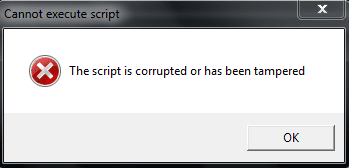
Using the HP tools provided on my computer, a test run on the network adaptor responded with a message,(see attached).

This problem is not on my computer but on my mother's HP computer.
 

Attachments
My Computer

Computer Manufacturer/Model Number
Gateway-Emachine, T-3656
OS
Windows 7 Pro- 32bit.
CPU
Intel(R) Celeron(R) CPU 440 @ 2.00GHz, ~2.0GHz
Motherboard
ELITEGROUP 945GCT-M3 3.1 V1.10 12/24/2007
Memory
2038MB RAM DDR2
Graphics Card(s)
Intel Corporation
Sound Card
HdAudio.sys 6.00.6002.18005
Monitor(s) Displays
Generic PnP... 17''
Screen Resolution
1440 x 900 (32bit) 75Hz
Hard Drives
2
Keyboard
Tevion "wireless" HID
Mouse
Tevion "wireless" HID
Internet Speed
Download.... 3.11 mb/s Upload.... 0.64 mb/s
Other Info
BIOS Phoenix- AwardBios v600PG / DirectX 11
Did you do a scan for malware? If you don't have a utility called Malwarebytes, it might be a good idea to download one and run it. They do have a good free one.
 

My Computer

Computer type
Laptop
Computer Manufacturer/Model Number
HP Pavilion g7-1260us Notebook
OS
Desk Top with Win 7 Home Premium 64 bit and Lap Top with Windows 8.1 Pro 64 bit
Memory
8Gig
Screen Resolution
1600x900
Hi Frank1,
Yes, that was the first thing I did. I've used malwarebytes for about two years now and like it. Let me tell you what I've done so far...

besides Mb, full AVG scan
SpyBot(portable, updated) scan (found 1 Trojan and 11 adware)
sfc scannow
errors and bad sectors scan
system restore back 1 week
Win 7 troubleshooting tool (network adapter and internet connection)
tuneup registry clean
ccleaner
HP scan ( that's where the snip came from )
got rid of google tool bar
reset iexplore
down loaded Chrome, ( to check browsers )
ping the amazon site ( nothing sent nothing received, 100% fail)
But again, ie's favorites links will take you right to your site faster than you can spit?
unplugged for 5 minutes

Now, here's the funny thing... we unplugged the pc over night and we have no problems anymore. Go figure... I've talked with friends around the area and some of them are experiencing the same thing. Why some and not others, and all at the same time I do not know. We think the provider may be doing something but, why would unplugging over night fix that unless the reconnect set something different at the providers end or maybe I just needed to unplug here for longer. I'm keeping my eye on it and letting others out here know what we did to help... so far :)

Todd
 

My Computer

Computer Manufacturer/Model Number
Gateway-Emachine, T-3656
OS
Windows 7 Pro- 32bit.
CPU
Intel(R) Celeron(R) CPU 440 @ 2.00GHz, ~2.0GHz
Motherboard
ELITEGROUP 945GCT-M3 3.1 V1.10 12/24/2007
Memory
2038MB RAM DDR2
Graphics Card(s)
Intel Corporation
Sound Card
HdAudio.sys 6.00.6002.18005
Monitor(s) Displays
Generic PnP... 17''
Screen Resolution
1440 x 900 (32bit) 75Hz
Hard Drives
2
Keyboard
Tevion "wireless" HID
Mouse
Tevion "wireless" HID
Internet Speed
Download.... 3.11 mb/s Upload.... 0.64 mb/s
Other Info
BIOS Phoenix- AwardBios v600PG / DirectX 11
Hi Frank1,
Yes, that was the first thing I did. I've used malwarebytes for about two years now and like it. Let me tell you what I've done so far...

besides Mb, full AVG scan
SpyBot(portable, updated) scan (found 1 Trojan and 11 adware)
sfc scannow
errors and bad sectors scan
system restore back 1 week
Win 7 troubleshooting tool (network adapter and internet connection)
tuneup registry clean
ccleaner
HP scan ( that's where the snip came from )
got rid of google tool bar
reset iexplore
down loaded Chrome, ( to check browsers )
ping the amazon site ( nothing sent nothing received, 100% fail)
But again, ie's favorites links will take you right to your site faster than you can spit?
unplugged for 5 minutes

Now, here's the funny thing... we unplugged the pc over night and we have no problems anymore. Go figure... I've talked with friends around the area and some of them are experiencing the same thing. Why some and not others, and all at the same time I do not know. We think the provider may be doing something but, why would unplugging over night fix that unless the reconnect set something different at the providers end or maybe I just needed to unplug here for longer. I'm keeping my eye on it and letting others out here know what we did to help... so far :)

Todd
That is strange--maybe the problem is at the provider's end. Sometimes when I'm experience a problem, just shutting down and restarting will help. I think that sometimes something will get stuck in the memory. When shutting down the computer, it clears the memory and you start fresh. But it could be one of several things that caused it.
 

My Computer

Computer type
Laptop
Computer Manufacturer/Model Number
HP Pavilion g7-1260us Notebook
OS
Desk Top with Win 7 Home Premium 64 bit and Lap Top with Windows 8.1 Pro 64 bit
Memory
8Gig
Screen Resolution
1600x900
Back
Top