"Consider Replacing Your Battery"

well I went from 63% wear to 46%, going to do a few cycles of draining it full and a recharge. when I started this new charge it took almost 20 min before it registered 1% but the simple lights told me it was charging. I believe something software is not working correctly and even being a battery that doesn't have memory effect it sure seems to in this case.

I still have no clue what is causing this issue at least on my laptop. With the use it gets I would expect at least 10-15% wear. the readings I got 2 days ago was 12% wear, for it to jump so dramatically and now with a simple full cycle I have gained 17% battery capacity back that tells me something is seriously wrong. HP should be calling me about a replacement on Tuesday. Will see how that goes and if doing another complete charge and discharge gains or loses and wear.

I know there are a lot of very intelligent people on here and I think this might be a true issue I just don't know from where as I don't have the tools, spare parts etc to conduct a true test. I am going to start taking screen shots and if I can bring the wear back to 12% or even half of what it is now then its a legit issue and the next step of testing should be started.
 

My Computer

Computer Manufacturer/Model Number
Alienware M17x R3
OS
Windows 7 Ultimate x64
CPU
Intel Core i7 2670QM 2.2GHz 3.3GHz Turbo Mode
Memory
12GB Dual Channel DDR3 at 1333MHz
Graphics Card(s)
2GB GDDR5 AMD Radeon 6990M
Sound Card
Audio Powered by Klipsch
Monitor(s) Displays
17.3-inch WideFHD 1920 x 1080 60Hz WLED
Screen Resolution
1920x1080
Hard Drives
120GB SSD slot 1
1TB HDD slot 2
Case
alienware laptop case
Cooling
Dual heatsink and fans
Keyboard
Alienware multi color keyboard
Mouse
logitech G300 gaming mouse
Other Info
Intel® Centrino Advanced-N 6230 2x2 agn+ Bluetooth

finally got it!!!
Having read through the whole thread, there's more software involved than Windows 7 only. From where i stand now it seems to me all software between the battery Gauge Chip (ie: Texas Instruments BQ range) and windows 7 might add to the confusion.

To my knowledge, Windows 7 is the first Microsoft variant with native support for laptop battery life time tracking. Before it was the territory of external programs like NHC and BatMon. It seems the BIOS, ACPI functionality has never been tested properly over a wide range of laptop and laptop batteries.

Based on this Microsoft has made a pretty bold step forward by including this feature in Windows 7 - with the side effect of many issues - of which some seem to relate to Windows 7 and others to software like BIOS, ACPI and embedded software running in the laptop battery gauge chip and the MOBO microprocessor that controls the gauge chip.

UBUNTU (a popular LINUX variant) also has nifty battery life time tracking options, though also here there seems to be issue's not related to the tracking software itself.

In any case the best path is to get at least a 2nd opinion before ditching a laptop battery. Either through running windows XP, UBUNTU or doing a simple laptop battery test with a power meter available in hardware stores.

Cheers!
 

My Computer

OS
Windows 7, XP Pro, Ubuntu, Fedora
well just checked again and its down to 33% does this make sense to anyone? will do a few more later today and see how far I can drop it.
 

My Computer

Computer Manufacturer/Model Number
Alienware M17x R3
OS
Windows 7 Ultimate x64
CPU
Intel Core i7 2670QM 2.2GHz 3.3GHz Turbo Mode
Memory
12GB Dual Channel DDR3 at 1333MHz
Graphics Card(s)
2GB GDDR5 AMD Radeon 6990M
Sound Card
Audio Powered by Klipsch
Monitor(s) Displays
17.3-inch WideFHD 1920 x 1080 60Hz WLED
Screen Resolution
1920x1080
Hard Drives
120GB SSD slot 1
1TB HDD slot 2
Case
alienware laptop case
Cooling
Dual heatsink and fans
Keyboard
Alienware multi color keyboard
Mouse
logitech G300 gaming mouse
Other Info
Intel® Centrino Advanced-N 6230 2x2 agn+ Bluetooth

finally got it!!!
Having read quite a bit of laptop battery gauge chip specifications (Texas Instruments), battery calibration is known as "capacity learning".

The resulting Full Charge Capacity value is calculated based on a the "capacity learning" measurement and estimates of self-discharge of the cells, battery empty and full battery values. In theory the calculation can result in a fluctuating Full Charge Capacity. This is mentioned in gauge chip data sheets.

Doing multiple calibrations in a row can show these fluctuation. However it's strange to see large ones. Please note that "capcity learning" is intrusive - meaning the test influences the test result. Each full discharge wears the battery down.

Taking in account Full Charge Capacity value fluctuations on battery gauge chip level, it would not surprise me at all that values traveling upwards to Windows 7 level can go sour by BIOS, ACPI and embedded software driving the gauge chip.

At windows 7 level battery life time tacking gets values that fluctuate and maybe influenced by incorrect software in between.

I think the maturity of this function is low and needs more testing to get accurate readings for a wide range of laptops and laptop batteries.

Cheers!
 

My Computer

OS
Windows 7, XP Pro, Ubuntu, Fedora
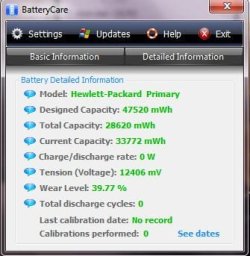
can someone comment, explain or tell me that they don't find these readings at all strange? 100% untouched snip and the numbers well just don't add up. I have owned at least 5 laptops and not once did a battery die within its first 6 months of normal use. My last laptop an Acer ran 80% of its life on battery an when I sold it it still ran for 2 hours after 9 months owning it.
 

Attachments

  • Capture.JPG
    Capture.JPG
    29.2 KB · Views: 35

My Computer

Computer Manufacturer/Model Number
Alienware M17x R3
OS
Windows 7 Ultimate x64
CPU
Intel Core i7 2670QM 2.2GHz 3.3GHz Turbo Mode
Memory
12GB Dual Channel DDR3 at 1333MHz
Graphics Card(s)
2GB GDDR5 AMD Radeon 6990M
Sound Card
Audio Powered by Klipsch
Monitor(s) Displays
17.3-inch WideFHD 1920 x 1080 60Hz WLED
Screen Resolution
1920x1080
Hard Drives
120GB SSD slot 1
1TB HDD slot 2
Case
alienware laptop case
Cooling
Dual heatsink and fans
Keyboard
Alienware multi color keyboard
Mouse
logitech G300 gaming mouse
Other Info
Intel® Centrino Advanced-N 6230 2x2 agn+ Bluetooth

finally got it!!!
The lingering and unanswered question remains; Does Windows 7 cause laptop batteries to wear out faster compared to XP, Vista or Linux variants?

This regardless of values extracted from the laptop battery gauge chip. Since those seem quite unreliable to me due to immaturity of the feature.

The first thing that wears a battery out are recharge cycles, temperature and stress. Assuming W7 usage patterns for most are not significantly different (compared to using Vista/XP) I'd say W7 steps 'the tail' of the processor harder causing higher stress (battery discharge) between lower power sessions.

IMHO, running equal benchmarks on 'off-the-shelf' / virgin platforms as mentioned above would provide a more substantial answer.

A more simpler test would be to remove the laptop battery, let the laptop run on AC power with a peak power meter in between. If power peaks are lower on XP, Vista, Ubuntu it would explain higher laptop battery wear under W7.

Cheers!
 

My Computer

OS
Windows 7, XP Pro, Ubuntu, Fedora
The lingering and unanswered question remains; Does Windows 7 cause laptop batteries to wear out faster compared to XP, Vista or Linux variants?

The question has been answered many times. No.

The OS on the computer does not control the flow of electricity. The CPU requires the same amount of power to run, regardless. The hardware determines how much electricity needs to flow to each component, not the OS.
 

My Computer

Computer type
PC/Desktop
Computer Manufacturer/Model Number
Alienware Aurora ALX R4
OS
Windows 10 Pro (x64)
CPU
Intel Core i7-3930K (3.2GHz - 4.5GHz)
Motherboard
Alienware Aurora-R4 x79
Memory
4x Samsung 4GB PC3-12800 DDR3 (16GB 1600MHz)
Graphics Card(s)
Nvidia Geforce GTX 690
Sound Card
SteelSeries Siberia Elite
Monitor(s) Displays
Dell UltraSharp U3011
Screen Resolution
2560x1600
Hard Drives
Samsung 850 Pro 256 GB, Seagate 1TB Desktop Hybrid HDD, 2x Western Digital 4TB Green HDD
PSU
875W Some Dell PSU <.<
Case
Alienware Aurora ALX
Cooling
Custom Liquid Cooling (EK CPU & GPU blocks) dual EK 480RAD
Keyboard
Logitech G710+ Mechanical
Mouse
Logitech G700s
Internet Speed
Verizon Fios (50 mbps average)
Other Info
Server: Intel NUC D54250WYK: i5-4250U, 16GB, 256 GB mSATA, Windows Server 2012 R2
The lingering and unanswered question remains; Does Windows 7 cause laptop batteries to wear out faster compared to XP, Vista or Linux variants?

The question has been answered many times. No.

The OS on the computer does not control the flow of electricity. The CPU requires the same amount of power to run, regardless. The hardware determines how much electricity needs to flow to each component, not the OS.

From Engineering Windows 7 - quote::

"The first step in reducing idle power is optimizing the amount of processor, memory and disk utilization. Reducing processor utilization is the most important, because the processor has a wide range of power consumption. When truly idle, the processor power consumption can be as low as 100-300mW. But, when fully busy, the processor can consume up to 35W. This large range means that even small amounts of processor activity can have a significant impact on overall power consumption and battery life."
 

My Computer

OS
Windows 7, XP Pro, Ubuntu, Fedora
A very valid point - and one which with the extensive work, especially on the optimization of processor usage on laptops, incorporated into the core of win7, should mean that battery life is far better for a win7 system than that for XP or Vista.
 

My Computers

System One System Two

  • Computer type
    PC/Desktop
    Computer Manufacturer/Model Number
    ChillBlast - Custom to my design
    OS
    Windows 11 Pro x64 [Latest Release and Release Preview]
    CPU
    Ryzen 9 5950X, 3.8 - 5.2 MHz
    Motherboard
    Asus Prime X570-Pro
    Memory
    64GB [2 x 32GB] DDR4 3200MHz
    Graphics Card(s)
    4GB NVIDIA GEFORCE GTX 1650 Ti
    Sound Card
    On-board SPDIF to 5.1 System + HDMI [5.1 system]
    Monitor(s) Displays
    32" UHD 32 Bit HDR Monitor + 43" UHD 4K 32Bit HDR TV
    Screen Resolution
    2 x 3840 x 2160 @60Hz
    Hard Drives
    1TB M2 SSD OS, 500GB Fast Access SSD, 2 x 8TB Data + Various Externals from 1TB to 4TB, 10TB NAS
    PSU
    NZXT C750 80 PLUS Gold 750W Modular PSU
    Case
    Workstation Case [Matt Black]
    Cooling
    NZXT Kraken X63 280mm CPU Cooler +2x Quiet Case fans
    Keyboard
    Logitech Wireless MX Keys & K400 + others
    Mouse
    Logitech Wireless MX Master 3S
    Internet Speed
    920 MB Down 50 MB Up
    Antivirus
    BitDefender Total Security Pro
    Browser
    Chrome (always run latest Non-Beta)
    Other Info
    Also run ...
    Laptop - Quad 8GB - Windows 10 Pro x64
    Nexus 7 Android tablet x2
    Samsung 10.2" tablet
    Blackview TAB 8 4G Android Tablet c/w Keyboard
    Wacom Intuos Pro Medium Pen Pad
    Wacom Intuos Pro Small Pen Pad
    Wacom Expresskeys Remote
    Loopdeck+ Graphics Controller
    Shuttle Pro v2 Control
  • Computer type
    Laptop
    System Manufacturer/Model Number
    Dell XPS 17 10750H
    OS
    Windows 11 Pro x64 Latest RP
    CPU
    Intel I7 10750H 5.0GHz
    Motherboard
    Dell XPS
    Memory
    32GB [2x16GB] DDR4 2933 MHz
    Graphics Card(s)
    nVidia GTX1650Ti 4 GB GDDR6
    Sound Card
    Stock [Realtek] 4 Speaker
    Monitor(s) Displays
    17" IPS UHD+ Infinity Edge Touchscreen
    Screen Resolution
    3840 x 2400
    Hard Drives
    2TB M2 NVMe, 4TB External + various 500GB & 1TB External NVMe (also have access to spinner HDD from
    PSU
    Stock
    Case
    Stock XPS Aluminium & Carbon Fibre
    Cooling
    Stock - Active Fan Control
    Keyboard
    Backlit + Various Logitech
    Mouse
    Stock Track Pad + Logitech MX Trackball
    Internet Speed
    72 MB Down 18MB Up
    Browser
    Chrome
    Other Info
    Also run ...
    Laptop - Quad 8GB - Windows 10 Pro x64
    Nexus 7 Android tablet x2
    10.2" tablet
    Sony Z3 Android Smartphone
    Wacom Intuos Pro Medium Pen Pad
    Wacom Intuos Pro Small Pen Pad
    Wacom Expresskeys Remote
    Loopdeck+ Graphics Controller
    Shuttle Pro v2 Control Pad
    10TB NAS
From Engineering Windows 7 - quote::

"The first step in reducing idle power is optimizing the amount of processor, memory and disk utilization. Reducing processor utilization is the most important, because the processor has a wide range of power consumption. When truly idle, the processor power consumption can be as low as 100-300mW. But, when fully busy, the processor can consume up to 35W. This large range means that even small amounts of processor activity can have a significant impact on overall power consumption and battery life."

Which is provided by the CPU to do that. Windows cannot dynamically adjust the frequency of just any CPU. The ability to control the scaling was in fact introduced in Windows Vista, while in Windows XP there was zero control. But again Windows 7 cannot get the CPU (or other hardware component) to use more power then any other OS. Without Dynamic frequency scaling (what your quote is about) then when a CPU is idle it will always use 35W versus 100-300mW with Dynamic frequency scaling.

Windows still does not control the flow of electricity and how much, that is still up to the hardware.
 

My Computer

Computer type
PC/Desktop
Computer Manufacturer/Model Number
Alienware Aurora ALX R4
OS
Windows 10 Pro (x64)
CPU
Intel Core i7-3930K (3.2GHz - 4.5GHz)
Motherboard
Alienware Aurora-R4 x79
Memory
4x Samsung 4GB PC3-12800 DDR3 (16GB 1600MHz)
Graphics Card(s)
Nvidia Geforce GTX 690
Sound Card
SteelSeries Siberia Elite
Monitor(s) Displays
Dell UltraSharp U3011
Screen Resolution
2560x1600
Hard Drives
Samsung 850 Pro 256 GB, Seagate 1TB Desktop Hybrid HDD, 2x Western Digital 4TB Green HDD
PSU
875W Some Dell PSU <.<
Case
Alienware Aurora ALX
Cooling
Custom Liquid Cooling (EK CPU & GPU blocks) dual EK 480RAD
Keyboard
Logitech G710+ Mechanical
Mouse
Logitech G700s
Internet Speed
Verizon Fios (50 mbps average)
Other Info
Server: Intel NUC D54250WYK: i5-4250U, 16GB, 256 GB mSATA, Windows Server 2012 R2
Well I can tell you all this, since I talked with HP about replacing my 6 month old crazy battery I had to talk with them a second time. While the gentlemen entered my info to find my battery I was talking to him about this thread, and that there seems to be an issue, I asked if HP was aware and if so what they were doing about it. Well he confirmed that MS and HP were both working out details about this issue and that at the current time HP will replace batteries that have gone dead or otherwise acting is a strange manner while windows 7 is installed in these systems.

It sounded like he was reading the basics from some statement to me. Either way it was interesting to hear that HP is replacing batteries on warranty systems that have 7 and act up. So everyone can debate if its possible for the OS to screw up batteries, all I have to say now is HP admitted to me there's a problem with the OS and laptops in regards to bad batteries or batteries going bad like mine. Just wish the battery would get here don't like having a laptop tied down by a cord all the time.
 

My Computer

Computer Manufacturer/Model Number
Alienware M17x R3
OS
Windows 7 Ultimate x64
CPU
Intel Core i7 2670QM 2.2GHz 3.3GHz Turbo Mode
Memory
12GB Dual Channel DDR3 at 1333MHz
Graphics Card(s)
2GB GDDR5 AMD Radeon 6990M
Sound Card
Audio Powered by Klipsch
Monitor(s) Displays
17.3-inch WideFHD 1920 x 1080 60Hz WLED
Screen Resolution
1920x1080
Hard Drives
120GB SSD slot 1
1TB HDD slot 2
Case
alienware laptop case
Cooling
Dual heatsink and fans
Keyboard
Alienware multi color keyboard
Mouse
logitech G300 gaming mouse
Other Info
Intel® Centrino Advanced-N 6230 2x2 agn+ Bluetooth

finally got it!!!
Update:

My roommate recently purchased a Compaq CQ60 a few weeks ago and I realized the battery is compatible with my HP dv5t. We swapped batteries and his computer gives him the same battery error and low battery life I was experiencing. Using his battery (which is just the regular 6-cell, not the 12-cell Lithium Ion battery) I no longer have the battery error, and the battery life is at least 3 times longer. Im getting a solid 2.5-3hrs with nonstop usage with his 6-cell vs. 1hr of usage or less with my 12-cell. He didnt need the laptop right now for much so I've been using his battery for about a week. So far I have not noticed a difference in life. Powercfg is still showing the last full charge at around 96-97% of design capacity. This may not be definitive evidence, but so far it would seem that the problem was indeed just a worn out battery that needed to be replaced and not a problem with Windows 7. Looks like I will be buying a new battery and calling it a day.
 

My Computer

OS
Windows 7 x64

My Computer

Computer type
PC/Desktop
Computer Manufacturer/Model Number
Dell OP7010
OS
Windows 7 Enterprise (x64); Windows Server 2008 R2 (x64)
Memory
16GB
Monitor(s) Displays
4 Dell 24" LCD
Screen Resolution
1280x1024
Keyboard
Dell
Mouse
Dell Optical
Internet Speed
40meg
Thanks windowstar - I'll have to fire up the netbook and check for updates :D
 

My Computers

System One System Two

  • Computer type
    PC/Desktop
    Computer Manufacturer/Model Number
    ChillBlast - Custom to my design
    OS
    Windows 11 Pro x64 [Latest Release and Release Preview]
    CPU
    Ryzen 9 5950X, 3.8 - 5.2 MHz
    Motherboard
    Asus Prime X570-Pro
    Memory
    64GB [2 x 32GB] DDR4 3200MHz
    Graphics Card(s)
    4GB NVIDIA GEFORCE GTX 1650 Ti
    Sound Card
    On-board SPDIF to 5.1 System + HDMI [5.1 system]
    Monitor(s) Displays
    32" UHD 32 Bit HDR Monitor + 43" UHD 4K 32Bit HDR TV
    Screen Resolution
    2 x 3840 x 2160 @60Hz
    Hard Drives
    1TB M2 SSD OS, 500GB Fast Access SSD, 2 x 8TB Data + Various Externals from 1TB to 4TB, 10TB NAS
    PSU
    NZXT C750 80 PLUS Gold 750W Modular PSU
    Case
    Workstation Case [Matt Black]
    Cooling
    NZXT Kraken X63 280mm CPU Cooler +2x Quiet Case fans
    Keyboard
    Logitech Wireless MX Keys & K400 + others
    Mouse
    Logitech Wireless MX Master 3S
    Internet Speed
    920 MB Down 50 MB Up
    Antivirus
    BitDefender Total Security Pro
    Browser
    Chrome (always run latest Non-Beta)
    Other Info
    Also run ...
    Laptop - Quad 8GB - Windows 10 Pro x64
    Nexus 7 Android tablet x2
    Samsung 10.2" tablet
    Blackview TAB 8 4G Android Tablet c/w Keyboard
    Wacom Intuos Pro Medium Pen Pad
    Wacom Intuos Pro Small Pen Pad
    Wacom Expresskeys Remote
    Loopdeck+ Graphics Controller
    Shuttle Pro v2 Control
  • Computer type
    Laptop
    System Manufacturer/Model Number
    Dell XPS 17 10750H
    OS
    Windows 11 Pro x64 Latest RP
    CPU
    Intel I7 10750H 5.0GHz
    Motherboard
    Dell XPS
    Memory
    32GB [2x16GB] DDR4 2933 MHz
    Graphics Card(s)
    nVidia GTX1650Ti 4 GB GDDR6
    Sound Card
    Stock [Realtek] 4 Speaker
    Monitor(s) Displays
    17" IPS UHD+ Infinity Edge Touchscreen
    Screen Resolution
    3840 x 2400
    Hard Drives
    2TB M2 NVMe, 4TB External + various 500GB & 1TB External NVMe (also have access to spinner HDD from
    PSU
    Stock
    Case
    Stock XPS Aluminium & Carbon Fibre
    Cooling
    Stock - Active Fan Control
    Keyboard
    Backlit + Various Logitech
    Mouse
    Stock Track Pad + Logitech MX Trackball
    Internet Speed
    72 MB Down 18MB Up
    Browser
    Chrome
    Other Info
    Also run ...
    Laptop - Quad 8GB - Windows 10 Pro x64
    Nexus 7 Android tablet x2
    10.2" tablet
    Sony Z3 Android Smartphone
    Wacom Intuos Pro Medium Pen Pad
    Wacom Intuos Pro Small Pen Pad
    Wacom Expresskeys Remote
    Loopdeck+ Graphics Controller
    Shuttle Pro v2 Control Pad
    10TB NAS
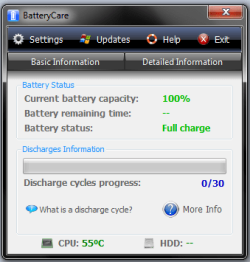
Can anyone tell me if my battery is going to die soon.. thx in advance! :) I also get the icon saying "Consider replacing your battery".. My laptop's model is HP 6735s, I have had it since Dec 2009
 

Attachments

  • asd1.png
    asd1.png
    12.4 KB · Views: 28
  • asd2.png
    asd2.png
    12.3 KB · Views: 42

My Computer

OS
Windows 7 Home Premium x64
I would assume from the information in your screens that you primarily use this laptop as a mains powered desktop replacement. The battery ware shows at a high 61% and the discharge cycles show as 0/30 which would suggest this

Running on mains is not a good thing for the longevity of a battery, what I suggest you do is run through the calibration procedure as detailed within the Batterycare program & documentation.

Hopefully this will recalibrate your battery, and prevent the situation getting worse. I would also advise that you run on battery for at least one charge cycle per week and follow batterycare's recommendations in future
 

My Computers

System One System Two

  • Computer type
    PC/Desktop
    Computer Manufacturer/Model Number
    ChillBlast - Custom to my design
    OS
    Windows 11 Pro x64 [Latest Release and Release Preview]
    CPU
    Ryzen 9 5950X, 3.8 - 5.2 MHz
    Motherboard
    Asus Prime X570-Pro
    Memory
    64GB [2 x 32GB] DDR4 3200MHz
    Graphics Card(s)
    4GB NVIDIA GEFORCE GTX 1650 Ti
    Sound Card
    On-board SPDIF to 5.1 System + HDMI [5.1 system]
    Monitor(s) Displays
    32" UHD 32 Bit HDR Monitor + 43" UHD 4K 32Bit HDR TV
    Screen Resolution
    2 x 3840 x 2160 @60Hz
    Hard Drives
    1TB M2 SSD OS, 500GB Fast Access SSD, 2 x 8TB Data + Various Externals from 1TB to 4TB, 10TB NAS
    PSU
    NZXT C750 80 PLUS Gold 750W Modular PSU
    Case
    Workstation Case [Matt Black]
    Cooling
    NZXT Kraken X63 280mm CPU Cooler +2x Quiet Case fans
    Keyboard
    Logitech Wireless MX Keys & K400 + others
    Mouse
    Logitech Wireless MX Master 3S
    Internet Speed
    920 MB Down 50 MB Up
    Antivirus
    BitDefender Total Security Pro
    Browser
    Chrome (always run latest Non-Beta)
    Other Info
    Also run ...
    Laptop - Quad 8GB - Windows 10 Pro x64
    Nexus 7 Android tablet x2
    Samsung 10.2" tablet
    Blackview TAB 8 4G Android Tablet c/w Keyboard
    Wacom Intuos Pro Medium Pen Pad
    Wacom Intuos Pro Small Pen Pad
    Wacom Expresskeys Remote
    Loopdeck+ Graphics Controller
    Shuttle Pro v2 Control
  • Computer type
    Laptop
    System Manufacturer/Model Number
    Dell XPS 17 10750H
    OS
    Windows 11 Pro x64 Latest RP
    CPU
    Intel I7 10750H 5.0GHz
    Motherboard
    Dell XPS
    Memory
    32GB [2x16GB] DDR4 2933 MHz
    Graphics Card(s)
    nVidia GTX1650Ti 4 GB GDDR6
    Sound Card
    Stock [Realtek] 4 Speaker
    Monitor(s) Displays
    17" IPS UHD+ Infinity Edge Touchscreen
    Screen Resolution
    3840 x 2400
    Hard Drives
    2TB M2 NVMe, 4TB External + various 500GB & 1TB External NVMe (also have access to spinner HDD from
    PSU
    Stock
    Case
    Stock XPS Aluminium & Carbon Fibre
    Cooling
    Stock - Active Fan Control
    Keyboard
    Backlit + Various Logitech
    Mouse
    Stock Track Pad + Logitech MX Trackball
    Internet Speed
    72 MB Down 18MB Up
    Browser
    Chrome
    Other Info
    Also run ...
    Laptop - Quad 8GB - Windows 10 Pro x64
    Nexus 7 Android tablet x2
    10.2" tablet
    Sony Z3 Android Smartphone
    Wacom Intuos Pro Medium Pen Pad
    Wacom Intuos Pro Small Pen Pad
    Wacom Expresskeys Remote
    Loopdeck+ Graphics Controller
    Shuttle Pro v2 Control Pad
    10TB NAS
I tried to d/l that BatteryCare app and it says it installed successfully, but I dont see anything. When I click on the program from the start menu I get a pop up message that says "BatteryCare is already running!" but I see no application interface, no taskbar icon (and it does not even appear on the list of hidden icons), and no additional information like Time Remaining is displayed when moving the cursor over the battery icon. What's the deal? I ran the app as an administrator as well to see if that might have been the issue but it made no difference.
 

My Computer

OS
Windows 7 x64

My Computer

Computer type
PC/Desktop
Computer Manufacturer/Model Number
Home built
OS
Windows 7 Ult, Windows 8.1 Pro,
CPU
Q9650-4.275GHz, E8600 4.5GHz, E6750-3.8GHz
Motherboard
Evga 780i FTW
Memory
G.Skill PC2 9600 1200Mhz 5 5 5 15 2T
Graphics Card(s)
GTX480
Sound Card
Asus Xonar D2
Monitor(s) Displays
HannsG
Screen Resolution
1680X1050
Hard Drives
GSkill Phoenix Pro 120GB SSD
PSU
ThermalTake Toughpower 1000Watt modular
Case
ThermalTake XaserV
Cooling
Xigmatek S1283
Keyboard
Logitech G15
Mouse
Logitech G9
Internet Speed
T1
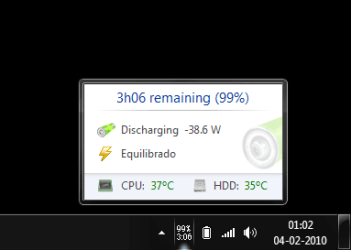
After install you should see an icon in the notification area (system tray) displaying the time and % change remaining - this is in addition to the native windows battery icon (this can be set to not display from the taskbar options)

ssbc05.png
 

My Computers

System One System Two

  • Computer type
    PC/Desktop
    Computer Manufacturer/Model Number
    ChillBlast - Custom to my design
    OS
    Windows 11 Pro x64 [Latest Release and Release Preview]
    CPU
    Ryzen 9 5950X, 3.8 - 5.2 MHz
    Motherboard
    Asus Prime X570-Pro
    Memory
    64GB [2 x 32GB] DDR4 3200MHz
    Graphics Card(s)
    4GB NVIDIA GEFORCE GTX 1650 Ti
    Sound Card
    On-board SPDIF to 5.1 System + HDMI [5.1 system]
    Monitor(s) Displays
    32" UHD 32 Bit HDR Monitor + 43" UHD 4K 32Bit HDR TV
    Screen Resolution
    2 x 3840 x 2160 @60Hz
    Hard Drives
    1TB M2 SSD OS, 500GB Fast Access SSD, 2 x 8TB Data + Various Externals from 1TB to 4TB, 10TB NAS
    PSU
    NZXT C750 80 PLUS Gold 750W Modular PSU
    Case
    Workstation Case [Matt Black]
    Cooling
    NZXT Kraken X63 280mm CPU Cooler +2x Quiet Case fans
    Keyboard
    Logitech Wireless MX Keys & K400 + others
    Mouse
    Logitech Wireless MX Master 3S
    Internet Speed
    920 MB Down 50 MB Up
    Antivirus
    BitDefender Total Security Pro
    Browser
    Chrome (always run latest Non-Beta)
    Other Info
    Also run ...
    Laptop - Quad 8GB - Windows 10 Pro x64
    Nexus 7 Android tablet x2
    Samsung 10.2" tablet
    Blackview TAB 8 4G Android Tablet c/w Keyboard
    Wacom Intuos Pro Medium Pen Pad
    Wacom Intuos Pro Small Pen Pad
    Wacom Expresskeys Remote
    Loopdeck+ Graphics Controller
    Shuttle Pro v2 Control
  • Computer type
    Laptop
    System Manufacturer/Model Number
    Dell XPS 17 10750H
    OS
    Windows 11 Pro x64 Latest RP
    CPU
    Intel I7 10750H 5.0GHz
    Motherboard
    Dell XPS
    Memory
    32GB [2x16GB] DDR4 2933 MHz
    Graphics Card(s)
    nVidia GTX1650Ti 4 GB GDDR6
    Sound Card
    Stock [Realtek] 4 Speaker
    Monitor(s) Displays
    17" IPS UHD+ Infinity Edge Touchscreen
    Screen Resolution
    3840 x 2400
    Hard Drives
    2TB M2 NVMe, 4TB External + various 500GB & 1TB External NVMe (also have access to spinner HDD from
    PSU
    Stock
    Case
    Stock XPS Aluminium & Carbon Fibre
    Cooling
    Stock - Active Fan Control
    Keyboard
    Backlit + Various Logitech
    Mouse
    Stock Track Pad + Logitech MX Trackball
    Internet Speed
    72 MB Down 18MB Up
    Browser
    Chrome
    Other Info
    Also run ...
    Laptop - Quad 8GB - Windows 10 Pro x64
    Nexus 7 Android tablet x2
    10.2" tablet
    Sony Z3 Android Smartphone
    Wacom Intuos Pro Medium Pen Pad
    Wacom Intuos Pro Small Pen Pad
    Wacom Expresskeys Remote
    Loopdeck+ Graphics Controller
    Shuttle Pro v2 Control Pad
    10TB NAS
Weird. Like I was saying before, when I checked the area to select which notification area icons appear there, BatteryCare wasnt even listed. I checked again and it's listed now but was set to only show notifications. Switched it to show the icon. Everything is working fine now. :D
 

My Computer

OS
Windows 7 x64
Back
Top