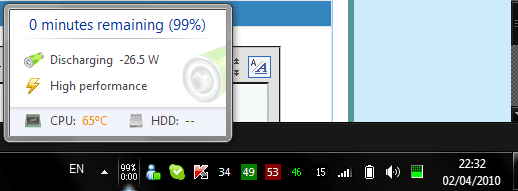
"Consider Replacing Your Battery"

Hello everybody, I had a look at batterycare - very useful tool, but isn't this quite strange when I unplug my laptop's AC adapter?
 

Attachments

  • qwe123.png
    qwe123.png
    8.3 KB · Views: 26

My Computer

OS
Windows 7 Home Premium x64
Can i use any other company battery or adapter for charging my Dell inspirion 1545
 

My Computer

Computer Manufacturer/Model Number
DELL Inspiron 1545
OS
Windows 7
CPU
Intel
Motherboard
Intel
Memory
250 GB
Hard Drives
Intet Core 2 Duo
Official Fix!

I have officially solved this problem,

1. Flip your laptop sideways in a smooth fashion (fast but not too fast) while the charger is plugged in

(lift your laptop slightly in the air and hold the left side and push it upwards to the right direction and smoothly push it back and down)

The errors and inconvenient messages will instantly dissapear!


Try it yourself, maybe try more than once if it doesn't work, I'm running a HP Pavillion and it fixed it.
Enjoy :)
 

My Computer

OS
7
I have an Acer Timeline 3810T w/c was 6months old, rarely used. Battery lasts 8 hrs+. After a week of installing Win7 on another partition, my battery suddenly went DEAD. Won't charge, no nothing. Now tell me after 6 months of problem free use, all of a sudden it conks out when I installed Win7.... I'm pretty sure it's the OS from what I'm reading all over the internet. It does not happen to all laptop models, but it does affect some.

I really want to dump VISTA for Win7, so please MS.... FIX THIS ISSUE!!!
 

My Computer

OS
Windows Vista SP2
I have an Acer Timeline 3810T w/c was 6months old, rarely used. Battery lasts 8 hrs+. After a week of installing Win7 on another partition, my battery suddenly went DEAD. Won't charge, no nothing. Now tell me after 6 months of problem free use, all of a sudden it conks out when I installed Win7.... I'm pretty sure it's the OS from what I'm reading all over the internet. It does not happen to all laptop models, but it does affect some.

I really want to dump VISTA for Win7, so please MS.... FIX THIS ISSUE!!!

And how would Windows 7 have affected your battery so? The battery is its own micro-computer that manages and maintains the battery. Windows could do nothing to kill your battery. The fault lies in your hardware. Or your battery is reaching end of life. Even when not used a battery loses power/life, they are also sensitive to heat the hotter it is the faster they lose power and life.

There is nothing for Microsoft to fix. It is reporting only what the hardware tells it, nothing more nothing less.
 

My Computer

Computer type
PC/Desktop
Computer Manufacturer/Model Number
Alienware Aurora ALX R4
OS
Windows 10 Pro (x64)
CPU
Intel Core i7-3930K (3.2GHz - 4.5GHz)
Motherboard
Alienware Aurora-R4 x79
Memory
4x Samsung 4GB PC3-12800 DDR3 (16GB 1600MHz)
Graphics Card(s)
Nvidia Geforce GTX 690
Sound Card
SteelSeries Siberia Elite
Monitor(s) Displays
Dell UltraSharp U3011
Screen Resolution
2560x1600
Hard Drives
Samsung 850 Pro 256 GB, Seagate 1TB Desktop Hybrid HDD, 2x Western Digital 4TB Green HDD
PSU
875W Some Dell PSU <.<
Case
Alienware Aurora ALX
Cooling
Custom Liquid Cooling (EK CPU & GPU blocks) dual EK 480RAD
Keyboard
Logitech G710+ Mechanical
Mouse
Logitech G700s
Internet Speed
Verizon Fios (50 mbps average)
Other Info
Server: Intel NUC D54250WYK: i5-4250U, 16GB, 256 GB mSATA, Windows Server 2012 R2
And how would Windows 7 have affected your battery so? The battery is its own micro-computer that manages and maintains the battery. Windows could do nothing to kill your battery. The fault lies in your hardware. Or your battery is reaching end of life. Even when not used a battery loses power/life, they are also sensitive to heat the hotter it is the faster they lose power and life.

There is nothing for Microsoft to fix. It is reporting only what the hardware tells it, nothing more nothing less.

Obviously you haven't read alot about this.... contrary to the old belief that an OS can never damage hardware, that's where you are wrong. I don't have the time to shed light on this for you. You can use google if you want. And btw, I've owned dozens of laptops over the years... I know when it's something hardware or not. Reaching end of life? It's barely 6mo old, and rarely used. Gives 8hrs+ usage prior to using Win7, and you say it's reaching it's end? hehehe. There's a good article on this issue, I suggest you read it 1st.

On a sidenote: I'm on a new set of batteries(1mo old) right now. I'll reinstall Win7 back on the Timeline laptop... mind you it has been working flawlessly for a month now. If the thing dies on me again on Win7, would it still be hardware? I'll spare another $150 for another battery, no problem.
 

My Computer

OS
Windows Vista SP2
Here's 1 testimony I copied from a bit-tech.net article:

"Yeah sure!

I have HP Pavilion dv5 and it had vista on it. Always wanted to get rid of it and at the launch of win 7 i changed my OS. After a week of use my laptop died in the middle of the work. Recharged it and after the incident my laptop's battery could last twice less than it used to.. Now it lasts ca 15 min.

STOP TALKING BS AND START FIXING THE PROBLEM, YOU ARROGANT MS

I tell everyone not to come here and say "Omg it's your battery.. bla bla". IT'S NOT!
Hate companies hiding their problems. If i knew it was going to happen i would have gone for the Snow Leopard."


It's funny that my battery problem also stemmed about a week after installing Win7....hmmmm. Like I said, it does not affect most laptops. Only some. But I also thought it could also be solved by a BIOS update from ACER, they have been churning out updates multiple times in a span of a few months. Hopefully this problem is one of the bugs addressed. Peace.
 

My Computer

OS
Windows Vista SP2
Obviously you haven't read alot about this.... contrary to the old belief that an OS can never damage hardware, that's where you are wrong.

Obviously you do not understand how Lithium-ion batteries used in laptops work. Windows or any other piece of software could not damage one of these batteries. Each battery is designed in such away to prevent such things from happening.


I don't have the time to shed light on this for you. You can use google if you want.
Yet you have time to post on a forum? I take it there is nothing on google?

And btw, I've owned dozens of laptops over the years... I know when it's something hardware or not.
When does owning make you an expert? Since my grandmother owns a desktop does that make her an expert?

Reaching end of life? It's barely 6mo old, and rarely used.
How long a battery lives is not set in stone, rarely used means nothing it still losses its charge and life just sitting. How long a Lithium battery last depends greatly on the environment conditions, the manufacturing process, how it is stored....there is a long list of variables that can affect the life.
 

My Computer

Computer type
PC/Desktop
Computer Manufacturer/Model Number
Alienware Aurora ALX R4
OS
Windows 10 Pro (x64)
CPU
Intel Core i7-3930K (3.2GHz - 4.5GHz)
Motherboard
Alienware Aurora-R4 x79
Memory
4x Samsung 4GB PC3-12800 DDR3 (16GB 1600MHz)
Graphics Card(s)
Nvidia Geforce GTX 690
Sound Card
SteelSeries Siberia Elite
Monitor(s) Displays
Dell UltraSharp U3011
Screen Resolution
2560x1600
Hard Drives
Samsung 850 Pro 256 GB, Seagate 1TB Desktop Hybrid HDD, 2x Western Digital 4TB Green HDD
PSU
875W Some Dell PSU <.<
Case
Alienware Aurora ALX
Cooling
Custom Liquid Cooling (EK CPU & GPU blocks) dual EK 480RAD
Keyboard
Logitech G710+ Mechanical
Mouse
Logitech G700s
Internet Speed
Verizon Fios (50 mbps average)
Other Info
Server: Intel NUC D54250WYK: i5-4250U, 16GB, 256 GB mSATA, Windows Server 2012 R2
Obviously you haven't read alot about this.... contrary to the old belief that an OS can never damage hardware, that's where you are wrong.

Obviously you do not understand how Lithium-ion batteries used in laptops work. Windows or any other piece of software could not damage one of these batteries. Each battery is designed in such away to prevent such things from happening.


I don't have the time to shed light on this for you. You can use google if you want.
Yet you have time to post on a forum? I take it there is nothing on google?

And btw, I've owned dozens of laptops over the years... I know when it's something hardware or not.
When does owning make you an expert? Since my grandmother owns a desktop does that make her an expert?

Reaching end of life? It's barely 6mo old, and rarely used.
How long a battery lives is not set in stone, rarely used means nothing it still losses its charge and life just sitting on.

Okay... you're the expert.... hehe. fine dude.
 

My Computer

OS
Windows Vista SP2
"Obviously you do not understand how Lithium-ion batteries used in laptops work. Windows or any other piece of software could not damage one of these batteries. Each battery is designed in such away to prevent such things from happening. "

Oh wow... you're really an expert. Now, explain this. I also have an HP Mini 1000, and last year HP gave out warnings to immediately update the BIOS to prevent a "bulging" from occuring on the battery. The actual batter BULGES physically, there are even pictures showing the problem... And you say no piece of software can affect hardware? Please....
 

My Computer

OS
Windows Vista SP2
Here's another testimony (still on bit-tech.net) :

" Sounds like BS from MS to me...

First, to the people who say unplug your battery, that really isn't necessary. Most chargers, and in fact *all* chargers in computers, will simply switch off the charging circuit and run off mains power once the battery is full. Removing the battery is unnecessary and an idea based on pure paranoia.

@shanky - recharging lithium-ion batteries often doesn't really cause any problems. In fact, it's better to charge them often than to completely discharge and completely charge them; lithium-ion doesn't suffer from memory like other types of battery. For more info on this see How to charge - when to charge table

The problems people are having relate to capacitance - it's a case of the battery not being charged correctly. From the sounds of things, MS decided to use a new method for measuring batteries which not all manufacturers conformed to, but whether or not this is down to the manufacturers not conforming to standard design specifications or MS using a field that wasn't widely accepted I don't know. The reason it hasn't affected new laptops is likely down to MS telling manufacturers how their system would work, and them making sure the battery would conform to their specification.

@LucusLoC - As I understand it, the peope who have had this problem were running other versions of Windows, upgraded to Win7 and then after that their battery was ruined. Changing back to another OS, be it Windows or Linux or whatever, didn't do anything to fix the problem. Also, I think it's better to leave a Li-ion battery partially charged for storage rather than fully charged, but I could be wrong.

Thinking about it, for my girlfriend's Eee PC there was a BIOS update for Windows 7. It's possible that this updated the ACPI information about the battery, so that Windows 7 could correctly charge it. If that's the case, then so long as the laptop manufacturers have provided a BIOS update within a reasonable timeframe of Win7's release the blame might lie with the end user. MS could argue it's their responsibility to ensure any software installed is compatible and won't break the computer.

Still, I don't like the way MS have come out with this press release. It's obvious if you listen to peoples' complaints that there *is* a problem and it's not just down to battery degredation with age. At the end of the day, whether or not the fault really lies on MS' shoulders they're not going to admit it. The ramifications if they did would be immense, and they would likely have to compensate everyone who had their battery ruined.
"


I came to this thread to post a "potential" problem... and rather than getting proper responses, I got another one of those "it's your hardware" replies. Ok then. Gotit. Thanks.. Peace.
 

My Computer

OS
Windows Vista SP2
Oh wow... you're really an expert. Now, explain this. I also have an HP Mini 1000, and last year HP gave out warnings to immediately update the BIOS to prevent a "bulging" from occuring on the battery. The actual batter BULGES physically, there are even pictures showing the problem... And you say no piece of software can affect hardware? Please....

So you want me to be extremely technical? Very way. Operating Systems and software that run on top of the hardware and its firmware cannot affect the battery in such a way. The BIOS update you are referring to update the batteries firmware. That crucial piece that lets hardware actually work?
 

My Computer

Computer type
PC/Desktop
Computer Manufacturer/Model Number
Alienware Aurora ALX R4
OS
Windows 10 Pro (x64)
CPU
Intel Core i7-3930K (3.2GHz - 4.5GHz)
Motherboard
Alienware Aurora-R4 x79
Memory
4x Samsung 4GB PC3-12800 DDR3 (16GB 1600MHz)
Graphics Card(s)
Nvidia Geforce GTX 690
Sound Card
SteelSeries Siberia Elite
Monitor(s) Displays
Dell UltraSharp U3011
Screen Resolution
2560x1600
Hard Drives
Samsung 850 Pro 256 GB, Seagate 1TB Desktop Hybrid HDD, 2x Western Digital 4TB Green HDD
PSU
875W Some Dell PSU <.<
Case
Alienware Aurora ALX
Cooling
Custom Liquid Cooling (EK CPU & GPU blocks) dual EK 480RAD
Keyboard
Logitech G710+ Mechanical
Mouse
Logitech G700s
Internet Speed
Verizon Fios (50 mbps average)
Other Info
Server: Intel NUC D54250WYK: i5-4250U, 16GB, 256 GB mSATA, Windows Server 2012 R2
hp nc6400, 4+ years old, original battery, same run time length as always. been running w7 since i got my hands on the first leak.

battery issues? not a freakin one. run with battery in on ac? sure, all the time. random charge/discharge/full charge cycles? check.

pretty much everything they say not to do to a battery, i've done, short of stabbing it, dunking it in water or shorting the terminals.

my take: short of the os glitching and assigning a faulty value to the battery serial number in the registry, it's either the power regulation software just deciding to be stupid and saying 'nope, this ain't right, even though it really is' or the batteries are worse off then people think (note: new != perfect, some will have flaws)

why so? as it's been pointed out, the hardware controls the battery, not the os. there's actually a specific set of circuits on the motherboards designed to check, monitor and regulate the battery charge level depending on wether or not it's on ac or running off the battery. os interaction? all it does is look 'oh hei, batury at #%! hay guis, lukit thiz!' and if it's read as a value below the given threshold, it starts whatever action is programmed.

i have, to date, had maybe 4 real issues with w7 beyond my finicky dislike of the ui layout in places*coughexplorercough*

honestly, it's either a really stupid software glitch thats fubaring the way it's reading the battery charge, or it's pebkac.

Guess which one my money is on in most of these cases.

YMMV.

-Tsuki
---Yeah, there's a touch of scathing sarcasm in there. careful, it bites.
 

My Computer

Computer Manufacturer/Model Number
My Own Worst Enemy
OS
Windows 7 Enterprise (Build# 7600) x64
CPU
Intel e5400 [email protected]
Motherboard
EVGA 730i/9300
Memory
OCZ 2x1g@800, Corsair 2x512@800 / 5-6-6-15
Graphics Card(s)
EVGA 9800 GT 512
Sound Card
Realtek HD Audio
Monitor(s) Displays
LG M237WD-PM 23" LCD
Screen Resolution
1920x1080@32bit
Hard Drives
320x1, 750x1, 1TBx1
PSU
Antec Earthwatts 500w
Case
Antec Sonata III
Cooling
Xigmatek Dark Knight
Keyboard
cheap
Mouse
cheap ms optical
Internet Speed
cable
I have a Toshiba Satellite which came with Vista but I did a clean install of Win 7 Pro x64. No problems for the first 3 months, but now the "consider replacing your battery" notification is always present. Used to get 4+ hours life out of my battery, but now a full charge gives me 56 min. Go figure...
 

My Computer

Computer Manufacturer/Model Number
Toshiba Satellite/E-1602
OS
Windows 7 Ultimate 64-bit
CPU
Intel(R) Core(TM)2 Duo CPU P7350 @ 2.00GHz 2.00GHz
Motherboard
Satellite E105 Chipset- Intel Cantiga GL40/GM45/GM47/GS45
Memory
4GB (3.84GB usable)
Graphics Card(s)
Mobil Intel(R) 45 Express Chipset Family (MS Corp WDDM1.1)
Sound Card
Microsoft High Definition Audio Device
Monitor(s) Displays
Generic PnP Monitor [NoDB]
Hard Drives
Disk Drive TOSHIBA MK5055GSX ATA Device
PSU
19V 3.95A
Case
?
Cooling
?
Keyboard
Standard PS/2 Keyboard
Mouse
PS/2 Compatible Mouse
Internet Speed
5MB
Other Info
BIOS- Insyde 1.40
Btw, you can always go to Device Manager and disable the "Microsoft ACPI-Compliant Control Method Battery" listed under "Batteries". I don't know how much good it will do, but it will remove the error message. Unfortunately, once disabled you can no longer determine how much battery life is left. Nonetheless, just a suggestion...
 

My Computer

Computer Manufacturer/Model Number
Toshiba Satellite/E-1602
OS
Windows 7 Ultimate 64-bit
CPU
Intel(R) Core(TM)2 Duo CPU P7350 @ 2.00GHz 2.00GHz
Motherboard
Satellite E105 Chipset- Intel Cantiga GL40/GM45/GM47/GS45
Memory
4GB (3.84GB usable)
Graphics Card(s)
Mobil Intel(R) 45 Express Chipset Family (MS Corp WDDM1.1)
Sound Card
Microsoft High Definition Audio Device
Monitor(s) Displays
Generic PnP Monitor [NoDB]
Hard Drives
Disk Drive TOSHIBA MK5055GSX ATA Device
PSU
19V 3.95A
Case
?
Cooling
?
Keyboard
Standard PS/2 Keyboard
Mouse
PS/2 Compatible Mouse
Internet Speed
5MB
Other Info
BIOS- Insyde 1.40
Btw, you can always go to Device Manager and disable the "Microsoft ACPI-Compliant Control Method Battery" listed under "Batteries". I don't know how much good it will do, but it will remove the error message. Unfortunately, once disabled you can no longer determine how much battery life is left. Nonetheless, just a suggestion...

That won't stop your battery from dieing. Either.
 

My Computer

Computer type
PC/Desktop
Computer Manufacturer/Model Number
Alienware Aurora ALX R4
OS
Windows 10 Pro (x64)
CPU
Intel Core i7-3930K (3.2GHz - 4.5GHz)
Motherboard
Alienware Aurora-R4 x79
Memory
4x Samsung 4GB PC3-12800 DDR3 (16GB 1600MHz)
Graphics Card(s)
Nvidia Geforce GTX 690
Sound Card
SteelSeries Siberia Elite
Monitor(s) Displays
Dell UltraSharp U3011
Screen Resolution
2560x1600
Hard Drives
Samsung 850 Pro 256 GB, Seagate 1TB Desktop Hybrid HDD, 2x Western Digital 4TB Green HDD
PSU
875W Some Dell PSU <.<
Case
Alienware Aurora ALX
Cooling
Custom Liquid Cooling (EK CPU & GPU blocks) dual EK 480RAD
Keyboard
Logitech G710+ Mechanical
Mouse
Logitech G700s
Internet Speed
Verizon Fios (50 mbps average)
Other Info
Server: Intel NUC D54250WYK: i5-4250U, 16GB, 256 GB mSATA, Windows Server 2012 R2
I have a Toshiba Satellite which came with Vista but I did a clean install of Win 7 Pro x64. No problems for the first 3 months, but now the "consider replacing your battery" notification is always present. Used to get 4+ hours life out of my battery, but now a full charge gives me 56 min. Go figure...

Did you try my technique that I posted? If not, try take out your battery and put it back in then boot up your laptop while it is facing sideways or upside down even. Believe me, this might sound silly, but after all that trouble, I'm sure trying this won't be as bad. It's worth a try.
 

My Computer

OS
7
Here's another interesting thread with eerily very similar stories: :eek:

Windows 7 and the battery error "consider replacing your battery" (Part 10)

One of the posts read:

"
I have COMPAQ PRESARIO V3000 laptop. My laptop is just less than a year old.
My original OS is Windows Vista. I used to have 4 to 5 hrs of battery usage until I upgraded my OS to Windows 7 Ultimate.
From the original 4 hours of battery life, I ended up having less that 20mins of battery usage.
I am also experiencing that error where in it displays an X on your battery and says that "Consider replaying your battery"
Can Microsoft be responsible for what happened to our batteries? It is unfair for users to spend money in buying new batteries that will later on display the same problem.

NOTE: My brother is using the same brand and model of laptop as I am. He is using Windows Vista and still enjoys the 4 hour battery life.

PLEASE provide us some answer. What can we do to fix this problem. It is even better if you will replace all our batteries!"
 

My Computer

OS
Windows Vista SP2
PLEASE provide us some answer. What can we do to fix this problem. It is even better if you will replace all our batteries!"

Replace your battery or talk to the original manufacture of your computer. The battery says it is dieing so there is only one logical solution, replace the battery. Why is that so hard to understand?
 

My Computer

Computer type
PC/Desktop
Computer Manufacturer/Model Number
Alienware Aurora ALX R4
OS
Windows 10 Pro (x64)
CPU
Intel Core i7-3930K (3.2GHz - 4.5GHz)
Motherboard
Alienware Aurora-R4 x79
Memory
4x Samsung 4GB PC3-12800 DDR3 (16GB 1600MHz)
Graphics Card(s)
Nvidia Geforce GTX 690
Sound Card
SteelSeries Siberia Elite
Monitor(s) Displays
Dell UltraSharp U3011
Screen Resolution
2560x1600
Hard Drives
Samsung 850 Pro 256 GB, Seagate 1TB Desktop Hybrid HDD, 2x Western Digital 4TB Green HDD
PSU
875W Some Dell PSU <.<
Case
Alienware Aurora ALX
Cooling
Custom Liquid Cooling (EK CPU & GPU blocks) dual EK 480RAD
Keyboard
Logitech G710+ Mechanical
Mouse
Logitech G700s
Internet Speed
Verizon Fios (50 mbps average)
Other Info
Server: Intel NUC D54250WYK: i5-4250U, 16GB, 256 GB mSATA, Windows Server 2012 R2
Quote from the link I pasted above: (could be a viable workaround)


"Appears to be a problem with Windows 7.
I found out that the following steps, revived the battery, which is possibly caused by a buggy ACPI in Windows 7.


Running Windows 7 32 bit, getting 30-35 minutes of battery power when AC is disconnected.
Disable the Microsoft ACPI-Compliant Control Method under BATTERY in the device manager.

Put the computer on HIGH PERFORMANCE (I get approx 2 hours of battery life before it shuts down on HIGH PERFORMANC.....Eensure Screen Dim, etc are NEVER) and start running Scandisk (Sector errors scan), Virus Scan, defrag, anything to make it quickly die.

When it has died and there is no power left, remove the battery for a few minutes, press the power button, put the battery back in and plug the power plug in and started the system up.

When windows loads, enable the ACPI-Compliant Method.

BatteryCare (cool program) should now be showing a FULL total capacity, rather than 1/3 or less that it was previously. There is also no Wear Level now (for me), it is saying 0.00% - previously it was 63%.

Since the power on, there is no X over the power icon, its acting normally.

Buggy ACPI - perhaps doesnt charge further than 40% and therefore the warning appears? Doesnt recognise that there is more to charge?

Either way, this fixed my issue and I could then use it for 2 hours, it told me two hours and no longer died at 30 minutes. " - Damian18
 

My Computer

OS
Windows Vista SP2
Back
Top