Constant hard drive activity?

gridsystems

New member
Member
Local time
3:20 AM
Messages
31
Hi,

I installed Windows 7 RC. When ever I am booted into Win7 one of my hard drives (probably not system drive - sounds like my secondary storage drive) is constantly working. Not very much but still making sounds.

I have completely turned off indexation, there is no automatic defrag going on. I have set a constant size to the paging file and there is no antivirus activity going on. The hard drive is making noise even when the system is idle for a long time and also when I am using it.

The processes tab in the task monitor shows no process that is using CPU.

What can this hard drive activity be?

Thanks!
 

My Computer

Computer Manufacturer/Model Number
built it myself
OS
Windows 7 Pro 64-bit
CPU
Intel i7 950
Motherboard
Asus Sabertooth X58
Memory
18GB
Graphics Card(s)
Gigabyte Radeon HD7700
Sound Card
onboard Realtek HD audio chip
Monitor(s) Displays
2 x Dell U2412M
Screen Resolution
1920x1200
Hard Drives
3 SSD
4 Western Digital Caviar Green
PSU
SeaSonic x650
Case
Fractal Design R3 case
Cooling
Magehalems rev. B CPU cooler
Windows Search service perhaps?
 

My Computer

Computer Manufacturer/Model Number
self built
OS
7600.20510 x86
CPU
P4 550 3.4 GHz HT running at 3.5 GHz
Motherboard
MSI PM8M3-V (MS-7211 v1.x) Micro-ATX mainboard
Memory
OCZ 2 GB(2x1GB) DDR400mHz running @ 414 mHz
Graphics Card(s)
HIS Radeon HD 3850 IceQ 3 Turbo HDMI Dual DL-DVI AGP
Sound Card
MOTU Traveler firewire studio interface 192 kHz 24 bit
Monitor(s) Displays
22" widescreen Acer X223W LCD, 17" Compaq P75 CRT
Screen Resolution
1680x1050 and 1280x1024
Hard Drives
SATA I x2 WD, 400 GB and 120 GB, SATA 2 WD Caviar Black 1 TB
PSU
350W generic
Case
Cybertronpc, it glows blue
Cooling
stock cpu fan, Ice-Q 3 gpu and system, many case fans
Keyboard
Logitch Classical Keyboard 200
Mouse
Logitech Mediaplay cordless
Internet Speed
1792/448 kbits/sec
Other Info
SATA II PCI fake RAID adapter, 1 GB Readyboost, original ATI Remote Wonder (even works with WMC perfectly), Logitech Rumblepad 2 game controller x2
I get this same problem sometimes as well.
 

My Computer

Computer Manufacturer/Model Number
Dell Dimension 3100, iMac G3, Custom built
OS
7 Ultimate, Debian Squeeze, #! Statler
CPU
AMD 4450e 2.4GHz, Intel P4 3.0GHz, PowerPC 400MHz
When I had this question recently I installed SysInternals (a group of talented MS programmers) free Process Monitor to see the disk access and responsible processes in real-time. Perhaps this might be of help in your case:

SysInternals Process Monitor
 

My Computer

Computer Manufacturer/Model Number
Dell Vostro 420
OS
Windows 7 Pro x64
CPU
3.00 GHz Intel Core2 Quad Q9650
Memory
4 GB
Graphics Card(s)
ATI Radeon HD 3400 Series
Monitor(s) Displays
DELL 2405FPW
Screen Resolution
1920x1200
Hard Drives
System: 80GB WDC WD800JD-22MSA1
Data: 500GB Hitachi HDP725050GLA360
Internet Speed
Verizon FiOS 20/5 mbps
Other Info
Computing is primarily business use with off-time troubleshooting practice: Remote desktop, scanning and producing invoices, some minor graphics work.
I have disabled WSearch as well so it is not Windows search.
I will try SysInternals Process Monitor.
 

My Computer

Computer Manufacturer/Model Number
built it myself
OS
Windows 7 Pro 64-bit
CPU
Intel i7 950
Motherboard
Asus Sabertooth X58
Memory
18GB
Graphics Card(s)
Gigabyte Radeon HD7700
Sound Card
onboard Realtek HD audio chip
Monitor(s) Displays
2 x Dell U2412M
Screen Resolution
1920x1200
Hard Drives
3 SSD
4 Western Digital Caviar Green
PSU
SeaSonic x650
Case
Fractal Design R3 case
Cooling
Magehalems rev. B CPU cooler
Ill be interested in what you find to be the cause of this. I too have the same issue. I always have my PC on and overnight when im not using it, it seems to go busy, sometimes just for a few moments, other times all night. Odd thing is though is when i start doing something it noise stops...
 

My Computer

OS
Windows 7 Professional x64
CPU
Intel Q6600
Motherboard
TPower i45
Memory
4gb (2x2gb) Corsair
Graphics Card(s)
ATI Radeon HD4870
Others have posted about this only to conclude that it is a mystery and the only solution is a solid-state drive. So let us know if you solve it.
 

My Computer

Computer type
PC/Desktop
Computer Manufacturer/Model Number
diy
OS
Win7 pro x64
CPU
stock i7 7700k
Motherboard
Gigabyte Z270N-WIFI mini-ITX
Memory
Corsair Vengeance LPX 16GB (2x8GB) DDR4 @ 3200MHz
Graphics Card(s)
integrated Intel HD 630
Sound Card
onboard Realtek ALC1220
Monitor(s) Displays
two vertically mounted samsung 55" 4k un55mu8000
Screen Resolution
1920x1280
Hard Drives
256GB Samsung EVO 960 M.2 pci-e NVMe SSD
PSU
SilverStone Nightjar ST45NF 450Watt Fanless
Case
No case. Motherboard is mounted directly onto power supply
Cooling
Evercool low profile 815EP with Panaflow 12L fan at 7v
Keyboard
Ortek MCK-86 mini
Mouse
Belkin 5-button USB
Internet Speed
spectrum 400mbps
Others have posted about this only to conclude that it is a mystery and the only solution is a solid-state drive. So let us know if you solve it.

That is bizarre. In those threads did the others admit that the problem went away when a SSD was installed in place of the disk-based HD or just that it wasn't noticeable?

Assuming the activity were caused by an OS process and not by virtue of the device type I would be even more eager to search for the cause if I had an SSD installed. Aren't SSD lifespans limited by a finite number of read/write cycles or is that just rumor?
 

My Computer

Computer Manufacturer/Model Number
Dell Vostro 420
OS
Windows 7 Pro x64
CPU
3.00 GHz Intel Core2 Quad Q9650
Memory
4 GB
Graphics Card(s)
ATI Radeon HD 3400 Series
Monitor(s) Displays
DELL 2405FPW
Screen Resolution
1920x1200
Hard Drives
System: 80GB WDC WD800JD-22MSA1
Data: 500GB Hitachi HDP725050GLA360
Internet Speed
Verizon FiOS 20/5 mbps
Other Info
Computing is primarily business use with off-time troubleshooting practice: Remote desktop, scanning and producing invoices, some minor graphics work.
Others have posted about this only to conclude that it is a mystery and the only solution is a solid-state drive. So let us know if you solve it.

In those threads did the others admit that the problem went away when a SSD was installed in place of the disk-based HD or just that it wasn't noticeable?

The conclusion was that it does not go away, so your only choice is to silence it by removing the moving parts which make noise.
 

My Computer

Computer type
PC/Desktop
Computer Manufacturer/Model Number
diy
OS
Win7 pro x64
CPU
stock i7 7700k
Motherboard
Gigabyte Z270N-WIFI mini-ITX
Memory
Corsair Vengeance LPX 16GB (2x8GB) DDR4 @ 3200MHz
Graphics Card(s)
integrated Intel HD 630
Sound Card
onboard Realtek ALC1220
Monitor(s) Displays
two vertically mounted samsung 55" 4k un55mu8000
Screen Resolution
1920x1280
Hard Drives
256GB Samsung EVO 960 M.2 pci-e NVMe SSD
PSU
SilverStone Nightjar ST45NF 450Watt Fanless
Case
No case. Motherboard is mounted directly onto power supply
Cooling
Evercool low profile 815EP with Panaflow 12L fan at 7v
Keyboard
Ortek MCK-86 mini
Mouse
Belkin 5-button USB
Internet Speed
spectrum 400mbps
System idle process on XP was silent... could it be that its that just being noisy?

(yes im picking at straws, but it may jolt some good ideas)
 

My Computer

OS
Windows 7 Professional x64
CPU
Intel Q6600
Motherboard
TPower i45
Memory
4gb (2x2gb) Corsair
Graphics Card(s)
ATI Radeon HD4870
The conclusion was that it does not go away, so your only choice is to silence it by removing the moving parts which make noise.

Ah... if you cannot address the cause, address the symptom. :)
 

My Computer

Computer Manufacturer/Model Number
Dell Vostro 420
OS
Windows 7 Pro x64
CPU
3.00 GHz Intel Core2 Quad Q9650
Memory
4 GB
Graphics Card(s)
ATI Radeon HD 3400 Series
Monitor(s) Displays
DELL 2405FPW
Screen Resolution
1920x1200
Hard Drives
System: 80GB WDC WD800JD-22MSA1
Data: 500GB Hitachi HDP725050GLA360
Internet Speed
Verizon FiOS 20/5 mbps
Other Info
Computing is primarily business use with off-time troubleshooting practice: Remote desktop, scanning and producing invoices, some minor graphics work.
System idle process on XP was silent... could it be that its that just being noisy?

(yes im picking at straws, but it may jolt some good ideas)

System Idle Process does nil with the HDD. System Idle Process is only concerned on the CPU.
Have any antivirus of "tweeking" type application (like disk-defragment) installed?
 

My Computer

Computer type
PC/Desktop
Computer Manufacturer/Model Number
Alienware Aurora ALX R4
OS
Windows 10 Pro (x64)
CPU
Intel Core i7-3930K (3.2GHz - 4.5GHz)
Motherboard
Alienware Aurora-R4 x79
Memory
4x Samsung 4GB PC3-12800 DDR3 (16GB 1600MHz)
Graphics Card(s)
Nvidia Geforce GTX 690
Sound Card
SteelSeries Siberia Elite
Monitor(s) Displays
Dell UltraSharp U3011
Screen Resolution
2560x1600
Hard Drives
Samsung 850 Pro 256 GB, Seagate 1TB Desktop Hybrid HDD, 2x Western Digital 4TB Green HDD
PSU
875W Some Dell PSU <.<
Case
Alienware Aurora ALX
Cooling
Custom Liquid Cooling (EK CPU & GPU blocks) dual EK 480RAD
Keyboard
Logitech G710+ Mechanical
Mouse
Logitech G700s
Internet Speed
Verizon Fios (50 mbps average)
Other Info
Server: Intel NUC D54250WYK: i5-4250U, 16GB, 256 GB mSATA, Windows Server 2012 R2
Anitvirus is Avast and that isnt set to go off unless I ask it too.
Defrag doesnt start unless set either.
 

My Computer

OS
Windows 7 Professional x64
CPU
Intel Q6600
Motherboard
TPower i45
Memory
4gb (2x2gb) Corsair
Graphics Card(s)
ATI Radeon HD4870
OK, I have the same problem. And its not physical noise that's bothering me, I have a monitor running and it shows my C: drive flat out 100% busy all the time, confirmed by the CPU case light flickering steadily.

It's not Defrag, It's not Indexing. I'm using the Windows Security essentials and it says its not scanning right now. Task Manager doesn't show anyone using any real CPU.

How do I tell what process is driving this I/O?
 

My Computer

OS
Windows 7
How do I tell what process is driving this I/O?

Two things:

1) Did you install the Sysinternals Process Monitor mentioned above and see if it identifies what the activity is?

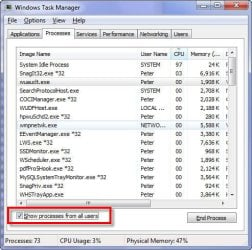
2) When you pulled up the Task Manager did you check the option to "Show process from all users"?
 

Attachments

  • SNAG-0038.jpg
    SNAG-0038.jpg
    50.6 KB · Views: 95

My Computer

Computer Manufacturer/Model Number
Dell Vostro 420
OS
Windows 7 Pro x64
CPU
3.00 GHz Intel Core2 Quad Q9650
Memory
4 GB
Graphics Card(s)
ATI Radeon HD 3400 Series
Monitor(s) Displays
DELL 2405FPW
Screen Resolution
1920x1200
Hard Drives
System: 80GB WDC WD800JD-22MSA1
Data: 500GB Hitachi HDP725050GLA360
Internet Speed
Verizon FiOS 20/5 mbps
Other Info
Computing is primarily business use with off-time troubleshooting practice: Remote desktop, scanning and producing invoices, some minor graphics work.
This has been discussed to death in Windows Vista. It's the same for Windows 7.

Don't worry about it. It won't hurt your HDD or your computer. Just let it be.

No matter what I did, it did not go away with Vista. So I won't bother with it anymore.
 

My Computer

Computer Manufacturer/Model Number
Custom
OS
Windows 7 Home Premium 64
CPU
Core i7 870 2.93 GHz
Motherboard
Gigabyte P55A-UD3
Memory
16 GB G-Skills DDR3 1333
Graphics Card(s)
ASUS GTX 680 DirectCu-II Top
Sound Card
Realtek 5.1 audio
Monitor(s) Displays
Samsung 23" widescreen
Screen Resolution
2048x1152
Hard Drives
OCZ Vertex III 128 GB (primary)
OCZ Vertex II 128 GB (data)
PSU
Corsair 650W
Case
CoolerMaster HAF 920
Cooling
Arctic Cooling Freezer 7 Pro
Keyboard
DAS Model S Ultimate keyboard
Mouse
Logitech G5 gaming mouse
Internet Speed
Cable
Browser
Chrome
Other Info
Built in December 2010
Install Malwarebytes and let it scan your machine, just a thought I'm having.
 

My Computer

Computer Manufacturer/Model Number
Self Build 64bit
OS
Vista Ult64, Win7600
CPU
Intel Core 2 Quad Q6600 @ 2400 MHz 64bit OS
Motherboard
Asus P5E3 Deluxe WiFi @p 64 bit OS
Memory
4096 MB DDR3-SDRAM
Graphics Card(s)
ATI Radeon HD 3870 Series x2 Crossfired
Sound Card
Realtek on board
Monitor(s) Displays
Samsung SyncMaster - 23 inches
Screen Resolution
1680x1050 pixels at 60 Hz in True Colors
Hard Drives
Hitachi (250 GB)/Samsung 750 GB. /Barracuda 160 GB.
My Book 1 TB external..
PSU
Cooler Master 1000w
Case
Cooler Master Cosmos 1000.
Cooling
Fans and fresh air,
Keyboard
Wireless
Mouse
Wireless
Internet Speed
Never fast enough
Other Info
I use a Magnum.
See if there is any program that has a setting to notify it when files are changed. I did everything I could to quiet Vista before SP1. Seemed like I got it fairly tamed, but now and then it would just go off for minutes at a time for no apparent reason. Turned out I had locate32 set to automatically update file system changes. After I copied a bunch of files to my external drive, it would get all these notifications for 15 minutes afterward. I switched to Everything Search which hooks into the NTFS journaling system to be updated rather than using the WinAPI. Now both my Vista and Windows 7 drives are quiet.

The only time the drive runs on and slows down other tasks is if I'm copying big files over the Gb network card.

Turn off Windows Search
Use Everything Search

turn off anything that gets autoupdates from the file system
 

My Computer

Computer Manufacturer/Model Number
HP Media Center
OS
Windows 7 32 bit
CPU
AMD 5200+ dual core
Memory
2 GB
Graphics Card(s)
NVidia GeForce 6150SE 128 MB
Monitor(s) Displays
CRT
Screen Resolution
1280x1024
Hard Drives
500 GB Sata internal :

SIIG USB 3.0 docking stations w/WD Caviar Black 6 Gb/s drives
Keyboard
PS/2
Mouse
PS/2 Wheel Mouse
Other Info
SIIG USB 3.0 PCIexpress card.
Just turn off superfetch! That's why vista had so much hdd activity, and it's probably why win7 does too.
Start>services>superfetch>disable...
 

My Computer

OS
Windows
I had this problem on day one, didn't figure out what was causing it, reinstalled W7 and didn't have the problem.

I just remembered. I think it had something to do with setting the number of processors and min. memory in MSCONFIG.
 

My Computer

Computer Manufacturer/Model Number
Home Built
OS
Windows7 beta 7000
CPU
Intel E6550
Motherboard
Intel DP35DP
Memory
8Gb
Graphics Card(s)
Nvidia 8500 GT
Sound Card
Intel onboard sound
Monitor(s) Displays
Two Gateway 22" LCD monitors
Screen Resolution
1680x1050
Hard Drives
Two 500Gb 7200rpm SATA
Back
Top