Constant reboots with NVIDIA 9800M GT (Samsung R710)

pATREUS

New member
Local time
9:48 AM
Messages
8
Hi everybody,

I have been trawling this site since Oct 22 for help with my problem, some pointers have worked to some extent but now I have reached a dead end so here's my post:

I have custom installed Win7 64 over an OEM Vista Home Premium on my Samsung R710 - a very pretty little laptop. Everything works great except the driver for my video card, an Nvidia 9600M GT. According to Dev Manager my GPU is currently running under a VGA compatible video controller which can only give me basic video display, no Aero or proper gaming display.

After struggling to find an Nvidia driver that would recognize my card similar to other posters in this forum, I came across the 186.81 driver (186.81_notebook_win7_winvista_64bit_international_whql) on the Nvidia site. Using Internet Explorer, this driver is automatically detected for my system and after downloading detects my GPU and installs right over the VGA driver. Great.

Not so great: I cannot boot into Windows 7. I get the 'Windows is Starting' screen with the whirling lights and the beatific windows logo shining away but just before the mouse pointer should appear the display completely switches off (not black screen) and reboots ad infinitum. Only a safe mode disinstall of 186.81 and 2 reboots will allow to get back into Win7 with the VGA driver back in control.

The funny thing is, after looking at other peoples problems on this site I DID get 186.81 to work for a few hours. Aero was working and I was playing the new Dyson game on Steam, but a sudden reboot dropped me into the cycle described above.

Because I had also done some messing around with the OEM drivers from Samsung I thought I had screwed something up; so, I executed a recovery back to Vista and a completely new custom install of Win7 64. I reinstalled 186.81 but immediately met the same reboot problem.

Now then. I have tried monkeying around with the VGA driver file: vgapnp.sys in system32 (no change to reboot situation), looking at ntbtlog.txt (completely fruitless), updating the BIOS from Samsung (this driver fails to load in Win7), every driver someone has recommended (the drivers usually install but result in same reboot situation) and the MS Update Catalog drivers (same reboot deal).

Essentially, I can get a compatible Nvidia driver to install but my system will not accept it and reboots until remove the offending driver in safe mode.

Over to you good people, best regards.

Oh, and if istorki reads this: you're the man but no, you're R610 method doesn't work for me :(
 

My Computer My Computer

At a glance

Windows 7 64Core 2 Duo4GbNvidia 9800 GT
Computer Manufacturer/Model Number
Samsung R710
OS
Windows 7 64
CPU
Core 2 Duo
Memory
4Gb
Graphics Card(s)
Nvidia 9800 GT

My Computer My Computer

At a glance

7600.20510 x86P4 550 3.4 GHz HT running at 3.5 GHzOCZ 2 GB(2x1GB) DDR400mHz running @ 414 mHzHIS Radeon HD 3850 IceQ 3 Turbo HDMI Dual DL-...
Computer Manufacturer/Model Number
self built
OS
7600.20510 x86
CPU
P4 550 3.4 GHz HT running at 3.5 GHz
Motherboard
MSI PM8M3-V (MS-7211 v1.x) Micro-ATX mainboard
Memory
OCZ 2 GB(2x1GB) DDR400mHz running @ 414 mHz
Graphics Card(s)
HIS Radeon HD 3850 IceQ 3 Turbo HDMI Dual DL-DVI AGP
Sound Card
MOTU Traveler firewire studio interface 192 kHz 24 bit
Monitor(s) Displays
22" widescreen Acer X223W LCD, 17" Compaq P75 CRT
Screen Resolution
1680x1050 and 1280x1024
Hard Drives
SATA I x2 WD, 400 GB and 120 GB, SATA 2 WD Caviar Black 1 TB
PSU
350W generic
Case
Cybertronpc, it glows blue
Cooling
stock cpu fan, Ice-Q 3 gpu and system, many case fans
Keyboard
Logitch Classical Keyboard 200
Mouse
Logitech Mediaplay cordless
Internet Speed
1792/448 kbits/sec
Other Info
SATA II PCI fake RAID adapter, 1 GB Readyboost, original ATI Remote Wonder (even works with WMC perfectly), Logitech Rumblepad 2 game controller x2
What's the hardware id? Right click it in device manager, properties, details tab, change the dropdown to hardware ids. Copy and paste the results here.

No results on Samsung's site. SAMSUNG

Cheers tg,

Hardware ids, as follows:

PCI\VEN_10DE&DEV_0649&SUBSYS_C520144D&REV_A1
PCI\VEN_10DE&DEV_0649&SUBSYS_C520144D
PCI\VEN_10DE&DEV_0649&CC_030000
PCI\VEN_10DE&DEV_0649&CC_0300

Try Samsung UK: the SAMSUNG R710 17? widescreen notebook is ideal for everyone R710 - R-Series - Entertainment - Notebook Computers | SAMSUNG
 

My Computer My Computer

At a glance

Windows 7 64Core 2 Duo4GbNvidia 9800 GT
Computer Manufacturer/Model Number
Samsung R710
OS
Windows 7 64
CPU
Core 2 Duo
Memory
4Gb
Graphics Card(s)
Nvidia 9800 GT

My Computer My Computer

At a glance

7600.20510 x86P4 550 3.4 GHz HT running at 3.5 GHzOCZ 2 GB(2x1GB) DDR400mHz running @ 414 mHzHIS Radeon HD 3850 IceQ 3 Turbo HDMI Dual DL-...
Computer Manufacturer/Model Number
self built
OS
7600.20510 x86
CPU
P4 550 3.4 GHz HT running at 3.5 GHz
Motherboard
MSI PM8M3-V (MS-7211 v1.x) Micro-ATX mainboard
Memory
OCZ 2 GB(2x1GB) DDR400mHz running @ 414 mHz
Graphics Card(s)
HIS Radeon HD 3850 IceQ 3 Turbo HDMI Dual DL-DVI AGP
Sound Card
MOTU Traveler firewire studio interface 192 kHz 24 bit
Monitor(s) Displays
22" widescreen Acer X223W LCD, 17" Compaq P75 CRT
Screen Resolution
1680x1050 and 1280x1024
Hard Drives
SATA I x2 WD, 400 GB and 120 GB, SATA 2 WD Caviar Black 1 TB
PSU
350W generic
Case
Cybertronpc, it glows blue
Cooling
stock cpu fan, Ice-Q 3 gpu and system, many case fans
Keyboard
Logitch Classical Keyboard 200
Mouse
Logitech Mediaplay cordless
Internet Speed
1792/448 kbits/sec
Other Info
SATA II PCI fake RAID adapter, 1 GB Readyboost, original ATI Remote Wonder (even works with WMC perfectly), Logitech Rumblepad 2 game controller x2
Thanks, I will give it a shot and report back :)
 

My Computer My Computer

At a glance

Windows 7 64Core 2 Duo4GbNvidia 9800 GT
Computer Manufacturer/Model Number
Samsung R710
OS
Windows 7 64
CPU
Core 2 Duo
Memory
4Gb
Graphics Card(s)
Nvidia 9800 GT
No joy, unfortunately.

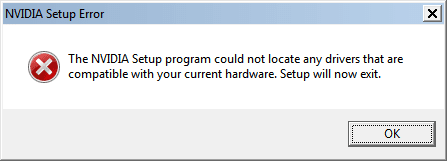
When installed from Windows, setup could not locate any drivers compatible with hardware.

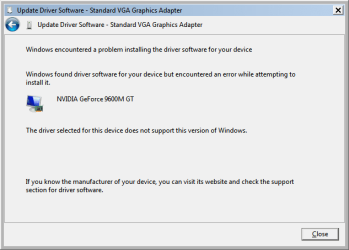
When installed from safe mode (using have disk) selected driver does not support this version of Windows.
 

Attachments

  • error#1.png
    error#1.png
    3.4 KB · Views: 8
  • error#2.png
    error#2.png
    9.4 KB · Views: 684

My Computer My Computer

At a glance

Windows 7 64Core 2 Duo4GbNvidia 9800 GT
Computer Manufacturer/Model Number
Samsung R710
OS
Windows 7 64
CPU
Core 2 Duo
Memory
4Gb
Graphics Card(s)
Nvidia 9800 GT
Device manager. Right click the adapter. Update driver software. Browse. Let me pick. Have disk. Browse. Find the
nvsm.inf now and install like that.

This is in the .inf, meaning it should install for you (hopefully :D) -
[DEV_0648&SUBSYS_C520144D] NVIDIA GeForce 9600M GS
 

My Computer My Computer

At a glance

7600.20510 x86P4 550 3.4 GHz HT running at 3.5 GHzOCZ 2 GB(2x1GB) DDR400mHz running @ 414 mHzHIS Radeon HD 3850 IceQ 3 Turbo HDMI Dual DL-...
Computer Manufacturer/Model Number
self built
OS
7600.20510 x86
CPU
P4 550 3.4 GHz HT running at 3.5 GHz
Motherboard
MSI PM8M3-V (MS-7211 v1.x) Micro-ATX mainboard
Memory
OCZ 2 GB(2x1GB) DDR400mHz running @ 414 mHz
Graphics Card(s)
HIS Radeon HD 3850 IceQ 3 Turbo HDMI Dual DL-DVI AGP
Sound Card
MOTU Traveler firewire studio interface 192 kHz 24 bit
Monitor(s) Displays
22" widescreen Acer X223W LCD, 17" Compaq P75 CRT
Screen Resolution
1680x1050 and 1280x1024
Hard Drives
SATA I x2 WD, 400 GB and 120 GB, SATA 2 WD Caviar Black 1 TB
PSU
350W generic
Case
Cybertronpc, it glows blue
Cooling
stock cpu fan, Ice-Q 3 gpu and system, many case fans
Keyboard
Logitch Classical Keyboard 200
Mouse
Logitech Mediaplay cordless
Internet Speed
1792/448 kbits/sec
Other Info
SATA II PCI fake RAID adapter, 1 GB Readyboost, original ATI Remote Wonder (even works with WMC perfectly), Logitech Rumblepad 2 game controller x2
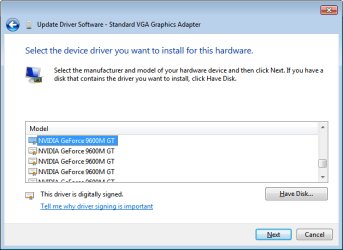
I have tried that and it is giving me 18 choices of my card under 'Select the device driver...', which one is which? The DEV_0649&SUBSYS_C520144D string shows up in the listing on the dl site but I can't detect it in the driver list.

Many thanks for your patience and help.
 

Attachments

  • error#3.png
    error#3.png
    10.7 KB · Views: 720

My Computer My Computer

At a glance

Windows 7 64Core 2 Duo4GbNvidia 9800 GT
Computer Manufacturer/Model Number
Samsung R710
OS
Windows 7 64
CPU
Core 2 Duo
Memory
4Gb
Graphics Card(s)
Nvidia 9800 GT
lol

You're welcome, not a problem.

Upload the nvsm.inf to Rapidshare and post a link. I don't have it any longer here.

I'll need to look at it again to advise, but my guess is right now, any will work. I'll let ya know my opinion when I see it again.
 

My Computer My Computer

At a glance

7600.20510 x86P4 550 3.4 GHz HT running at 3.5 GHzOCZ 2 GB(2x1GB) DDR400mHz running @ 414 mHzHIS Radeon HD 3850 IceQ 3 Turbo HDMI Dual DL-...
Computer Manufacturer/Model Number
self built
OS
7600.20510 x86
CPU
P4 550 3.4 GHz HT running at 3.5 GHz
Motherboard
MSI PM8M3-V (MS-7211 v1.x) Micro-ATX mainboard
Memory
OCZ 2 GB(2x1GB) DDR400mHz running @ 414 mHz
Graphics Card(s)
HIS Radeon HD 3850 IceQ 3 Turbo HDMI Dual DL-DVI AGP
Sound Card
MOTU Traveler firewire studio interface 192 kHz 24 bit
Monitor(s) Displays
22" widescreen Acer X223W LCD, 17" Compaq P75 CRT
Screen Resolution
1680x1050 and 1280x1024
Hard Drives
SATA I x2 WD, 400 GB and 120 GB, SATA 2 WD Caviar Black 1 TB
PSU
350W generic
Case
Cybertronpc, it glows blue
Cooling
stock cpu fan, Ice-Q 3 gpu and system, many case fans
Keyboard
Logitch Classical Keyboard 200
Mouse
Logitech Mediaplay cordless
Internet Speed
1792/448 kbits/sec
Other Info
SATA II PCI fake RAID adapter, 1 GB Readyboost, original ATI Remote Wonder (even works with WMC perfectly), Logitech Rumblepad 2 game controller x2
Hi again, I managed to get the driver install by searching for the DEV_0649&SUBSYS_C520144D string in the 'addional infs' folder. It was listed within nvsm.inf and nvsm_win7.inf, only nvsm_win7.inf loaded.

But I'm still getting the reboot, Win 7 doesn't like these drivers.

I think it must be a hardware issue somewhere.
 

My Computer My Computer

At a glance

Windows 7 64Core 2 Duo4GbNvidia 9800 GT
Computer Manufacturer/Model Number
Samsung R710
OS
Windows 7 64
CPU
Core 2 Duo
Memory
4Gb
Graphics Card(s)
Nvidia 9800 GT
Ok, this is now solved. 186.81 driver installed and reboot cleared.

I had to roll back to Vista, install latest BIOS firmware for my lappy and then custom install Win7 all over again. I have done this 3 times in last 48 hours so pretty used to it now :)

Much obliged for your help tg.
 

My Computer My Computer

At a glance

Windows 7 64Core 2 Duo4GbNvidia 9800 GT
Computer Manufacturer/Model Number
Samsung R710
OS
Windows 7 64
CPU
Core 2 Duo
Memory
4Gb
Graphics Card(s)
Nvidia 9800 GT
Back
Top