Contents of window not visible when moving it

BlackRaven

New member
Local time
4:13 PM
Messages
26
Location
Hungary
As stated in the thread title, whenever I attempt to reposition a window, the contents of the window (except its borders) are not visible on the screen until I finish moving it. I looked around in the Windows Control Panel but couldnt find anything related to moving windows. Can you guys help me please?


My Computer My Computer

At a glance

Windows 7 64 bitAMD Phenom II X3 720 @ X4 950 3200 MHzOCZ Reaper 2x2 GB @ 1600MHzASUS Radeon 5770
OS
Windows 7 64 bit
CPU
AMD Phenom II X3 720 @ X4 950 3200 MHz
Motherboard
Gigabyte GA-MA770T-UD3P
Memory
OCZ Reaper 2x2 GB @ 1600MHz
Graphics Card(s)
ASUS Radeon 5770
Monitor(s) Displays
Samsung 961BW 19"
Screen Resolution
1440*900@75Hz
Hard Drives
Samsung 750GB
Hitachi Deskstar T7K250 160GB
PSU
Corsair VX450W
Case
Coolermaster RC-690
Mouse
Logitech G5 Blue
Internet Speed
25 mbit down / 15 mbit up
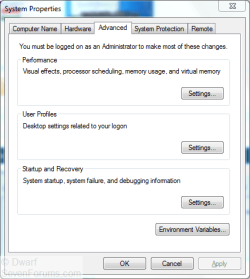
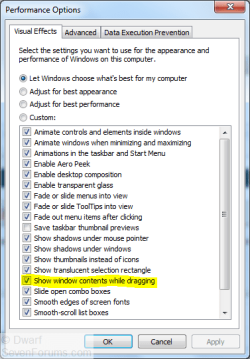
GoTo Start > R-click My Computer, select Properties, then Advanced system settings on the left. In the Performance box click the Settings button. Under the Visual Effects tab, make sure Show windows contents while dragging is ticked.

HTH
 

My Computer My Computer

At a glance

Win7 HP 64bit
OS
Win7 HP 64bit
Click Start, and type Advanced System Settings into the search box and press Enter/Return. You will need to provide administrative credentials. Select the Advanced tab.
Capture.PNG
Under Performance, click Settings... and select the Visual Effects tab.
Capture1.PNG
Check that the setting highlighted, Show window contents while dragging, is enabled (ticked) as shown above. Click OK twice to close the dialogue panels.
 

My Computer My Computer

At a glance

Windows 8.1 Pro RTM x64Intel Core-i5-3570K 4-core @ 3.4GHz (Ivy Brid...4 x 4GB DDR3-1600 Corsair Vengeance CMZ8GX3M2...MSI GeForce GTX770 Gaming OC 2GB
Computer type
PC/Desktop
Computer Manufacturer/Model Number
Dwarf Dwf/11/2012 r09/2013
OS
Windows 8.1 Pro RTM x64
CPU
Intel Core-i5-3570K 4-core @ 3.4GHz (Ivy Bridge) (OC 4.4GHz)
Motherboard
ASRock Z77 Extreme4-M
Memory
4 x 4GB DDR3-1600 Corsair Vengeance CMZ8GX3M2A1600C9B (16GB)
Graphics Card(s)
MSI GeForce GTX770 Gaming OC 2GB
Sound Card
Realtek High Definition on board solution (ALC 898)
Monitor(s) Displays
ViewSonic VA1912w Widescreen (VGA)
Screen Resolution
1440x900
Hard Drives
OCZ Agility 3 SSD 120GB SATA III x2 (RAID 0)
Samsung HD501LJ 500GB SATA II x2
Hitachi HDS721010CLA332 1TB SATA II
Iomega 1.5TB Ext USB 2.0
WD 2.0TB Ext USB 3.0
PSU
XFX Pro Series 850W Semi-Modular
Case
Gigabyte IF233
Cooling
1 x 120mm Front Inlet 1 x 120mm Rear Exhaust
Keyboard
Microsoft Comfort Curve Keyboard 3000 (USB)
Mouse
Microsoft Comfort Mouse 3000 for Business (USB)
Internet Speed
NetGear DG834Gv3 ADSL Modem/Router (Ethernet) ~4.0 Mb/s (O2)
Antivirus
Avast! 8.0.1497
Browser
IE 11
Other Info
Optical Drive: HL-DT-ST BD-RE BH10LS30 SATA Bluray
Lexmark S305 Printer/Scanner/Copier (USB)
WEI Score: 8.1/8.1/8.5/8.5/8.25
Asus Eee PC 1011PX Netbook (Windows 7 x86 Starter)
Wow, I actually checked that window, the option was ticked and I was only looking at the unticked boxes so I didnt notice it. I unticked it then ticked it again, saved the changes and everythings working fine now. Thanks!
 

My Computer My Computer

At a glance

Windows 7 64 bitAMD Phenom II X3 720 @ X4 950 3200 MHzOCZ Reaper 2x2 GB @ 1600MHzASUS Radeon 5770
OS
Windows 7 64 bit
CPU
AMD Phenom II X3 720 @ X4 950 3200 MHz
Motherboard
Gigabyte GA-MA770T-UD3P
Memory
OCZ Reaper 2x2 GB @ 1600MHz
Graphics Card(s)
ASUS Radeon 5770
Monitor(s) Displays
Samsung 961BW 19"
Screen Resolution
1440*900@75Hz
Hard Drives
Samsung 750GB
Hitachi Deskstar T7K250 160GB
PSU
Corsair VX450W
Case
Coolermaster RC-690
Mouse
Logitech G5 Blue
Internet Speed
25 mbit down / 15 mbit up
You're welcome. Sometimes an option doesn't work for some unknown reason even if it is enabled (ticked). One way of resetting it is to uncheck and then recheck the option. This corrects the information in the registry.
 

My Computer My Computer

At a glance

Windows 8.1 Pro RTM x64Intel Core-i5-3570K 4-core @ 3.4GHz (Ivy Brid...4 x 4GB DDR3-1600 Corsair Vengeance CMZ8GX3M2...MSI GeForce GTX770 Gaming OC 2GB
Computer type
PC/Desktop
Computer Manufacturer/Model Number
Dwarf Dwf/11/2012 r09/2013
OS
Windows 8.1 Pro RTM x64
CPU
Intel Core-i5-3570K 4-core @ 3.4GHz (Ivy Bridge) (OC 4.4GHz)
Motherboard
ASRock Z77 Extreme4-M
Memory
4 x 4GB DDR3-1600 Corsair Vengeance CMZ8GX3M2A1600C9B (16GB)
Graphics Card(s)
MSI GeForce GTX770 Gaming OC 2GB
Sound Card
Realtek High Definition on board solution (ALC 898)
Monitor(s) Displays
ViewSonic VA1912w Widescreen (VGA)
Screen Resolution
1440x900
Hard Drives
OCZ Agility 3 SSD 120GB SATA III x2 (RAID 0)
Samsung HD501LJ 500GB SATA II x2
Hitachi HDS721010CLA332 1TB SATA II
Iomega 1.5TB Ext USB 2.0
WD 2.0TB Ext USB 3.0
PSU
XFX Pro Series 850W Semi-Modular
Case
Gigabyte IF233
Cooling
1 x 120mm Front Inlet 1 x 120mm Rear Exhaust
Keyboard
Microsoft Comfort Curve Keyboard 3000 (USB)
Mouse
Microsoft Comfort Mouse 3000 for Business (USB)
Internet Speed
NetGear DG834Gv3 ADSL Modem/Router (Ethernet) ~4.0 Mb/s (O2)
Antivirus
Avast! 8.0.1497
Browser
IE 11
Other Info
Optical Drive: HL-DT-ST BD-RE BH10LS30 SATA Bluray
Lexmark S305 Printer/Scanner/Copier (USB)
WEI Score: 8.1/8.1/8.5/8.5/8.25
Asus Eee PC 1011PX Netbook (Windows 7 x86 Starter)
what if the same problem keeps re accuring? random! :S
I have the same problem and once in a while it keeps re-accuring :S
 
Last edited:

My Computer My Computer

At a glance

Windows 7 Ultimate x64
Computer Manufacturer/Model Number
hp
OS
Windows 7 Ultimate x64
Back
Top