Solved Context Menu Add Play with Foobar Option!

Digital7

New member
Member
VIP
Local time
4:50 AM
Messages
86
Location
USA
Hello folks,
I need little help with this question, I want to add when i right click anywhere on folder or file option to open file/folder with foobar player.. i want that option anytime i right click....ANYWHERE...

also same thing for Photoshop/notepad/excel options as well...

Thanks for any help i looked @ couple of tutorials but nothing shows exactly what i want!

Thanks:o
 

My Computer My Computer

Computer Manufacturer/Model Number
AlienWare GodFatheriZed!
OS
WIN 7 x64
CPU
I7 550
Memory
8 GB DDR3
Graphics Card(s)
9800 GTX Turbo Dual
Monitor(s) Displays
21" Samsung True Colors HD + 25 SYNC Master
Screen Resolution
1680*1050
Hard Drives
Total 1.5 TB

My Computer My Computer

Computer Manufacturer/Model Number
Vostro
OS
Windows 7 Ultimate (SP1)
CPU
AMD Sempron 3600+
Graphics Card(s)
ATI Radeon Xpress 1150
Screen Resolution
1200 x 800
Hard Drives
WD Scorpio Blue 500 GB
DId try it but didnot work
 

My Computer My Computer

Computer Manufacturer/Model Number
AlienWare GodFatheriZed!
OS
WIN 7 x64
CPU
I7 550
Memory
8 GB DDR3
Graphics Card(s)
9800 GTX Turbo Dual
Monitor(s) Displays
21" Samsung True Colors HD + 25 SYNC Master
Screen Resolution
1680*1050
Hard Drives
Total 1.5 TB
FileMenu Tools is a third party application that allows you to customize the context Menu of Windows Explorer. It lets you:
  • Add some built-in utilities that perform operations on files and folders.
  • Add customized commands which run external applications, copy or move to a specific folder, or delete specific file types.
  • Configure the "Send to..." sub-menu.
  • Enable or disable commands which are added by other applications to the context menu.
Also, take a look at this tutorial that won't give you the exact command you're looking for, but may provide some clues as to how to set it:
Customize the Right Click Menu in Windows 7 - Make Tech Easier
 

My Computer My Computer

Computer Manufacturer/Model Number
HP Pavillion dv5t (generation 1)
OS
Vista 64 bit and 32 bit (SP2)
CPU
Intel(R) Core(TM)2 Duo Processor T9400 (2.53 GHz
Memory
4GB DDR2 System Memory (2 Dimm)
Graphics Card(s)
512 MB NVIDIA GeForce 9600M GT
Monitor(s) Displays
15.4" diagonal WSXGA+ High-Definition HP BrightView Widescre
Screen Resolution
1680 x 1050
Hard Drives
320GB 5400RPM SATA Hard Drive with HP ProtectSmart Hard Drive Protection
Keyboard
Built-in HP
Mouse
Built in - Synaptics TouchPad V6.5 on PS/2 Port
Internet Speed
Max
Other Info
~ Intel Next-Gen Wireless-N Mini-card w/Bluetooth ~ Blu-Ray ROM DVD+/-R/RW ~ Integ. HDTV Hybrid Tuner ~ 12 Cell Battery ~ MS Office (Home Premium) 2007 ~
yes i want to have something like command or reg-edit trick if someone can make little walk through would be gr8...so i can apply this to all my question then another SOFTWARE...

thanks
 

My Computer My Computer

Computer Manufacturer/Model Number
AlienWare GodFatheriZed!
OS
WIN 7 x64
CPU
I7 550
Memory
8 GB DDR3
Graphics Card(s)
9800 GTX Turbo Dual
Monitor(s) Displays
21" Samsung True Colors HD + 25 SYNC Master
Screen Resolution
1680*1050
Hard Drives
Total 1.5 TB
I'm just about to make a new entry for one of my editors so I'll just write it up

Make sure your registry is backed up !! I never had any problems but you never know Murphy is real ;)

OK..here goes
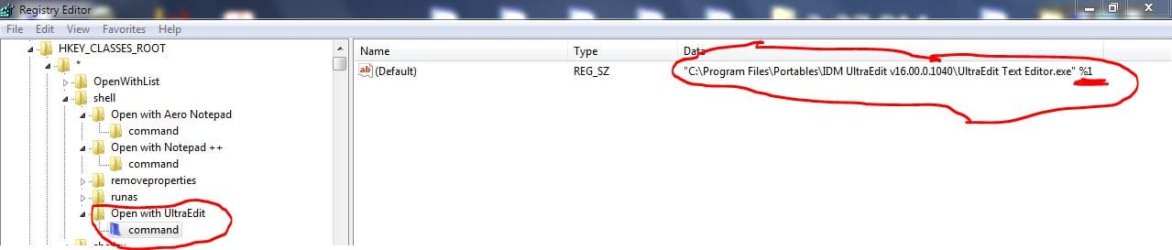
Start regedit as Admin and go to

HKEY_CLASSES_ROOT\*\shell

Right click on shell and create a new key. Name it something useful like "Open with Foobar" (I use UltraEdit here)

Now right click on the just created key and create a new key under that one, which has to be named command
Now with command the active key, go to the right window, double click Default and give it the path to your program after that a space and %1

Now you can right click on any file type and have the option you want.
Capture.JPG

Capture.1JPG.JPG
 

My Computer My Computer

Computer Manufacturer/Model Number
HP m8000n
OS
Windows 7 Ultimate x86
CPU
DualCore AMD Athlon 64 X2, 2600 MHz 5200+
Motherboard
Asus M2N68-LA (Narra)
Memory
Samsung 2GB DDR2
Graphics Card(s)
Onboard NVIDIA GeForce 6150SE nForce 430
Sound Card
Onboard nVIDIA nForce 6100-430 (MCP61P)
Monitor(s) Displays
Westinghouse 19" LED
Screen Resolution
1280x1024
Hard Drives
SATA II Seagate Barracuda 500GB
USB II WD Elements 500GB
USB II WD My Book 1TB
USB II WD My Book 2TB
PSU
Stock (HP)
Case
Stock (HP)
Cooling
Stock
Keyboard
Logitech Classic KB 200
Mouse
Standard HP opticle USB mouse
question on the path...i have x64 system and i have created the folder here in regedit...

HKEY_CLASSES_ROOT\Directory\Background\shell\

is that correct..? here's picture for it
 

My Computer My Computer

Computer Manufacturer/Model Number
AlienWare GodFatheriZed!
OS
WIN 7 x64
CPU
I7 550
Memory
8 GB DDR3
Graphics Card(s)
9800 GTX Turbo Dual
Monitor(s) Displays
21" Samsung True Colors HD + 25 SYNC Master
Screen Resolution
1680*1050
Hard Drives
Total 1.5 TB
Does it work ??? (i don't have a 64 Bit system right now so I'm not too sure about the differences in the registry but this is basic stuff the should be identical for all versions of Se7en and Vista
Of course there is always more than one way to skin a cat.
I create mine always in
HKEY_CLASSES_ROOT\*\shell like my picture showed

Capture.JPG


If your method works, stick with it, if not...try mine :D
Of course you know if you right click on any file, foobar can't handle don't expect anything useful to come from that. I used this method for my editors since they can handle whatever I throw at them. Like UE can open EXE/DLLs etc like a HEX editor in case I have to "hard core" patch.

-DG
 

My Computer My Computer

Computer Manufacturer/Model Number
HP m8000n
OS
Windows 7 Ultimate x86
CPU
DualCore AMD Athlon 64 X2, 2600 MHz 5200+
Motherboard
Asus M2N68-LA (Narra)
Memory
Samsung 2GB DDR2
Graphics Card(s)
Onboard NVIDIA GeForce 6150SE nForce 430
Sound Card
Onboard nVIDIA nForce 6100-430 (MCP61P)
Monitor(s) Displays
Westinghouse 19" LED
Screen Resolution
1280x1024
Hard Drives
SATA II Seagate Barracuda 500GB
USB II WD Elements 500GB
USB II WD My Book 1TB
USB II WD My Book 2TB
PSU
Stock (HP)
Case
Stock (HP)
Cooling
Stock
Keyboard
Logitech Classic KB 200
Mouse
Standard HP opticle USB mouse
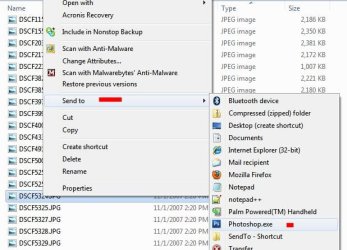
You could always place a shortcut in the 'Send To' folder, which will show up in the Send To fly out menu (in the right click context menu):

C:\Users\USER NAME\AppData\Roaming\Microsoft\Windows\SendTo

Send To Item.JPG

James
 

My Computer My Computer

OS
Win7U 64 RTM
CPU
Q9550
Motherboard
GA-EP45-UD3R
Memory
8GB Gskill
Graphics Card(s)
ASUS|EAH4850/HTDI/1GD3/A
Sound Card
xfi Plat
Monitor(s) Displays
Dell 2405fpw
Screen Resolution
1920x1200
Hard Drives
Seagate & WD sata Drives
PSU
Antec
Case
Antec
Keyboard
MS Natural Ergonomic 4000
Mouse
Logitech MX610 USB Cordless
You could always place a shortcut in the 'Send To' folder, which will show up in the Send To fly out menu (in the right click context menu):

C:\Users\USER NAME\AppData\Roaming\Microsoft\Windows\SendTo

View attachment 133355

James

This works like charm and the software works too thanks guys for all the help!
 

My Computer My Computer

Computer Manufacturer/Model Number
AlienWare GodFatheriZed!
OS
WIN 7 x64
CPU
I7 550
Memory
8 GB DDR3
Graphics Card(s)
9800 GTX Turbo Dual
Monitor(s) Displays
21" Samsung True Colors HD + 25 SYNC Master
Screen Resolution
1680*1050
Hard Drives
Total 1.5 TB
You could always place a shortcut in the 'Send To' folder, which will show up in the Send To fly out menu (in the right click context menu):

C:\Users\USER NAME\AppData\Roaming\Microsoft\Windows\SendTo

View attachment 133355

James

FTW! For the win! This has helped me so much. Thank you kindly~
 

My Computer My Computer

Computer Manufacturer/Model Number
HP
OS
64x - Windows 7 Home Premium
You can set this up in foobar preferences without any bother: On "Shell Integration": tick "Folder context menus" and you see "Play in foobar" in the folder context menu. Tick "Register supported file formats on startup" and all the filetypes that foobar supports will show "Play in foobar" in file context menu. If you only want specific filetypes, untick the "Register...." box, click on "Manage filetype associations" and then tick the selected filetypes you want.
 

My Computer My Computer

OS
Windows 7
Thanks for pointing that out!!
+1
It only makes sense to have it in the preferences. I just couldn't figure out why so many people were missing that feature.
I don't use foobar so all I could suggest was a generic approach.

-DG
 

My Computer My Computer

Computer Manufacturer/Model Number
HP m8000n
OS
Windows 7 Ultimate x86
CPU
DualCore AMD Athlon 64 X2, 2600 MHz 5200+
Motherboard
Asus M2N68-LA (Narra)
Memory
Samsung 2GB DDR2
Graphics Card(s)
Onboard NVIDIA GeForce 6150SE nForce 430
Sound Card
Onboard nVIDIA nForce 6100-430 (MCP61P)
Monitor(s) Displays
Westinghouse 19" LED
Screen Resolution
1280x1024
Hard Drives
SATA II Seagate Barracuda 500GB
USB II WD Elements 500GB
USB II WD My Book 1TB
USB II WD My Book 2TB
PSU
Stock (HP)
Case
Stock (HP)
Cooling
Stock
Keyboard
Logitech Classic KB 200
Mouse
Standard HP opticle USB mouse
I just couldn't figure out why so many people were missing that feature.

Some media players hold on to file associations very aggressively, so if you're using several players it might seem like your settings in sensible players like foobar don't work. Also, if you use shark007 codec's recommended settings, WMP gets all the associations; it might be keeping them there until you go in and untick that box. (not sure about that 'cause WMP is gathering dust in my setup.)
 

My Computer My Computer

OS
Windows 7
Back
Top