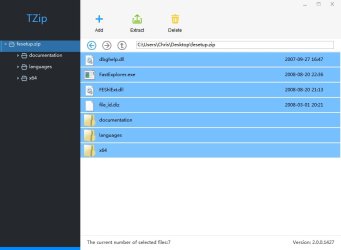
I've been looking for a 7-zip replacement for a while. I've also tried the alpha.
Problem: After extracting files, folders that were unzipped remain locked and require restarting explorer in order to unlock them. Until then they can't be deleted, copied, moved or renamed.
Disabling 7-zip context menu solves the issue but that's not ideal. I've tried a few other programs to replace 7-zip including Peazip but finally settled on Tzip. (It's blocked from connecting to the internet by my firewall).
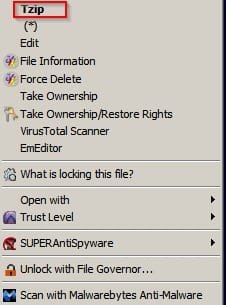
However there's still a problem with the right click context menu. It displays in Chinese. The GUI and everything else displays in English. I'd like to keep Tzip as it seems to work well but I'd prefer an English context menu.
Context Menu:
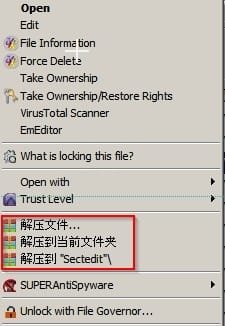
I've searched the registry for context menu handlers and found them but can't find any text to change.
I've used Process Hacker to edit Tzip's contextmenu64.dll but again there's no text displayed that can be changed.
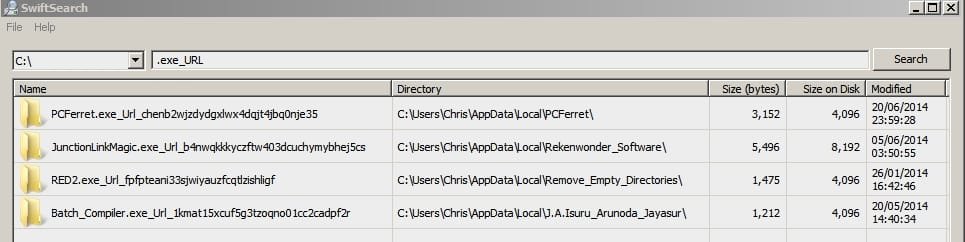
I've used a tool to examine both Tzip's executable and contextmenu64.dll and here's the strange thing. Using the search utility in that tool I can find what I'm looking for but I can't pinpoint it.
If anyone has any ideas I'd appreciate it!
Here's what I find in contextmenu64.dll but how to get it displayed in the context menu?
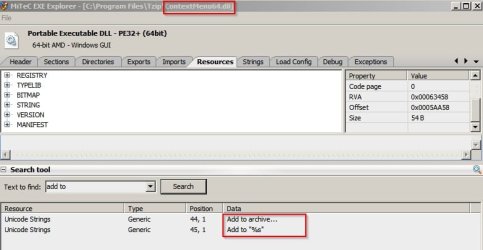
and
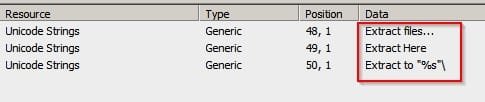

Problem: After extracting files, folders that were unzipped remain locked and require restarting explorer in order to unlock them. Until then they can't be deleted, copied, moved or renamed.
Disabling 7-zip context menu solves the issue but that's not ideal. I've tried a few other programs to replace 7-zip including Peazip but finally settled on Tzip. (It's blocked from connecting to the internet by my firewall).
However there's still a problem with the right click context menu. It displays in Chinese. The GUI and everything else displays in English. I'd like to keep Tzip as it seems to work well but I'd prefer an English context menu.
Context Menu:
I've searched the registry for context menu handlers and found them but can't find any text to change.
I've used Process Hacker to edit Tzip's contextmenu64.dll but again there's no text displayed that can be changed.
I've used a tool to examine both Tzip's executable and contextmenu64.dll and here's the strange thing. Using the search utility in that tool I can find what I'm looking for but I can't pinpoint it.
If anyone has any ideas I'd appreciate it!
Here's what I find in contextmenu64.dll but how to get it displayed in the context menu?
and
My Computer
- Computer type
- Laptop
- Computer Manufacturer/Model Number
- ASUS
- OS
- Microsoft Windows 7 Home Premium 64-bit 7601 Multiprocessor Free Service Pack 1
- CPU
- AMD C-60 APU with Radeon(tm) HD Graphics
- Motherboard
- ASUSTeK COMPUTER INC. X501U
- Memory
- 4.00 GB
- Graphics Card(s)
- AMD Radeon HD 6290 Graphics
- Sound Card
- (1) AMD High Definition Audio Device (2) Realtek High Defi
- Screen Resolution
- 1366 x 768 x 32 bits (4294967296 colors) @ 60 Hz
- Hard Drives
- Hitachi HTS545050A7E380 SATA Disk Device
- Antivirus
- Comodo CIS & FW, SecureAplus App Whitelisting, Threatfire
- Browser
- Cyberfox 64bit, Opera 64bit, Airfox
- Other Info
- Spy-The-Spy, HitmanPro.Alert, Norton Connect Safe, MJRegWatcher, BitDefender TrafficLight, Voodoo Shield, Zemana AntiMalware