Solved Context Menu problem

Callender

New member
Guru
Gold Member
VIP
Local time
10:27 AM
Messages
4,776
Location
United Kingdom
I've been looking for a 7-zip replacement for a while. I've also tried the alpha.

Problem: After extracting files, folders that were unzipped remain locked and require restarting explorer in order to unlock them. Until then they can't be deleted, copied, moved or renamed.

Disabling 7-zip context menu solves the issue but that's not ideal. I've tried a few other programs to replace 7-zip including Peazip but finally settled on Tzip. (It's blocked from connecting to the internet by my firewall).

However there's still a problem with the right click context menu. It displays in Chinese. The GUI and everything else displays in English. I'd like to keep Tzip as it seems to work well but I'd prefer an English context menu.

Context Menu:
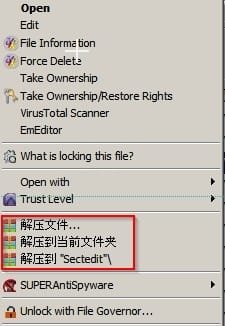
Tzip.jpg

I've searched the registry for context menu handlers and found them but can't find any text to change.

I've used Process Hacker to edit Tzip's contextmenu64.dll but again there's no text displayed that can be changed.

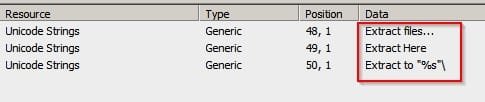
I've used a tool to examine both Tzip's executable and contextmenu64.dll and here's the strange thing. Using the search utility in that tool I can find what I'm looking for but I can't pinpoint it.

If anyone has any ideas I'd appreciate it!

Here's what I find in contextmenu64.dll but how to get it displayed in the context menu?
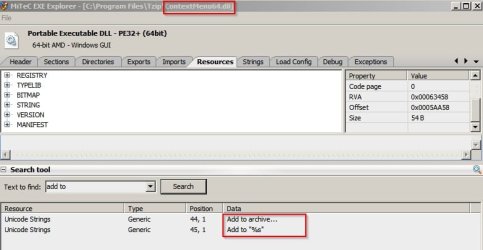
Tzip_ContextMenu64 1.jpg

and

Tzip_ContextMenu64 2.jpg

Tzip_ContextMenu64 3.jpg
 

My Computer

Computer type
Laptop
Computer Manufacturer/Model Number
ASUS
OS
Microsoft Windows 7 Home Premium 64-bit 7601 Multiprocessor Free Service Pack 1
CPU
AMD C-60 APU with Radeon(tm) HD Graphics
Motherboard
ASUSTeK COMPUTER INC. X501U
Memory
4.00 GB
Graphics Card(s)
AMD Radeon HD 6290 Graphics
Sound Card
(1) AMD High Definition Audio Device (2) Realtek High Defi
Screen Resolution
1366 x 768 x 32 bits (4294967296 colors) @ 60 Hz
Hard Drives
Hitachi HTS545050A7E380 SATA Disk Device
Antivirus
Comodo CIS & FW, SecureAplus App Whitelisting, Threatfire
Browser
Cyberfox 64bit, Opera 64bit, Airfox
Other Info
Spy-The-Spy, HitmanPro.Alert, Norton Connect Safe, MJRegWatcher, BitDefender TrafficLight, Voodoo Shield, Zemana AntiMalware
I've been using 7-zip since early XP days and never had the problem you are seeing. Maybe you could use ShellExView with 7-zip installed to see what is causing the problem and disable just that part?

Maybe it's interaction with some other context hook?
 

My Computer

Computer type
PC/Desktop
Computer Manufacturer/Model Number
Lenovo IdeaCenter 450
OS
Windows 10 Pro X64
CPU
Intel Quad Core i7-4770 @ 3.4Ghz
Memory
16.0GB PC3-12800 DDR3 SDRAM 1600 MHz
Graphics Card(s)
Intel Integrated HD Graphics
Sound Card
Realtek HD Audio
Monitor(s) Displays
HP 22" LCD
Screen Resolution
1680 x 1050
Hard Drives
250GB Samsung EVO SATA-3 SSD
2TB Seagate ST2000DM001 SATA-2
1.5TB Seagate ST3150041AS SATA
Keyboard
Dell USB
Mouse
Lenovo USB
Internet Speed
Cable via Road Runner 3MB Upload, 30MB Download
Antivirus
Windows Defender, MBAM Pro, MBAE
Browser
Seamonkey
Other Info
UEFI/GPT
PLDS DVD-RW DH16AERSH
Shell Extensions

I've been using 7-zip since early XP days and never had the problem you are seeing. Maybe you could use ShellExView with 7-zip installed to see what is causing the problem and disable just that part?

Maybe it's interaction with some other context hook?

Well I reckon you're 100% correct. I've already tried a few things:

Removed any software that I no longer use that installed any shell extension.

Checked for and installed any available updates for what was left.

Disabled any shell extension that I don't use on a regular basis.

Full removal and reinstall of 7-zip.

It seems that 7-zip hasn't been updated in quite some time. Maybe a 7-zip update would fix it!
 

My Computer

Computer type
Laptop
Computer Manufacturer/Model Number
ASUS
OS
Microsoft Windows 7 Home Premium 64-bit 7601 Multiprocessor Free Service Pack 1
CPU
AMD C-60 APU with Radeon(tm) HD Graphics
Motherboard
ASUSTeK COMPUTER INC. X501U
Memory
4.00 GB
Graphics Card(s)
AMD Radeon HD 6290 Graphics
Sound Card
(1) AMD High Definition Audio Device (2) Realtek High Defi
Screen Resolution
1366 x 768 x 32 bits (4294967296 colors) @ 60 Hz
Hard Drives
Hitachi HTS545050A7E380 SATA Disk Device
Antivirus
Comodo CIS & FW, SecureAplus App Whitelisting, Threatfire
Browser
Cyberfox 64bit, Opera 64bit, Airfox
Other Info
Spy-The-Spy, HitmanPro.Alert, Norton Connect Safe, MJRegWatcher, BitDefender TrafficLight, Voodoo Shield, Zemana AntiMalware
I see there is a 7.34 Alpha version. I'm using 7.25 Alpha on Win 8 Pro X64, Win 7 Pro X64 and Win 8 Pro X86.
 

My Computer

Computer type
PC/Desktop
Computer Manufacturer/Model Number
Lenovo IdeaCenter 450
OS
Windows 10 Pro X64
CPU
Intel Quad Core i7-4770 @ 3.4Ghz
Memory
16.0GB PC3-12800 DDR3 SDRAM 1600 MHz
Graphics Card(s)
Intel Integrated HD Graphics
Sound Card
Realtek HD Audio
Monitor(s) Displays
HP 22" LCD
Screen Resolution
1680 x 1050
Hard Drives
250GB Samsung EVO SATA-3 SSD
2TB Seagate ST2000DM001 SATA-2
1.5TB Seagate ST3150041AS SATA
Keyboard
Dell USB
Mouse
Lenovo USB
Internet Speed
Cable via Road Runner 3MB Upload, 30MB Download
Antivirus
Windows Defender, MBAM Pro, MBAE
Browser
Seamonkey
Other Info
UEFI/GPT
PLDS DVD-RW DH16AERSH
Also found a 7.30 Alpha which I just installed. Will see how that behaves.
 

My Computer

Computer type
PC/Desktop
Computer Manufacturer/Model Number
Lenovo IdeaCenter 450
OS
Windows 10 Pro X64
CPU
Intel Quad Core i7-4770 @ 3.4Ghz
Memory
16.0GB PC3-12800 DDR3 SDRAM 1600 MHz
Graphics Card(s)
Intel Integrated HD Graphics
Sound Card
Realtek HD Audio
Monitor(s) Displays
HP 22" LCD
Screen Resolution
1680 x 1050
Hard Drives
250GB Samsung EVO SATA-3 SSD
2TB Seagate ST2000DM001 SATA-2
1.5TB Seagate ST3150041AS SATA
Keyboard
Dell USB
Mouse
Lenovo USB
Internet Speed
Cable via Road Runner 3MB Upload, 30MB Download
Antivirus
Windows Defender, MBAM Pro, MBAE
Browser
Seamonkey
Other Info
UEFI/GPT
PLDS DVD-RW DH16AERSH
7-zip alpha

Thanks I only tried one alpha version when I found the regular version had this problem. Like you say - I reckon it's a conflict somewhere or other. I'll try both alpha versions (not at the same time) as I don't actually remember which one I installed!
 

My Computer

Computer type
Laptop
Computer Manufacturer/Model Number
ASUS
OS
Microsoft Windows 7 Home Premium 64-bit 7601 Multiprocessor Free Service Pack 1
CPU
AMD C-60 APU with Radeon(tm) HD Graphics
Motherboard
ASUSTeK COMPUTER INC. X501U
Memory
4.00 GB
Graphics Card(s)
AMD Radeon HD 6290 Graphics
Sound Card
(1) AMD High Definition Audio Device (2) Realtek High Defi
Screen Resolution
1366 x 768 x 32 bits (4294967296 colors) @ 60 Hz
Hard Drives
Hitachi HTS545050A7E380 SATA Disk Device
Antivirus
Comodo CIS & FW, SecureAplus App Whitelisting, Threatfire
Browser
Cyberfox 64bit, Opera 64bit, Airfox
Other Info
Spy-The-Spy, HitmanPro.Alert, Norton Connect Safe, MJRegWatcher, BitDefender TrafficLight, Voodoo Shield, Zemana AntiMalware
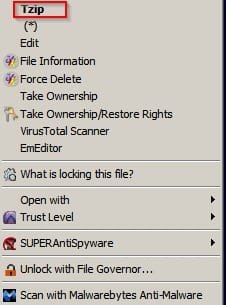
Solved - kind of

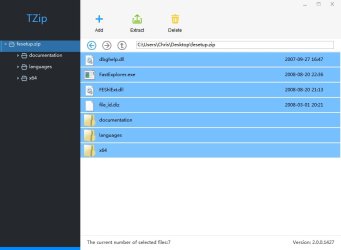
Well I tried both 7-zip Alpha versions and still experienced the same problem. For now I've decided to stick with Tzip but rather than see Chinese characters displayed in the context menu I deleted it's shell extension and created a new right click context menu entry to open files in the program's GUI.

Tzip2.jpg

Tzip3.jpg
 

My Computer

Computer type
Laptop
Computer Manufacturer/Model Number
ASUS
OS
Microsoft Windows 7 Home Premium 64-bit 7601 Multiprocessor Free Service Pack 1
CPU
AMD C-60 APU with Radeon(tm) HD Graphics
Motherboard
ASUSTeK COMPUTER INC. X501U
Memory
4.00 GB
Graphics Card(s)
AMD Radeon HD 6290 Graphics
Sound Card
(1) AMD High Definition Audio Device (2) Realtek High Defi
Screen Resolution
1366 x 768 x 32 bits (4294967296 colors) @ 60 Hz
Hard Drives
Hitachi HTS545050A7E380 SATA Disk Device
Antivirus
Comodo CIS & FW, SecureAplus App Whitelisting, Threatfire
Browser
Cyberfox 64bit, Opera 64bit, Airfox
Other Info
Spy-The-Spy, HitmanPro.Alert, Norton Connect Safe, MJRegWatcher, BitDefender TrafficLight, Voodoo Shield, Zemana AntiMalware
You have a lot of context entries I don't recognize. It's quite possible one or more of them is the actual cause of the problem.

What is File Governor?

Try creeating a new Administrator level account and see if 7-zip causes problems there.
 

My Computer

Computer type
PC/Desktop
Computer Manufacturer/Model Number
Lenovo IdeaCenter 450
OS
Windows 10 Pro X64
CPU
Intel Quad Core i7-4770 @ 3.4Ghz
Memory
16.0GB PC3-12800 DDR3 SDRAM 1600 MHz
Graphics Card(s)
Intel Integrated HD Graphics
Sound Card
Realtek HD Audio
Monitor(s) Displays
HP 22" LCD
Screen Resolution
1680 x 1050
Hard Drives
250GB Samsung EVO SATA-3 SSD
2TB Seagate ST2000DM001 SATA-2
1.5TB Seagate ST3150041AS SATA
Keyboard
Dell USB
Mouse
Lenovo USB
Internet Speed
Cable via Road Runner 3MB Upload, 30MB Download
Antivirus
Windows Defender, MBAM Pro, MBAE
Browser
Seamonkey
Other Info
UEFI/GPT
PLDS DVD-RW DH16AERSH
I have 7-Zip 9.22 (64 bit) installed and I haven't noticed any issues, although I normally use IZArc.
 

My Computer

Computer type
PC/Desktop
Computer Manufacturer/Model Number
n/a
OS
W7 Ultimate SP1, LM19.2 MATE, W10 Home 1703, W10 Pro 1703 VM, #All 64 bit
CPU
AMD Phenom II x6 1100T, 3.3 GHz
Motherboard
ASUS M4A88T-M/USB3 (AM3)
Memory
12GB DDR3 1333 G-Skill (4GB x 2), G-Skill (2GB x 2)
Graphics Card(s)
NVIDIA GeForce GTX 660
Sound Card
Realtek?
Monitor(s) Displays
Samsung S23B350
Screen Resolution
1920x1080
Hard Drives
WD Green 2TB (SATA), WD Green 3TB (SATA), WD Blue 4TB (SATA), WD Blue 6TB (SATA)
PSU
Cooler Master
Case
Antec GX300 Tower
Cooling
3x Antec TRICOOL 120mm Fans
Mouse
Wired Optical
Internet Speed
DSL
Antivirus
Avast
Browser
Pale Moon (64 bit)
Other Info
2018-12-27 Upgraded HDDs
2015-12-10 Upgraded case, graphics card, storage
2015-08-15 Upgraded motherboard & RAM
2015-07-15 Upgraded LM17.1 to LM17.2
File Governor

You have a lot of context entries I don't recognize. It's quite possible one or more of them is the actual cause of the problem.

What is File Governor?

Try creating a new Administrator level account and see if 7-zip causes problems there.

File Governor is like a more advanced version of LockHunter. I like it because it can scan all files in a folder or all folders and files in a directory.

NoVirusThanks File Governor: Unlock locked files and folders


Current file and folder context menu entries:

Code:
<FileContextMenu> | edit | C:\Windows\system32\notepad.exe | Notepad | F2C7BB8ACC97F92E987A2D4087D021B1 | Signed :  Microsoft Corporation

<FileContextMenu> | File Information | C:\Program Files\UVK - Ultra Virus Killer\UVK_en.exe | Ultra Virus Killer | 8465CF8686EEBFBDE54203CDD8548B8B | Signed :  Carifred

<FileContextMenu> | Force Delete | C:\Program Files\UVK - Ultra Virus Killer\UVK_en.exe | Ultra Virus Killer | 8465CF8686EEBFBDE54203CDD8548B8B | Signed :  Carifred

<FileContextMenu> | removeproperties | C:\Windows\system32\shell32.dll | Windows Shell Common Dll | AE57F6C7AB3ED244B5F14151C4EA0057 | Signed :  Microsoft Corporation

<FileContextMenu> | runas | C:\Windows\system32\takeown.exe | Takes ownership of a file | 53F4BCD594CC2A791E16246AED525B6D | Signed :  Microsoft Corporation

<FileContextMenu> | TakeOwnerShipEx | C:\Program Files (x86)\TakeOwnershipEx\TakeOwnershipEx.exe | TakeOwnershipEx | AA6964CF7CE6212808C5A117019F023F | Unsigned :  http://winaero.com

<FileContextMenu> | VirusTotal Scanner | C:\Program Files (x86)\SecurityXploded\VirusTotalScanner\VirusTotalScanner.exe | Desktop Tool to Perform Quick Anti-virus Scan using VirusTotal | 7C783AD72CAD7D178214D6B9D930DD5A | Unsigned :  SecurityXploded

<FileContextMenu> | BriefcaseMenu | C:\Windows\system32\syncui.dll | Windows Briefcase | A10B048B681C38E26CA90CD1BC123604 | Signed :  Microsoft Corporation

<FileContextMenu> | EmEditor | C:\Program Files\EmEditor\emedshl64.dll | EmEditor Context Menu | 6A25C383BC6804933F5F7A3B4D9781CF | Signed :  Emurasoft, Inc.

<FileContextMenu> | LockHunterShellExt | C:\Program Files\LockHunter\LHShellExt64.dll | LockHunter Explorer Extension | 579AD392C231FDDD39E5792D7DCDA77A | Signed :  Crystal Rich Ltd

<FileContextMenu> | Open With | C:\Windows\system32\shell32.dll | Windows Shell Common Dll | AE57F6C7AB3ED244B5F14151C4EA0057 | Signed :  Microsoft Corporation

<FileContextMenu> | Open With EncryptionMenu | C:\Windows\system32\shell32.dll | Windows Shell Common Dll | AE57F6C7AB3ED244B5F14151C4EA0057 | Signed :  Microsoft Corporation

<FileContextMenu> | PuranDefrag |  | No description | Hash error: File not found | Unsigned :  No publisher

<FileContextMenu> | SATrustCtxMenuExt | C:\Program Files\SecureAge\Whitelist\SATrustCtx.dll | Application Whitelisting context menu | 5772933CFF7B8600681911E351D7D2FF | Signed :  SecureAge Technology Pte. Ltd.

<FileContextMenu> | Sharing | C:\Windows\system32\ntshrui.dll | Shell extensions for sharing | 037A719DAD50603202C978CD802623E4 | Signed :  Microsoft Corporation

<FileContextMenu> | {90AA3A4E-1CBA-4233-B8BB-535773D48449} | C:\Windows\system32\shell32.dll | Windows Shell Common Dll | AE57F6C7AB3ED244B5F14151C4EA0057 | Signed :  Microsoft Corporation

<FileContextMenu> | {a2a9545d-a0c2-42b4-9708-a0b2badd77c8} | C:\Windows\system32\shell32.dll | Windows Shell Common Dll | AE57F6C7AB3ED244B5F14151C4EA0057 | Signed :  Microsoft Corporation

<FileContextMenu> | {CA8ACAFA-5FBB-467B-B348-90DD488DE003} | C:\Program Files\SUPERAntiSpyware\SASCTXMN64.DLL | SUPERAntiSpyware Context Menu Extension | 2640B083BB33CC6095CB0E6E2F8ACC98 | Signed :  SUPERAntiSpyware.com

<FileContextMenu> | CopyAsPathMenu | C:\Windows\system32\shell32.dll | Windows Shell Common Dll | AE57F6C7AB3ED244B5F14151C4EA0057 | Signed :  Microsoft Corporation

<FileContextMenu> | FG_CTX | C:\PROGRA~1\NoVirusThanks\File Governor\FG_SHLEXT.dll | No description | 5320E5DFEE8A0D7BE8F91232167D6A10 | Signed :  No publisher

<FileContextMenu> | MBAMShlExt | C:\Program Files (x86)\Malwarebytes' Anti-Malware\mbamext.dll | Malwarebytes Anti-Malware | D713FBECECD754FB7110CC5C4E0948F5 | Signed :  Malwarebytes Corporation

<FileContextMenu> | SendTo | C:\Windows\system32\shell32.dll | Windows Shell Common Dll | AE57F6C7AB3ED244B5F14151C4EA0057 | Signed :  Microsoft Corporation

<FileContextMenu> | {596AB062-B4D2-4215-9F74-E9109B0A8153} | C:\Windows\system32\twext.dll | Previous Versions property page | 534D84434D9DB1D1E1E865F64E52AA8E | Signed :  Microsoft Corporation

<FileContextMenu> | {CA8ACAFA-5FBB-467B-B348-90DD488DE003} | C:\Program Files\SUPERAntiSpyware\SASCTXMN64.DLL | SUPERAntiSpyware Context Menu Extension | 2640B083BB33CC6095CB0E6E2F8ACC98 | Signed :  SUPERAntiSpyware.com

<FolderContextMenu> | disksorter | C:\Program Files (x86)\Disk Sorter\bin\sppshex.exe | No description | 4D719E74F6BDCA23EA09BBB9E033EC4E | Unsigned :  No publisher

<FolderContextMenu> | explore | C:\Windows\system32\explorerframe.dll | ExplorerFrame | EED05D42D91835064703E2318552ED25 | Signed :  Microsoft Corporation

<FolderContextMenu> | open | C:\Windows\Explorer.exe | Windows Explorer | 332FEAB1435662FC6C672E25BEB37BE3 | Signed :  Microsoft Corporation

<FolderContextMenu> | opennewprocess | C:\Windows\system32\explorerframe.dll | ExplorerFrame | EED05D42D91835064703E2318552ED25 | Signed :  Microsoft Corporation

<FolderContextMenu> | opennewwindow | C:\Windows\system32\explorerframe.dll | ExplorerFrame | EED05D42D91835064703E2318552ED25 | Signed :  Microsoft Corporation

<FolderContextMenu> | TakeOwnerShipEx | C:\Program Files (x86)\TakeOwnershipEx\TakeOwnershipEx.exe | TakeOwnershipEx | AA6964CF7CE6212808C5A117019F023F | Unsigned :  http://winaero.com

<FolderContextMenu> | BriefcaseMenu | C:\Windows\system32\syncui.dll | Windows Briefcase | A10B048B681C38E26CA90CD1BC123604 | Signed :  Microsoft Corporation

<FolderContextMenu> | Library Location | C:\Windows\system32\shell32.dll | Windows Shell Common Dll | AE57F6C7AB3ED244B5F14151C4EA0057 | Signed :  Microsoft Corporation

<FolderContextMenu> | MBAMShlExt | C:\Program Files (x86)\Malwarebytes' Anti-Malware\mbamext.dll | Malwarebytes Anti-Malware | D713FBECECD754FB7110CC5C4E0948F5 | Signed :  Malwarebytes Corporation

<FolderContextMenu> | SATrustCtxMenuExt | C:\Program Files\SecureAge\Whitelist\SATrustCtx.dll | Application Whitelisting context menu | 5772933CFF7B8600681911E351D7D2FF | Signed :  SecureAge Technology Pte. Ltd.

<FolderContextMenu> | Browse with &IrfanView | C:\Program Files (x86)\IrfanView\i_view32.exe | IrfanView | D5C0C468F5CE03E680F73283EC5DF1AC | Signed :  Irfan Skiljan

<FolderContextMenu> | cmd | C:\Windows\system32\cmd.exe | Windows Command Processor | 5746BD7E255DD6A8AFA06F7C42C1BA41 | Signed :  Microsoft Corporation

<FolderContextMenu> | disksorter | C:\Program Files (x86)\Disk Sorter\bin\sppshex.exe | No description | 4D719E74F6BDCA23EA09BBB9E033EC4E | Unsigned :  No publisher

<FolderContextMenu> | find | C:\Windows\Explorer.exe | Windows Explorer | 332FEAB1435662FC6C672E25BEB37BE3 | Signed :  Microsoft Corporation

<FolderContextMenu> | Force Delete | C:\Program Files\UVK - Ultra Virus Killer\UVK_en.exe | Ultra Virus Killer | 8465CF8686EEBFBDE54203CDD8548B8B | Signed :  Carifred

<FolderContextMenu> | LA_Enqueue | V:\LA_Portable_v4.8.2\LA.exe | Light Alloy - multimedia player | 805C8BD192E5015FEB52024240E6726F | Unsigned :  http://www.light-alloy.ru

<FolderContextMenu> | LA_PlayIn | V:\LA_Portable_v4.8.2\LA.exe | Light Alloy - multimedia player | 805C8BD192E5015FEB52024240E6726F | Unsigned :  http://www.light-alloy.ru

<FolderContextMenu> | runas | C:\Windows\system32\takeown.exe | Takes ownership of a file | 53F4BCD594CC2A791E16246AED525B6D | Signed :  Microsoft Corporation

<FolderContextMenu> | UltraFileSearch | C:\Program Files (x86)\UltraFileSearch\UltraFileSearch.exe | UltraFileSearch - File Search Utility | 9F22B70497B99C813551841617A333A3 | Unsigned :  Stegisoft

<FolderContextMenu> | EmEditor | C:\Program Files\EmEditor\emedshl64.dll | EmEditor Context Menu | 6A25C383BC6804933F5F7A3B4D9781CF | Signed :  Emurasoft, Inc.

<FolderContextMenu> | EncryptionMenu | C:\Windows\system32\shell32.dll | Windows Shell Common Dll | AE57F6C7AB3ED244B5F14151C4EA0057 | Signed :  Microsoft Corporation

<FolderContextMenu> | LockHunterShellExt | C:\Program Files\LockHunter\LHShellExt64.dll | LockHunter Explorer Extension | 579AD392C231FDDD39E5792D7DCDA77A | Signed :  Crystal Rich Ltd

<FolderContextMenu> | Sharing | C:\Windows\system32\ntshrui.dll | Shell extensions for sharing | 037A719DAD50603202C978CD802623E4 | Signed :  Microsoft Corporation

<FolderContextMenu> | {596AB062-B4D2-4215-9F74-E9109B0A8153} | C:\Windows\system32\twext.dll | Previous Versions property page | 534D84434D9DB1D1E1E865F64E52AA8E | Signed :  Microsoft Corporation

<FolderContextMenu> | {CA8ACAFA-5FBB-467B-B348-90DD488DE003} | C:\Program Files\SUPERAntiSpyware\SASCTXMN64.DLL | SUPERAntiSpyware Context Menu Extension | 2640B083BB33CC6095CB0E6E2F8ACC98 | Signed :  SUPERAntiSpyware.com

I reckon a new admin level account with 7-zip installed is likely to work fine but I'll test and post back here.

Edit: I've fixed the Puran Defrag file context menu issue shown above.
 
Last edited:

My Computer

Computer type
Laptop
Computer Manufacturer/Model Number
ASUS
OS
Microsoft Windows 7 Home Premium 64-bit 7601 Multiprocessor Free Service Pack 1
CPU
AMD C-60 APU with Radeon(tm) HD Graphics
Motherboard
ASUSTeK COMPUTER INC. X501U
Memory
4.00 GB
Graphics Card(s)
AMD Radeon HD 6290 Graphics
Sound Card
(1) AMD High Definition Audio Device (2) Realtek High Defi
Screen Resolution
1366 x 768 x 32 bits (4294967296 colors) @ 60 Hz
Hard Drives
Hitachi HTS545050A7E380 SATA Disk Device
Antivirus
Comodo CIS & FW, SecureAplus App Whitelisting, Threatfire
Browser
Cyberfox 64bit, Opera 64bit, Airfox
Other Info
Spy-The-Spy, HitmanPro.Alert, Norton Connect Safe, MJRegWatcher, BitDefender TrafficLight, Voodoo Shield, Zemana AntiMalware
IZArc

I have 7-Zip 9.22 (64 bit) installed and I haven't noticed any issues, although I normally use IZArc.

IZArc was one utility that I looked at but the latest version is bundled with Open Candy. Of course I can clean install it but decided to try other alternatives for now. Most reviews of IZArc suggest that it's pretty decent!
 

My Computer

Computer type
Laptop
Computer Manufacturer/Model Number
ASUS
OS
Microsoft Windows 7 Home Premium 64-bit 7601 Multiprocessor Free Service Pack 1
CPU
AMD C-60 APU with Radeon(tm) HD Graphics
Motherboard
ASUSTeK COMPUTER INC. X501U
Memory
4.00 GB
Graphics Card(s)
AMD Radeon HD 6290 Graphics
Sound Card
(1) AMD High Definition Audio Device (2) Realtek High Defi
Screen Resolution
1366 x 768 x 32 bits (4294967296 colors) @ 60 Hz
Hard Drives
Hitachi HTS545050A7E380 SATA Disk Device
Antivirus
Comodo CIS & FW, SecureAplus App Whitelisting, Threatfire
Browser
Cyberfox 64bit, Opera 64bit, Airfox
Other Info
Spy-The-Spy, HitmanPro.Alert, Norton Connect Safe, MJRegWatcher, BitDefender TrafficLight, Voodoo Shield, Zemana AntiMalware
I have 7-Zip 9.22 (64 bit) installed and I haven't noticed any issues, although I normally use IZArc.

IZArc was one utility that I looked at but the latest version is bundled with Open Candy. Of course I can clean install it but decided to try other alternatives for now. Most reviews of IZArc suggest that it's pretty decent!
I noticed the blurb about Open Candy.
I didn't notice anything weird after I finished installing the latest version (v4.1.9).
It did offer me something, which I declined.

My "Programs and Features" doesn't show any suspicious entries.

Version 4.1.8 came with multiple pieces of crapware (each one had its own bypass method). :mad:
 

My Computer

Computer type
PC/Desktop
Computer Manufacturer/Model Number
n/a
OS
W7 Ultimate SP1, LM19.2 MATE, W10 Home 1703, W10 Pro 1703 VM, #All 64 bit
CPU
AMD Phenom II x6 1100T, 3.3 GHz
Motherboard
ASUS M4A88T-M/USB3 (AM3)
Memory
12GB DDR3 1333 G-Skill (4GB x 2), G-Skill (2GB x 2)
Graphics Card(s)
NVIDIA GeForce GTX 660
Sound Card
Realtek?
Monitor(s) Displays
Samsung S23B350
Screen Resolution
1920x1080
Hard Drives
WD Green 2TB (SATA), WD Green 3TB (SATA), WD Blue 4TB (SATA), WD Blue 6TB (SATA)
PSU
Cooler Master
Case
Antec GX300 Tower
Cooling
3x Antec TRICOOL 120mm Fans
Mouse
Wired Optical
Internet Speed
DSL
Antivirus
Avast
Browser
Pale Moon (64 bit)
Other Info
2018-12-27 Upgraded HDDs
2015-12-10 Upgraded case, graphics card, storage
2015-08-15 Upgraded motherboard & RAM
2015-07-15 Upgraded LM17.1 to LM17.2
Finally fixed

The issue is completely solved but I don't know how. The problem is that I didn't even notice that it was fixed until recently. The major changes that I remember making are listed below. Maybe one of these fixed it or it could be something else entirely!

I ran ContextEdit v1.2
Prune Your Context Menus - Context Edit | PCMag.com

Windows 7 is not supported but it worked for me!
It found a few problems along with incorrect file associations that were left behind after removing previously installed software. None of these were related to compressed files.

I deleted the following files on boot and also deleted $UsnJrnl. This is something that I do every month or so but can't see anything in the list below that would have caused the problem.
Note: It's not recommended to delete these files - it's my personal choice.

Code:
%systemdrive%\Users\%user%\AppData\Local\Microsoft\FeedsCache\
%systemdrive%\Users\%user%\AppData\Roaming\Microsoft\Windows\iecompatuaCache\
%systemdrive%\Users\%user%\AppData\Roaming\Microsoft\Windows\IETldCache\
C:\ Del *.log /s /q
C:\$Recycle.bin\*
C:\* Del *.log /s /q
C:\System Volume Information\Chkdsk\*
C:\System Volume Information\Tracking.log*
C:\TEMP\*.log
C:\Users\Chris\AppData\Local\Microsoft\Feeds Cache\
C:\Users\Chris\AppData\Local\Microsoft\Feeds Cache\container.dat
C:\Users\Chris\AppData\Local\Microsoft\IECompatCache\
C:\Users\Chris\AppData\Local\Microsoft\IETldcache\
C:\Users\Chris\AppData\Local\Microsoft\Inernet Explorer\UserData\LOW\
C:\Users\Chris\AppData\Local\Microsoft\Internet Explorer\DOMStore\container.dat
C:\Users\Chris\AppData\Local\Microsoft\Windows\AppCache\3B8P4TL9\container.dat
C:\Users\Chris\AppData\Local\Microsoft\Windows\AppCache\container.dat
C:\Users\Chris\AppData\Local\Microsoft\Windows\Caches\{AFBF9F1A-8EE8-4C77-AF34-C647E37CA0D9}.1.ver0x00000000000000*.db
C:\Users\Chris\AppData\Local\Microsoft\Windows\Caches\5
C:\Users\Chris\AppData\Local\Microsoft\Windows\Caches\cversions.1.db
C:\Users\Chris\AppData\Local\Microsoft\Windows\History\desktop.ini
C:\Users\Chris\AppData\Local\Microsoft\Windows\History\History.IE5\*
C:\Users\Chris\AppData\Local\Microsoft\Windows\History\History.IE5\container.dat
C:\Users\Chris\AppData\Local\Microsoft\Windows\History\LOW\History.IE5\
C:\Users\Chris\AppData\Local\Microsoft\Windows\Temporary Internet Files\Content.IE5\container.dat
C:\Users\Chris\AppData\Local\Microsoft\Windows\Temporary Internet Files\counters.dat
C:\Users\Chris\AppData\Local\Microsoft\Windows\UsrClass.dat{0dc10bf9-7ca8-11e3-8566-0025faf2eac8}.TMContainer00000000000000000001.regtrans-ms
C:\Users\Chris\AppData\Local\Microsoft\Windows\UsrClass.dat{0dc10bf9-7ca8-11e3-8566-0025faf2eac8}.TMContainer00000000000000000002.regtrans-ms
C:\Users\Chris\AppData\Local\Microsoft\Windows\WebCache\edb.chk
C:\Users\Chris\AppData\Local\Microsoft\Windows\WebCache\edbres00001.jrs
C:\Users\Chris\AppData\Local\Microsoft\Windows\WebCache\edbres00002.jrs
C:\Users\Chris\AppData\Local\Microsoft\Windows\WebCache\V01.chk
C:\Users\Chris\AppData\Local\Microsoft\Windows\WebCache\V01.log
C:\Users\Chris\AppData\Local\Microsoft\Windows\WebCache\V01res00001.jrs
C:\Users\Chris\AppData\Local\Microsoft\Windows\WebCache\V01res00002.jrs
C:\Users\Chris\AppData\Local\Microsoft\Windows\WebCache\WebCacheV01.dat
C:\Users\Chris\AppData\Roaming\Microsoft\Windows\IECompatCache
C:\Users\Chris\Cookies\container.dat
C:\Windows\Debug\PASSWD.LOG
C:\Windows\setupact.log
C:\Windows\setuperr.log
C:\Windows\SoftwareDistribution\DataStore\Logs\edb.chk
C:\Windows\SoftwareDistribution\DataStore\Logs\edb.log
C:\Windows\SoftwareDistribution\DataStore\Logs\edbres00001.jrs
C:\Windows\SoftwareDistribution\DataStore\Logs\edbres00002.jrs
C:\Windows\SoftwareDistribution\DataStore\Logs\tmp.edb
C:\Windows\System32\catroot2\dberr.txt
C:\Windows\System32\catroot2\edb.chk
C:\Windows\System32\catroot2\edb.log
C:\Windows\System32\catroot2\edb005D2.log
C:\Windows\System32\catroot2\edbres00001.jrs
C:\Windows\System32\catroot2\edbres00002.jrs
C:\Windows\WindowsUpdate.log
HKCU\Software\Classes\Local Settings\Software\Microsoft\Windows\Shell\MuiCache
C:\Users\Chris\AppData\Local\Microsoft\Windows\UsrClass.dat{4667a3b8-c16d-11e3-bffb-0025faf2eac8}.TMContainer00000000000000000002.regtrans-ms
C:\Windows\Logs\CBS\cbs.log
C:\Users\Chris\AppData\Local\Microsoft\Windows\UsrClass.dat{4e442768-d888-11e3-95b6-0025faf2eac8}.TMContainer00000000000000000002.regtrans-ms
C:\Users\Chris\Desktop\Toolbox 2\MJRegWatcher\MJRegWatchKeys.log
C:\Program Files\PeerBlock\peerblock.log

Attempting to help another forum member I backed up my HKEY_CLASSES_ROOT\InternetShortcut\shell registry key and attempted to import their version.

Can't modify registry key even after changing permissions
 

My Computer

Computer type
Laptop
Computer Manufacturer/Model Number
ASUS
OS
Microsoft Windows 7 Home Premium 64-bit 7601 Multiprocessor Free Service Pack 1
CPU
AMD C-60 APU with Radeon(tm) HD Graphics
Motherboard
ASUSTeK COMPUTER INC. X501U
Memory
4.00 GB
Graphics Card(s)
AMD Radeon HD 6290 Graphics
Sound Card
(1) AMD High Definition Audio Device (2) Realtek High Defi
Screen Resolution
1366 x 768 x 32 bits (4294967296 colors) @ 60 Hz
Hard Drives
Hitachi HTS545050A7E380 SATA Disk Device
Antivirus
Comodo CIS & FW, SecureAplus App Whitelisting, Threatfire
Browser
Cyberfox 64bit, Opera 64bit, Airfox
Other Info
Spy-The-Spy, HitmanPro.Alert, Norton Connect Safe, MJRegWatcher, BitDefender TrafficLight, Voodoo Shield, Zemana AntiMalware
Did you manually edit/enter that data?

If not, there may have been an issue:
C:\Users\Chris\AppData\Local\Microsoft\Inernet Explorer\UserData\LOW\
 

My Computer

Computer type
PC/Desktop
Computer Manufacturer/Model Number
n/a
OS
W7 Ultimate SP1, LM19.2 MATE, W10 Home 1703, W10 Pro 1703 VM, #All 64 bit
CPU
AMD Phenom II x6 1100T, 3.3 GHz
Motherboard
ASUS M4A88T-M/USB3 (AM3)
Memory
12GB DDR3 1333 G-Skill (4GB x 2), G-Skill (2GB x 2)
Graphics Card(s)
NVIDIA GeForce GTX 660
Sound Card
Realtek?
Monitor(s) Displays
Samsung S23B350
Screen Resolution
1920x1080
Hard Drives
WD Green 2TB (SATA), WD Green 3TB (SATA), WD Blue 4TB (SATA), WD Blue 6TB (SATA)
PSU
Cooler Master
Case
Antec GX300 Tower
Cooling
3x Antec TRICOOL 120mm Fans
Mouse
Wired Optical
Internet Speed
DSL
Antivirus
Avast
Browser
Pale Moon (64 bit)
Other Info
2018-12-27 Upgraded HDDs
2015-12-10 Upgraded case, graphics card, storage
2015-08-15 Upgraded motherboard & RAM
2015-07-15 Upgraded LM17.1 to LM17.2
Strange folder

Did you manually edit/enter that data?

If not, there may have been an issue:
C:\Users\Chris\AppData\Local\Microsoft\Inernet Explorer\UserData\LOW\

No I didn't enter that data myself. In fact I didn't even notice the spelling error - "Inernet" so very well spotted indeed!

I can say that the folder was added to my list of files to delete after running Bleachbit and getting access denied errors when deleting certain folders. I know not to take ownership of the ApplicationData/ AppData folder.

C:\Users\Chris\AppData\Local\Microsoft\Inernet Explorer\UserData\LOW\ - was a copy and paste from the Bleachbit error log and I never even gave it any thought!

Looking again at the current folders the only UserData folder is located here:

"C:\Users\Chris\AppData\Roaming\Microsoft\Internet Explorer\UserData\Low"

I believe that's how it should be.
 

My Computer

Computer type
Laptop
Computer Manufacturer/Model Number
ASUS
OS
Microsoft Windows 7 Home Premium 64-bit 7601 Multiprocessor Free Service Pack 1
CPU
AMD C-60 APU with Radeon(tm) HD Graphics
Motherboard
ASUSTeK COMPUTER INC. X501U
Memory
4.00 GB
Graphics Card(s)
AMD Radeon HD 6290 Graphics
Sound Card
(1) AMD High Definition Audio Device (2) Realtek High Defi
Screen Resolution
1366 x 768 x 32 bits (4294967296 colors) @ 60 Hz
Hard Drives
Hitachi HTS545050A7E380 SATA Disk Device
Antivirus
Comodo CIS & FW, SecureAplus App Whitelisting, Threatfire
Browser
Cyberfox 64bit, Opera 64bit, Airfox
Other Info
Spy-The-Spy, HitmanPro.Alert, Norton Connect Safe, MJRegWatcher, BitDefender TrafficLight, Voodoo Shield, Zemana AntiMalware
Interesting

I mentioned it because I've experienced issues with some program installers creating folders in the wrong locations.

For example:
"... AppDataLocal\ ..."
instead of:
"... AppData\Local\ ..."
 

My Computer

Computer type
PC/Desktop
Computer Manufacturer/Model Number
n/a
OS
W7 Ultimate SP1, LM19.2 MATE, W10 Home 1703, W10 Pro 1703 VM, #All 64 bit
CPU
AMD Phenom II x6 1100T, 3.3 GHz
Motherboard
ASUS M4A88T-M/USB3 (AM3)
Memory
12GB DDR3 1333 G-Skill (4GB x 2), G-Skill (2GB x 2)
Graphics Card(s)
NVIDIA GeForce GTX 660
Sound Card
Realtek?
Monitor(s) Displays
Samsung S23B350
Screen Resolution
1920x1080
Hard Drives
WD Green 2TB (SATA), WD Green 3TB (SATA), WD Blue 4TB (SATA), WD Blue 6TB (SATA)
PSU
Cooler Master
Case
Antec GX300 Tower
Cooling
3x Antec TRICOOL 120mm Fans
Mouse
Wired Optical
Internet Speed
DSL
Antivirus
Avast
Browser
Pale Moon (64 bit)
Other Info
2018-12-27 Upgraded HDDs
2015-12-10 Upgraded case, graphics card, storage
2015-08-15 Upgraded motherboard & RAM
2015-07-15 Upgraded LM17.1 to LM17.2
AppData

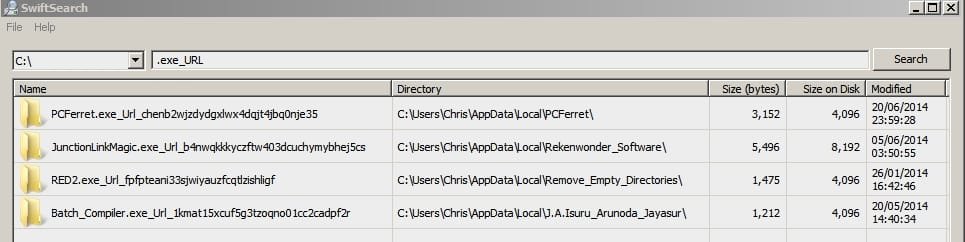
You're probably correct about a faulty program installer however further investigation reveals some strangely renamed folders.

SwiftSearch.jpg

The folder contents appear to be okay. I've run scans with my AV (Comodo), Malwarebytes, Emsisoft Emergency Kit, SAS and checked connections with Comodo Kill Switch, Crowd Inspect Network Scanner and CurrPorts. Nothing found! Currently I'm scanning with Trend Micro Anti-Threat Toolkit as it seems to report on anything out of the ordinary.
 

My Computer

Computer type
Laptop
Computer Manufacturer/Model Number
ASUS
OS
Microsoft Windows 7 Home Premium 64-bit 7601 Multiprocessor Free Service Pack 1
CPU
AMD C-60 APU with Radeon(tm) HD Graphics
Motherboard
ASUSTeK COMPUTER INC. X501U
Memory
4.00 GB
Graphics Card(s)
AMD Radeon HD 6290 Graphics
Sound Card
(1) AMD High Definition Audio Device (2) Realtek High Defi
Screen Resolution
1366 x 768 x 32 bits (4294967296 colors) @ 60 Hz
Hard Drives
Hitachi HTS545050A7E380 SATA Disk Device
Antivirus
Comodo CIS & FW, SecureAplus App Whitelisting, Threatfire
Browser
Cyberfox 64bit, Opera 64bit, Airfox
Other Info
Spy-The-Spy, HitmanPro.Alert, Norton Connect Safe, MJRegWatcher, BitDefender TrafficLight, Voodoo Shield, Zemana AntiMalware
Scan results

All scan results show up clean. For good measure I restored a system image backup from several weeks back. I keep weekly backups going back a few months. I mounted each backup image until I found the newest one that didn't have the renamed folders problem. That seems to have sorted it!

Thanks for your help.
 

My Computer

Computer type
Laptop
Computer Manufacturer/Model Number
ASUS
OS
Microsoft Windows 7 Home Premium 64-bit 7601 Multiprocessor Free Service Pack 1
CPU
AMD C-60 APU with Radeon(tm) HD Graphics
Motherboard
ASUSTeK COMPUTER INC. X501U
Memory
4.00 GB
Graphics Card(s)
AMD Radeon HD 6290 Graphics
Sound Card
(1) AMD High Definition Audio Device (2) Realtek High Defi
Screen Resolution
1366 x 768 x 32 bits (4294967296 colors) @ 60 Hz
Hard Drives
Hitachi HTS545050A7E380 SATA Disk Device
Antivirus
Comodo CIS & FW, SecureAplus App Whitelisting, Threatfire
Browser
Cyberfox 64bit, Opera 64bit, Airfox
Other Info
Spy-The-Spy, HitmanPro.Alert, Norton Connect Safe, MJRegWatcher, BitDefender TrafficLight, Voodoo Shield, Zemana AntiMalware
I'm not really sure that I actually helped you (you did all of the work). :D
 

My Computer

Computer type
PC/Desktop
Computer Manufacturer/Model Number
n/a
OS
W7 Ultimate SP1, LM19.2 MATE, W10 Home 1703, W10 Pro 1703 VM, #All 64 bit
CPU
AMD Phenom II x6 1100T, 3.3 GHz
Motherboard
ASUS M4A88T-M/USB3 (AM3)
Memory
12GB DDR3 1333 G-Skill (4GB x 2), G-Skill (2GB x 2)
Graphics Card(s)
NVIDIA GeForce GTX 660
Sound Card
Realtek?
Monitor(s) Displays
Samsung S23B350
Screen Resolution
1920x1080
Hard Drives
WD Green 2TB (SATA), WD Green 3TB (SATA), WD Blue 4TB (SATA), WD Blue 6TB (SATA)
PSU
Cooler Master
Case
Antec GX300 Tower
Cooling
3x Antec TRICOOL 120mm Fans
Mouse
Wired Optical
Internet Speed
DSL
Antivirus
Avast
Browser
Pale Moon (64 bit)
Other Info
2018-12-27 Upgraded HDDs
2015-12-10 Upgraded case, graphics card, storage
2015-08-15 Upgraded motherboard & RAM
2015-07-15 Upgraded LM17.1 to LM17.2
Back
Top