Solved Continue without scanning external HDD, computer lags

jjknz

New member
Member
Local time
10:59 AM
Messages
26
Location
New Zealand
Hi Sevenforums community,

I plugged in an external HDD, I was in a bit of a hurry so I chose the option 'continue without scanning'
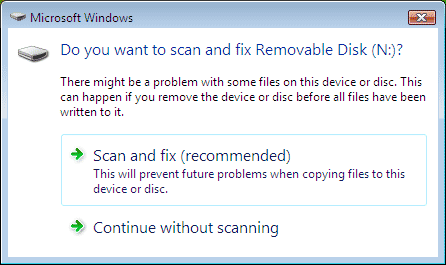
do-you-want-to-scan-and-fix-removable-disk.png


My computer now lags severely, I cannot open applications.
I can get into safe mode.
After removing the external HDD, I scanned my internal HDDs for errors.

What should I try doing?

Thank you

PC specs if relevant:
Windows 7 Ultimate x64
Core i7
8GB RAM
A harddrive that is healthy and not full
No viruses and malware (scanned regularly and frequently)
 

My Computer

Computer type
PC/Desktop
Computer Manufacturer/Model Number
Custom
OS
Windows 7 Ultimate x64
CPU
Core i7 3770K
Motherboard
Gigabyte GA-Z77X-D3H
Memory
16GB DDR3 @ 1333MHz
Graphics Card(s)
ASUS Geforce GTX 760 x2 SLI
Sound Card
ASUS Xonar DSX
Monitor(s) Displays
LG IPS235P
Screen Resolution
1920x1080
Hard Drives
Seagate Barracuda 1TB
PSU
Antec High Current Gamer 850W
Case
Corsair 300R
Cooling
Corsair H60 v2
Keyboard
Corsair K70 Cherry MX Blue
Mouse
Razer Abyssus
Browser
Firefox
If it was my computer I would scan the external hard drive.
What was the results of the internal drive scan?
 

My Computer

Computer type
PC/Desktop
Computer Manufacturer/Model Number
Home made Desktop
OS
Windows 10 Pro. 64/ version 1709 Windows 7 Pro/64
CPU
Intel i7-6800K @ 4.3
Motherboard
ASUS X-99 Deluxe II
Memory
Corsair Platinum 16 gig @2400
Graphics Card(s)
EVGA GTX 1070 OC
Monitor(s) Displays
Asus 27" LED LCD/VE278Q
Screen Resolution
1920-1080 or 1280-720 HDMI
Hard Drives
INTEL SSD 730-240 Gb Sata 3.0/
PSU
EVGA Platium 1200W
Case
Phanteks Luxe Tempered Glass 8 fans/ one radiator
Cooling
XSPC/ Water Cooled CPU
Keyboard
Das 4 Professional
Mouse
Logitech M705/MX Anywhere 2-S
Internet Speed
100 mbits
Antivirus
Microsoft Security Essentials/ Malwarebytes Premium 3.0/ SAS
Browser
I.E. 11 default/Firefox/ ISP Time Warner Cable/Spectrum
Other Info
LG BluRay Burner/
Sound system-KLipsch-THX/
Icy Dock ssd Hot Swap bays.
Thanks for your quick response.

I forgot to mention that I did scan and fix the external drives afterward.
After scanning my internal drives, it said it was error free. Nothing has changed.
I'm currently defragmenting my drives to see if that changes anything.
I am now able to start applications (no idea why)
but the speed is nowhere near to what I had before.
 

My Computer

Computer type
PC/Desktop
Computer Manufacturer/Model Number
Custom
OS
Windows 7 Ultimate x64
CPU
Core i7 3770K
Motherboard
Gigabyte GA-Z77X-D3H
Memory
16GB DDR3 @ 1333MHz
Graphics Card(s)
ASUS Geforce GTX 760 x2 SLI
Sound Card
ASUS Xonar DSX
Monitor(s) Displays
LG IPS235P
Screen Resolution
1920x1080
Hard Drives
Seagate Barracuda 1TB
PSU
Antec High Current Gamer 850W
Case
Corsair 300R
Cooling
Corsair H60 v2
Keyboard
Corsair K70 Cherry MX Blue
Mouse
Razer Abyssus
Browser
Firefox
Please keep us informed of what you have done and the results. It will help me and others to guide you farther if need be. When you get done doing all your scanning please do this so we know what kind of computer we are working with.

http://www.sevenforums.com/tutorials/180324-system-info-see-your-system-specs.html

These specs will follow you ever post. Take a look at my specs in the lower left of this post and it will give you a idea of the kind of info that helps us help you.
I'm sorry; Welcome aboard our Forum.
 

My Computer

Computer type
PC/Desktop
Computer Manufacturer/Model Number
Home made Desktop
OS
Windows 10 Pro. 64/ version 1709 Windows 7 Pro/64
CPU
Intel i7-6800K @ 4.3
Motherboard
ASUS X-99 Deluxe II
Memory
Corsair Platinum 16 gig @2400
Graphics Card(s)
EVGA GTX 1070 OC
Monitor(s) Displays
Asus 27" LED LCD/VE278Q
Screen Resolution
1920-1080 or 1280-720 HDMI
Hard Drives
INTEL SSD 730-240 Gb Sata 3.0/
PSU
EVGA Platium 1200W
Case
Phanteks Luxe Tempered Glass 8 fans/ one radiator
Cooling
XSPC/ Water Cooled CPU
Keyboard
Das 4 Professional
Mouse
Logitech M705/MX Anywhere 2-S
Internet Speed
100 mbits
Antivirus
Microsoft Security Essentials/ Malwarebytes Premium 3.0/ SAS
Browser
I.E. 11 default/Firefox/ ISP Time Warner Cable/Spectrum
Other Info
LG BluRay Burner/
Sound system-KLipsch-THX/
Icy Dock ssd Hot Swap bays.
What I have tried so far in chronological order and results:
No change refers to no change in system symptoms: severe lag, constantly reading HDD

  • Internal HDD scan with chkdsk
    - No change
  • External HDD scan and fix
    - No change
  • Virus and malware scan
    - No change
  • Internal disk defragmentation
    - No change
  • System restore to point before this incident
    - Still lags, but no longer constantly reads HDD
  • Delete all program caches and browser caches, cookies
    - A lot less lag, but still hangs occasionally
 

My Computer

Computer type
PC/Desktop
Computer Manufacturer/Model Number
Custom
OS
Windows 7 Ultimate x64
CPU
Core i7 3770K
Motherboard
Gigabyte GA-Z77X-D3H
Memory
16GB DDR3 @ 1333MHz
Graphics Card(s)
ASUS Geforce GTX 760 x2 SLI
Sound Card
ASUS Xonar DSX
Monitor(s) Displays
LG IPS235P
Screen Resolution
1920x1080
Hard Drives
Seagate Barracuda 1TB
PSU
Antec High Current Gamer 850W
Case
Corsair 300R
Cooling
Corsair H60 v2
Keyboard
Corsair K70 Cherry MX Blue
Mouse
Razer Abyssus
Browser
Firefox
You have been busy. Rear through this Tutorial. There will be some very good information. Some this you might want to do and some you might not want to do. It will take some time to read their is a lot of information.
Most peoples problems are in sections #7 and #8. So lets focus on those first.

http://www.sevenforums.com/tutorials/11728-optimize-windows-7-a.html

A picture is worth 1014 words so lets do this.
Show me these. This will help with uploads. If you have question just ask.

http://www.sevenforums.com/tutorials/9733-screenshots-files-upload-post-seven-forums.html

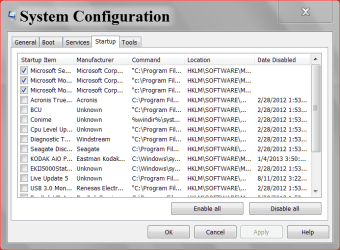
msconfig Start UP.PNG

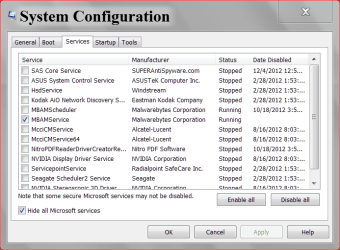
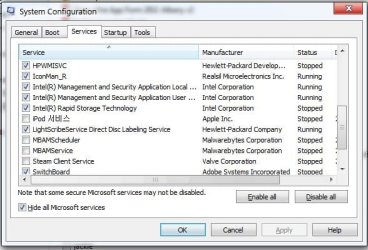
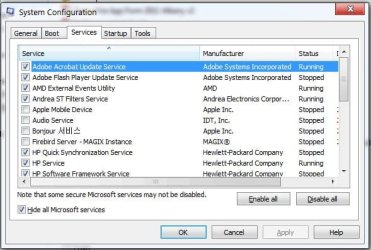
services msconfig.PNG

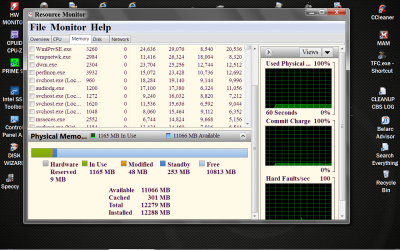
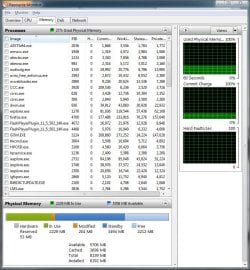
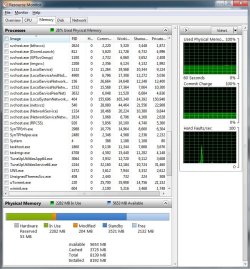
Resource Monitor RAM.PNG
 

My Computer

Computer type
PC/Desktop
Computer Manufacturer/Model Number
Home made Desktop
OS
Windows 10 Pro. 64/ version 1709 Windows 7 Pro/64
CPU
Intel i7-6800K @ 4.3
Motherboard
ASUS X-99 Deluxe II
Memory
Corsair Platinum 16 gig @2400
Graphics Card(s)
EVGA GTX 1070 OC
Monitor(s) Displays
Asus 27" LED LCD/VE278Q
Screen Resolution
1920-1080 or 1280-720 HDMI
Hard Drives
INTEL SSD 730-240 Gb Sata 3.0/
PSU
EVGA Platium 1200W
Case
Phanteks Luxe Tempered Glass 8 fans/ one radiator
Cooling
XSPC/ Water Cooled CPU
Keyboard
Das 4 Professional
Mouse
Logitech M705/MX Anywhere 2-S
Internet Speed
100 mbits
Antivirus
Microsoft Security Essentials/ Malwarebytes Premium 3.0/ SAS
Browser
I.E. 11 default/Firefox/ ISP Time Warner Cable/Spectrum
Other Info
LG BluRay Burner/
Sound system-KLipsch-THX/
Icy Dock ssd Hot Swap bays.
Update: I found I was having issues with specific programs:

  • Google Chrome - Google Chrome would make my computer completely hang
  • AMD graphics driver - AMD graphics driver taking a very long time to load on boot
  • Avira antivirus - Avira would just lag on its own and not respond
I've uninstalled them and cleaned the registry and rebooted. The lag is gone.
I've reinstalled the AMD driver without problems.
I've reinstalled Avira without problems.
I've reinstalled Chrome and it's making my computer hang again.
It only happens when I try to run Chrome. When I do, my computer doesn't stop reading my harddrive.
 

Attachments

  • 3.JPG
    3.JPG
    49.7 KB · Views: 9
  • 2.JPG
    2.JPG
    51 KB · Views: 11
  • 1.JPG
    1.JPG
    50.7 KB · Views: 13
  • startup.JPG
    startup.JPG
    56.3 KB · Views: 13
  • a1.JPG
    a1.JPG
    124.1 KB · Views: 7
  • a2.JPG
    a2.JPG
    124.5 KB · Views: 5
  • a3.JPG
    a3.JPG
    131.4 KB · Views: 6
  • a4.JPG
    a4.JPG
    127.9 KB · Views: 5
Last edited:

My Computer

Computer type
PC/Desktop
Computer Manufacturer/Model Number
Custom
OS
Windows 7 Ultimate x64
CPU
Core i7 3770K
Motherboard
Gigabyte GA-Z77X-D3H
Memory
16GB DDR3 @ 1333MHz
Graphics Card(s)
ASUS Geforce GTX 760 x2 SLI
Sound Card
ASUS Xonar DSX
Monitor(s) Displays
LG IPS235P
Screen Resolution
1920x1080
Hard Drives
Seagate Barracuda 1TB
PSU
Antec High Current Gamer 850W
Case
Corsair 300R
Cooling
Corsair H60 v2
Keyboard
Corsair K70 Cherry MX Blue
Mouse
Razer Abyssus
Browser
Firefox
Thank you for the pictures they do help.
These are some ideas that will help but of course it your computer your choice.
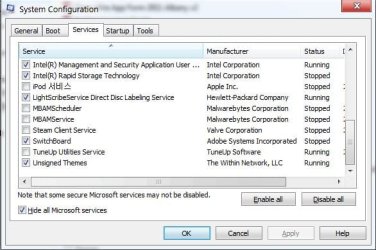
1. As you can see in Non Microsoft Services (3rd party programs)I only have my security running. All those other things you have check are running in the background all the time even when you are not using them. They don't need to be. All those auto Updates programs are using your browser to call home for updates when ever they want to. I do my updated manually. They should only run when you tick on they and tell them to run.
Example: Office is running in the background all the time. Remove the check mark. Office will not start at boot up. It will only start when you tick on it when you want to use it. When you close Office it stops running and that includes in the background. It still works the way it always has except it does not run in the background when not is use. Their is absolutely no reason for Office to be sucking up computer resources when you are not using it. That goes for all those other free loaders except security programs.
 

My Computer

Computer type
PC/Desktop
Computer Manufacturer/Model Number
Home made Desktop
OS
Windows 10 Pro. 64/ version 1709 Windows 7 Pro/64
CPU
Intel i7-6800K @ 4.3
Motherboard
ASUS X-99 Deluxe II
Memory
Corsair Platinum 16 gig @2400
Graphics Card(s)
EVGA GTX 1070 OC
Monitor(s) Displays
Asus 27" LED LCD/VE278Q
Screen Resolution
1920-1080 or 1280-720 HDMI
Hard Drives
INTEL SSD 730-240 Gb Sata 3.0/
PSU
EVGA Platium 1200W
Case
Phanteks Luxe Tempered Glass 8 fans/ one radiator
Cooling
XSPC/ Water Cooled CPU
Keyboard
Das 4 Professional
Mouse
Logitech M705/MX Anywhere 2-S
Internet Speed
100 mbits
Antivirus
Microsoft Security Essentials/ Malwarebytes Premium 3.0/ SAS
Browser
I.E. 11 default/Firefox/ ISP Time Warner Cable/Spectrum
Other Info
LG BluRay Burner/
Sound system-KLipsch-THX/
Icy Dock ssd Hot Swap bays.
I want to disable them, the reason I haven't disabled them is because I'm not sure exactly what the services correspond to. It's also interesting that none of my other browsers IE, Firefox and Waterfox have this problem; just Chrome.
I've clean uninstalled Chrome, deleting from registry and local app data files. I'm too scared to install Chrome again. The reason I like Chrome is the low RAM use, speed and Adblock. None of my other browsers can do all three.
 

My Computer

Computer type
PC/Desktop
Computer Manufacturer/Model Number
Custom
OS
Windows 7 Ultimate x64
CPU
Core i7 3770K
Motherboard
Gigabyte GA-Z77X-D3H
Memory
16GB DDR3 @ 1333MHz
Graphics Card(s)
ASUS Geforce GTX 760 x2 SLI
Sound Card
ASUS Xonar DSX
Monitor(s) Displays
LG IPS235P
Screen Resolution
1920x1080
Hard Drives
Seagate Barracuda 1TB
PSU
Antec High Current Gamer 850W
Case
Corsair 300R
Cooling
Corsair H60 v2
Keyboard
Corsair K70 Cherry MX Blue
Mouse
Razer Abyssus
Browser
Firefox
Leave Chrome off the computer for now. Play with it later. I will go back and take a close look at your pictures and get back to you in a short time. I'm back. Anything that indicated security I would leave alone. HP has a lot of little goodies in there and I'm not familiar with HP Laptop at all. You have so many things. I noticed you have a Tune Up Utility.
I recommend removing that first. Windows 7 does not need or want such a program. Then reboot.
In Start Up I would start by un-checking a few things first.
1. M/S Office
2. Anything Adobe
3. Light scribe service
4. IconMan-R
I will go find someone for the HP stuff. You probable don't need all that HP but I'm not sure.
-----------------------------------
Looking at this mess again this would really be your best option. Take a read through it when you get a chance.

http://www.sevenforums.com/tutorials/219487-clean-reinstall-factory-oem-windows-7-a.html#post1839164
 
Last edited:

My Computer

Computer type
PC/Desktop
Computer Manufacturer/Model Number
Home made Desktop
OS
Windows 10 Pro. 64/ version 1709 Windows 7 Pro/64
CPU
Intel i7-6800K @ 4.3
Motherboard
ASUS X-99 Deluxe II
Memory
Corsair Platinum 16 gig @2400
Graphics Card(s)
EVGA GTX 1070 OC
Monitor(s) Displays
Asus 27" LED LCD/VE278Q
Screen Resolution
1920-1080 or 1280-720 HDMI
Hard Drives
INTEL SSD 730-240 Gb Sata 3.0/
PSU
EVGA Platium 1200W
Case
Phanteks Luxe Tempered Glass 8 fans/ one radiator
Cooling
XSPC/ Water Cooled CPU
Keyboard
Das 4 Professional
Mouse
Logitech M705/MX Anywhere 2-S
Internet Speed
100 mbits
Antivirus
Microsoft Security Essentials/ Malwarebytes Premium 3.0/ SAS
Browser
I.E. 11 default/Firefox/ ISP Time Warner Cable/Spectrum
Other Info
LG BluRay Burner/
Sound system-KLipsch-THX/
Icy Dock ssd Hot Swap bays.
You have perhaps the very worst possible Win7 install with all of that HP bloatware starting on Win7's back. You need badly to do the Clean Reinstall which Layback linked above.

If you need time to prepare and want to see if you can make WIn7 tolerable in spite of the huge load of freeloading crapware, then try to Clean Up Factory Bloatware
 
Yeah, I'm thinking of doing an OS reinstall too.
But a quick question, what's wrong with TuneUp Utilities?
The main uses for that application for me is:

  • Clearing progam caches
  • Clearing browser caches
  • Cleaning the registry
  • Defragmenting the registry
  • Removing broken shortcuts
If I do remove the utility, can you give me an easy way to do these things please?
I unchecked the 4 you recommended from startup.
 

My Computer

Computer type
PC/Desktop
Computer Manufacturer/Model Number
Custom
OS
Windows 7 Ultimate x64
CPU
Core i7 3770K
Motherboard
Gigabyte GA-Z77X-D3H
Memory
16GB DDR3 @ 1333MHz
Graphics Card(s)
ASUS Geforce GTX 760 x2 SLI
Sound Card
ASUS Xonar DSX
Monitor(s) Displays
LG IPS235P
Screen Resolution
1920x1080
Hard Drives
Seagate Barracuda 1TB
PSU
Antec High Current Gamer 850W
Case
Corsair 300R
Cooling
Corsair H60 v2
Keyboard
Corsair K70 Cherry MX Blue
Mouse
Razer Abyssus
Browser
Firefox
You have perhaps the very worst possible Win7 install with all of that HP bloatware starting on Win7's back. You need badly to do the Clean Reinstall which Layback linked above.

I recently did a clean install, but this laptop has two separate partitions that contains all the HP 'crap-ware.' The two drives are RECOVERY and HP_TOOLS. I'm not sure exactly what's in them, but I'm assuming the bloatware is in there; a clean install doesn't remove the software. I haven't done a low level format on those drives because I'm not sure how it will affect my system. If I can know for sure then I will format those drives.
 

My Computer

Computer type
PC/Desktop
Computer Manufacturer/Model Number
Custom
OS
Windows 7 Ultimate x64
CPU
Core i7 3770K
Motherboard
Gigabyte GA-Z77X-D3H
Memory
16GB DDR3 @ 1333MHz
Graphics Card(s)
ASUS Geforce GTX 760 x2 SLI
Sound Card
ASUS Xonar DSX
Monitor(s) Displays
LG IPS235P
Screen Resolution
1920x1080
Hard Drives
Seagate Barracuda 1TB
PSU
Antec High Current Gamer 850W
Case
Corsair 300R
Cooling
Corsair H60 v2
Keyboard
Corsair K70 Cherry MX Blue
Mouse
Razer Abyssus
Browser
Firefox
Yeah, I'm thinking of doing an OS reinstall too.
But a quick question, what's wrong with TuneUp Utilities?
The main uses for that application for me is:

  • Clearing progam caches
  • Clearing browser caches
  • Cleaning the registry
  • Defragmenting the registry
  • Removing broken shortcuts
If I do remove the utility, can you give me an easy way to do these things please?
I unchecked the 4 you recommended from startup.

Ccleaner. CCleaner - PC Optimization and Cleaning - Free Download

Leave your registry alone. It seldom if ever needs cleaning and definitely never needs "defragging"
 

My Computer

Computer type
Laptop
Computer Manufacturer/Model Number
MSI GE72VR Apache Pro-416
OS
Windows 10x64 Build 1709
CPU
Intel i7 7700HQ Kaby Lake
Motherboard
Micro-Star Intl. MS-179B (U3C1)
Memory
16 GB DDR4 @2400
Graphics Card(s)
Nvidia Geforce GTX 1060
Screen Resolution
1920x1080 120Hz
Hard Drives
256 GB Nvme M.2 SSD

1TB HDD@7200
Cooling
Cooler Blast 4
Keyboard
Steel Series
Antivirus
Bit Defender Free
Browser
Edge

Thanks, but that doesn't answer why TuneUp Utilities is not preferred.
Isn't CCleaner similar to TuneUp in terms of what LayBear said?

I noticed you have a Tune Up Utility.
I recommend removing that first. Windows 7 does not need or want such a program.

I'm assuming TuneUp Utilities and CCleaner are both a type of tuning utility software, or am I mistaken?
 

My Computer

Computer type
PC/Desktop
Computer Manufacturer/Model Number
Custom
OS
Windows 7 Ultimate x64
CPU
Core i7 3770K
Motherboard
Gigabyte GA-Z77X-D3H
Memory
16GB DDR3 @ 1333MHz
Graphics Card(s)
ASUS Geforce GTX 760 x2 SLI
Sound Card
ASUS Xonar DSX
Monitor(s) Displays
LG IPS235P
Screen Resolution
1920x1080
Hard Drives
Seagate Barracuda 1TB
PSU
Antec High Current Gamer 850W
Case
Corsair 300R
Cooling
Corsair H60 v2
Keyboard
Corsair K70 Cherry MX Blue
Mouse
Razer Abyssus
Browser
Firefox
Tuneup utilities have a way of screwing up your system. Deleting things you need etc. We have more problems here at the forum related to the so called "optimization" app.'s than I care to think about. Ccleaner at least is well recognized as safe. It will do all the cleaning, i.e. caches, temp folders etc. that you seem to not want to do manually.

Ccleaner "tunes" by getting rid of temp files, and general clean up. You're thinking of tweeking and tuning which win7 does not need.
 

My Computer

Computer type
Laptop
Computer Manufacturer/Model Number
MSI GE72VR Apache Pro-416
OS
Windows 10x64 Build 1709
CPU
Intel i7 7700HQ Kaby Lake
Motherboard
Micro-Star Intl. MS-179B (U3C1)
Memory
16 GB DDR4 @2400
Graphics Card(s)
Nvidia Geforce GTX 1060
Screen Resolution
1920x1080 120Hz
Hard Drives
256 GB Nvme M.2 SSD

1TB HDD@7200
Cooling
Cooler Blast 4
Keyboard
Steel Series
Antivirus
Bit Defender Free
Browser
Edge
Ok I'll look into CCleaner. However, when I clean and defragment the registry after a few months of computer usage, I do get better performance in terms of speed. Also, I'm not using any of the optimization that comes along with TuneUp, just using it to clear caches, temp files etc.
So to sum up, the way I'm using TuneUp Utilities is very similar to what CCleaner can do, yes?
Unless TuneUp Utilities is doing something in the background that I'm not aware of?
You speak of manually methods of clearing temp files, could you enlighten me on those methods please? I would like to know.
And please don't misunderstand my skepticism, I'm willing to learn new things to take care of my PC, but I just want to be sure and check with lots of evidence and reasoning.
 

My Computer

Computer type
PC/Desktop
Computer Manufacturer/Model Number
Custom
OS
Windows 7 Ultimate x64
CPU
Core i7 3770K
Motherboard
Gigabyte GA-Z77X-D3H
Memory
16GB DDR3 @ 1333MHz
Graphics Card(s)
ASUS Geforce GTX 760 x2 SLI
Sound Card
ASUS Xonar DSX
Monitor(s) Displays
LG IPS235P
Screen Resolution
1920x1080
Hard Drives
Seagate Barracuda 1TB
PSU
Antec High Current Gamer 850W
Case
Corsair 300R
Cooling
Corsair H60 v2
Keyboard
Corsair K70 Cherry MX Blue
Mouse
Razer Abyssus
Browser
Firefox
You did not Clean Reinstall - Factory OEM Windows 7 if you still have all the HP bloatware, but instead ran Factory Recovery to replace all the crap.

Please read the tutorial to understand the difference. It also explains how to regard the two HP OEM partitions in the Note to HP Owners at end of tutorial.

If you stick with the tools and methods in the tutorial you will get and keep a perfect install, based on countless thousands we've helped with here. Trying to apply old XPired-era tools will sabotage your efforts. We see nothing but problems with Tune-Up Utilities and Registry cleaners other than CCleaner.
 
I'll chime in on Tune Up Utilities. It has a too aggressive registry cleaner and it's optimizations can actually cripple w7 if not used with a very deft touch. I use it only for the Shredder option for deleting files and changing some icons. I don't let the "One Click" maintenance options run and turn off automatic optimization.

If they HP still has their "HP Tools" thing, that is crap and not needed, w7 can do anything it does without wrecking your system.
 

My Computer

Computer type
PC/Desktop
Computer Manufacturer/Model Number
Home Built Desktop By DataTech
OS
Windows 7 Ultimate X64 SP1
CPU
Intel i5-2550K, Differing ~4.4-4.8GHz No built in GPU
Motherboard
ASUS P8Z68-V PRO/GEN3
Memory
16GB G.Skill Sniper 1866MHz @ 2133MHz 2x8GB
Graphics Card(s)
ASUS GTX650TIB-DC2OC-2GD5, (650TI Boost)
Sound Card
Onboard Realtek 5-1
Monitor(s) Displays
Samsung P2570HD
Screen Resolution
1920x1080
Hard Drives
Samsung 840 Pro 256GB SSD for OS, 500GB Seagate Constellation (Enterprise drive) for Data
PSU
Corsair HX650W
Case
Inwin Dragon Rider
Cooling
Hyper 212 EVO w/two Noctua fans, push-pull, @1300 RPM
Keyboard
E-Z Eyes, bright yellow keys with large characters
Mouse
steelseries SENSEI Laser Pro Gaming
Internet Speed
48-51Mbs Mbs down, 11 Mbs up Xfinity Cable
Antivirus
Norton Internet Security 2013
Browser
IE 10, Opera, Pale Moon if needed
Other Info
4 case fans, LG BluRay-RE, ASUS DVD-RW, Mr. Fusion power supply, 1.21 gigawatts.
I'll chime in on Tune Up Utilities. It has a too aggressive registry cleaner and it's optimizations can actually cripple w7 if not used with a very deft touch. I use it only for the Shredder option for deleting files and changing some icons. I don't let the "One Click" maintenance options run and turn off automatic optimization.

If they HP still has their "HP Tools" thing, that is crap and not needed, w7 can do anything it does without wrecking your system.
You did not Clean Reinstall - Factory OEM Windows 7 if you still have all the HP bloatware, but instead ran Factory Recovery to replace all the crap.

Ok, so the collective opinion on TuneUp Utilities seems to be unanimous, I'll remove it.
Come to think of it all the bloatware must have been installed when I was updating using the HP website.
Unfortunately some of my hardware only supports software from HP, which is probably why the bloatware tagged along. So even if I did clean install, I would need to install drivers again, which will contain the bloatware.
My desktop is perfect, I swear. It's just my laptop.
 

My Computer

Computer type
PC/Desktop
Computer Manufacturer/Model Number
Custom
OS
Windows 7 Ultimate x64
CPU
Core i7 3770K
Motherboard
Gigabyte GA-Z77X-D3H
Memory
16GB DDR3 @ 1333MHz
Graphics Card(s)
ASUS Geforce GTX 760 x2 SLI
Sound Card
ASUS Xonar DSX
Monitor(s) Displays
LG IPS235P
Screen Resolution
1920x1080
Hard Drives
Seagate Barracuda 1TB
PSU
Antec High Current Gamer 850W
Case
Corsair 300R
Cooling
Corsair H60 v2
Keyboard
Corsair K70 Cherry MX Blue
Mouse
Razer Abyssus
Browser
Firefox
Back
Top