Solved Continue without scanning external HDD, computer lags

Thank you all folks for dropping by.
To answer your question jjknz; Ccleaner is not a Tune Up program. It does as its old name implies. It use to be called Crap Cleaner. That's what it does. It does have a registry cleaner that I and many do not recommend using unless you know what your doing.
Now I went back to the home ranch and asked if some folks would come and help you with your problem and here they are. You have many choices how you want to continue. Looking at your mess again I recommend a Clean Reinstall - Factory OEM Windows 7
After that is done please don't install and Tune Up and thing programs.
Windows 7 is tuned up right out the Clean Install. Greg wrote the Tutorial. Thousands have used it with success if the instructions are followed. Windows 7 Forum offers the Tutorial and the needed help to you for the great total price that we always use FREE. Your call.
Once again for all the help friends; back to the ranch. We will wait for
jjknz decision.
 

My Computer

Computer type
PC/Desktop
Computer Manufacturer/Model Number
Home made Desktop
OS
Windows 10 Pro. 64/ version 1709 Windows 7 Pro/64
CPU
Intel i7-6800K @ 4.3
Motherboard
ASUS X-99 Deluxe II
Memory
Corsair Platinum 16 gig @2400
Graphics Card(s)
EVGA GTX 1070 OC
Monitor(s) Displays
Asus 27" LED LCD/VE278Q
Screen Resolution
1920-1080 or 1280-720 HDMI
Hard Drives
INTEL SSD 730-240 Gb Sata 3.0/
PSU
EVGA Platium 1200W
Case
Phanteks Luxe Tempered Glass 8 fans/ one radiator
Cooling
XSPC/ Water Cooled CPU
Keyboard
Das 4 Professional
Mouse
Logitech M705/MX Anywhere 2-S
Internet Speed
100 mbits
Antivirus
Microsoft Security Essentials/ Malwarebytes Premium 3.0/ SAS
Browser
I.E. 11 default/Firefox/ ISP Time Warner Cable/Spectrum
Other Info
LG BluRay Burner/
Sound system-KLipsch-THX/
Icy Dock ssd Hot Swap bays.
You defeat the purpose of a Clean Reinstall if you reimport all of the bloatware from the HP SUpport Downloads webpage. That's why it is very specific about where and what to reimport in the tutorial, especially about how to handle drivers in Win7.

If you have questions about a program you think Win7 needs from HP, then ask back. Some laptops have HD monitors or battery tenders that users feel better having reinstalled, although Win7 has better utilties for this and almost everything else built in.
 
Thanks guys, I'll do the clean install using the tutorial.
But my initial question to this whole thread was why my computer lags after I 'continued without scanning.'
Forget all the bloatware and my unsuccessful Windows installation for a moment.
Everything was fine until I 'continued without scanning.'
Why would it suddenly mess up my system that badly?
I'm going to do the clean install, I just want to understand why.
 

My Computer

Computer type
PC/Desktop
Computer Manufacturer/Model Number
Custom
OS
Windows 7 Ultimate x64
CPU
Core i7 3770K
Motherboard
Gigabyte GA-Z77X-D3H
Memory
16GB DDR3 @ 1333MHz
Graphics Card(s)
ASUS Geforce GTX 760 x2 SLI
Sound Card
ASUS Xonar DSX
Monitor(s) Displays
LG IPS235P
Screen Resolution
1920x1080
Hard Drives
Seagate Barracuda 1TB
PSU
Antec High Current Gamer 850W
Case
Corsair 300R
Cooling
Corsair H60 v2
Keyboard
Corsair K70 Cherry MX Blue
Mouse
Razer Abyssus
Browser
Firefox
When you say 'scan' do you mean this? If you do, then yes I intend to follow all the steps.

When finished, clean and order the HD perfectly using state-of-the-art free CCleaner "Run Cleaner" button and Registry tab.
● I also recommend running Puran free boot-time defragger + Full Disk Check (after checking Intelligent Optimizer on Additional Operations tab) for state-of-the-art defrag which includes System files.

● Periodically run both of the above as well as a full scan with free Malwarebytes and SUPERAntiSpyware.
 

My Computer

Computer type
PC/Desktop
Computer Manufacturer/Model Number
Custom
OS
Windows 7 Ultimate x64
CPU
Core i7 3770K
Motherboard
Gigabyte GA-Z77X-D3H
Memory
16GB DDR3 @ 1333MHz
Graphics Card(s)
ASUS Geforce GTX 760 x2 SLI
Sound Card
ASUS Xonar DSX
Monitor(s) Displays
LG IPS235P
Screen Resolution
1920x1080
Hard Drives
Seagate Barracuda 1TB
PSU
Antec High Current Gamer 850W
Case
Corsair 300R
Cooling
Corsair H60 v2
Keyboard
Corsair K70 Cherry MX Blue
Mouse
Razer Abyssus
Browser
Firefox
Whenever a HD is brought into question as was yours, you should back up your files to run a full Disk Check followed by the HD maker's HD Diagnostic extended CD scan which will give you the exact condition of the HD. This tests both the file System and disk surface condition.

If the HD is not internally connection then run Disk Check followed by Partition Wizard Partition surface test which will suffice to give its physical condition.
 
Whenever a HD is brought into question as was yours, you should back up your files to run a full Disk Check followed by the HD maker's HD Diagnostic extended CD scan which will give you the exact condition of the HD. This tests both the file System and disk surface condition.

If the HD is not internally connection then run Disk Check followed by Partition Wizard Partition surface test which will suffice to give its physical condition.

Should I do this before clean installing, after or both?
 

My Computer

Computer type
PC/Desktop
Computer Manufacturer/Model Number
Custom
OS
Windows 7 Ultimate x64
CPU
Core i7 3770K
Motherboard
Gigabyte GA-Z77X-D3H
Memory
16GB DDR3 @ 1333MHz
Graphics Card(s)
ASUS Geforce GTX 760 x2 SLI
Sound Card
ASUS Xonar DSX
Monitor(s) Displays
LG IPS235P
Screen Resolution
1920x1080
Hard Drives
Seagate Barracuda 1TB
PSU
Antec High Current Gamer 850W
Case
Corsair 300R
Cooling
Corsair H60 v2
Keyboard
Corsair K70 Cherry MX Blue
Mouse
Razer Abyssus
Browser
Firefox
I would do it before on all drives to know for sure the condition of your HD's.

Remember to unplug all other HD's during install.
 
I'll do the scans and let you know of the results.
 

My Computer

Computer type
PC/Desktop
Computer Manufacturer/Model Number
Custom
OS
Windows 7 Ultimate x64
CPU
Core i7 3770K
Motherboard
Gigabyte GA-Z77X-D3H
Memory
16GB DDR3 @ 1333MHz
Graphics Card(s)
ASUS Geforce GTX 760 x2 SLI
Sound Card
ASUS Xonar DSX
Monitor(s) Displays
LG IPS235P
Screen Resolution
1920x1080
Hard Drives
Seagate Barracuda 1TB
PSU
Antec High Current Gamer 850W
Case
Corsair 300R
Cooling
Corsair H60 v2
Keyboard
Corsair K70 Cherry MX Blue
Mouse
Razer Abyssus
Browser
Firefox
The lagging could be Window's re-indexing the drive or an automatic defrag. Even so, you have enough running to cause occasional slow periods as each one "phones home" or checks for updates.
 

My Computer

Computer type
PC/Desktop
Computer Manufacturer/Model Number
Built 2/11/2011
OS
Windows 7 Pro-x64
CPU
i7-2600 3.4GHz - 3.8GHz Turbo
Motherboard
Intel DH67BL-B3
Memory
8Gb - 2x4GB, Muskin 991770 PC3-1333
Graphics Card(s)
Integrated Intel HD 2000
Sound Card
Integrated Intel 10.1 HD, RealTek ALC892
Monitor(s) Displays
Asus LCD VH222H, Haier HL24XSL2a
Screen Resolution
1920x1080, 1920x1080
Hard Drives
Crucial SSD C300-128Gb,
Western Digital WD5002AALX - 500Gb,
Western Digital WD7501AALS - 750Gb
PSU
Seasonic 650W 80+ Gold Modular
Case
Rosewill Defender
Cooling
Stock CPU, Four 120mm case fans, PCH fan added
Keyboard
Logitech EX100 Y-RBH94 Wireless
Mouse
Logitech EX100 M-RCE95 Wireless
Internet Speed
3.0/1.5 Mbs
Antivirus
Microsoft Security Essentials
Browser
Microsoft Internet Explorer 11
Other Info
Antec Veris Premier-Multimedia IR Station,
Cyber Accoustics-3602 Speakers,
AFT XM-5U Card Reader,
Hauppauge TV-HVR-2250,
Sony LX300 USB Turntable
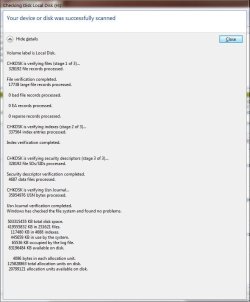
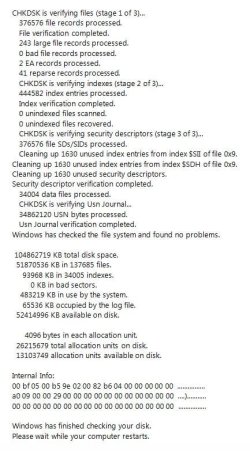
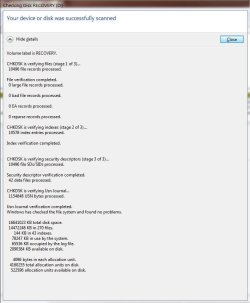
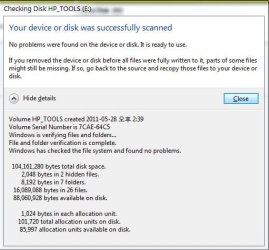
I did mention in my third post on this thread that I did a CHKDSK, but I did it again anyway.
CHKDSK results are here, the one not in a window is C drive.

I went to my HDD manufacturer's website for the utility,
but I can't seem to find any ISO images to burn on a CD.
They all seem to be standalone programs; Software Utilities
I tried running the Fujitsu HDD diagnostic tool, but it wouldn't let me select a hard drive.
It detected which hard drive I have, but won't let me select it for diagnosis.

I'm going to use SeaToolsDOS for the time being.
 

Attachments

  • chdsk H.JPG
    chdsk H.JPG
    58.6 KB · Views: 5
  • chkdsk C.JPG
    chkdsk C.JPG
    68.5 KB · Views: 5
  • chkdsk D.JPG
    chkdsk D.JPG
    56.6 KB · Views: 4
  • chkdsk E.JPG
    chkdsk E.JPG
    44.6 KB · Views: 6

My Computer

Computer type
PC/Desktop
Computer Manufacturer/Model Number
Custom
OS
Windows 7 Ultimate x64
CPU
Core i7 3770K
Motherboard
Gigabyte GA-Z77X-D3H
Memory
16GB DDR3 @ 1333MHz
Graphics Card(s)
ASUS Geforce GTX 760 x2 SLI
Sound Card
ASUS Xonar DSX
Monitor(s) Displays
LG IPS235P
Screen Resolution
1920x1080
Hard Drives
Seagate Barracuda 1TB
PSU
Antec High Current Gamer 850W
Case
Corsair 300R
Cooling
Corsair H60 v2
Keyboard
Corsair K70 Cherry MX Blue
Mouse
Razer Abyssus
Browser
Firefox
Can you help me with finding a harddrive diagnosis tool? SeaTools is not supported. And the Toshiba tools are not supported either because the DOS version requires a x86 architecture and the Windows version supports up to 2000/XP/Vista. I tried running it anyway, but it wouldn't let me select the harddrive, only let me detect it.
Also in Disk Management all my partitions say that they are 'at risk' what does this mean?
 

My Computer

Computer type
PC/Desktop
Computer Manufacturer/Model Number
Custom
OS
Windows 7 Ultimate x64
CPU
Core i7 3770K
Motherboard
Gigabyte GA-Z77X-D3H
Memory
16GB DDR3 @ 1333MHz
Graphics Card(s)
ASUS Geforce GTX 760 x2 SLI
Sound Card
ASUS Xonar DSX
Monitor(s) Displays
LG IPS235P
Screen Resolution
1920x1080
Hard Drives
Seagate Barracuda 1TB
PSU
Antec High Current Gamer 850W
Case
Corsair 300R
Cooling
Corsair H60 v2
Keyboard
Corsair K70 Cherry MX Blue
Mouse
Razer Abyssus
Browser
Firefox
But the harddrive IS internally connected. You said IF the harddrive is NOT internally connected. So I assumed I couldn't use that one because my harddrive is internally connected. Unless I'm misunderstanding what internal and external connections are. External connection would be from outside the system like an external HDD is that right?

Sorry this is getting a little complex just to check the HDD, I'm just gonna buy a new one.
 

My Computer

Computer type
PC/Desktop
Computer Manufacturer/Model Number
Custom
OS
Windows 7 Ultimate x64
CPU
Core i7 3770K
Motherboard
Gigabyte GA-Z77X-D3H
Memory
16GB DDR3 @ 1333MHz
Graphics Card(s)
ASUS Geforce GTX 760 x2 SLI
Sound Card
ASUS Xonar DSX
Monitor(s) Displays
LG IPS235P
Screen Resolution
1920x1080
Hard Drives
Seagate Barracuda 1TB
PSU
Antec High Current Gamer 850W
Case
Corsair 300R
Cooling
Corsair H60 v2
Keyboard
Corsair K70 Cherry MX Blue
Mouse
Razer Abyssus
Browser
Firefox
Um I think your external Hdd was tampered with you might have picked up a Trojan from the thumbs.db file. Does your antivirus scan hidden files?
 

My Computer

Computer Manufacturer/Model Number
AsusTeK Computer Inc.
OS
Windows 7 Ultimate x64
CPU
AMD Athlon X2 x64
Motherboard
AsusTeK Computer Inc. M2N4-SLI
Memory
2GB
Graphics Card(s)
ATi Radeon HD 4600 Series
Sound Card
C-Media PCI Audio Card
Monitor(s) Displays
LG W2242TQ
Hard Drives
2 Seagate 320GB
PSU
Coolingman Black
Case
Too ancient to remember but is black.
Cooling
Fan
Um I think your external Hdd was tampered with you might have picked up a Trojan from the thumbs.db file. Does your antivirus scan hidden files?

I'm using Avira and yes it does scan hidden files, and I've scanned the external HDD. I didn't get any warnings about viruses.
 

My Computer

Computer type
PC/Desktop
Computer Manufacturer/Model Number
Custom
OS
Windows 7 Ultimate x64
CPU
Core i7 3770K
Motherboard
Gigabyte GA-Z77X-D3H
Memory
16GB DDR3 @ 1333MHz
Graphics Card(s)
ASUS Geforce GTX 760 x2 SLI
Sound Card
ASUS Xonar DSX
Monitor(s) Displays
LG IPS235P
Screen Resolution
1920x1080
Hard Drives
Seagate Barracuda 1TB
PSU
Antec High Current Gamer 850W
Case
Corsair 300R
Cooling
Corsair H60 v2
Keyboard
Corsair K70 Cherry MX Blue
Mouse
Razer Abyssus
Browser
Firefox
Greetings from the MS Global MVP Summit 2013 in Seattle which is dividing my attention right now.

Re-reading your thread the only HD at issue was the external which you disk checked. I also suggested you run the PW Surface scan on it, if desired from the Home version which is easily installed and run. There is no reason to scan or diagnose your other HD's unless you just want to check their condition. For that Disk Check and the PW Surface Scan should be sufficient.

What also caught my attention was one of the worst loads of preinstalled crapware I've ever seen, which is why we also suggested the Clean Reinstall so you can enjoy Win7 in its native state without a ton of freeloaders riding on its back.
 
Yes, the external HDD is not mine, it's my friend's. I honestly don't care what the state of that is. I'm going to give it back this afternoon.
For the clean install, I'm going to buy a new internal HDD to replace all the crapware and bloatware and unnecessary partitions. Also my internal HDD says it is 'at risk' in disk management just wondering what that means.
Sorry to keep you from your MVP summit.
 
Last edited:

My Computer

Computer type
PC/Desktop
Computer Manufacturer/Model Number
Custom
OS
Windows 7 Ultimate x64
CPU
Core i7 3770K
Motherboard
Gigabyte GA-Z77X-D3H
Memory
16GB DDR3 @ 1333MHz
Graphics Card(s)
ASUS Geforce GTX 760 x2 SLI
Sound Card
ASUS Xonar DSX
Monitor(s) Displays
LG IPS235P
Screen Resolution
1920x1080
Hard Drives
Seagate Barracuda 1TB
PSU
Antec High Current Gamer 850W
Case
Corsair 300R
Cooling
Corsair H60 v2
Keyboard
Corsair K70 Cherry MX Blue
Mouse
Razer Abyssus
Browser
Firefox
I wouldn't be answering if I didn't keep up my workload while here. I just wanted you to know why I was slow in responding, because I needed to re-read the entire thread.

Keep in mind when shopping for a new HD that an SSD is the best performance boost you can get for Win7.

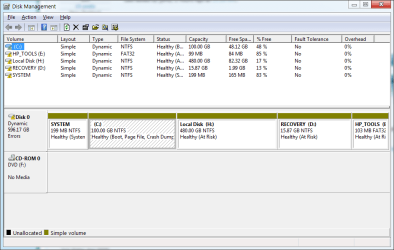
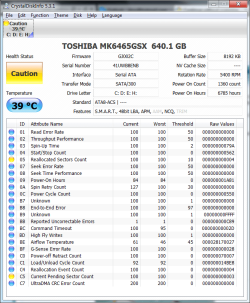
Please post back a screenshot of your Disk Mgmt warning, and also install CrystalDiskInfo - Software to post back its readings.
 
I'm thinking of getting a hybrid, because SSD won't give me enough storage space. What do you think about the Seagate Momentus XT 750GB? The HDD has to be 2.5" form factor and the laptop only supports one drive space. I think.
 

Attachments

  • Untitled.png
    Untitled.png
    21.5 KB · Views: 6
  • 2.png
    2.png
    40.4 KB · Views: 5

My Computer

Computer type
PC/Desktop
Computer Manufacturer/Model Number
Custom
OS
Windows 7 Ultimate x64
CPU
Core i7 3770K
Motherboard
Gigabyte GA-Z77X-D3H
Memory
16GB DDR3 @ 1333MHz
Graphics Card(s)
ASUS Geforce GTX 760 x2 SLI
Sound Card
ASUS Xonar DSX
Monitor(s) Displays
LG IPS235P
Screen Resolution
1920x1080
Hard Drives
Seagate Barracuda 1TB
PSU
Antec High Current Gamer 850W
Case
Corsair 300R
Cooling
Corsair H60 v2
Keyboard
Corsair K70 Cherry MX Blue
Mouse
Razer Abyssus
Browser
Firefox
The problem is that you converted your HD to Dynamic which is only meant to be used to span a partition across multiple HD's. Apparently you didn't see the warning message when you added H partition.

You can only have four Primary partitions or 3 Primary and unlimited Logical. Had you asked us we would have advised you that to keep HP Recovery and Diagnostics tools (OEM) partitions bootable you'd need to convert C to Logical to add another adjacent partition.

The solution to reconvert to Basic non-destructively is to boot free Partition Wizard CD version 4.2 which is the last one which offers this as a free feature: pw422.zip ISO - Windows Live.

Download the ISO, rightclick to burn it to CD using Windows Image Burner, or use ImgBurn.

Back up the files on H which will need to be deleted before disk will convert back to Basic.

Boot CD, follow these video steps: How to convert dynamic disk to basic disk with Partition Wizard?

After conversion to Basic, set C to Logical then create a new Logical partition for H:
How to set partition as Primary or Logical.
Partition Wizard Create Partition Video Help
 
Back
Top