
How to Add or Remove "All Tasks" (God Mode) from Control Panel in Windows
Information
This will show you how to add All Tasks (God Mode) to the Control Panel for all users in Vista, Windows 7, and Windows 8.
EXAMPLE: "All Tasks" (God Mode) added to Control Panel
NOTE: This is the Control Panel icons and category view.
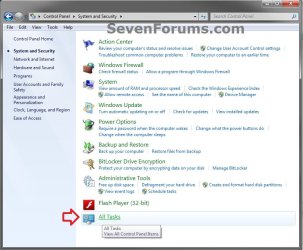
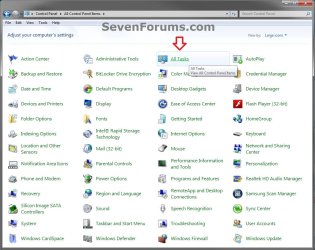
EXAMPLE: Control Panel "All Tasks" List
NOTE: This will show you every task available in the Control Panel listed by category. Some of these are not normally displayed in the Control Panel.

Here's How:
1. To Remove "All Tasks" from Control Panel
NOTE: This is the default setting.
A) Click/tap on the Download button below to download the file below.
Remove_All_Tasks_from_Control Panel.reg
Download
B) Go to step 3.
2. To Add "All Tasks" to Control Panel
A) Click/tap on the Download button below to download the file below.
Add_All_Tasks_to_Control Panel.reg
Download
3. Save the .reg file to the Desktop.
4. Double click/tap on the downloaded .reg file to Merge it.
5. Click/tap on Run, Yes, Yes (UAC-Windowws 7/8) or Continue (UAC-Vista), and OK when prompted.
6. When finished, you can delete the .reg file if you like.
That's it,
Shawn
Related Tutorials
- How to Create a "Control Panel All Tasks List" Shortcut in Windows
- How to Add or Remove "Local Group Policy Editor" from Control Panel in Windows
- How to Add or Remove "Advanced User Accounts" from Control Panel in Windows
- How to Add or Remove "Hyper-V Manager" to Control Panel in Windows 8
- How to Add or Remove "Registry Editor" from Control Panel in Windows
- How to Add or Remove "Services" from Control Panel in Windows
- How to Add or Remove "System Configuration" (msconfig) from Control Panel in Windows
- How to Hide or Show a Control Panel Icon in Windows
- How to Change or Restore the Default Control Panel Icons in Windows 8
Attachments
Last edited:


 nevertheless thanks very much.

