dwightmccann
New member
- Local time
- 6:31 AM
- Messages
- 14
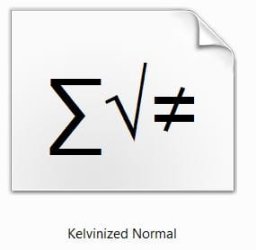
I am running Win 7 Pro 64-bit with 24GB memory and lots of disk with a Dual Core i7 930. When I go to Control Panel->All Control Panel Items->Fonts I see file icons, most of which have examples of the fonts they represent. The hidden fonts are grayed out. But I have a significant number of fonts that display the same preview on the file icon that is nothing like what the font looks like. Is this a known issue? Is there a fix?
TIA,
Dwight
TIA,
Dwight
Attachments
My Computer
- OS
- Windows 7 Pro 64-bit
- CPU
- Intel i7-930
- Motherboard
- ASUS P6T Deluxe V2
- Memory
- 12GB
- Graphics Card(s)
- ATI Radeon 5850
- Monitor(s) Displays
- Eizo 24" / Wacom Cintiq 21 ux
- Hard Drives
- 8 - 2TB drives in two RAID arrays using Adaptec 5805 controller.
- PSU
- Antec CP-1000
- Case
- Antec 1200