Display and Personalization control panels don't open

Eep

New member
Local time
5:00 AM
Messages
5
Several issues:

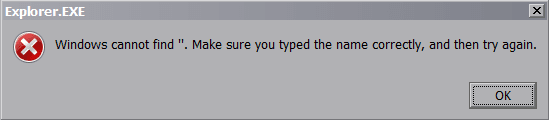
  1. Right-click desktop, choose "Display" or "Personalization, get a window with "explorer.exe" as title and "windows cannot find ". make sure you typed the name correctly, and then try again." Note the ". is exactly that: a double-quote and period. See attached image.
  2. I have Classic Shell installed but the control panel "flyout" menu does not show the control panels (display, system, etc) in them like it used to. I have to double-click the "Control Panel" menu option to open it. Then I can open various control panels fine but, for example, on Personalization, any links on the left side in the "See also" section do not work; nothing happens when I click them. In "Display" control panel, "Adjust resolution" and "Change display setting" (as well as "See also" options) do nothing."sfc /scannow" finds no issues. I don't want to do a repair install either.
Any ideas? Thanks.
 

Attachments

  • windows7_error_cannot-find.png
    windows7_error_cannot-find.png
    3 KB · Views: 10
Last edited:

My Computer My Computer

Computer type
PC/Desktop
Computer Manufacturer/Model Number
custom build
OS
Windows 7 Ultimate x64
CPU
Intel Core i5 4690K
Motherboard
MSI Z97 MPOWER MAX AC (MS-7888)
Memory
16GB DDR3 PC3-12800 (800 MHz)
Graphics Card(s)
nVidia GeForce GTX 750 Ti 2GB GDDR5
Did you try uninstalling classic shell. Reboot.
 

My Computers My Computers

System One System Two

  • Computer type
    PC/Desktop
    OS
    7 X64
    CPU
    i5 8400
    Motherboard
    gigabyte b365m ds3h
    Memory
    2x8gb 3200mhz
    Hard Drives
    various
    PSU
    pure power 11 400w cm
    Case
    Coolermaster
    Cooling
    cryorig m9i
  • Computer type
    PC/Desktop
    OS
    7x64
    CPU
    g5400
    Motherboard
    ga b365m ds3h
    Memory
    8gb ddr4 2400
    PSU
    xfx pro 450w
Classic Shell isn't the problem.
 

My Computer My Computer

Computer type
PC/Desktop
Computer Manufacturer/Model Number
custom build
OS
Windows 7 Ultimate x64
CPU
Intel Core i5 4690K
Motherboard
MSI Z97 MPOWER MAX AC (MS-7888)
Memory
16GB DDR3 PC3-12800 (800 MHz)
Graphics Card(s)
nVidia GeForce GTX 750 Ti 2GB GDDR5
Hi

something has destroyed the explorere.exe shortcut, and replaced it with >> " <<
try running sfc / scannow
this should restore it back. if not use kb947821 the standard repair tool


Roy
 

My Computer My Computer

Computer type
PC/Desktop
Computer Manufacturer/Model Number
medionl/Aspire 6930G/acer x55a
OS
W7 home premium 32bit/W7HP 64bit/w10 tp insider ring
CPU
E5300 dual core
Motherboard
medion MS7366
Memory
3gb
Graphics Card(s)
Nvidia Geforce 7100 Nforce 630i
Monitor(s) Displays
avixc
Internet Speed
n (isp resticted to 72)
Antivirus
mse/pands
Browser
palemoon
Other Info
Belkin Fd7050 n USB using Railink RT2870 drivers, more upto date
Seeing as how, again, "sfc /scannow" finds no issues (wish people would read...), I decided to try Process Monitor to see exactly what explorer.exe is doing and it found explorer.exe reading/writing to:

HKCU\Software\Microsoft\Windows\CurrentVersion\Explorer\UserAssist\{CEBFF5CD-ACE2-4F4F-9178-9926F41749EA}\Count\P:\Hfref\Rrc\NccQngn\Ybpny\Grzc\Cebpzba64.rkr

This doesn't look right but I'm not sure what to delete/replace here. Did a Google search for this key and came across this site which says it's encrypted so I will try the recommended tool, UserAssist (had to use the Windows 7 version). However, it doesn't show any program run when I try to access Display/Personalization via the desktop right-click.
 
Last edited:

My Computer My Computer

Computer type
PC/Desktop
Computer Manufacturer/Model Number
custom build
OS
Windows 7 Ultimate x64
CPU
Intel Core i5 4690K
Motherboard
MSI Z97 MPOWER MAX AC (MS-7888)
Memory
16GB DDR3 PC3-12800 (800 MHz)
Graphics Card(s)
nVidia GeForce GTX 750 Ti 2GB GDDR5
Hi
it can sometimes take 3 runs of sfc to correct problems

Did you bother to run the other tool.

According to the Avast forum that file is safe
google Cebpzba64.rkr


Roy
 

My Computer My Computer

Computer type
PC/Desktop
Computer Manufacturer/Model Number
medionl/Aspire 6930G/acer x55a
OS
W7 home premium 32bit/W7HP 64bit/w10 tp insider ring
CPU
E5300 dual core
Motherboard
medion MS7366
Memory
3gb
Graphics Card(s)
Nvidia Geforce 7100 Nforce 630i
Monitor(s) Displays
avixc
Internet Speed
n (isp resticted to 72)
Antivirus
mse/pands
Browser
palemoon
Other Info
Belkin Fd7050 n USB using Railink RT2870 drivers, more upto date
System event log shows this error, the key of which leads to HKEY_CLASSES_ROOT\AppID\{06622D85-6856-4460-8DE1-A81921B41C4B} called when trying to open COpenControlPanel for Display and Personalization. Not sure how to fix this.

Code:
Unable to start a DCOM Server: {06622D85-6856-4460-8DE1-A81921B41C4B}. The error: "2" happened while starting this command: C:\Windows\SysWOW64\DllHost.exe /Processid:{06622D85-6856-4460-8DE1-A81921B41C4B}
 

My Computer My Computer

Computer type
PC/Desktop
Computer Manufacturer/Model Number
custom build
OS
Windows 7 Ultimate x64
CPU
Intel Core i5 4690K
Motherboard
MSI Z97 MPOWER MAX AC (MS-7888)
Memory
16GB DDR3 PC3-12800 (800 MHz)
Graphics Card(s)
nVidia GeForce GTX 750 Ti 2GB GDDR5
Back
Top