Convert FAT or FAT32 Volume to NTFS

How to Convert a FAT or FAT32 Volume to NTFS in Windows 7


   Information
This will show you how to convert a drive or partition volume with a FAT (FAT16) or FAT32 file system to a NTFS file system in Windows 7 without having to format the volume and lose your data on it.
   Note
Before you start to convert a FAT or FAT32 volume to NTFS, please consider the following limitations and requirements:
  • UDF and CDfs file systems are only used with optical media and cannot be converted to NTFS.
  • FAT12 is the only format used on floppy diskettes (as if these are used anymore ;)). This does not apply to a USB flash key though.
  • The conversion to NTFS is a one-way process. After you convert a drive or a partition to NTFS, you cannot convert it back to FAT or to FAT32 unless you format it again as FAT or FAT32.
  • The convert command requires that you have enough free space on the drive or on the partition that you want to convert to be able to convert it. If Convert.exe determines that there is not sufficient free space on the volume, it will not convert the volume.
  • If the files are being used on the volume that you are trying to convert, then you will be prompted with:
    "Convert cannot run because the volume is in use by another process. Convert may run if this volume is dismounted first. ALL OPENED HANDLES TO THIS VOLUME WOULD THEN BE INVALID. Would you like to force a dismount on this volume? <Y/N>"
    • Quit all the programs that are using the files on the drive, and then type Y at the command prompt to convert the drive to NTFS.
  • If the drive or partition volume that you are trying to convert is in use, then you will be prompted with:
    "Convert cannot gain exclusive access to the drive letter drive, so it cannot convert it now. Would you like to schedule it to be converted the next time the system restarts? <Y/N>"
    • To resolve this issue, type Y at the command prompt. The volume or drive will be converted to NTFS the next time that you restart the computer.
   Warning
Although the chance of corruption or data loss during the conversion is minimal, it is recommended that you backup any data that you do not want to lose on the volume that you want to convert before you start the conversion to be extra safe.

The only way to convert a NTFS disk back to a FAT or FAT32 disk is to format the disk.

Before you begin, note that the FAT32 file system has size limitations. In this version of Windows, you cannot create a FAT32 partition greater than 32 GB (32728 MB). In addition, you cannot store a file larger than 4 GB on a FAT32 partition. For more information, see Comparing NTFS and FAT file systems.


Here's How:
1. To Use a Elevated Command Prompt in Windows
A) Open an elevated command prompt.

B) Go to step 3.
2. To Use a Command Prompt at Boot
A) Open a command prompt at boot.

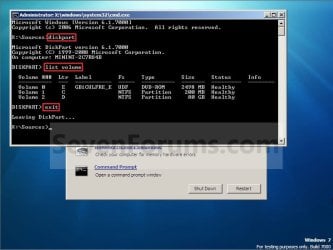
B) In the command prompt, type diskpart and press Enter. (see screenshot below)

C) In the command prompt, type list volume and press Enter. (see screenshot below)
NOTE: This will let you see what the drive letter is for the drive that you want to connvert since it may not always be the same drive letter that it is in Windows.

D) After making note of the drive letter, type exit and press Enter. (see screenshot below)
Command-1.jpg
E) Continue on to step 3 to convert the drive.
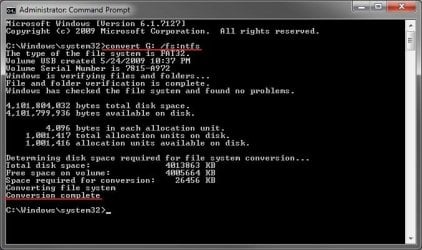
3. In the command prompt, type convert drive letter: /fs:ntfs and press Enter. (See screenshot below)
NOTE: Substitute drive letter for the drive letter of the FAT or FAT32 drive or partition that you want to convert to NTFS. For example, I want to convert my USB flash key with the drive letter G: , so I would type convert g: /fs:ntfs and press enter.
Command.jpg
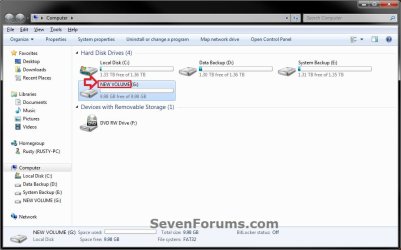
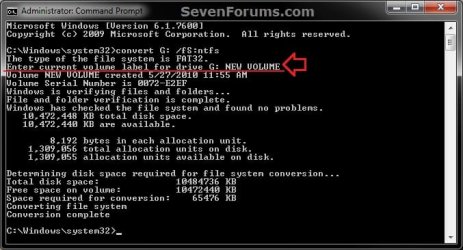
4. If prompted to Enter current volume label for drive (drive letter) (ex: G: ), then enter the name (ex: NEW VOLUME) of this drive letter as it is displayed in the Computer window and press Enter. (see screenshots below)
Current_Volume_Label-1.jpg

Current_Volume_Label-2.jpg
5. When the conversion to NTFS is complete, you receive the Conversion complete message. (See screenshot above)
NOTE: This may take a while to convert depending on full and large the drive is. It may also seem like it has hung at points, but be patient and let it finish.

6. Close the command prompt.
NOTE: If you used a command prompt at boot, then also close the System Recovery Options window and restart the computer.
That's it,
Shawn


Last edited:
I can still copy files to it, but I can't download stuff like games onto it. There is no way to help it?

Do you mean that you can't install games or programs to it?

If so, that's normal. You usually can't install to an external drive. An external drive is typically used for a data drive.

Let's see a screenshot of Disk Management showing this drive in it to see if anything may stand out.

Just to be extra safe, I would recommend to copy everything on the external drive you don't want to lose to another drive in case there is an issue with it.
 

My Computer My Computer

At a glance

64-bit Windows 11 Pro for WorkstationsIntel i7-8700K OC'd to 5 GHz64 GB (4x16GB) G.SKILL TridentZ RGB DDR4 3600...ASUS ROG-STRIX-GTX1080TI-O11G-GAMING
Computer type
PC/Desktop
Computer Manufacturer/Model Number
Self built custom
OS
64-bit Windows 11 Pro for Workstations
CPU
Intel i7-8700K OC'd to 5 GHz
Motherboard
ASUS ROG Maximus XI Formula Z390
Memory
64 GB (4x16GB) G.SKILL TridentZ RGB DDR4 3600 MHz
Graphics Card(s)
ASUS ROG-STRIX-GTX1080TI-O11G-GAMING
Sound Card
Integrated
Monitor(s) Displays
2 x Samsung Odyssey G7 27"
Screen Resolution
2560x1440
Hard Drives
1TB Samsung 990 PRO M.2,
4TB Samsung 990 PRO PRO M.2,
TerraMaster F8 SSD Plus NAS
PSU
Seasonic Prime Titanium 850W
Case
Thermaltake Core P3
Cooling
Corsair Hydro H115i
Keyboard
Logitech wireless K800
Mouse
Logitech MX Master 4
Internet Speed
2 Gb/s Download and 100 Mb/s Upload
Antivirus
Malwarebyte Anti-Malware Premium
Browser
Google Chrome
Other Info
Logitech Z625 speaker system,
Logitech BRIO 4K Pro webcam,
HP Color LaserJet Pro MFP M477fdn,
APC SMART-UPS RT 1000 XL - SURT1000XLI,
Galaxy S23 Plus phone
Here is disk managment.
 

Attachments

  • c36e6b44d9be8d96279aafab7be8d3f6.png
    c36e6b44d9be8d96279aafab7be8d3f6.png
    2.1 KB · Views: 398

My Computer My Computer

At a glance

Windows 7 Professional 64bit4GB DDR4
Computer type
PC/Desktop
Computer Manufacturer/Model Number
Certera
OS
Windows 7 Professional 64bit
Memory
4GB DDR4
Hard Drives
Drive C: -OS drive - 120GB - NTFS
Drive D: - Backup drive - 50GB - NTFS
Drive G: -External hard drive - 2TB - FAT32
Browser
Chrome

My Computer My Computer

At a glance

64-bit Windows 11 Pro for WorkstationsIntel i7-8700K OC'd to 5 GHz64 GB (4x16GB) G.SKILL TridentZ RGB DDR4 3600...ASUS ROG-STRIX-GTX1080TI-O11G-GAMING
Computer type
PC/Desktop
Computer Manufacturer/Model Number
Self built custom
OS
64-bit Windows 11 Pro for Workstations
CPU
Intel i7-8700K OC'd to 5 GHz
Motherboard
ASUS ROG Maximus XI Formula Z390
Memory
64 GB (4x16GB) G.SKILL TridentZ RGB DDR4 3600 MHz
Graphics Card(s)
ASUS ROG-STRIX-GTX1080TI-O11G-GAMING
Sound Card
Integrated
Monitor(s) Displays
2 x Samsung Odyssey G7 27"
Screen Resolution
2560x1440
Hard Drives
1TB Samsung 990 PRO M.2,
4TB Samsung 990 PRO PRO M.2,
TerraMaster F8 SSD Plus NAS
PSU
Seasonic Prime Titanium 850W
Case
Thermaltake Core P3
Cooling
Corsair Hydro H115i
Keyboard
Logitech wireless K800
Mouse
Logitech MX Master 4
Internet Speed
2 Gb/s Download and 100 Mb/s Upload
Antivirus
Malwarebyte Anti-Malware Premium
Browser
Google Chrome
Other Info
Logitech Z625 speaker system,
Logitech BRIO 4K Pro webcam,
HP Color LaserJet Pro MFP M477fdn,
APC SMART-UPS RT 1000 XL - SURT1000XLI,
Galaxy S23 Plus phone
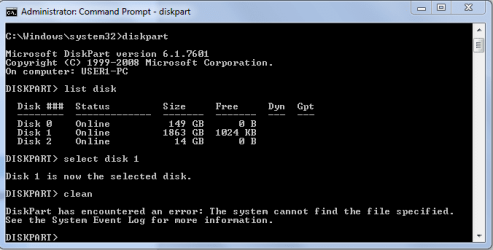
Didn't work. I don't know how to view the system event log either.
 

Attachments

  • dfe60cb48de1cab76590fea312121d3d.png
    dfe60cb48de1cab76590fea312121d3d.png
    11.1 KB · Views: 387

My Computer My Computer

At a glance

Windows 7 Professional 64bit4GB DDR4
Computer type
PC/Desktop
Computer Manufacturer/Model Number
Certera
OS
Windows 7 Professional 64bit
Memory
4GB DDR4
Hard Drives
Drive C: -OS drive - 120GB - NTFS
Drive D: - Backup drive - 50GB - NTFS
Drive G: -External hard drive - 2TB - FAT32
Browser
Chrome
All signs pointing towards dead drive. :(
 

My Computer My Computer

At a glance

64-bit Windows 11 Pro for WorkstationsIntel i7-8700K OC'd to 5 GHz64 GB (4x16GB) G.SKILL TridentZ RGB DDR4 3600...ASUS ROG-STRIX-GTX1080TI-O11G-GAMING
Computer type
PC/Desktop
Computer Manufacturer/Model Number
Self built custom
OS
64-bit Windows 11 Pro for Workstations
CPU
Intel i7-8700K OC'd to 5 GHz
Motherboard
ASUS ROG Maximus XI Formula Z390
Memory
64 GB (4x16GB) G.SKILL TridentZ RGB DDR4 3600 MHz
Graphics Card(s)
ASUS ROG-STRIX-GTX1080TI-O11G-GAMING
Sound Card
Integrated
Monitor(s) Displays
2 x Samsung Odyssey G7 27"
Screen Resolution
2560x1440
Hard Drives
1TB Samsung 990 PRO M.2,
4TB Samsung 990 PRO PRO M.2,
TerraMaster F8 SSD Plus NAS
PSU
Seasonic Prime Titanium 850W
Case
Thermaltake Core P3
Cooling
Corsair Hydro H115i
Keyboard
Logitech wireless K800
Mouse
Logitech MX Master 4
Internet Speed
2 Gb/s Download and 100 Mb/s Upload
Antivirus
Malwarebyte Anti-Malware Premium
Browser
Google Chrome
Other Info
Logitech Z625 speaker system,
Logitech BRIO 4K Pro webcam,
HP Color LaserJet Pro MFP M477fdn,
APC SMART-UPS RT 1000 XL - SURT1000XLI,
Galaxy S23 Plus phone
Well that really sucks, guess that's what I get for buying the cheapest one. XD thank you for all your help, good to know at least one person knows all the tips and tricks about Windows 7
 

My Computer My Computer

At a glance

Windows 7 Professional 64bit4GB DDR4
Computer type
PC/Desktop
Computer Manufacturer/Model Number
Certera
OS
Windows 7 Professional 64bit
Memory
4GB DDR4
Hard Drives
Drive C: -OS drive - 120GB - NTFS
Drive D: - Backup drive - 50GB - NTFS
Drive G: -External hard drive - 2TB - FAT32
Browser
Chrome
You're most welcome. I'm sorry that the drive appears to be dead.
 

My Computer My Computer

At a glance

64-bit Windows 11 Pro for WorkstationsIntel i7-8700K OC'd to 5 GHz64 GB (4x16GB) G.SKILL TridentZ RGB DDR4 3600...ASUS ROG-STRIX-GTX1080TI-O11G-GAMING
Computer type
PC/Desktop
Computer Manufacturer/Model Number
Self built custom
OS
64-bit Windows 11 Pro for Workstations
CPU
Intel i7-8700K OC'd to 5 GHz
Motherboard
ASUS ROG Maximus XI Formula Z390
Memory
64 GB (4x16GB) G.SKILL TridentZ RGB DDR4 3600 MHz
Graphics Card(s)
ASUS ROG-STRIX-GTX1080TI-O11G-GAMING
Sound Card
Integrated
Monitor(s) Displays
2 x Samsung Odyssey G7 27"
Screen Resolution
2560x1440
Hard Drives
1TB Samsung 990 PRO M.2,
4TB Samsung 990 PRO PRO M.2,
TerraMaster F8 SSD Plus NAS
PSU
Seasonic Prime Titanium 850W
Case
Thermaltake Core P3
Cooling
Corsair Hydro H115i
Keyboard
Logitech wireless K800
Mouse
Logitech MX Master 4
Internet Speed
2 Gb/s Download and 100 Mb/s Upload
Antivirus
Malwarebyte Anti-Malware Premium
Browser
Google Chrome
Other Info
Logitech Z625 speaker system,
Logitech BRIO 4K Pro webcam,
HP Color LaserJet Pro MFP M477fdn,
APC SMART-UPS RT 1000 XL - SURT1000XLI,
Galaxy S23 Plus phone
Back
Top