
Solved Cool'and'Quiet, How can I tell if it is working?

Local time
3:34 PM
Messages
237
Location
Tucson, AZ
I have Cool'and'Quiet installed but I no longer have the monitor tools on my desk top.

I think that Cool'and'Quiet is working because I see the rpms and temperature changing in the bios.

Windows 7 boots fine and operates with no apparent problems UNLESS I enable Cool'and'Quiet in the bios.

When I do that, Windows starts up but freezes on the Windows Flag page.

Once that happens, I have to power down and upon start up go into the bios to disable Cool'and'Quiet.

Two questions then:

Why no Cool'and'Quiet tools on the desktop? and

Why does Enabling Cool'and'Quiet freeze Windows 7x32 Startup.
 
Last edited:

My Computer My Computer

At a glance

Windows 7x32 Home Premium & XP SP3 x86Athlon 64FXCorsair CM2X1024-8500C5GeForce 7950X2 (Dual)
Computer Manufacturer/Model Number
Polywell
OS
Windows 7x32 Home Premium & XP SP3 x86
CPU
Athlon 64FX
Motherboard
ASUS M2N32SLI Delux
Memory
Corsair CM2X1024-8500C5
Graphics Card(s)
GeForce 7950X2 (Dual)
Monitor(s) Displays
ViewSonic A90f+ (Two)
Screen Resolution
1280x1024
Hard Drives
WD1500ADFD-00NLR1 (Originally Raid5)

Changed to three individual drives after HD crashed. May return to RAID5 if I locate a suitable HD.
PSU
TurboColl 1KW
Case
Polywell
Cooling
Cool'n'Quiet (Questionable Operation)
Keyboard
Logitech
Mouse
Logitech
Internet Speed
1GHertz (I think)
Other Info
Sony CD-RW CRX320EE

HP DVD Writer 1140d (may need to replace??)
Hello there, dww!

Well, you could check on the BIOS and you'll find if it's enabled or disabled, another way to check that out is to use CPU-Z on a idle state (don't do anything besides having the CPU-Z window open) and under Clocks, see if the core clock matches your actual processor speed.

IE: if your processor is an Athlon II X4 640, your core clock should be 3.0GHz, but with cool 'n' quiet enabled, in an idle state, the processor underclocks itself to save power.

This means that if you have CnC enabled, the processor's core clock could (could)! be 800MHz.
 

My Computer My Computer

At a glance

Windows
Computer type
PC/Desktop
OS
Windows
I don't know about special gadgets for that (never bothered to look because I don't need that)
But my Cool and Quiet (you mean the option for AMD-chips, right?) is enabled since day 1 and never caused a problem.
To check if it really works you could use Core Temp Core Temp (and see the temperature change in the tray..I recall there were desktop gadgets that show those temps too...a kind of indirect way of checking if C&Q works ;)

And with SIV SIV - System Information Viewer you can see if the CPU Frequency changes with different loads (when idle the CPU gets tacted down to keep it cool(er))

Now that punkster mentions it...CPU-Z http://www.cpuid.com/softwares/cpu-z.html is an excellent tool for that too !
-DG
 

My Computer My Computer

At a glance

Windows 7 Ultimate x86DualCore AMD Athlon 64 X2, 2600 MHz 5200+Samsung 2GB DDR2Onboard NVIDIA GeForce 6150SE nForce 430
Computer Manufacturer/Model Number
HP m8000n
OS
Windows 7 Ultimate x86
CPU
DualCore AMD Athlon 64 X2, 2600 MHz 5200+
Motherboard
Asus M2N68-LA (Narra)
Memory
Samsung 2GB DDR2
Graphics Card(s)
Onboard NVIDIA GeForce 6150SE nForce 430
Sound Card
Onboard nVIDIA nForce 6100-430 (MCP61P)
Monitor(s) Displays
Westinghouse 19" LED
Screen Resolution
1280x1024
Hard Drives
SATA II Seagate Barracuda 500GB
USB II WD Elements 500GB
USB II WD My Book 1TB
USB II WD My Book 2TB
PSU
Stock (HP)
Case
Stock (HP)
Cooling
Stock
Keyboard
Logitech Classic KB 200
Mouse
Standard HP opticle USB mouse
What is installed? You shouldn't need to install anything for it to work in Windows 7, as 7 supports CnQ natively, just need to enable it in the bios.

As for seeing if it is working you can use this,

CPUID - System & hardware benchmark, monitoring, reporting

to see if the CPU speed is going up and down as it should.
 

My Computer My Computer

At a glance

Win 7 Ultimate x64FX-8350 @ 4.6 GHz so farADATA XPG V1 Series Black 8GB DDR3 1600Sapphire R9 270x Dual-X
Computer type
PC/Desktop
Computer Manufacturer/Model Number
Me
OS
Win 7 Ultimate x64
CPU
FX-8350 @ 4.6 GHz so far
Motherboard
Asus M5A97 EVO
Memory
ADATA XPG V1 Series Black 8GB DDR3 1600
Graphics Card(s)
Sapphire R9 270x Dual-X
Sound Card
Xonar DGX w/ Corsair Vengence 1300
Monitor(s) Displays
Acer S232HL Abid
Screen Resolution
1920x1080
Hard Drives
120 GB OCZ Vertex 3
500 GB Seagate 7200.12
PSU
Antec Earthwatts 650W Green
Case
Antec Three Hundred
Cooling
Cooler Master 212 EVO
Keyboard
Logitech G510
Mouse
Logitech G500s
Internet Speed
35000/3000
What is installed? You shouldn't need to install anything for it to work in Windows 7, as 7 supports CnQ natively, just need to enable it in the bios.

As for seeing if it is working you can use this,

CPUID - System & hardware benchmark, monitoring, reporting

to see if the CPU speed is going up and down as it should.

Then, if CnQ is native to Windows 7, I may have a problem worse than I thought. If I have Cool'and'Quiet enabled (in the bios), my computer freezes at the
Starting Windows (Windows Flag) page. To recover, I must restart and disable Cool'and'Quite in the bios.

Are there any other settings within the bios can can jointly effect the operation of CnQ.

Recall, I changed from XP (where CnQ was visible on the desktop) to Windows 7 and while doing so I reset the bios (without taking note of the settings). Now I have the stated problem.
 

My Computer My Computer

At a glance

Windows 7x32 Home Premium & XP SP3 x86Athlon 64FXCorsair CM2X1024-8500C5GeForce 7950X2 (Dual)
Computer Manufacturer/Model Number
Polywell
OS
Windows 7x32 Home Premium & XP SP3 x86
CPU
Athlon 64FX
Motherboard
ASUS M2N32SLI Delux
Memory
Corsair CM2X1024-8500C5
Graphics Card(s)
GeForce 7950X2 (Dual)
Monitor(s) Displays
ViewSonic A90f+ (Two)
Screen Resolution
1280x1024
Hard Drives
WD1500ADFD-00NLR1 (Originally Raid5)

Changed to three individual drives after HD crashed. May return to RAID5 if I locate a suitable HD.
PSU
TurboColl 1KW
Case
Polywell
Cooling
Cool'n'Quiet (Questionable Operation)
Keyboard
Logitech
Mouse
Logitech
Internet Speed
1GHertz (I think)
Other Info
Sony CD-RW CRX320EE

HP DVD Writer 1140d (may need to replace??)
Using CPU-Z, I can see that my Core Speed is 2.780GHz (varies slightly). Someone said it should be 300GHz so it appears that it has been throttled down.

Is that because of the temperature?

PS: Just noticed in CPU-Z that the multiplier is x12. When idle, is that high?

Sorry for the dump questions but I am not well schooled on this high tech stuff. Please bare with me.

A sidebar question here: Are CPU-Z and CPUID one in the same or am I missing something?
 
Last edited:

My Computer My Computer

At a glance

Windows 7x32 Home Premium & XP SP3 x86Athlon 64FXCorsair CM2X1024-8500C5GeForce 7950X2 (Dual)
Computer Manufacturer/Model Number
Polywell
OS
Windows 7x32 Home Premium & XP SP3 x86
CPU
Athlon 64FX
Motherboard
ASUS M2N32SLI Delux
Memory
Corsair CM2X1024-8500C5
Graphics Card(s)
GeForce 7950X2 (Dual)
Monitor(s) Displays
ViewSonic A90f+ (Two)
Screen Resolution
1280x1024
Hard Drives
WD1500ADFD-00NLR1 (Originally Raid5)

Changed to three individual drives after HD crashed. May return to RAID5 if I locate a suitable HD.
PSU
TurboColl 1KW
Case
Polywell
Cooling
Cool'n'Quiet (Questionable Operation)
Keyboard
Logitech
Mouse
Logitech
Internet Speed
1GHertz (I think)
Other Info
Sony CD-RW CRX320EE

HP DVD Writer 1140d (may need to replace??)
A sidebar question here: Are CPU-Z and CPUID one in the same or am I missing something?

CPU-Z is the application based on the CPUID Software Development Kit.

Regards,
GEWB
 

My Computer My Computer

At a glance

Linux Mint / XP / Win7 Home, Pro, Ultimate / ...
Computer type
PC/Desktop
Computer Manufacturer/Model Number
(7 different computers booting up to 10 systems)
OS
Linux Mint / XP / Win7 Home, Pro, Ultimate / Win8.1 / Win10
Other Info
Four desktops, two laptops, one notebook and one tablet

My Computer My Computer

At a glance

Windows 7x32 Home Premium & XP SP3 x86Athlon 64FXCorsair CM2X1024-8500C5GeForce 7950X2 (Dual)
Computer Manufacturer/Model Number
Polywell
OS
Windows 7x32 Home Premium & XP SP3 x86
CPU
Athlon 64FX
Motherboard
ASUS M2N32SLI Delux
Memory
Corsair CM2X1024-8500C5
Graphics Card(s)
GeForce 7950X2 (Dual)
Monitor(s) Displays
ViewSonic A90f+ (Two)
Screen Resolution
1280x1024
Hard Drives
WD1500ADFD-00NLR1 (Originally Raid5)

Changed to three individual drives after HD crashed. May return to RAID5 if I locate a suitable HD.
PSU
TurboColl 1KW
Case
Polywell
Cooling
Cool'n'Quiet (Questionable Operation)
Keyboard
Logitech
Mouse
Logitech
Internet Speed
1GHertz (I think)
Other Info
Sony CD-RW CRX320EE

HP DVD Writer 1140d (may need to replace??)
Using CPU-Z, I can see that my Core Speed is 2.780GHz (varies slightly). Someone said it should be 300GHz so it appears that it has been throttled down.

Which Athlon 64FX do you have (there was more than one)?

CPU-Z gives core speed in MHz so it sounds like yours is 2780MHz which is 2.78GHz. That would be slightly "up" for the 2.6GHz version or slightly "down" for the 3.0GHz version.

Can you post a screen shot of the CPU tab in CPU-Z?

Regards,
GEWB
 

My Computer My Computer

At a glance

Linux Mint / XP / Win7 Home, Pro, Ultimate / ...
Computer type
PC/Desktop
Computer Manufacturer/Model Number
(7 different computers booting up to 10 systems)
OS
Linux Mint / XP / Win7 Home, Pro, Ultimate / Win8.1 / Win10
Other Info
Four desktops, two laptops, one notebook and one tablet
Ah ha - do you have the Athlon 64 FX-57? If so, it is running at 2.8GHz so 2.78GHz would be correct.

Regards,
GEWB
 

My Computer My Computer

At a glance

Linux Mint / XP / Win7 Home, Pro, Ultimate / ...
Computer type
PC/Desktop
Computer Manufacturer/Model Number
(7 different computers booting up to 10 systems)
OS
Linux Mint / XP / Win7 Home, Pro, Ultimate / Win8.1 / Win10
Other Info
Four desktops, two laptops, one notebook and one tablet
Ah ha - do you have the Athlon 64 FX-57? If so, it is running at 2.8GHz so 2.78GHz would be correct.

Regards,
GEWB

I have the Athlon 64 FX-62. Googling that I gather that it too operates at 2.8Ghz.

I think so:

CPU-Z CPU.png

Should have cropped it huh?
 

My Computer My Computer

At a glance

Windows 7x32 Home Premium & XP SP3 x86Athlon 64FXCorsair CM2X1024-8500C5GeForce 7950X2 (Dual)
Computer Manufacturer/Model Number
Polywell
OS
Windows 7x32 Home Premium & XP SP3 x86
CPU
Athlon 64FX
Motherboard
ASUS M2N32SLI Delux
Memory
Corsair CM2X1024-8500C5
Graphics Card(s)
GeForce 7950X2 (Dual)
Monitor(s) Displays
ViewSonic A90f+ (Two)
Screen Resolution
1280x1024
Hard Drives
WD1500ADFD-00NLR1 (Originally Raid5)

Changed to three individual drives after HD crashed. May return to RAID5 if I locate a suitable HD.
PSU
TurboColl 1KW
Case
Polywell
Cooling
Cool'n'Quiet (Questionable Operation)
Keyboard
Logitech
Mouse
Logitech
Internet Speed
1GHertz (I think)
Other Info
Sony CD-RW CRX320EE

HP DVD Writer 1140d (may need to replace??)
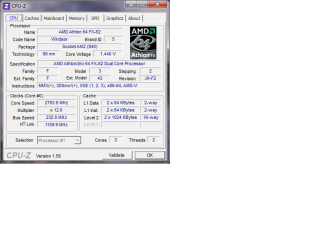
Those numbers look fine for that chip. You could also try multiplier of 14 and bus of 200 (or see if the 232 bus will work with x14).

The speed will fluctuate a bit up/down which is normal.

Side bar: looks like you are in the Mountain time zone - what state/province?

Regards,
GEWB
 

My Computer My Computer

At a glance

Linux Mint / XP / Win7 Home, Pro, Ultimate / ...
Computer type
PC/Desktop
Computer Manufacturer/Model Number
(7 different computers booting up to 10 systems)
OS
Linux Mint / XP / Win7 Home, Pro, Ultimate / Win8.1 / Win10
Other Info
Four desktops, two laptops, one notebook and one tablet
Those numbers look fine for that chip. You could also try multiplier of 14 and bus of 200 (or see if the 232 bus will work with x14).

The speed will fluctuate a bit up/down which is normal.

Side bar: looks like you are in the Mountain time zone - what state/province?

Regards,
GEWB

Okay, now I gotta take a guess. The multiplier must be a variable that I can select in the bios. Furthermore, since I am not a power user, maybe I don't really need some of the capabilities of this machine and therefore may now even need Cool'and'Quiet to be enabled.

Please warn me if I am wrong. Especially if I am wrong.

As for my location - Tucson, AZ.
 

My Computer My Computer

At a glance

Windows 7x32 Home Premium & XP SP3 x86Athlon 64FXCorsair CM2X1024-8500C5GeForce 7950X2 (Dual)
Computer Manufacturer/Model Number
Polywell
OS
Windows 7x32 Home Premium & XP SP3 x86
CPU
Athlon 64FX
Motherboard
ASUS M2N32SLI Delux
Memory
Corsair CM2X1024-8500C5
Graphics Card(s)
GeForce 7950X2 (Dual)
Monitor(s) Displays
ViewSonic A90f+ (Two)
Screen Resolution
1280x1024
Hard Drives
WD1500ADFD-00NLR1 (Originally Raid5)

Changed to three individual drives after HD crashed. May return to RAID5 if I locate a suitable HD.
PSU
TurboColl 1KW
Case
Polywell
Cooling
Cool'n'Quiet (Questionable Operation)
Keyboard
Logitech
Mouse
Logitech
Internet Speed
1GHertz (I think)
Other Info
Sony CD-RW CRX320EE

HP DVD Writer 1140d (may need to replace??)
Okay, now I gotta take a guess. The multiplier must be a variable that I can select in the bios. Furthermore, since I am not a power user, maybe I don't really need some of the capabilities of this machine and therefore may now even need Cool'and'Quiet to be enabled.

Please warn me if I am wrong. Especially if I am wrong.

As for my location - Tucson, AZ.

Your guess is correct - it's called overclocking. Your chip can overclock a bit but not much. Not being a power user, you can leave the settings as-is.

However, I don't know what speed RAM you have. If it is DDR2-800 (PC2 6400), setting the multiplier to x14 and bus to 200 will optimize the RAM timing. This is done in the BIOS.

Cool and Quiet is used to throttle down the processor during light load thus reducing electrical demand and lowering temps. On demand the speed ramps up to max.

Regards,
GEWB
 
Last edited:

My Computer My Computer

At a glance

Linux Mint / XP / Win7 Home, Pro, Ultimate / ...
Computer type
PC/Desktop
Computer Manufacturer/Model Number
(7 different computers booting up to 10 systems)
OS
Linux Mint / XP / Win7 Home, Pro, Ultimate / Win8.1 / Win10
Other Info
Four desktops, two laptops, one notebook and one tablet
A little research and I think I answered my own question here. But I still have a question. Since heat is a potential problem, rather than speed up the processor, can I slow it down and as a result lower the CPU temperatures?
 

My Computer My Computer

At a glance

Windows 7x32 Home Premium & XP SP3 x86Athlon 64FXCorsair CM2X1024-8500C5GeForce 7950X2 (Dual)
Computer Manufacturer/Model Number
Polywell
OS
Windows 7x32 Home Premium & XP SP3 x86
CPU
Athlon 64FX
Motherboard
ASUS M2N32SLI Delux
Memory
Corsair CM2X1024-8500C5
Graphics Card(s)
GeForce 7950X2 (Dual)
Monitor(s) Displays
ViewSonic A90f+ (Two)
Screen Resolution
1280x1024
Hard Drives
WD1500ADFD-00NLR1 (Originally Raid5)

Changed to three individual drives after HD crashed. May return to RAID5 if I locate a suitable HD.
PSU
TurboColl 1KW
Case
Polywell
Cooling
Cool'n'Quiet (Questionable Operation)
Keyboard
Logitech
Mouse
Logitech
Internet Speed
1GHertz (I think)
Other Info
Sony CD-RW CRX320EE

HP DVD Writer 1140d (may need to replace??)
You could also try multiplier of 14 and bus of 200
Which are also the default values for the FX-62,

techPowerUp! :: CPU Database : AMD Athlon 64 FX-62

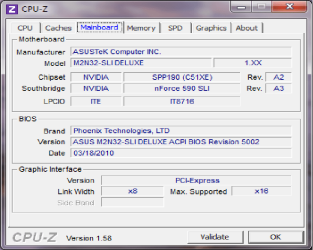
Wouldn't happen to have any of the auto overclocking features in the bios (of which there are a few) enabled would you? Also what bios version are you running on the board? The Mainboard tab in CPUz should show it. Reason for asking is Asus has a beta bios listed for that board that has a fix for Cool and Quiet,

M2N32-SLI Deluxe BIOS 2209
Fix the CPU multiplier cannot be changed when Cool&Quiet is enabled.
File Size 762,33 (KBytes) 2009.09.21 update
 

My Computer My Computer

At a glance

Win 7 Ultimate x64FX-8350 @ 4.6 GHz so farADATA XPG V1 Series Black 8GB DDR3 1600Sapphire R9 270x Dual-X
Computer type
PC/Desktop
Computer Manufacturer/Model Number
Me
OS
Win 7 Ultimate x64
CPU
FX-8350 @ 4.6 GHz so far
Motherboard
Asus M5A97 EVO
Memory
ADATA XPG V1 Series Black 8GB DDR3 1600
Graphics Card(s)
Sapphire R9 270x Dual-X
Sound Card
Xonar DGX w/ Corsair Vengence 1300
Monitor(s) Displays
Acer S232HL Abid
Screen Resolution
1920x1080
Hard Drives
120 GB OCZ Vertex 3
500 GB Seagate 7200.12
PSU
Antec Earthwatts 650W Green
Case
Antec Three Hundred
Cooling
Cooler Master 212 EVO
Keyboard
Logitech G510
Mouse
Logitech G500s
Internet Speed
35000/3000
Okay, now I gotta take a guess. The multiplier must be a variable that I can select in the bios. Furthermore, since I am not a power user, maybe I don't really need some of the capabilities of this machine and therefore may now even need Cool'and'Quiet to be enabled.

Please warn me if I am wrong. Especially if I am wrong.

As for my location - Tucson, AZ.

Your guess is correct - it's called overclocking. Your chip can overclock a bit but not much. Not being a power user, you can leave the settings as-is.

However, I don't know what speed RAM you have. If it is DDR-800 (PC2 6400), setting the multiplier to x14 and bus to 200 will optimize the RAM timing. This is done in the BIOS.

Cool and Quiet is used to throttle down the processor during light load thus reducing electrical demand and lowering temps. On demand the speed ramps up to max.

Regards,
GEWB

My ram is currently 3G of Corsair CM2X1024-8500C5. I had a memory failure and lost one stick. Frankly, I don't notice any difference in performance at all.
 

My Computer My Computer

At a glance

Windows 7x32 Home Premium & XP SP3 x86Athlon 64FXCorsair CM2X1024-8500C5GeForce 7950X2 (Dual)
Computer Manufacturer/Model Number
Polywell
OS
Windows 7x32 Home Premium & XP SP3 x86
CPU
Athlon 64FX
Motherboard
ASUS M2N32SLI Delux
Memory
Corsair CM2X1024-8500C5
Graphics Card(s)
GeForce 7950X2 (Dual)
Monitor(s) Displays
ViewSonic A90f+ (Two)
Screen Resolution
1280x1024
Hard Drives
WD1500ADFD-00NLR1 (Originally Raid5)

Changed to three individual drives after HD crashed. May return to RAID5 if I locate a suitable HD.
PSU
TurboColl 1KW
Case
Polywell
Cooling
Cool'n'Quiet (Questionable Operation)
Keyboard
Logitech
Mouse
Logitech
Internet Speed
1GHertz (I think)
Other Info
Sony CD-RW CRX320EE

HP DVD Writer 1140d (may need to replace??)
A little research and I think I answered my own question here. But I still have a question. Since heat is a potential problem, rather than speed up the processor, can I slow it down and as a result lower the CPU temperatures?

Sure, but why bother? See Stormy's reply regarding the BIOS version. Let C'n'C do the controlling.

(Nice RAM, DDR2-1066, can run at 266.)

Regards,
GEWB
 

My Computer My Computer

At a glance

Linux Mint / XP / Win7 Home, Pro, Ultimate / ...
Computer type
PC/Desktop
Computer Manufacturer/Model Number
(7 different computers booting up to 10 systems)
OS
Linux Mint / XP / Win7 Home, Pro, Ultimate / Win8.1 / Win10
Other Info
Four desktops, two laptops, one notebook and one tablet
You could also try multiplier of 14 and bus of 200
Which are also the default values for the FX-62,

techPowerUp! :: CPU Database : AMD Athlon 64 FX-62

Wouldn't happen to have any of the auto overclocking features in the bios (of which there are a few) enabled would you? Also what bios version are you running on the board? The Mainboard tab in CPUz should show it. Reason for asking is Asus has a beta bios listed for that board that has a fix for Cool and Quiet,

M2N32-SLI Deluxe BIOS 2209
Fix the CPU multiplier cannot be changed when Cool&Quiet is enabled.
File Size 762,33 (KBytes) 2009.09.21 update

I am getting more information here than I can absorb let alone fully understand.

I'll have to look at the bios to answer your question about overclocking features but this may shed some light.

CPU-Z Mainboard.png
.
 

My Computer My Computer

At a glance

Windows 7x32 Home Premium & XP SP3 x86Athlon 64FXCorsair CM2X1024-8500C5GeForce 7950X2 (Dual)
Computer Manufacturer/Model Number
Polywell
OS
Windows 7x32 Home Premium & XP SP3 x86
CPU
Athlon 64FX
Motherboard
ASUS M2N32SLI Delux
Memory
Corsair CM2X1024-8500C5
Graphics Card(s)
GeForce 7950X2 (Dual)
Monitor(s) Displays
ViewSonic A90f+ (Two)
Screen Resolution
1280x1024
Hard Drives
WD1500ADFD-00NLR1 (Originally Raid5)

Changed to three individual drives after HD crashed. May return to RAID5 if I locate a suitable HD.
PSU
TurboColl 1KW
Case
Polywell
Cooling
Cool'n'Quiet (Questionable Operation)
Keyboard
Logitech
Mouse
Logitech
Internet Speed
1GHertz (I think)
Other Info
Sony CD-RW CRX320EE

HP DVD Writer 1140d (may need to replace??)
OK, that's the last BIOS update. Check in your BIOS to be sure C-n-C is enabled.

Regards,
GEWB
 

My Computer My Computer

At a glance

Linux Mint / XP / Win7 Home, Pro, Ultimate / ...
Computer type
PC/Desktop
Computer Manufacturer/Model Number
(7 different computers booting up to 10 systems)
OS
Linux Mint / XP / Win7 Home, Pro, Ultimate / Win8.1 / Win10
Other Info
Four desktops, two laptops, one notebook and one tablet
Back
Top