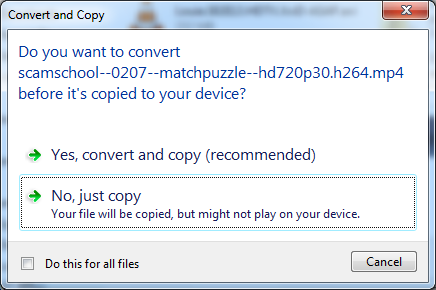
Copy and convert m4a to wma when copying files to just like in W7

The2nd

New member
Member
Local time
11:37 PM
Messages
57
Hello, (Not sure if this is the right place)

I recently switched from a windows 7 system to a vista because my laptop is broken. I was wondering how do I get the option to convert m4a files into wma when copying them to my phone? In W7 when I would copy music files onto my phone I would be asked if I want to convert the file into mwa since my phone doesn't really support m4a files but on vista it just copies the file and I have a hard time playing it on my phone?
 

My Computer My Computer

At a glance

Windows 7 Ultimate 32bitIntel(R) Pentium(R) Dual CPU E2140 @ 1.60GHz2,00 GBATI Radeon HD 2350
Computer type
PC/Desktop
Computer Manufacturer/Model Number
HP Presario SR5302FR
OS
Windows 7 Ultimate 32bit
CPU
Intel(R) Pentium(R) Dual CPU E2140 @ 1.60GHz
Motherboard
ECS
Memory
2,00 GB
Graphics Card(s)
ATI Radeon HD 2350
Sound Card
Realtek High Definition Audio
Convert them while on the hard drive using an application designed for that purpose.

After conversion, move them to your phone.

I know nothing about phones, but I convert sound files all the time. There are a bunch of applications that will do that--free applications.
 

My Computer My Computer

At a glance

Windows 7 Home Premium SP1, 64-bitIntel Skylake i5-6600K, not overclocked8 GB HyperX DDR4-2666 (2 x 4 GB)none; graphics are integrated on CPU
Computer type
PC/Desktop
Computer Manufacturer/Model Number
Ignatz Special; 4 speed manual gearbox; factory air conditioning; one of one
OS
Windows 7 Home Premium SP1, 64-bit
CPU
Intel Skylake i5-6600K, not overclocked
Motherboard
AsRock Z170M Extreme 4, micro ATX
Memory
8 GB HyperX DDR4-2666 (2 x 4 GB)
Graphics Card(s)
none; graphics are integrated on CPU
Sound Card
onboard: Realtek ALC1150; external: USB Behringer UF0-202
Monitor(s) Displays
Dell S2340M 23 inch IPS
Screen Resolution
1600 x 900
Hard Drives
System: Crucial MX100 series SSD, 128 GB;
Data: Samsung Spinpoint 103SJ, 1 TB;
Backup: WD Caviar Green WD30EZRX-00D8PB0, 3 TB
PSU
Rosewill SilentNight 500 watt fanless, semi-modular
Case
Antec Solo II
Cooling
Noctua NH-U12S; Noctua F12 intake, Noctua S12A exhaust
Keyboard
Microsoft 200 6JH-00001 USB
Mouse
Dell or Microsoft optical wired; USB
Antivirus
Microsoft Security Essentials and Malwarebytes Premium
Browser
Pale Moon
Other Info
All fans PWM; speeds at idle: CPU circa 500 rpm; intake circa 600 rpm; exhaust circa 600 rpm; CPU temps 27 idle and 47 C load in a warm room (27 C/81 F) when running Intel Extreme Tuning Utility stress test.
Convert them while on the hard drive using an application designed for that purpose.

After conversion, move them to your phone.

I know nothing about phones, but I convert sound files all the time. There are a bunch of applications that will do that--free applications.

Yeah I know but why was I given the option to convert the files when copying them onto my phone on windows 7 without any applications?
LTWmk.png

I didn't want to use any applications but if there is not other way then thanks.
 
Last edited:

My Computer My Computer

At a glance

Windows 7 Ultimate 32bitIntel(R) Pentium(R) Dual CPU E2140 @ 1.60GHz2,00 GBATI Radeon HD 2350
Computer type
PC/Desktop
Computer Manufacturer/Model Number
HP Presario SR5302FR
OS
Windows 7 Ultimate 32bit
CPU
Intel(R) Pentium(R) Dual CPU E2140 @ 1.60GHz
Motherboard
ECS
Memory
2,00 GB
Graphics Card(s)
ATI Radeon HD 2350
Sound Card
Realtek High Definition Audio
Presumably because that functionality is built into Windows 7, but not Vista.

I have no idea.

Why worry about why? Do what you have to do.
 

My Computer My Computer

At a glance

Windows 7 Home Premium SP1, 64-bitIntel Skylake i5-6600K, not overclocked8 GB HyperX DDR4-2666 (2 x 4 GB)none; graphics are integrated on CPU
Computer type
PC/Desktop
Computer Manufacturer/Model Number
Ignatz Special; 4 speed manual gearbox; factory air conditioning; one of one
OS
Windows 7 Home Premium SP1, 64-bit
CPU
Intel Skylake i5-6600K, not overclocked
Motherboard
AsRock Z170M Extreme 4, micro ATX
Memory
8 GB HyperX DDR4-2666 (2 x 4 GB)
Graphics Card(s)
none; graphics are integrated on CPU
Sound Card
onboard: Realtek ALC1150; external: USB Behringer UF0-202
Monitor(s) Displays
Dell S2340M 23 inch IPS
Screen Resolution
1600 x 900
Hard Drives
System: Crucial MX100 series SSD, 128 GB;
Data: Samsung Spinpoint 103SJ, 1 TB;
Backup: WD Caviar Green WD30EZRX-00D8PB0, 3 TB
PSU
Rosewill SilentNight 500 watt fanless, semi-modular
Case
Antec Solo II
Cooling
Noctua NH-U12S; Noctua F12 intake, Noctua S12A exhaust
Keyboard
Microsoft 200 6JH-00001 USB
Mouse
Dell or Microsoft optical wired; USB
Antivirus
Microsoft Security Essentials and Malwarebytes Premium
Browser
Pale Moon
Other Info
All fans PWM; speeds at idle: CPU circa 500 rpm; intake circa 600 rpm; exhaust circa 600 rpm; CPU temps 27 idle and 47 C load in a warm room (27 C/81 F) when running Intel Extreme Tuning Utility stress test.
If it does convert to Wma which is the Windows Media Player, you could try to convert them using it. If you see your phone in the application WMP then it's ok. Otherwise yes you can convert to wma your mp4 on your phone directly.
 

My Computer My Computer

At a glance

Windows 7 Professional SP1 - x64 [Non-UEFI Boot]Ivy Bridge Core i5 3570K (Delidded)G.Skill "Ares" DDR3 PC3-12800 - 1600MHz (16Gb)Asus Dual-RX480-O4G
Computer type
PC/Desktop
Computer Manufacturer/Model Number
Custom Build
OS
Windows 7 Professional SP1 - x64 [Non-UEFI Boot]
CPU
Ivy Bridge Core i5 3570K (Delidded)
Motherboard
Asus P8Z77-V LE PLUS
Memory
G.Skill "Ares" DDR3 PC3-12800 - 1600MHz (16Gb)
Graphics Card(s)
Asus Dual-RX480-O4G
Sound Card
Creative Sound Blaster Z w/5.1 sound system
Monitor(s) Displays
Asus IPS 23"
Screen Resolution
16/9
Hard Drives
Internal:
500Go Sata 6Gb/s (x2)
500Go Sata 3Gb/s (x2)
SSD 60Go Sata 6Gb/s
PSU
In Win C 900W Series 80+ Platinum
Case
Thermaltake Chaser A71
Cooling
Custom Water Cooling Loop
Keyboard
Cooler Master QuickFire XTi
Mouse
Razer Imperator 2012 (4G)
Antivirus
MSE
Browser
IE 11.0.xxx Rtm
Other Info
"Raid0" with Intel Smart Response Technology (HDD/SSD)
If it does convert to Wma which is the Windows Media Player, you could try to convert them using it. If you see your phone in the application WMP then it's ok. Otherwise yes you can convert to wma your mp4 on your phone directly.

When I copy the music files from the pc to the phone I'm not asked if I want to convert them first. When plugged my phone does show up in WMP but when i try putting music on my phon thru WMP it doesn't convcert them neither
 

My Computer My Computer

At a glance

Windows 7 Ultimate 32bitIntel(R) Pentium(R) Dual CPU E2140 @ 1.60GHz2,00 GBATI Radeon HD 2350
Computer type
PC/Desktop
Computer Manufacturer/Model Number
HP Presario SR5302FR
OS
Windows 7 Ultimate 32bit
CPU
Intel(R) Pentium(R) Dual CPU E2140 @ 1.60GHz
Motherboard
ECS
Memory
2,00 GB
Graphics Card(s)
ATI Radeon HD 2350
Sound Card
Realtek High Definition Audio
If it does convert to Wma which is the Windows Media Player, you could try to convert them using it. If you see your phone in the application WMP then it's ok. Otherwise yes you can convert to wma your mp4 on your phone directly.

When I copy the music files from the pc to the phone I'm not asked if I want to convert them first. When plugged my phone does show up in WMP but when i try putting music on my phon thru WMP it doesn't convcert them neither

What if you try in WMP parameters=>tools=>options=>mobiles devices, then edit the properties while your phone is connected. See what settings it does give you.

On mine i do pull off the micro SD card because and have a card reader in my 3,5' bay. I had always trouble for the phone to be well recognized by WMP or it takes ages to it.
 

My Computer My Computer

At a glance

Windows 7 Professional SP1 - x64 [Non-UEFI Boot]Ivy Bridge Core i5 3570K (Delidded)G.Skill "Ares" DDR3 PC3-12800 - 1600MHz (16Gb)Asus Dual-RX480-O4G
Computer type
PC/Desktop
Computer Manufacturer/Model Number
Custom Build
OS
Windows 7 Professional SP1 - x64 [Non-UEFI Boot]
CPU
Ivy Bridge Core i5 3570K (Delidded)
Motherboard
Asus P8Z77-V LE PLUS
Memory
G.Skill "Ares" DDR3 PC3-12800 - 1600MHz (16Gb)
Graphics Card(s)
Asus Dual-RX480-O4G
Sound Card
Creative Sound Blaster Z w/5.1 sound system
Monitor(s) Displays
Asus IPS 23"
Screen Resolution
16/9
Hard Drives
Internal:
500Go Sata 6Gb/s (x2)
500Go Sata 3Gb/s (x2)
SSD 60Go Sata 6Gb/s
PSU
In Win C 900W Series 80+ Platinum
Case
Thermaltake Chaser A71
Cooling
Custom Water Cooling Loop
Keyboard
Cooler Master QuickFire XTi
Mouse
Razer Imperator 2012 (4G)
Antivirus
MSE
Browser
IE 11.0.xxx Rtm
Other Info
"Raid0" with Intel Smart Response Technology (HDD/SSD)
Back
Top