Solved copy and paste print screen

novice60

New member
Local time
5:00 AM
Messages
2
To copy and paste a print screen via paint into a word doc i find the result to small to read. How do i increase it`s size?
 

My Computer

Computer type
PC/Desktop
Computer Manufacturer/Model Number
unknown
OS
windows7 home premium x64
CPU
E5400
Motherboard
Pentium duel core
Memory
3.00GB
Graphics Card(s)
NVIDIA GeForce 210
Hard Drives
156GB
Antivirus
trend micro
Browser
firefox
Don't use copy and paste. Click on start and use the search to search for 'snipping tool'. This will allow you to 'snip' the part of the image you want, it should render better than copying from paint to word.
 

My Computer

Computer type
PC/Desktop
Computer Manufacturer/Model Number
Custom
OS
Windows 7 Ultimate x64
CPU
Intel Core i7 2600K (O/C 4.7GHz)
Motherboard
Asus ROG Maximus IV Extreme-Z - Intel Z68 Chipset
Memory
8GB Corsair Vengeance LP, DDR3, 1600Mhz
Graphics Card(s)
Nvidia GTX 460 Graphics Card
Sound Card
Onboard
Monitor(s) Displays
Dell E228WFP
Hard Drives
2 x 500GB Samsung SpinPoint Drives (1 for OS, 1 for Data and Apps)
PSU
CoolerMaster 1000W
Case
CoolerMaster HAF
Cooling
Air
Internet Speed
Fibre - 60MB Down, 30MB Up
Antivirus
ESET NOD32 Antivirus
Use snipping tool to copy only what you want and not the whole screen. In WORD make left and right margins smaller. And/or set the page format to landscape. Then paste in WORD
 

My Computer

Computer type
Laptop
Computer Manufacturer/Model Number
ACER ASPIRE 5742G
OS
Microsoft Windows 7 Home Premium 64-bits 7601 Multiprocessor Free Service Pack 1
CPU
Intel(R) Core(TM) i3 CPU M 370 @ 2.40GHz
Motherboard
Acer Aspire 5742G
Memory
4,00 GB
Graphics Card(s)
ATI Mobility Radeon HD 5400 Series
Sound Card
(1) AMD High Definition Audio Device (2) Realtek High Defi
Screen Resolution
1366 x 768 x 32 bits (4294967296 colors) @ 60 Hz
Hard Drives
WDC WD5000BEVT-22ZAT0
You can use "Alt+PrtScn" to capture a window instead of the entire screen.

Paint can save images as png files, so I'm not sure why you are having quality issues.
 

My Computer

Computer type
PC/Desktop
Computer Manufacturer/Model Number
n/a
OS
W7 Ultimate SP1, LM19.2 MATE, W10 Home 1703, W10 Pro 1703 VM, #All 64 bit
CPU
AMD Phenom II x6 1100T, 3.3 GHz
Motherboard
ASUS M4A88T-M/USB3 (AM3)
Memory
12GB DDR3 1333 G-Skill (4GB x 2), G-Skill (2GB x 2)
Graphics Card(s)
NVIDIA GeForce GTX 660
Sound Card
Realtek?
Monitor(s) Displays
Samsung S23B350
Screen Resolution
1920x1080
Hard Drives
WD Green 2TB (SATA), WD Green 3TB (SATA), WD Blue 4TB (SATA), WD Blue 6TB (SATA)
PSU
Cooler Master
Case
Antec GX300 Tower
Cooling
3x Antec TRICOOL 120mm Fans
Mouse
Wired Optical
Internet Speed
DSL
Antivirus
Avast
Browser
Pale Moon (64 bit)
Other Info
2018-12-27 Upgraded HDDs
2015-12-10 Upgraded case, graphics card, storage
2015-08-15 Upgraded motherboard & RAM
2015-07-15 Upgraded LM17.1 to LM17.2
Hi there

You CAN paste directly into Word / Wordpad from Prt Screen. After Prtscreen just open Word / wordpad and select PASTE.

Sometimes you want a Print screen -- for example capturing a Menu or a drop down list -- if you use snipping tool in these cases a menu / drop down list or other part of the screen often disappears.

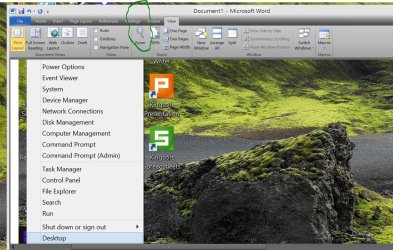
Past into a Word doc (or Wordpad if you don't have Ms office) and simply ZOOM until you get the size you want.

Now use the snipping tool to capture THAT part of the image you want in the word / wordpad doc.

As an example I've captured the Windows 8.1 "Menu" -- if you use the snipping tool when this is displayed the menu will disappear. So I took a Prt screen, pasted into Ms word, zoomed to 300% and then used snipping tool to capture the bit of the image I wanted. (The one in the word / wordpad doc).

(Wordpad is included with window ==>accessories -- go to VIEW and Zoom there. I have word so I'm showing the Word way of doing it - both are the same however. You could use Paint or any other program --Word / Wordpad are the quickest and easiest IMO).

Cheers
jimbo

 

Attachments

  • ws.jpg
    ws.jpg
    236.4 KB · Views: 1

My Computer

Computer type
PC/Desktop
Computer Manufacturer/Model Number
Custom built, several laptops HP/ASUS
OS
Linux CENTOS 7 / various Windows OS'es and servers
CPU
Intel i7 Intel i5
Memory
8GB, 16GB
Graphics Card(s)
On Motherboard
Sound Card
Realtek HD audio
Monitor(s) Displays
Apple Cinema display, Samsung LCD
Screen Resolution
1920 X 1080
Hard Drives
4 X 1TB SATA
Mouse
Toshiba wireless laser
Internet Speed
> 20MB up
print screen

Thanks for email. Problem solved. Many thanks novice 60
 

My Computer

Computer type
PC/Desktop
Computer Manufacturer/Model Number
unknown
OS
windows7 home premium x64
CPU
E5400
Motherboard
Pentium duel core
Memory
3.00GB
Graphics Card(s)
NVIDIA GeForce 210
Hard Drives
156GB
Antivirus
trend micro
Browser
firefox
Back
Top