Copy and Pasting Different Parts of Text - in one action

techlearner

New member
Local time
4:18 PM
Messages
86
Location
UK
I used to have this info...thought it was to hold down the left shift key or CTRL...doesn't seem to work. Google search was not fruitful.

In a body of text, if I want to copy just a sentence here and there, i.e. not the whole piece - and want to do this in one action...how is this done?
 

My Computer My Computer

At a glance

windows 7 professional8.00 GB
Computer type
Laptop
Computer Manufacturer/Model Number
Lenovo Thinkpad E550
OS
windows 7 professional
Memory
8.00 GB
Hard Drives
Windows 7_OS (C:) and Lenovo_Recovery (Q:)
Antivirus
McAfee and AVG
Browser
Mozilla Firefox

Attachments

  • Capture.PNG
    Capture.PNG
    11.9 KB · Views: 58

My Computer My Computer

At a glance

Dual Boot: Windows 8.1 & Server 2012r2 VMs: K...A10 7700 Kavari SteamRoller8GB DDR3 SDRAM PC3-85001024MB ATI AMD Radeon R7 Graphics
Computer type
PC/Desktop
Computer Manufacturer/Model Number
Custom
OS
Dual Boot: Windows 8.1 & Server 2012r2 VMs: Kali Linux, Backbox, Matriux, Windows 8.1
CPU
A10 7700 Kavari SteamRoller
Motherboard
ASUS A88XM-PLUS (FM2+ )
Memory
8GB DDR3 SDRAM PC3-8500
Graphics Card(s)
1024MB ATI AMD Radeon R7 Graphics
Sound Card
Realtek High Definition Audio
Monitor(s) Displays
Samsung
Hard Drives
SSD Crucial 120gb
WD VelociRaptor 1tb
PSU
Rosewill Gaming 650w
Case
Rosewill Galaxy 2
Internet Speed
55/12
Antivirus
Malwarebytes, MSE, SAS
Browser
FireFox, Chrome
Unfortunately the CTRL method does not work for me - I am in Windows 7, Mozilla Firefox. From my google searches, to copy and paste different sentences in a text (i.e. not a continuous block) seems to need some added software. I was hoping there would be a simple, straightforward method that I did not know about.
 

My Computer My Computer

At a glance

windows 7 professional8.00 GB
Computer type
Laptop
Computer Manufacturer/Model Number
Lenovo Thinkpad E550
OS
windows 7 professional
Memory
8.00 GB
Hard Drives
Windows 7_OS (C:) and Lenovo_Recovery (Q:)
Antivirus
McAfee and AVG
Browser
Mozilla Firefox
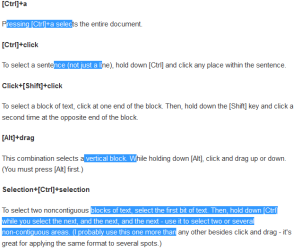
Highlight a sentence - FIRST > Then Press and Hold CTRL while you Highlight another sentence > Release CNTRL > Press and hold CTRL - Highlight another sentence > Release CTRL - Repeat for as many sentences as you want.

Im on Firefox in google searches and it works for me.
 

My Computer My Computer

At a glance

Dual Boot: Windows 8.1 & Server 2012r2 VMs: K...A10 7700 Kavari SteamRoller8GB DDR3 SDRAM PC3-85001024MB ATI AMD Radeon R7 Graphics
Computer type
PC/Desktop
Computer Manufacturer/Model Number
Custom
OS
Dual Boot: Windows 8.1 & Server 2012r2 VMs: Kali Linux, Backbox, Matriux, Windows 8.1
CPU
A10 7700 Kavari SteamRoller
Motherboard
ASUS A88XM-PLUS (FM2+ )
Memory
8GB DDR3 SDRAM PC3-8500
Graphics Card(s)
1024MB ATI AMD Radeon R7 Graphics
Sound Card
Realtek High Definition Audio
Monitor(s) Displays
Samsung
Hard Drives
SSD Crucial 120gb
WD VelociRaptor 1tb
PSU
Rosewill Gaming 650w
Case
Rosewill Galaxy 2
Internet Speed
55/12
Antivirus
Malwarebytes, MSE, SAS
Browser
FireFox, Chrome
Hi,
The problem is a webpage is not an open document and most is copy righted so websites do not enable allot of advanced copy features,
At best you can drag a left click across as much text as you can or want and copy that,
Then paste and edit out what you don't want,
Cheers.
 

My Computer My Computer

At a glance

Win-7-Pro64bit 7-H-Prem-64biti7-5930K 2nd i9-9940x both water blocked VRM'...Trident-z 3200C14 2nd Trident-z 3600C16EVGA 1080ti ftw3 2nd Titan Xp both water blocked
Computer type
PC/Desktop
Computer Manufacturer/Model Number
Custom assembled by me :}
OS
Win-7-Pro64bit 7-H-Prem-64bit
CPU
i7-5930K 2nd i9-9940x both water blocked VRM's too
Motherboard
ASUS SABERTOOTH X99 2nd ASUS x299 Apex
Memory
Trident-z 3200C14 2nd Trident-z 3600C16
Graphics Card(s)
EVGA 1080ti ftw3 2nd Titan Xp both water blocked
Sound Card
Built-in Realtek
Monitor(s) Displays
1-AOC G2460PG 24"G-Sync 144Hz/ 2nd 1-ASUS VG248QE 24" 144Hz
Screen Resolution
1920 x 1080 144Hz
Hard Drives
2-Samsung M.2 Evo & Evo Plus
2-Samsung 850 EVO 500GB SSD's/ 3-2.5 W.D. Black 1tb-&3-1tb/3-3.5 WD Black 1tb hdd's
PSU
EVGA SuperNOVA 1000-P2 2nd 1200-P2
Case
2-Corsair Obsidian Series 450D Black ATX Mid Tower
Cooling
Custom water loops
Keyboard
Logitech G710+/ 2nd Logitech G910
Mouse
2-RedDragon M901 Perdition 16400 dpi Gaming mouse = wired
Internet Speed
Comcast Ping 19ms 89.31mbps download speed 6.12mbps upload
Antivirus
Malwarebytes Pro/ Superantispyware Pro
Browser
FireFox & Pale moon
Other Info
2nd ASUS X299 Apex/Intel i9-9940x with Custom water loop/7H-Prem-x64/Corsair 450D case/Ram Trident-z 3600C16 4x8gb / Samsung970Evo plus 500gb SSD/Dual ssd EZ swap evo/PSU EVGA SuperNova 1200w-P2 80+Platinum/GPU Titan Xp /8-ML-140 on push-pull on 2-280GTX rads
This is not exactly what you're looking for but I find triple-click useful. It selects all text for that line, ie until next linefeed (Enter).

The CTRL doesn't work for me either. Different behavior in FF and IE but doesn't work.
 

My Computer My Computer

At a glance

Windows 7 Pro 32Intel(R) Core(TM) i5 CPU M 540 @ 2.53GHz4,00 GB (Usable 2,98)NVIDIA NVS 5100M
Computer type
Laptop
Computer Manufacturer/Model Number
HP Elitebook 8540p
OS
Windows 7 Pro 32
CPU
Intel(R) Core(TM) i5 CPU M 540 @ 2.53GHz
Motherboard
Hewlett-Packard 1521
Memory
4,00 GB (Usable 2,98)
Graphics Card(s)
NVIDIA NVS 5100M
Sound Card
NVIDIA High Definition Audio
Screen Resolution
1600x900
Hard Drives
INTEL SSDSA2CW120G3
Antivirus
F-Secure Internet Security
Browser
IE, Firefox, Opera
Other Info
Sandboxie,
SRP (Software Restriction Policy),
EMET (Enhanced Mitigation Experience Toolkit),
WFC (Windows Firewall Control by BiniSoft),
Malwarebytes Premium
Highlight a sentence - FIRST > Then Press and Hold CTRL while you Highlight another sentence > Release CNTRL > Press and hold CTRL - Highlight another sentence > Release CTRL - Repeat for as many sentences as you want.

Im on Firefox in google searches and it works for me.
You don't say at what stage you click on copy. Tried it with various combinations of what you say here i.e. copy to begin with or just at the last stage....all I ever get is the last part I highlighted being pasted.
 

My Computer My Computer

At a glance

windows 7 professional8.00 GB
Computer type
Laptop
Computer Manufacturer/Model Number
Lenovo Thinkpad E550
OS
windows 7 professional
Memory
8.00 GB
Hard Drives
Windows 7_OS (C:) and Lenovo_Recovery (Q:)
Antivirus
McAfee and AVG
Browser
Mozilla Firefox
Use Ctrl+C that will copy what ever is highlighted ;)
 

My Computer My Computer

At a glance

Win-7-Pro64bit 7-H-Prem-64biti7-5930K 2nd i9-9940x both water blocked VRM'...Trident-z 3200C14 2nd Trident-z 3600C16EVGA 1080ti ftw3 2nd Titan Xp both water blocked
Computer type
PC/Desktop
Computer Manufacturer/Model Number
Custom assembled by me :}
OS
Win-7-Pro64bit 7-H-Prem-64bit
CPU
i7-5930K 2nd i9-9940x both water blocked VRM's too
Motherboard
ASUS SABERTOOTH X99 2nd ASUS x299 Apex
Memory
Trident-z 3200C14 2nd Trident-z 3600C16
Graphics Card(s)
EVGA 1080ti ftw3 2nd Titan Xp both water blocked
Sound Card
Built-in Realtek
Monitor(s) Displays
1-AOC G2460PG 24"G-Sync 144Hz/ 2nd 1-ASUS VG248QE 24" 144Hz
Screen Resolution
1920 x 1080 144Hz
Hard Drives
2-Samsung M.2 Evo & Evo Plus
2-Samsung 850 EVO 500GB SSD's/ 3-2.5 W.D. Black 1tb-&3-1tb/3-3.5 WD Black 1tb hdd's
PSU
EVGA SuperNOVA 1000-P2 2nd 1200-P2
Case
2-Corsair Obsidian Series 450D Black ATX Mid Tower
Cooling
Custom water loops
Keyboard
Logitech G710+/ 2nd Logitech G910
Mouse
2-RedDragon M901 Perdition 16400 dpi Gaming mouse = wired
Internet Speed
Comcast Ping 19ms 89.31mbps download speed 6.12mbps upload
Antivirus
Malwarebytes Pro/ Superantispyware Pro
Browser
FireFox & Pale moon
Other Info
2nd ASUS X299 Apex/Intel i9-9940x with Custom water loop/7H-Prem-x64/Corsair 450D case/Ram Trident-z 3600C16 4x8gb / Samsung970Evo plus 500gb SSD/Dual ssd EZ swap evo/PSU EVGA SuperNova 1200w-P2 80+Platinum/GPU Titan Xp /8-ML-140 on push-pull on 2-280GTX rads
Use Ctrl+C that will copy what ever is highlighted ;)
Still the same result, i.e. just the last copied sentence shows up when pasted.

Here is what I did...

Sentence 1 - highlighted then held down CTRL and pressed down C
repeated for 2 more isolated sentences...
then clicked on paste on mouse

just the last sentence appears

Also tried as above but, after CTRL clicking on copy on mouse...same result.

What am I doing wrong?

I see that Tookeri (in the above post) also found that CTRL did not work. This is why I started this thread, i.e. I knew about the CTRL facility but it does not work for me in Windows 7 and Mozilla Firefox.
 

My Computer My Computer

At a glance

windows 7 professional8.00 GB
Computer type
Laptop
Computer Manufacturer/Model Number
Lenovo Thinkpad E550
OS
windows 7 professional
Memory
8.00 GB
Hard Drives
Windows 7_OS (C:) and Lenovo_Recovery (Q:)
Antivirus
McAfee and AVG
Browser
Mozilla Firefox
Right click the page and click on View source,
Then see what happens,
Cheers.
 

My Computer My Computer

At a glance

Win-7-Pro64bit 7-H-Prem-64biti7-5930K 2nd i9-9940x both water blocked VRM'...Trident-z 3200C14 2nd Trident-z 3600C16EVGA 1080ti ftw3 2nd Titan Xp both water blocked
Computer type
PC/Desktop
Computer Manufacturer/Model Number
Custom assembled by me :}
OS
Win-7-Pro64bit 7-H-Prem-64bit
CPU
i7-5930K 2nd i9-9940x both water blocked VRM's too
Motherboard
ASUS SABERTOOTH X99 2nd ASUS x299 Apex
Memory
Trident-z 3200C14 2nd Trident-z 3600C16
Graphics Card(s)
EVGA 1080ti ftw3 2nd Titan Xp both water blocked
Sound Card
Built-in Realtek
Monitor(s) Displays
1-AOC G2460PG 24"G-Sync 144Hz/ 2nd 1-ASUS VG248QE 24" 144Hz
Screen Resolution
1920 x 1080 144Hz
Hard Drives
2-Samsung M.2 Evo & Evo Plus
2-Samsung 850 EVO 500GB SSD's/ 3-2.5 W.D. Black 1tb-&3-1tb/3-3.5 WD Black 1tb hdd's
PSU
EVGA SuperNOVA 1000-P2 2nd 1200-P2
Case
2-Corsair Obsidian Series 450D Black ATX Mid Tower
Cooling
Custom water loops
Keyboard
Logitech G710+/ 2nd Logitech G910
Mouse
2-RedDragon M901 Perdition 16400 dpi Gaming mouse = wired
Internet Speed
Comcast Ping 19ms 89.31mbps download speed 6.12mbps upload
Antivirus
Malwarebytes Pro/ Superantispyware Pro
Browser
FireFox & Pale moon
Other Info
2nd ASUS X299 Apex/Intel i9-9940x with Custom water loop/7H-Prem-x64/Corsair 450D case/Ram Trident-z 3600C16 4x8gb / Samsung970Evo plus 500gb SSD/Dual ssd EZ swap evo/PSU EVGA SuperNova 1200w-P2 80+Platinum/GPU Titan Xp /8-ML-140 on push-pull on 2-280GTX rads
Right click the page and click on View source,
Then see what happens,
Cheers.
Right click the page = right click what action? Right click on the mouse, you mean "select all" then what?
The View (top left of screen) gives facilities for toolbars, sidebar, zoom, page style, character encoding and full screen. (?)
 

My Computer My Computer

At a glance

windows 7 professional8.00 GB
Computer type
Laptop
Computer Manufacturer/Model Number
Lenovo Thinkpad E550
OS
windows 7 professional
Memory
8.00 GB
Hard Drives
Windows 7_OS (C:) and Lenovo_Recovery (Q:)
Antivirus
McAfee and AVG
Browser
Mozilla Firefox
View source :)
Down in that code is the actual content :)
 

My Computer My Computer

At a glance

Win-7-Pro64bit 7-H-Prem-64biti7-5930K 2nd i9-9940x both water blocked VRM'...Trident-z 3200C14 2nd Trident-z 3600C16EVGA 1080ti ftw3 2nd Titan Xp both water blocked
Computer type
PC/Desktop
Computer Manufacturer/Model Number
Custom assembled by me :}
OS
Win-7-Pro64bit 7-H-Prem-64bit
CPU
i7-5930K 2nd i9-9940x both water blocked VRM's too
Motherboard
ASUS SABERTOOTH X99 2nd ASUS x299 Apex
Memory
Trident-z 3200C14 2nd Trident-z 3600C16
Graphics Card(s)
EVGA 1080ti ftw3 2nd Titan Xp both water blocked
Sound Card
Built-in Realtek
Monitor(s) Displays
1-AOC G2460PG 24"G-Sync 144Hz/ 2nd 1-ASUS VG248QE 24" 144Hz
Screen Resolution
1920 x 1080 144Hz
Hard Drives
2-Samsung M.2 Evo & Evo Plus
2-Samsung 850 EVO 500GB SSD's/ 3-2.5 W.D. Black 1tb-&3-1tb/3-3.5 WD Black 1tb hdd's
PSU
EVGA SuperNOVA 1000-P2 2nd 1200-P2
Case
2-Corsair Obsidian Series 450D Black ATX Mid Tower
Cooling
Custom water loops
Keyboard
Logitech G710+/ 2nd Logitech G910
Mouse
2-RedDragon M901 Perdition 16400 dpi Gaming mouse = wired
Internet Speed
Comcast Ping 19ms 89.31mbps download speed 6.12mbps upload
Antivirus
Malwarebytes Pro/ Superantispyware Pro
Browser
FireFox & Pale moon
Other Info
2nd ASUS X299 Apex/Intel i9-9940x with Custom water loop/7H-Prem-x64/Corsair 450D case/Ram Trident-z 3600C16 4x8gb / Samsung970Evo plus 500gb SSD/Dual ssd EZ swap evo/PSU EVGA SuperNova 1200w-P2 80+Platinum/GPU Titan Xp /8-ML-140 on push-pull on 2-280GTX rads
Ah OK...found out how to do this but just get a lot of guff I can't decipher...i.e.

ead> <meta http-equiv="Content-Type" content="text/html; charset=utf-8"/> <title>Where is View Source? How can the source code of a website be viewed? | Firefox Support Forum | Mozilla Support</title> <link rel="icon" type="image/png" sizes="512x512" href="//support.cdn.mozilla.net/static/img/firefox-512.png?v=1"> <link rel="icon" type="image/png" sizes="256x256" href="//support.cdn.mozilla.net/static/img/firefox-256.png?v=1"> <link rel="icon" type="image/png" sizes="128x128" href="//support.cdn.mozilla.net/static/img/firefox-128.png?v=1"> <link rel="icon" type="image/png" sizes="64x64" href="//support.cdn.mozilla.net/static/img/firefox-64.png?v=1"> <link rel="icon" type="image/png" sizes="32x32" href="//support.cdn.mozilla.net/static/img/firefox-32.png?v=1"> <link rel="icon" type="image/png" sizes="16x16" href="//support.cdn.mozilla.net/static/img/firefox-16.png?v=1"> <link rel="search" type="application/opensearchdescription+xml" title="Firefox Help" href="/en-US/search/xml"/> <link rel="alternate" type="application/atom+xml" href="/en-US/questions/973832/feed" title="Recent answers to Where is View Source? How can the source code of a website be viewed?"/> <link rel="stylesheet" media="screen,projection,tv" href="//support.cdn.mozilla.net/static/css/common-min.css?build=58ad020" /> <link rel="stylesheet" media="print" href="//support.cdn.mozilla.net/static/css/print-min.css?build=58ad020" /> <link rel="stylesheet" media="screen,projection,tv" href="//support.cdn.mozilla.net/static/css/questions-min.css?build=58ad020" /> <link rel="stylesheet" media="screen,projection,tv" href="//support.cdn.mozilla.net/static/css/jqueryui/jqueryui-min.css?build=58ad020" /> <link href="//mozorg.cdn.mozilla.net/media/css/tabzilla-min.css" rel="stylesheet" />

What am I supposed to be looking for?
 

My Computer My Computer

At a glance

windows 7 professional8.00 GB
Computer type
Laptop
Computer Manufacturer/Model Number
Lenovo Thinkpad E550
OS
windows 7 professional
Memory
8.00 GB
Hard Drives
Windows 7_OS (C:) and Lenovo_Recovery (Q:)
Antivirus
McAfee and AVG
Browser
Mozilla Firefox
Depends on the website on how far down the actual story or content you want to find is ?
Post a link to the webpage,
Cheers.
 

My Computer My Computer

At a glance

Win-7-Pro64bit 7-H-Prem-64biti7-5930K 2nd i9-9940x both water blocked VRM'...Trident-z 3200C14 2nd Trident-z 3600C16EVGA 1080ti ftw3 2nd Titan Xp both water blocked
Computer type
PC/Desktop
Computer Manufacturer/Model Number
Custom assembled by me :}
OS
Win-7-Pro64bit 7-H-Prem-64bit
CPU
i7-5930K 2nd i9-9940x both water blocked VRM's too
Motherboard
ASUS SABERTOOTH X99 2nd ASUS x299 Apex
Memory
Trident-z 3200C14 2nd Trident-z 3600C16
Graphics Card(s)
EVGA 1080ti ftw3 2nd Titan Xp both water blocked
Sound Card
Built-in Realtek
Monitor(s) Displays
1-AOC G2460PG 24"G-Sync 144Hz/ 2nd 1-ASUS VG248QE 24" 144Hz
Screen Resolution
1920 x 1080 144Hz
Hard Drives
2-Samsung M.2 Evo & Evo Plus
2-Samsung 850 EVO 500GB SSD's/ 3-2.5 W.D. Black 1tb-&3-1tb/3-3.5 WD Black 1tb hdd's
PSU
EVGA SuperNOVA 1000-P2 2nd 1200-P2
Case
2-Corsair Obsidian Series 450D Black ATX Mid Tower
Cooling
Custom water loops
Keyboard
Logitech G710+/ 2nd Logitech G910
Mouse
2-RedDragon M901 Perdition 16400 dpi Gaming mouse = wired
Internet Speed
Comcast Ping 19ms 89.31mbps download speed 6.12mbps upload
Antivirus
Malwarebytes Pro/ Superantispyware Pro
Browser
FireFox & Pale moon
Other Info
2nd ASUS X299 Apex/Intel i9-9940x with Custom water loop/7H-Prem-x64/Corsair 450D case/Ram Trident-z 3600C16 4x8gb / Samsung970Evo plus 500gb SSD/Dual ssd EZ swap evo/PSU EVGA SuperNova 1200w-P2 80+Platinum/GPU Titan Xp /8-ML-140 on push-pull on 2-280GTX rads
Depends on the website on how far down the actual story or content you want to find is ?
Post a link to the webpage,
Cheers.
Thanks for your persistence with me but I am not following your train of thought very well. I am fairly new to all this. Is it that you want me to paste the page where I try to copy isolated sentences and fail? Or just any page with a view source? What does the view source tell you?
 

My Computer My Computer

At a glance

windows 7 professional8.00 GB
Computer type
Laptop
Computer Manufacturer/Model Number
Lenovo Thinkpad E550
OS
windows 7 professional
Memory
8.00 GB
Hard Drives
Windows 7_OS (C:) and Lenovo_Recovery (Q:)
Antivirus
McAfee and AVG
Browser
Mozilla Firefox
It just can't be done in a webpage!!
 

My Computer My Computer

At a glance

Windows 7 Home Premium 32bit
Computer type
PC/Desktop
OS
Windows 7 Home Premium 32bit

My Computer My Computer

At a glance

Windows 7 Ultimate 64-bit, Windows 8.1 64-bit...
Computer type
PC/Desktop
Computer Manufacturer/Model Number
Customs, Dell, Gateway, HP, Toshiba, Acer, ASUS
OS
Windows 7 Ultimate 64-bit, Windows 8.1 64-bit, Mac OS X 10.10, Linux Mint 17, Windows 10 Pro TP
Keyboard
Microsoft
Mouse
Microsoft
Depends

It depends on the software.
Excel has had the ability since at least Office 2000 (the earliest version I've used).

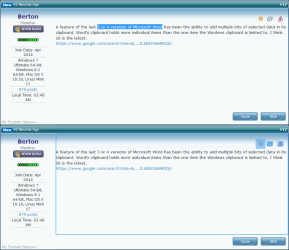
I can't select non-contiguous text in PM25 on this forum.
If I hold "Ctrl" down and then try to select some additional text, something else gets selected.
W7 Forums - Multi-Select.png
 

My Computer My Computer

At a glance

W7 Ultimate SP1, LM19.2 MATE, W10 Home 1703, ...AMD Phenom II x6 1100T, 3.3 GHz12GB DDR3 1333 G-Skill (4GB x 2), G-Skill (2G...NVIDIA GeForce GTX 660
Computer type
PC/Desktop
Computer Manufacturer/Model Number
n/a
OS
W7 Ultimate SP1, LM19.2 MATE, W10 Home 1703, W10 Pro 1703 VM, #All 64 bit
CPU
AMD Phenom II x6 1100T, 3.3 GHz
Motherboard
ASUS M4A88T-M/USB3 (AM3)
Memory
12GB DDR3 1333 G-Skill (4GB x 2), G-Skill (2GB x 2)
Graphics Card(s)
NVIDIA GeForce GTX 660
Sound Card
Realtek?
Monitor(s) Displays
Samsung S23B350
Screen Resolution
1920x1080
Hard Drives
WD Green 2TB (SATA), WD Green 3TB (SATA), WD Blue 4TB (SATA), WD Blue 6TB (SATA)
PSU
Cooler Master
Case
Antec GX300 Tower
Cooling
3x Antec TRICOOL 120mm Fans
Mouse
Wired Optical
Internet Speed
DSL
Antivirus
Avast
Browser
Pale Moon (64 bit)
Other Info
2018-12-27 Upgraded HDDs
2015-12-10 Upgraded case, graphics card, storage
2015-08-15 Upgraded motherboard & RAM
2015-07-15 Upgraded LM17.1 to LM17.2
It depends on the software.
Excel has had the ability since at least Office 2000 (the earliest version I've used).

I can't select non-contiguous text in PM25 on this forum.
If I hold "Ctrl" down and then try to select some additional text, something else gets selected.

Same here for this site. I've tested on other sites and it works fine. Not sure what would be causing other people to have this problem though.
 

My Computer My Computer

At a glance

Dual Boot: Windows 8.1 & Server 2012r2 VMs: K...A10 7700 Kavari SteamRoller8GB DDR3 SDRAM PC3-85001024MB ATI AMD Radeon R7 Graphics
Computer type
PC/Desktop
Computer Manufacturer/Model Number
Custom
OS
Dual Boot: Windows 8.1 & Server 2012r2 VMs: Kali Linux, Backbox, Matriux, Windows 8.1
CPU
A10 7700 Kavari SteamRoller
Motherboard
ASUS A88XM-PLUS (FM2+ )
Memory
8GB DDR3 SDRAM PC3-8500
Graphics Card(s)
1024MB ATI AMD Radeon R7 Graphics
Sound Card
Realtek High Definition Audio
Monitor(s) Displays
Samsung
Hard Drives
SSD Crucial 120gb
WD VelociRaptor 1tb
PSU
Rosewill Gaming 650w
Case
Rosewill Galaxy 2
Internet Speed
55/12
Antivirus
Malwarebytes, MSE, SAS
Browser
FireFox, Chrome
Depends on the website on how far down the actual story or content you want to find is ?
Post a link to the webpage,
Cheers.
Thanks for your persistence with me but I am not following your train of thought very well. I am fairly new to all this. Is it that you want me to paste the page where I try to copy isolated sentences and fail? Or just any page with a view source? What does the view source tell you?

Copy and paste the url on the very top of you browsers search bar to a reply here example http/:www.sevenforums.com.....
This will at least give us an idea of the site with the issue,
Cheers.
 

My Computer My Computer

At a glance

Win-7-Pro64bit 7-H-Prem-64biti7-5930K 2nd i9-9940x both water blocked VRM'...Trident-z 3200C14 2nd Trident-z 3600C16EVGA 1080ti ftw3 2nd Titan Xp both water blocked
Computer type
PC/Desktop
Computer Manufacturer/Model Number
Custom assembled by me :}
OS
Win-7-Pro64bit 7-H-Prem-64bit
CPU
i7-5930K 2nd i9-9940x both water blocked VRM's too
Motherboard
ASUS SABERTOOTH X99 2nd ASUS x299 Apex
Memory
Trident-z 3200C14 2nd Trident-z 3600C16
Graphics Card(s)
EVGA 1080ti ftw3 2nd Titan Xp both water blocked
Sound Card
Built-in Realtek
Monitor(s) Displays
1-AOC G2460PG 24"G-Sync 144Hz/ 2nd 1-ASUS VG248QE 24" 144Hz
Screen Resolution
1920 x 1080 144Hz
Hard Drives
2-Samsung M.2 Evo & Evo Plus
2-Samsung 850 EVO 500GB SSD's/ 3-2.5 W.D. Black 1tb-&3-1tb/3-3.5 WD Black 1tb hdd's
PSU
EVGA SuperNOVA 1000-P2 2nd 1200-P2
Case
2-Corsair Obsidian Series 450D Black ATX Mid Tower
Cooling
Custom water loops
Keyboard
Logitech G710+/ 2nd Logitech G910
Mouse
2-RedDragon M901 Perdition 16400 dpi Gaming mouse = wired
Internet Speed
Comcast Ping 19ms 89.31mbps download speed 6.12mbps upload
Antivirus
Malwarebytes Pro/ Superantispyware Pro
Browser
FireFox & Pale moon
Other Info
2nd ASUS X299 Apex/Intel i9-9940x with Custom water loop/7H-Prem-x64/Corsair 450D case/Ram Trident-z 3600C16 4x8gb / Samsung970Evo plus 500gb SSD/Dual ssd EZ swap evo/PSU EVGA SuperNova 1200w-P2 80+Platinum/GPU Titan Xp /8-ML-140 on push-pull on 2-280GTX rads
Back
Top