
Copy CD to CD or DVD to DVD

Jambe

New member
Power User
VIP
Local time
12:29 AM
Messages
110
Location
Bottom of Utah
Like many others on this forum I have had a hard time finding a simple program to copy non-copy protected discs.

I thought I had found what I was looking for when I read a thread similar to this one which promoted CDBurnerXP. I downloaded it and proceeded to copy a (driver) CD from Drive R: to Drive S:. I set up the Source and Target. I used "Copy or grab disc". I ticked "Finalize disc". It went through its paces as though everything was working properly, but when I looked at the contents of the target disc it was blank.

It did copy to the HDD and then to the blank CD.

These are new drives that I have verified reading and writing.

Why am I not getting a useable copy of the disc?
 

My Computer My Computer

At a glance

Windows 7 Home Premium 64-bitIntel i5 2500KRipjaws 1600, 16 GBSaphire Radeon 6770
OS
Windows 7 Home Premium 64-bit
CPU
Intel i5 2500K
Motherboard
Gigabyte Z68MA-D2H-B3
Memory
Ripjaws 1600, 16 GB
Graphics Card(s)
Saphire Radeon 6770
Monitor(s) Displays
Gateway FHX2300
Screen Resolution
1600x900@60Hz
Hard Drives
Crucial M4 128 GB, Samsung 1.5 TB
PSU
CoolMaster 600 W.
Case
CoolMaster Storm Scout
Other Info
Saphire fan is noisy. Case fans are almost silent. Love the case.
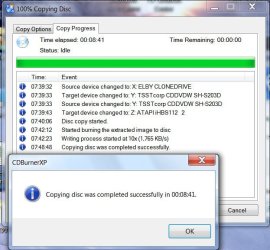
Just finished copying CD to CD using CDBurnerXP. Contents of both CDs checked. No problems.

CDBurnerXP.jpg

Obviously, there is nothing wrong with the program.

So recheck that both your drives can really write. Use a different quality media, try and then post a screenshot like above.( You may use CD-RW for the trial)
 

My Computer My Computer

At a glance

Windows 7 Home Premium 32 bit
OS
Windows 7 Home Premium 32 bit
Many would use something reliable like ImgBurn
Disk -> ISO -> Disk(s)
verify on
 

My Computer My Computer

At a glance

Windows 7x64 Home Premium SP1Intel i7 2600kG.Skill Ripjaws (DDR3-1600) 2x4GBNvidia GeForce GTS 450; Intel HD Graphics 300...
Computer type
PC/Desktop
Computer Manufacturer/Model Number
Own build
OS
Windows 7x64 Home Premium SP1
CPU
Intel i7 2600k
Motherboard
ASUS P8Z68 Deluxe
Memory
G.Skill Ripjaws (DDR3-1600) 2x4GB
Graphics Card(s)
Nvidia GeForce GTS 450; Intel HD Graphics 3000(GT2+)
Monitor(s) Displays
Dell Ultrasharp IPS panel U2311H, Samsung SyncMaster P2350
Screen Resolution
1920x1080
Hard Drives
Samsung 850 Pro SSD 256GB, Samsung SSD 840 120GB, Seagates 1TB Barracuda ST31000528AS x2
PSU
Seasonic M12II 520W
Case
Lian Li Lancool PC-K60
Cooling
Case: 1x120mm, 3x140mm CPU: Hyper 212+
Keyboard
Logitech MK520 (wireless)
Mouse
Logitech MK520
Internet Speed
6-7 Mbps
Antivirus
Norton Security Premium, Malwarebytes on 2 (MSE on 3rd PC)
Browser
FireFox
Other Info
Audio: Logitech Z523 2.1
+1 for ImgBurn. Even though I have Nero, I now use this all the time. I am surprised that they still provide it for FREE.
 

My Computer My Computer

At a glance

Win7 Pro 32-bit, Win8 Pro 32-bitAMD Phenom II X6 1090T4GB ddr3 1300AMD HD 4290 onboard
Computer type
PC/Desktop
Computer Manufacturer/Model Number
Custom
OS
Win7 Pro 32-bit, Win8 Pro 32-bit
CPU
AMD Phenom II X6 1090T
Motherboard
Gigabyte
Memory
4GB ddr3 1300
Graphics Card(s)
AMD HD 4290 onboard
Sound Card
Builtin Realtek HD Audio
Monitor(s) Displays
Samsung 24" widescreen, LG 23" widescreen
Screen Resolution
1920x1200/1920x1080
Hard Drives
Kingston 256GB SSD
Keyboard
Logitech Illuminated Keyboard
Mouse
Logitech M705 wireless mouse
Antivirus
Norton Av 2013
Browser
IE v10
I've given up on CDBurnerXP.

I did copy a couple of discs using Imgburn but it is more complicated than I had hoped for.
1. I read a disc and it created TWO files, not an .ISO--name.bin and name.cue. For the Write it was a toss-up which to use.
2. Another disc did create an .ISO. That was okay. But when I looked at the disc contents there was an additional file--"Files ready to be written to the disc(1) - Desktop.ini. Whats with that?
3. It doesn't seem to have persistence. It wants to write to R: not S:. (Maybe that is a setting I need to adjust.)
 

My Computer My Computer

At a glance

Windows 7 Home Premium 64-bitIntel i5 2500KRipjaws 1600, 16 GBSaphire Radeon 6770
OS
Windows 7 Home Premium 64-bit
CPU
Intel i5 2500K
Motherboard
Gigabyte Z68MA-D2H-B3
Memory
Ripjaws 1600, 16 GB
Graphics Card(s)
Saphire Radeon 6770
Monitor(s) Displays
Gateway FHX2300
Screen Resolution
1600x900@60Hz
Hard Drives
Crucial M4 128 GB, Samsung 1.5 TB
PSU
CoolMaster 600 W.
Case
CoolMaster Storm Scout
Other Info
Saphire fan is noisy. Case fans are almost silent. Love the case.
ImgBurn will want to default to
Music CDs : .bin, .cue files
Pure data (software) : .ISO
Video DVD: .ISO, .MDS (not with copyright protection)

I my experience you have to overide ImgBurn not to get the correct format.
 

My Computer My Computer

At a glance

Windows 7x64 Home Premium SP1Intel i7 2600kG.Skill Ripjaws (DDR3-1600) 2x4GBNvidia GeForce GTS 450; Intel HD Graphics 300...
Computer type
PC/Desktop
Computer Manufacturer/Model Number
Own build
OS
Windows 7x64 Home Premium SP1
CPU
Intel i7 2600k
Motherboard
ASUS P8Z68 Deluxe
Memory
G.Skill Ripjaws (DDR3-1600) 2x4GB
Graphics Card(s)
Nvidia GeForce GTS 450; Intel HD Graphics 3000(GT2+)
Monitor(s) Displays
Dell Ultrasharp IPS panel U2311H, Samsung SyncMaster P2350
Screen Resolution
1920x1080
Hard Drives
Samsung 850 Pro SSD 256GB, Samsung SSD 840 120GB, Seagates 1TB Barracuda ST31000528AS x2
PSU
Seasonic M12II 520W
Case
Lian Li Lancool PC-K60
Cooling
Case: 1x120mm, 3x140mm CPU: Hyper 212+
Keyboard
Logitech MK520 (wireless)
Mouse
Logitech MK520
Internet Speed
6-7 Mbps
Antivirus
Norton Security Premium, Malwarebytes on 2 (MSE on 3rd PC)
Browser
FireFox
Other Info
Audio: Logitech Z523 2.1
Back
Top