

Hello Everybody!
I don't know if this is a real issue, or just one of those "What the . . . .!!" situations. You judge.
Situation:
I was working on a batch file that combines two .txt (ASCII?) files created in Notepad to create a composite file, and I noticed something really interesting. (And yes, when someone talks about doing something and the result is "really interesting", it's time to duck and hunt cover! )
)
Viz.:
Assume that there are two text files: "This.txt" and "That.txt", and they contain the text "This[cr-lf]" and "That[cr-lf]", where [cr-lf] is used to indicate a newline generated by hitting the "Enter/Return" key on the keyboard.
If you look at the files with a hex editor, what you see is something like this:
The file "This.txt" contains the text "This" followed by 0x0D0A, which are the ascii codes for CR and LF.
The file "That.txt" contains the text "That" followed by the same CR and LF characters.
Note that these two files contain nothing else.
Issue I discovered:
I have tested it on two different machines, one running Win7 64 bit Professional on a domain, and another system running Win7 64 bit Home Premium on a Toshiba laptop.
I am attaching two ZIP archives:
You can open the three result files in either a hex editor, or notepad, to see what I see. If you use a hex editor, you will see the trailing 0x1A on the first two files. If you open them in Notepad, you will see a small right-arrow character at the very bottom of the first two files.
I do not know if this is a "bug" or a "feature", ( ), as I would expect either a "simple" copy, or (especially!), an ASCII copy to not generate spurious artifacts.
If someone could help me understand what is happening here, and (even better), why it's happening this way, I would gratefully appreciate it.
Thanks again for all your help!
Jim (JR)
I don't know if this is a real issue, or just one of those "What the . . . .!!" situations. You judge.
Situation:
I was working on a batch file that combines two .txt (ASCII?) files created in Notepad to create a composite file, and I noticed something really interesting. (And yes, when someone talks about doing something and the result is "really interesting", it's time to duck and hunt cover!
)Viz.:
Assume that there are two text files: "This.txt" and "That.txt", and they contain the text "This[cr-lf]" and "That[cr-lf]", where [cr-lf] is used to indicate a newline generated by hitting the "Enter/Return" key on the keyboard.
If you look at the files with a hex editor, what you see is something like this:
The file "This.txt" contains the text "This" followed by 0x0D0A, which are the ascii codes for CR and LF.
The file "That.txt" contains the text "That" followed by the same CR and LF characters.
Note that these two files contain nothing else.
Issue I discovered:
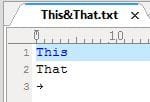
- When I execute the command copy /y ".\This.txt"+".\That.txt" ".\This&That.txt", I do not get the simple concatenation of the two files, which is what I would expect. Instead I get the two files concatenated, (including the trailing CR/LF's as I would expect), but also one additional character, the hex character for a right-arrow symbol - 0x1A. In essence I get the following:
This[0x0D0A]
That[0x0D0A1A] - If I perform the same copy, and signal that the copy is an "ascii" copy, (copy /a /y), I get the exact same result, including the trailing 0x1A.
- If, and only if, I signal the copy as a "binary" copy, (copy /b /y), do I get the two files copied together without the trailing 0x1A.
I have tested it on two different machines, one running Win7 64 bit Professional on a domain, and another system running Win7 64 bit Home Premium on a Toshiba laptop.
I am attaching two ZIP archives:
- The first, titled "this&that.zip", contains the three files: This.txt, That.txt. and the batch file "this&that.bat" that performs the three copy operations noted above.
- The second, titled "this&that results.zip" has the three output files "this&that.txt", "this&that_ascii.txt", and "this&that_binary.txt"
- I am also including two screen snips showing the ascii and hex results for the "this&that.txt" file.
You can open the three result files in either a hex editor, or notepad, to see what I see. If you use a hex editor, you will see the trailing 0x1A on the first two files. If you open them in Notepad, you will see a small right-arrow character at the very bottom of the first two files.
I do not know if this is a "bug" or a "feature", (
), as I would expect either a "simple" copy, or (especially!), an ASCII copy to not generate spurious artifacts.If someone could help me understand what is happening here, and (even better), why it's happening this way, I would gratefully appreciate it.
Thanks again for all your help!
Jim (JR)
Attachments

Last edited:
My Computer
- Computer type
- PC/Desktop
- OS
- Two soup cans and some string.
- CPU
- Multi-Processor - TWO large rubber bands!
- Memory
- Huh? Wassit?! I don't remember. . .
- Monitor(s) Displays
- Etch-a-Sketch.
- Screen Resolution
- To have less glitches this year.
- Mouse
- Nope. Killed 'em all off last summer.
- Other Info
- I actually have several machines that all frustrate me. That's why I'm here, not to try and impress people with sordid tales of outrageous hardware.


