Copy files and "property loss" message

gogreen

New member
Power User
VIP
Local time
9:15 PM
Messages
544
Location
Florida
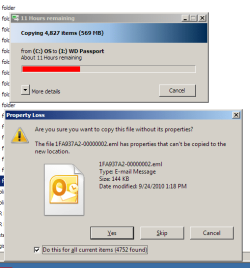
I backup files monthly from my desktop computer to an external hard drive. In Windows XP, I copied files without difficulty. In Windows 7, however, when I begin to copy files, copying appears to stand still, and it appears that copying is estimated to take 11 hours or more. Then, after several minutes, the “property loss” window appears (see .png attachment), I check “do this for all...” and click “yes.” Copying then goes as I expect it to--quickly, without interruption and in only a minute or so.

How do I copy files in Windows 7 without these annoying, time-consuming steps?


Thanks.[FONT=&quot][/FONT]
 

Attachments

  • copy without properties.png
    copy without properties.png
    17.6 KB · Views: 36

My Computer My Computer

Computer type
PC/Desktop
Computer Manufacturer/Model Number
Dell Studio XPS 8100, Dell XPS 15 laptop
OS
Windows 10 Home, 64 bit
CPU
Intel Core i7 860 @ 2.8 GHz
Motherboard
Dell 0T568R (CPU1)
Memory
8.0 GB Dual Channel DDR3 @ 664 MHz (9-9-9-24)
Graphics Card(s)
nVidia GeForce GTS 240
Sound Card
M-Audio Delta Audiophile 2496
Monitor(s) Displays
Dell 2407WFP
Screen Resolution
1920x1200
Hard Drives
977 GB Western Digital WDC WD1001FAES-75W7A0 (SCSI)
Antivirus
Windows Defender, MalwareBytes Anti-Malware, AdwCleaner
Browser
Firefox, occasionally IE and Edge
Other Info
Mozilla Firefox, Mozilla Thunderbird. Western Digital Passport 250 GB external HD, two Mushkin Enhanced Mulholland 32GB USB flash drives, AKG K240 Studio headphones, Asus AC-1900 dual band wireless router.
Thanks, Bill2. Is there a way to do this with Windows settings--without using another program?
 

My Computer My Computer

Computer type
PC/Desktop
Computer Manufacturer/Model Number
Dell Studio XPS 8100, Dell XPS 15 laptop
OS
Windows 10 Home, 64 bit
CPU
Intel Core i7 860 @ 2.8 GHz
Motherboard
Dell 0T568R (CPU1)
Memory
8.0 GB Dual Channel DDR3 @ 664 MHz (9-9-9-24)
Graphics Card(s)
nVidia GeForce GTS 240
Sound Card
M-Audio Delta Audiophile 2496
Monitor(s) Displays
Dell 2407WFP
Screen Resolution
1920x1200
Hard Drives
977 GB Western Digital WDC WD1001FAES-75W7A0 (SCSI)
Antivirus
Windows Defender, MalwareBytes Anti-Malware, AdwCleaner
Browser
Firefox, occasionally IE and Edge
Other Info
Mozilla Firefox, Mozilla Thunderbird. Western Digital Passport 250 GB external HD, two Mushkin Enhanced Mulholland 32GB USB flash drives, AKG K240 Studio headphones, Asus AC-1900 dual band wireless router.
This seems to be a bit of a bug, have not come across any definitive solution.
 

My Computer My Computer

Computer Manufacturer/Model Number
Too many to describe...
OS
Windows 7 x64 pro/ Windows 7 x86 Pro/ XP SP3 x86
Even though you don't want to use another program, you might want to also consider Microsoft SyncToy 2.1 as an alternative to just copying files, or trying to turn of the message of also copying metadata that you are getting.


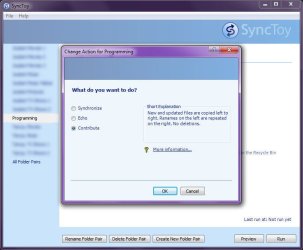
It works on the principle that you create a series of "Left" (source) and "Right" (destination) folder pairs, for which each can use one of the following options:
  • Synchronize - File are copied Left To Right. If a file was deleted or renamed on the left, then the action is repeated on the right, and vice versa. Not a good choice for backups, because files are deleted or renamed on boths sides of the folder pair.
  • Echo - Works the same as Syncronize, but files will not be deleted or renamed from right to left.
  • Contribute - Copies or renames files from left to right. If a file is deleted from the left, then it remains in the right. This is the best choice for backups.
See the following screenshot:
ms_synctoy.jpg

It has the advantage of once the initial run of a folder pair (or all specified folder pairs) have been run, the following run works very quickly, because any subsequent runs will only copy new files or files that have been modified.

SyncToy has most defintely made my job of backing up files far easier.
 

My Computer My Computer

Computer type
PC/Desktop
Computer Manufacturer/Model Number
Virtual Machine
OS
Windows 7 Professional 32-bit SP1
CPU
AMD A4/A6
Motherboard
Intel Corporation 440BX Desktop Reference Platform
Memory
3.00GB EDO
Graphics Card(s)
VMware SVGA 3D
Sound Card
High Definition Audio Device
Monitor(s) Displays
Generic Non-PnP Monitor on VMware SVGA 3D
Screen Resolution
1440x900
Hard Drives
1 x 60GB VMware Virtual SATA Hard Drive ATA Device
Antivirus
Kaspersky Total Security
Thanks for the Synctoy idea, Dzomlija, but I already use that frequently. However, in this case--backing up email--the same thing happens. I figured copying would be faster, and it is, except for this apparent bug. I also use KLS Mail Backup.

And speaking of bugs, thanks, Bill2, for the word on that. How does one report this to MS, or do they already know about it?
 

My Computer My Computer

Computer type
PC/Desktop
Computer Manufacturer/Model Number
Dell Studio XPS 8100, Dell XPS 15 laptop
OS
Windows 10 Home, 64 bit
CPU
Intel Core i7 860 @ 2.8 GHz
Motherboard
Dell 0T568R (CPU1)
Memory
8.0 GB Dual Channel DDR3 @ 664 MHz (9-9-9-24)
Graphics Card(s)
nVidia GeForce GTS 240
Sound Card
M-Audio Delta Audiophile 2496
Monitor(s) Displays
Dell 2407WFP
Screen Resolution
1920x1200
Hard Drives
977 GB Western Digital WDC WD1001FAES-75W7A0 (SCSI)
Antivirus
Windows Defender, MalwareBytes Anti-Malware, AdwCleaner
Browser
Firefox, occasionally IE and Edge
Other Info
Mozilla Firefox, Mozilla Thunderbird. Western Digital Passport 250 GB external HD, two Mushkin Enhanced Mulholland 32GB USB flash drives, AKG K240 Studio headphones, Asus AC-1900 dual band wireless router.
Try this: make sure the external drive is NTFS format.

I'm having the same issue but only when I'm remotely transferring files from a Win2003 server to a Red Hat file server(NTFS emulation) from my Windows 7 workstation. I posted about it in the Microsoft forum asking for a toggle to turn of the annoying message pop up and one of the moderators said "this problem is related to Windows server 2003" and promptly marked my thread as being answered. LOL
 

My Computer My Computer

OS
Win7Pro x64
The WD Passport to which I'm copying files is FAT32. Are you saying that if the Passport were NTFS, the problem might go away?
 

My Computer My Computer

Computer type
PC/Desktop
Computer Manufacturer/Model Number
Dell Studio XPS 8100, Dell XPS 15 laptop
OS
Windows 10 Home, 64 bit
CPU
Intel Core i7 860 @ 2.8 GHz
Motherboard
Dell 0T568R (CPU1)
Memory
8.0 GB Dual Channel DDR3 @ 664 MHz (9-9-9-24)
Graphics Card(s)
nVidia GeForce GTS 240
Sound Card
M-Audio Delta Audiophile 2496
Monitor(s) Displays
Dell 2407WFP
Screen Resolution
1920x1200
Hard Drives
977 GB Western Digital WDC WD1001FAES-75W7A0 (SCSI)
Antivirus
Windows Defender, MalwareBytes Anti-Malware, AdwCleaner
Browser
Firefox, occasionally IE and Edge
Other Info
Mozilla Firefox, Mozilla Thunderbird. Western Digital Passport 250 GB external HD, two Mushkin Enhanced Mulholland 32GB USB flash drives, AKG K240 Studio headphones, Asus AC-1900 dual band wireless router.
Apparently from what I've read regarding this issue, yes.
 

My Computer My Computer

OS
Win7Pro x64
It worked! Problem solved. I converted the WD Passport from FAT32 to NFTS, and the message no longer appears when I copy files. Thanks, pokermon!
 

My Computer My Computer

Computer type
PC/Desktop
Computer Manufacturer/Model Number
Dell Studio XPS 8100, Dell XPS 15 laptop
OS
Windows 10 Home, 64 bit
CPU
Intel Core i7 860 @ 2.8 GHz
Motherboard
Dell 0T568R (CPU1)
Memory
8.0 GB Dual Channel DDR3 @ 664 MHz (9-9-9-24)
Graphics Card(s)
nVidia GeForce GTS 240
Sound Card
M-Audio Delta Audiophile 2496
Monitor(s) Displays
Dell 2407WFP
Screen Resolution
1920x1200
Hard Drives
977 GB Western Digital WDC WD1001FAES-75W7A0 (SCSI)
Antivirus
Windows Defender, MalwareBytes Anti-Malware, AdwCleaner
Browser
Firefox, occasionally IE and Edge
Other Info
Mozilla Firefox, Mozilla Thunderbird. Western Digital Passport 250 GB external HD, two Mushkin Enhanced Mulholland 32GB USB flash drives, AKG K240 Studio headphones, Asus AC-1900 dual band wireless router.
Loss of files during backup!

Hi there,

I was using Comodo to back up windows 7 onto my WD passport. I was browsing the photos on my computer and all of a sudden, the folder which I was viewing photos in, became unavailable. Now I can't find the folder at all! What in the world happened??:cry:
 

My Computer My Computer

OS
windows 7
Back
Top