Solved Copying a Music DVD

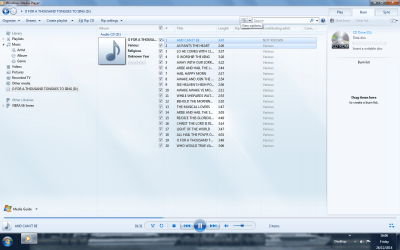
I have got this far (see screen shot) but cannot get any further. How the blazes do you get the folder into the right hand column to enable a burn please!!!! ??? I have imported the files in Windows Media Player but can't shift them over to burn. I have carefully read the tutorial I was sent and it all looks so easy but when I try to do it, it will not work. Urghhh!!!
 

Attachments

  • What next.png
    What next.png
    185.9 KB · Views: 1

My Computer My Computer

At a glance

Windows Seven PremiumIntel Core i5-23008GB1GB ATI Raedon HD 5450
Computer Manufacturer/Model Number
Dell XP8300
OS
Windows Seven Premium
CPU
Intel Core i5-2300
Motherboard
Unknown
Memory
8GB
Graphics Card(s)
1GB ATI Raedon HD 5450
Sound Card
Integrated 7.1 with THX TrueStudio
Monitor(s) Displays
Dell 17"
Hard Drives
1 Terrabyte Serial ATA
Case
Dell (Metal)
Cooling
None
Keyboard
Dell
Mouse
Dell Laser
Internet Speed
2.8Gb
Do you know how to select a list? Click on your first selection (#1) then hold down the Shift Key and go to your last selection (#20) and click on it.
Now all of your songs should be highlighted in a darker blue. Go anywhere in that highlighted area and hold down on the left click button on your mouse and drag the whole selection over to the right where it says Burn List, make sure you have the mouse cursor in the burn list area and release your finger from holding down the button.

Give it a few seconds for the list to populate, and there you have it!

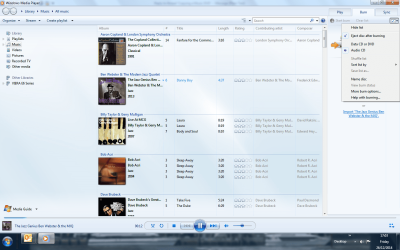
You still have the burn set for a Data Burn so go up to the Icon below the SYNC Tab (it looks like a little window) and click on the down arrow then click on Audio CD and you'll see the type of burn change right above the burn list.

Make sure you have a disk in your player/burner then click on Start Burn.


Take your time, and count to 2 if you get frustrated :p selecting a whole list can be tricky If that doesn't seem to be working you can left-click-hold the individual songs and drag them over to the burn list individually.

I'll be here all day so if you get stuck post back and I'll help you out, Its happened to the best of us when using a program for the first time so you're not alone being frustrated.
 

My Computer My Computer

At a glance

Originally Win 7 Hm Prem x64 Ver 6.1.7600 Bui...Intel i3 530 2.93GHz, 2933MHz 2 Cores 4 Logic...6GB of 1,333MHz DDR3 SDRAM32MB Intel Graphics Media Accelerator HD IGChip
Computer type
PC/Desktop
Computer Manufacturer/Model Number
Gateway DX4831-01e (Mid-Tower Desktop)
OS
Originally Win 7 Hm Prem x64 Ver 6.1.7600 Build 7601-SP1 | Upgraded to Windows 10 December 14, 2019
CPU
Intel i3 530 2.93GHz, 2933MHz 2 Cores 4 Logical Processors
Motherboard
Gateway H57M01 133 megahertz
Memory
6GB of 1,333MHz DDR3 SDRAM
Graphics Card(s)
32MB Intel Graphics Media Accelerator HD IGChip
Sound Card
Realtek High Definition Audio
Monitor(s) Displays
Gateway HX2000 20inch TFT active matrix TN
Screen Resolution
1600 x 900 x 59 hertz
Hard Drives
WDC WD10EADS-00M2B0 [HDD] (1000.20 GB) -- drive 0,
HL-DT-ST DVDRAM GH41N [CD-ROM dr]
Four card readers, and Four USB 2.0
PSU
300watts.
Case
Mid-Tower Desktop
Cooling
Stock from Gateway
Keyboard
Natural Ergonomic Keyboard 4000, see Other Info
Mouse
Orig. Gateway wore out now using Insignia USB wired optical
Internet Speed
Vz FIOS 10ms png 57.64Mbps down 65.53Mbps up Speedtest.org
Antivirus
Zamana Anti-logger with Anti-malware, MSE, Windows Firewall,
Browser
IE11.0.9600.19399-Upd ver11.0.135, Firefox 68.0.1 x64
Other Info
System Specs by Belarc.

BIOS: American Megatrends Inc. P01-A0 11/17/2009

Replaced the MS 'Natural' Standard PS/2 Enhanced 101-102 Keyboard with a new Natural Ergonomic Keyboard 4000 on August 1st 2014.

Canon Pixma MG3222 Printer.

Updated to IE11 on 12102015 | Fios Quantum Router g1100

Additional AV: SpywareBlaster, manual Mbam, SAS
ANAK, Thank you very much for your reply. With your help I have managed to burn two discs, both of which worked on my CD player in the lounge. It has been an expensive process having gone through nine CD discs during the process but at last I have got there.

Once again, a very big thank you for all your hard work and understanding. Have a Hapy New Year when it comes, take care,

All the best RonBin79 now 83!!! Oh, have a look at the screen shot, that was the major problem holding me back.
 

Attachments

  • Audio CD.png
    Audio CD.png
    203.2 KB · Views: 1

My Computer My Computer

At a glance

Windows Seven PremiumIntel Core i5-23008GB1GB ATI Raedon HD 5450
Computer Manufacturer/Model Number
Dell XP8300
OS
Windows Seven Premium
CPU
Intel Core i5-2300
Motherboard
Unknown
Memory
8GB
Graphics Card(s)
1GB ATI Raedon HD 5450
Sound Card
Integrated 7.1 with THX TrueStudio
Monitor(s) Displays
Dell 17"
Hard Drives
1 Terrabyte Serial ATA
Case
Dell (Metal)
Cooling
None
Keyboard
Dell
Mouse
Dell Laser
Internet Speed
2.8Gb
ANAK, Thank you very much for your reply. With your help I have managed to burn two discs, both of which worked on my CD player in the lounge. It has been an expensive process having gone through nine CD discs during the process but at last I have got there.
That's Wonderful; Great News! You're welcome!

You know, you may not have lost those nine CD's. If they're the right type (CD+ or -R or CD+ or -RW) they can be re-used, look at the packaging and post back what type they are, I believe just plain CD's with no R or RW suffix have only a one time use. It has to do with the Dye used in the burn layer medium.

If they are CDR's or CDRW's you place them in the player/burner and when you click on Start Burn the program will warn you that you're about to overwrite anything on that disk, and if you're not concerned about what is on those disks click on OK and the program will overwrite the old files with the new.

Once again, a very big thank you for all your hard work and understanding. Have a Hapy New Year when it comes, take care,

All the best RonBin79 now 83!!! Oh, have a look at the screen shot, that was the major problem holding me back.
You're welcome, it was my pleasure to help you! I hope you're having a fine Boxing Day, I remember that because it's held on my Patron Saint Stephens day.

I'm glad I reminded you about that Data/Audio Setting, Boozad had mentioned that earlier, but if you're like me you have senioritis or sometimers; Sometimes I remember, sometimes I don't, you performed admirably Ron, and you have 20years on me, I'm 63! :shock:

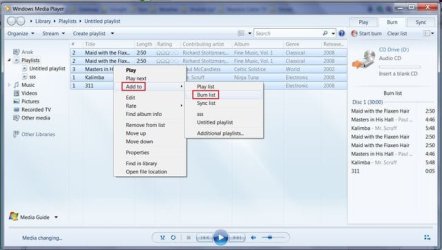
One item I forgot to mention :o and could make things easier for you is, after you highlight the songs you want to move to the burn list, make sure your mouse cursor is within the highlighted list, right click and you'll see a context menu appear, click on Add To, when that opens click on Burn List, and wait a few seconds for the list to populate.
The rest of the steps are the same.
burnlist.jpg

Thank you for marking your thread solved, it helps others in case they have problems with Windows Media Player; You can mark it unsolved if you run into more difficulty or just add to it, it doesn't mean the thread is closed.


May you and yours have a safe, healthy, and happy new year!

Steve.....aka....Anak.

 

My Computer My Computer

At a glance

Originally Win 7 Hm Prem x64 Ver 6.1.7600 Bui...Intel i3 530 2.93GHz, 2933MHz 2 Cores 4 Logic...6GB of 1,333MHz DDR3 SDRAM32MB Intel Graphics Media Accelerator HD IGChip
Computer type
PC/Desktop
Computer Manufacturer/Model Number
Gateway DX4831-01e (Mid-Tower Desktop)
OS
Originally Win 7 Hm Prem x64 Ver 6.1.7600 Build 7601-SP1 | Upgraded to Windows 10 December 14, 2019
CPU
Intel i3 530 2.93GHz, 2933MHz 2 Cores 4 Logical Processors
Motherboard
Gateway H57M01 133 megahertz
Memory
6GB of 1,333MHz DDR3 SDRAM
Graphics Card(s)
32MB Intel Graphics Media Accelerator HD IGChip
Sound Card
Realtek High Definition Audio
Monitor(s) Displays
Gateway HX2000 20inch TFT active matrix TN
Screen Resolution
1600 x 900 x 59 hertz
Hard Drives
WDC WD10EADS-00M2B0 [HDD] (1000.20 GB) -- drive 0,
HL-DT-ST DVDRAM GH41N [CD-ROM dr]
Four card readers, and Four USB 2.0
PSU
300watts.
Case
Mid-Tower Desktop
Cooling
Stock from Gateway
Keyboard
Natural Ergonomic Keyboard 4000, see Other Info
Mouse
Orig. Gateway wore out now using Insignia USB wired optical
Internet Speed
Vz FIOS 10ms png 57.64Mbps down 65.53Mbps up Speedtest.org
Antivirus
Zamana Anti-logger with Anti-malware, MSE, Windows Firewall,
Browser
IE11.0.9600.19399-Upd ver11.0.135, Firefox 68.0.1 x64
Other Info
System Specs by Belarc.

BIOS: American Megatrends Inc. P01-A0 11/17/2009

Replaced the MS 'Natural' Standard PS/2 Enhanced 101-102 Keyboard with a new Natural Ergonomic Keyboard 4000 on August 1st 2014.

Canon Pixma MG3222 Printer.

Updated to IE11 on 12102015 | Fios Quantum Router g1100

Additional AV: SpywareBlaster, manual Mbam, SAS
ANAK, thanks for your response. I will need to take the disc container apart to have a look at what it says about the manufacture of the Verbatim CD - R discs I use. Which one's would I be able to reuse do you reckon? Is there any way we can communicate other than via the Forum please??

Cheers,

Ron
 

My Computer My Computer

At a glance

Windows Seven PremiumIntel Core i5-23008GB1GB ATI Raedon HD 5450
Computer Manufacturer/Model Number
Dell XP8300
OS
Windows Seven Premium
CPU
Intel Core i5-2300
Motherboard
Unknown
Memory
8GB
Graphics Card(s)
1GB ATI Raedon HD 5450
Sound Card
Integrated 7.1 with THX TrueStudio
Monitor(s) Displays
Dell 17"
Hard Drives
1 Terrabyte Serial ATA
Case
Dell (Metal)
Cooling
None
Keyboard
Dell
Mouse
Dell Laser
Internet Speed
2.8Gb
No need to take them apart Ron, You won't be able to re-use them.

Can I record over audio/data stored on a CD-R?
No. CD-Recordable discs are designed for one-time recording only.

Source: CD-R - Music CD-R, Photo CD-R, Lightscribe CD-R, Cases, Spindles, Digital Vinyl | Verbatim
Is there any way we can communicate other than via the Forum please??
You could send me a Private message (PM) would that help?
I'll get you started, and all you have to do is reply to the PM I send you.

Here's how if you want to send to other members: How do I send Private Messages?
 

My Computer My Computer

At a glance

Originally Win 7 Hm Prem x64 Ver 6.1.7600 Bui...Intel i3 530 2.93GHz, 2933MHz 2 Cores 4 Logic...6GB of 1,333MHz DDR3 SDRAM32MB Intel Graphics Media Accelerator HD IGChip
Computer type
PC/Desktop
Computer Manufacturer/Model Number
Gateway DX4831-01e (Mid-Tower Desktop)
OS
Originally Win 7 Hm Prem x64 Ver 6.1.7600 Build 7601-SP1 | Upgraded to Windows 10 December 14, 2019
CPU
Intel i3 530 2.93GHz, 2933MHz 2 Cores 4 Logical Processors
Motherboard
Gateway H57M01 133 megahertz
Memory
6GB of 1,333MHz DDR3 SDRAM
Graphics Card(s)
32MB Intel Graphics Media Accelerator HD IGChip
Sound Card
Realtek High Definition Audio
Monitor(s) Displays
Gateway HX2000 20inch TFT active matrix TN
Screen Resolution
1600 x 900 x 59 hertz
Hard Drives
WDC WD10EADS-00M2B0 [HDD] (1000.20 GB) -- drive 0,
HL-DT-ST DVDRAM GH41N [CD-ROM dr]
Four card readers, and Four USB 2.0
PSU
300watts.
Case
Mid-Tower Desktop
Cooling
Stock from Gateway
Keyboard
Natural Ergonomic Keyboard 4000, see Other Info
Mouse
Orig. Gateway wore out now using Insignia USB wired optical
Internet Speed
Vz FIOS 10ms png 57.64Mbps down 65.53Mbps up Speedtest.org
Antivirus
Zamana Anti-logger with Anti-malware, MSE, Windows Firewall,
Browser
IE11.0.9600.19399-Upd ver11.0.135, Firefox 68.0.1 x64
Other Info
System Specs by Belarc.

BIOS: American Megatrends Inc. P01-A0 11/17/2009

Replaced the MS 'Natural' Standard PS/2 Enhanced 101-102 Keyboard with a new Natural Ergonomic Keyboard 4000 on August 1st 2014.

Canon Pixma MG3222 Printer.

Updated to IE11 on 12102015 | Fios Quantum Router g1100

Additional AV: SpywareBlaster, manual Mbam, SAS
Back
Top