Copying data to External hard drive shows error

maan143

New member
Local time
7:13 PM
Messages
9
I have external USB hard drive 'Seagate 500 Gb'
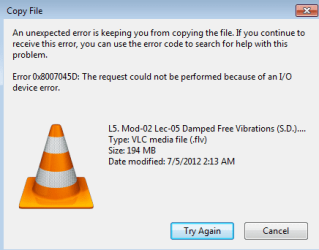
When I transfer data (say Video file) from my Laptop to External Hard drive, it starts coping but it stucks and cannot finish coping.

Check out the attachment for the detail of the error while coping.

Thanx.
 

Attachments

  • 1.png
    1.png
    9.5 KB · Views: 6

My Computer My Computer

OS
Windows 7 Ultimate x86
Hi and welcome,

The I/O device error implies a problem with the USB device.

Run a chkdsk /R on the USB device, and then also run this program to check the health status of the drive:

CrystalDiskInfo - Software - Crystal Dew World

Regards,
Golden
 

My Computer My Computer

Computer type
PC/Desktop
Computer Manufacturer/Model Number
Golden Mk. I.4
OS
Windows 10 Pro x64 ; Xubuntu x64
CPU
Intel i7 860 @ 2.80 GHz O/C'ed to 4.0GHz
Motherboard
Gigabyte P55A-UD3R Rev.1. Award BIOS F13
Memory
16GB Corsair Vengance DDR3 @ 661 MHz Dual Channel (9-9-9-24)
Graphics Card(s)
EVGA NVidia GTX 560 1024MB
Sound Card
Realtek Integrated
Monitor(s) Displays
Dual Samsung SyncMaster 2494HS
Screen Resolution
1920*1080 and 1920*1080
Hard Drives
1*Samsung 840 EVO 120GB SSD;
1*OCZ Vertex 2 60GB SSD;
2*Samsung F3 SpinPoint 1TB in RAID0;
1*Samsung F1 SpinPoint 1TB;
2*Western Digital 1TB External USB 3.0
1*Western Digital 500GB External USB 3.0
1*Seagate 500GB External USB 2.0
PSU
Thermaltake ToughPower QFan 750W
Case
Thermaltake Element S VK60001W2Z
Cooling
Corsair H60 Water Cooling, 2*230mm and 2*80mm case fans
Keyboard
Logitech G110
Mouse
Logitech MX518
@Golden
Could you mind, mentioning the procedure step by step procedure, it would be easy to perform then.
Thanx.
 

My Computer My Computer

OS
Windows 7 Ultimate x86
Hi,

1. Click Start :orb:
2. In the search box, type cmd
3. Right-click on cmd.exe and choose Run as Administrator
4. In the cmd window change to the USB drive - (for example if it is F:, type F: and hit enter)
5. Type chkdsk /R and hit enter

What does CrystalDiskInfo report?

Regards,
Golden
 

My Computer My Computer

Computer type
PC/Desktop
Computer Manufacturer/Model Number
Golden Mk. I.4
OS
Windows 10 Pro x64 ; Xubuntu x64
CPU
Intel i7 860 @ 2.80 GHz O/C'ed to 4.0GHz
Motherboard
Gigabyte P55A-UD3R Rev.1. Award BIOS F13
Memory
16GB Corsair Vengance DDR3 @ 661 MHz Dual Channel (9-9-9-24)
Graphics Card(s)
EVGA NVidia GTX 560 1024MB
Sound Card
Realtek Integrated
Monitor(s) Displays
Dual Samsung SyncMaster 2494HS
Screen Resolution
1920*1080 and 1920*1080
Hard Drives
1*Samsung 840 EVO 120GB SSD;
1*OCZ Vertex 2 60GB SSD;
2*Samsung F3 SpinPoint 1TB in RAID0;
1*Samsung F1 SpinPoint 1TB;
2*Western Digital 1TB External USB 3.0
1*Western Digital 500GB External USB 3.0
1*Seagate 500GB External USB 2.0
PSU
Thermaltake ToughPower QFan 750W
Case
Thermaltake Element S VK60001W2Z
Cooling
Corsair H60 Water Cooling, 2*230mm and 2*80mm case fans
Keyboard
Logitech G110
Mouse
Logitech MX518
Thanx. Golden for that useful opinion of ur's.

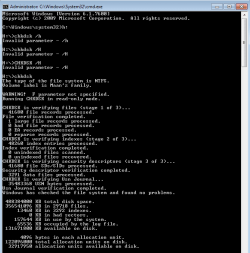
I did "chkdsk" and it says, Windows doesn't found any error in the External (usb) Hard drive. I'm attaching the screen shot of that, just in case u need to verify anything else about it.

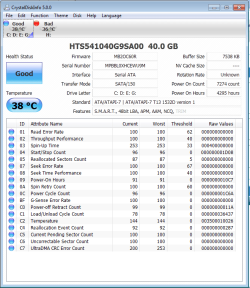
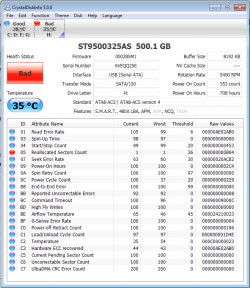
About 'Crystal Disc Info' application, It shows some issues. So, that also I'm attaching as the screen shot.

* Attachment 1 for 'chkdsk' report.
* Attachment 2 for CrystalDiscInfo report for "Internal Hard drives"
* Attachment 3 for CrystalDiscInfo report for "USB Hard drives"

Let me know, if I can provide you any reqd. detail to understand the scenario better.

Regards,
Maan.
 

Attachments

  • Report of 'chkdsk' of H drive 500 gb (External Hard).png
    Report of 'chkdsk' of H drive 500 gb (External Hard).png
    12.5 KB · Views: 7
  • CrystalDiscinfo Report 1 (Internal Hard Drives).png
    CrystalDiscinfo Report 1 (Internal Hard Drives).png
    33.1 KB · Views: 7
  • CrystalDiscinfo Report 2 (USB Hard Drives).png
    CrystalDiscinfo Report 2 (USB Hard Drives).png
    35 KB · Views: 13

My Computer My Computer

OS
Windows 7 Ultimate x86
Hi,

The reallocated sectors count points to a physical defect with the disk. Its hard to predict when it will fail, but I would start considering investing in a new external drive at this point.

S.M.A.R.T. - Wikipedia, the free encyclopedia.

Regards,
Golden
 

My Computer My Computer

Computer type
PC/Desktop
Computer Manufacturer/Model Number
Golden Mk. I.4
OS
Windows 10 Pro x64 ; Xubuntu x64
CPU
Intel i7 860 @ 2.80 GHz O/C'ed to 4.0GHz
Motherboard
Gigabyte P55A-UD3R Rev.1. Award BIOS F13
Memory
16GB Corsair Vengance DDR3 @ 661 MHz Dual Channel (9-9-9-24)
Graphics Card(s)
EVGA NVidia GTX 560 1024MB
Sound Card
Realtek Integrated
Monitor(s) Displays
Dual Samsung SyncMaster 2494HS
Screen Resolution
1920*1080 and 1920*1080
Hard Drives
1*Samsung 840 EVO 120GB SSD;
1*OCZ Vertex 2 60GB SSD;
2*Samsung F3 SpinPoint 1TB in RAID0;
1*Samsung F1 SpinPoint 1TB;
2*Western Digital 1TB External USB 3.0
1*Western Digital 500GB External USB 3.0
1*Seagate 500GB External USB 2.0
PSU
Thermaltake ToughPower QFan 750W
Case
Thermaltake Element S VK60001W2Z
Cooling
Corsair H60 Water Cooling, 2*230mm and 2*80mm case fans
Keyboard
Logitech G110
Mouse
Logitech MX518
@Golden
Is there any possible way you could suggest to solve this issue ?
 

My Computer My Computer

OS
Windows 7 Ultimate x86
@Golden
Is there any possible way you could suggest to solve this issue ?
Yup. Agree w/Golden. RMA the drive. Crystal Disc Info is a very reliable tool (good choice) Been there. Done that.......:cool:
 

My Computer My Computer

Computer Manufacturer/Model Number
Built By ELiTEFX 2012
OS
Windows 7 Ultimate SP1 x64
CPU
Intel Core i7 2700K @ 4.515 Ghz
Motherboard
ASUS P8P67 Deluxe
Memory
16GB GSkill Ripjaws X DDR3-1600
Graphics Card(s)
2 x MSI R6870HAWK 1GB TwinFrozr III CrossFire Enabled
Monitor(s) Displays
Samsung 27" LED 2ms Syncmaster S27B350
Screen Resolution
1920 x 1080
Hard Drives
Mushkin Chronos MKNSSDCR120GB SSD 550/515 MB/sec
Seagate ST31000528AS 1TB HDD
PSU
Corsair TX850W
Case
Coolermaster CM690
Cooling
Coolermaster V8
Keyboard
Logitech G510
Mouse
Razer DeathAdder
Internet Speed
18mbps/.512mbps
Other Info
Samsung SH-S243D DVD+RW/DVD-RW Optical Drive
5x120mm Blue LED Case Fans
Logitech Z4 2.1 80 Watt Sound System
Cisco DPC3008 Docsis 3 Cable Modem
TP-Link TL-WR1043ND Wireless N Gigabit Router
@Golden
Is there any possible way you could suggest to solve this issue ?

Hi,

Unfortunately there is no fix for this - the only thing you can use is to create a partition over the affected sectors, and then not use that partition at all (in other words never write any data to it). However, longer term, you want to completely replace this disk.

Regards,
Golden
 

My Computer My Computer

Computer type
PC/Desktop
Computer Manufacturer/Model Number
Golden Mk. I.4
OS
Windows 10 Pro x64 ; Xubuntu x64
CPU
Intel i7 860 @ 2.80 GHz O/C'ed to 4.0GHz
Motherboard
Gigabyte P55A-UD3R Rev.1. Award BIOS F13
Memory
16GB Corsair Vengance DDR3 @ 661 MHz Dual Channel (9-9-9-24)
Graphics Card(s)
EVGA NVidia GTX 560 1024MB
Sound Card
Realtek Integrated
Monitor(s) Displays
Dual Samsung SyncMaster 2494HS
Screen Resolution
1920*1080 and 1920*1080
Hard Drives
1*Samsung 840 EVO 120GB SSD;
1*OCZ Vertex 2 60GB SSD;
2*Samsung F3 SpinPoint 1TB in RAID0;
1*Samsung F1 SpinPoint 1TB;
2*Western Digital 1TB External USB 3.0
1*Western Digital 500GB External USB 3.0
1*Seagate 500GB External USB 2.0
PSU
Thermaltake ToughPower QFan 750W
Case
Thermaltake Element S VK60001W2Z
Cooling
Corsair H60 Water Cooling, 2*230mm and 2*80mm case fans
Keyboard
Logitech G110
Mouse
Logitech MX518
@ Golden,......... thx. for info.
Are you suggesting, I shouldn't ever transfer (paste) data from my Laptop to my 500gig (external drive - which is affected) ?

and about making partition,
Could you help me in 'creating the partition' (as u suggest), since I didn't do it earlier, but can, if define it's procedure ...

@ ELiTEFX
I'll think about RMA, first to assure my data is backed-up.
 

My Computer My Computer

OS
Windows 7 Ultimate x86
Hi,

If I think it over a bit more carefully, I don't think partitioning across bad sectors is such a good idea after all, for the following reasons :

1. This technique relies upon you being quite proficient at partition manipulation;
2. If the bad sectors aren't contiguous, you may end up with several partitions, which is really horrible to work with

My advice is to RMA/replace this drive as soon as you can.

Regards,
Golden
 

My Computer My Computer

Computer type
PC/Desktop
Computer Manufacturer/Model Number
Golden Mk. I.4
OS
Windows 10 Pro x64 ; Xubuntu x64
CPU
Intel i7 860 @ 2.80 GHz O/C'ed to 4.0GHz
Motherboard
Gigabyte P55A-UD3R Rev.1. Award BIOS F13
Memory
16GB Corsair Vengance DDR3 @ 661 MHz Dual Channel (9-9-9-24)
Graphics Card(s)
EVGA NVidia GTX 560 1024MB
Sound Card
Realtek Integrated
Monitor(s) Displays
Dual Samsung SyncMaster 2494HS
Screen Resolution
1920*1080 and 1920*1080
Hard Drives
1*Samsung 840 EVO 120GB SSD;
1*OCZ Vertex 2 60GB SSD;
2*Samsung F3 SpinPoint 1TB in RAID0;
1*Samsung F1 SpinPoint 1TB;
2*Western Digital 1TB External USB 3.0
1*Western Digital 500GB External USB 3.0
1*Seagate 500GB External USB 2.0
PSU
Thermaltake ToughPower QFan 750W
Case
Thermaltake Element S VK60001W2Z
Cooling
Corsair H60 Water Cooling, 2*230mm and 2*80mm case fans
Keyboard
Logitech G110
Mouse
Logitech MX518
Back
Top