
Copying large files from C: to USB2 thumb drive

bawldiggle

GrayGhost2 ret.
Pro User
VIP
Local time
4:53 AM
Messages
895
Location
Australia
This is new territory for me.

I am trying to save two ISO files (Win7 Pro 32bit + 64bit, ex Digital River) from my C: drive (laptop spinner) to a new USB2 thumb-drive. (Laptop does not have USB3).

The two ISOs are about 2.5gb each, which 70% filled the 8gb thumb drive.
I simply did not think about the size of the ISO files and the thumb-drive capacity. :o

Copying from the internal drive to the USB2 thumb drive took about 22 minutes.
Speed was ±4MB/s, via a mains-powered hub.
Not having a clue about "transfer" times/speeds, I am wondering if the 4mb/s is reasonable ?

AS a bargain hunter I bought a few "cheap" sticks, the red-all-plastic-ones. But just now I discovered they are all USB2. (Which is irrelevant on this laptop, but is a let-down for my USB3 rigs (comments?)
It now makes sense to load the ISOs onto separate DVDs, ready for use.
What type of DVD should I use to load the ISOs onto ?

An old thread-post USB Transfer rate ~~ suggests changing the BIOS USB speed to high-speed instead of full-speed. The thread is directed at USB3 ... just wondering if such a tweak is applicable to USB2 ? If so ... how would I do that. ?

Is there any point to using third-party file copier programs ?

Thanks :)

SPECS:
Toshiba Satellite C665
USB2 only
OS:= Windows 7 Home Premium (32-bit), sp1 (Build 7601) OEM
UI:=Classic Shell Start + Classic Explorer
Windows Indexing = disabled


THUMB DRIVE
SanDisk Cruzer Switch USB2
8 GB FAT32
- cheap end of thumb drives I know


-----
EDIT
-----

Editing this post has gone pear shaped, weirdly duplicating paragraphs later in the post
I tried twice to rectify it without success.
 
Last edited:

My Computer My Computer

At a glance

XP Pro (x86) | 7 HP (x86) & (x64) | 7 Pro (x64)
Computer type
PC/Desktop
Computer Manufacturer/Model Number
Toshiba, Lenovo (laptops) + 4 rigs
OS
XP Pro (x86) | 7 HP (x86) & (x64) | 7 Pro (x64)
I get about 1 GB every 20 minutes through a USB 2.0 port; that's about .8 MB per second; average file size 260k. This is to a cheap USB 2.0 stick.

If I change to a cheap USB 3.0 stick through a USB 3.0 port, I get about 5 times as much speed---about 4 minutes per GB or 4 MB per second. Same average file size

Large files tend to copy faster than small files. You're copying very large files and getting 4 mbs onto a cheap USB drive similar to mine. I'm only getting .8 for small files.

I'd say you are doing OK considering your USB is 2.0 and cheap.

You should be able to get much better performance if you step up to USB 3.0.

I wouldn't expect much improvement with file-copy programs, but might experiment if I was doing this job constantly and saving time was critical.

I don't know anything about the BIOS tweaks, but you could experiment.

I'd think even a slowish USB drive would be preferable to DVD, reliability issues aside.
 

My Computer My Computer

At a glance

Windows 7 Home Premium SP1, 64-bitIntel Skylake i5-6600K, not overclocked8 GB HyperX DDR4-2666 (2 x 4 GB)none; graphics are integrated on CPU
Computer type
PC/Desktop
Computer Manufacturer/Model Number
Ignatz Special; 4 speed manual gearbox; factory air conditioning; one of one
OS
Windows 7 Home Premium SP1, 64-bit
CPU
Intel Skylake i5-6600K, not overclocked
Motherboard
AsRock Z170M Extreme 4, micro ATX
Memory
8 GB HyperX DDR4-2666 (2 x 4 GB)
Graphics Card(s)
none; graphics are integrated on CPU
Sound Card
onboard: Realtek ALC1150; external: USB Behringer UF0-202
Monitor(s) Displays
Dell S2340M 23 inch IPS
Screen Resolution
1600 x 900
Hard Drives
System: Crucial MX100 series SSD, 128 GB;
Data: Samsung Spinpoint 103SJ, 1 TB;
Backup: WD Caviar Green WD30EZRX-00D8PB0, 3 TB
PSU
Rosewill SilentNight 500 watt fanless, semi-modular
Case
Antec Solo II
Cooling
Noctua NH-U12S; Noctua F12 intake, Noctua S12A exhaust
Keyboard
Microsoft 200 6JH-00001 USB
Mouse
Dell or Microsoft optical wired; USB
Antivirus
Microsoft Security Essentials and Malwarebytes Premium
Browser
Pale Moon
Other Info
All fans PWM; speeds at idle: CPU circa 500 rpm; intake circa 600 rpm; exhaust circa 600 rpm; CPU temps 27 idle and 47 C load in a warm room (27 C/81 F) when running Intel Extreme Tuning Utility stress test.
With usb pen drives, write is slower than read. 4MB/s write is about par for cheap pen drives. I suggest that rather than backing up digital river iso's, you get 2 cheap drives and make x86 and x64 install sticks using one of the tutorials on this site. After creation, deleting the ei.cfg file will make the usb's universal (will install any version). Because read is faster than write, cheap pen drives are fine for this task.

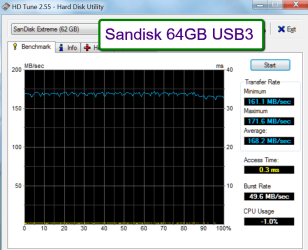
This is what I do, but for general usb2 use, I have a Sandisk Extreme usb3 pen drive. On usb2 I get 30MB/s write.
 

My Computer My Computer

At a glance

Windows 7 pro x64 SP1Intel i7-2600k o/c to 4.6GHz8GB Mushkin 1866MHzNvidia GTX 750 Ti 2GB
Computer type
PC/Desktop
Computer Manufacturer/Model Number
self build
OS
Windows 7 pro x64 SP1
CPU
Intel i7-2600k o/c to 4.6GHz
Motherboard
MSI Z68-GD80
Memory
8GB Mushkin 1866MHz
Graphics Card(s)
Nvidia GTX 750 Ti 2GB
Sound Card
integrated
Monitor(s) Displays
Liyama ProLite 27"
Screen Resolution
1920*1080 px
Hard Drives
Seagate 2TB
PSU
Coolermaster GX 750W
Case
Antec 300 case + 5 fans
Cooling
Dark Rock Pro
Internet Speed
62Mbit down 18Mbit up
Antivirus
MSE
Browser
Firefox
Other Info
Blackgold BGT3650 Quad HD TV card. Also have various 3770 + 4770K render boxes.
If you buy cheap sticks you cannot expect good performance. High speed sticks are expensive but their performance is great (see example below).

To transfer the iso to DVD I suggest you take a DVD-R
 

Attachments

  • 2014-04-12_1920.png
    2014-04-12_1920.png
    38.9 KB · Views: 0

My Computer My Computer

At a glance

Vista, Windows7, Mint Mate, Zorin, Windows 8from 1.6GHz Duo to i7
Computer Manufacturer/Model Number
HP, Dell, Gateway, Toshiba - 4 laptops and 2 desktops
OS
Vista, Windows7, Mint Mate, Zorin, Windows 8
CPU
from 1.6GHz Duo to i7
Monitor(s) Displays
2x HP w2207
Hard Drives
5x HDD, 7x SSD, 12x Externals
Keyboard
with trackball - no mices
Mouse
Trackball mice
Internet Speed
DSL 6000
What type of DVD to use?
Writeable, you don't need re-write capabilities and there are some issues with them that are outside the scope of this discussion.

Why save the ISO though, it would be better I think to just create the install media on the DVD disc.

A 4GB USB stick (one for each) is enough space for Win7 or Win8 install media (take a look in EightForums tutorials - there's one that discusses merging Win8 and Win8.1 into a single install media). You can always download the ISO if you need it (Win 8 is a bit different - Windows Store, but still it can be done).

UEFI install caveat:
I was involved in a UEFI thread and discovered that USB install media needs to be formatted FAT32. You cannot use the Windows 7 USB/DVD tool to write the media because it formats a NTFS partition.
Rufus or another bootable USB creation utility would have to be used.
I have not verified this, but three sources state it.

Windows install media on a DVD does not present any UEFI issues since the file system is UDF.

Again, this is only a consideration for a UEFI install.​

Side note: If your system is a 64 bit machine, you can install Windows x64 as long as you have sufficient memory installed. Performance seems to suffer on Windows x64 with less than 4 GB.

Other members have provided excellent information on the copy questions.

Bill
.
 

My Computer My Computer

At a glance

x64 (6.3.9600) Win8.1 Pro & soon dual boot x6...AMD A6-3420M APU with Radeon(tm) HD Graphics6.00 GBAMD Radeon(TM) HD 6520G
Computer type
Laptop
Computer Manufacturer/Model Number
HP Pavilion dv6-6c10us
OS
x64 (6.3.9600) Win8.1 Pro & soon dual boot x64 (6.1.7601) Win7_SP1 HomePrem
CPU
AMD A6-3420M APU with Radeon(tm) HD Graphics
Motherboard
Hewlett-Packard 1805
Memory
6.00 GB
Graphics Card(s)
AMD Radeon(TM) HD 6520G
Sound Card
(1) AMD High Definition Audio Device (2) IDT High Definiti
Monitor(s) Displays
HP W2072a 20" LCD (1600 x 900) @ 60 Hz
Screen Resolution
1366 x 768 x 32 bits (4294967296 colors) @ 60 Hz
Hard Drives
ST640LM0 00 HM641JI SATA Disk Device
Keyboard
Logitech k520 wireless KB
Mouse
Logitech m320 wireless mouse (bundled with KB)
Internet Speed
15/5 | 54 MB Wireless 'n'
Antivirus
Realtime: Defender or Avast | On-demand: Malwarebytes, ESET
Browser
IE 11 on Win8, IE 10 on win 7
Other Info
Media: [Gimp, Audacity, VLC] || Comm: [WEmail 2012, Skype] || Productivity: [OpenOffice,| Textpad] || Utils: [Sysinternals, cCleaner, Speccy, Defraggler]
My reason for moving the two ISO files onto external media is when doing a monthly C:drive defrag, one of the ISO files took 20minutes+ to defrag. There is no good reason to to keep the ISOs on the laptop HDD.
Being anal about documentation I keep a copy of all installation files as a backup (plus details of the source and any quirks). Some downloads have taken some digging to find a clean version, some download sites simply disappear.
-----
The ISO files. (Win7 Professional 32bit and 64bit)
- downloaded for my daughters Dell laptop
- ISOs never used, but I would like to keep them in case she changes her mind
Q1: should I load the ISOs onto separate DVD (DVD-R) discs ... OR...
Q2: load onto USB2 thumb drive (my laptop does not have USB3) ... OR...
Q3: copy/move the ISO files onto another thumb-drive (a cheap one? or not)
-----

@3D Jed
Are USB install sticks any more reliable (life wise) than DVD-R install discs. ?
Which media would last longer ?

3D Jed said:
I have a Sandisk Extreme usb3 pen drive. On usb2 I get 30MB/s write.
Just to confirm you get 30MB/s through a USB2 port onto a USB3 quality stick ?
- I thought USB2 port would not perform beyond USB2 limitations ?
- Noted: Sandisk Extreme usb3, thank you. :cool:
-----

@whs
Thanks "Wolfgang"
I assume your transfer rate is from a USB3 port ?
DVD-R ... noted, I didn't know where to start. :cool:
-----

@Slartybart
It makes more sense, as you suggest, to load the ISOs onto DVDs (cheaper than sticks)
[quote="Slartybart']UEFI install caveat:

I was involved in a UEFI thread and discovered that USB install media needs to be formatted FAT32.
You cannot use the Windows 7 USB/DVD tool to write the media because it formats a NTFS partition.
Rufus or another bootable USB creation utility would have to be used.
I have not verified this, but three sources state it.

Windows install media on a DVD does not present any UEFI issues since the file system is UDF.

Again, this is only a consideration for a UEFI install.[/quote]
Q4: What is UEFI and UDF ?
Q5: the bog standard DVD writer on my Toshiba will format the resulting DVD-R with a NTFS partition OR format the entire DVD as NTFS ?? (Sorry for being so thick)
Q5: Rufus (a 3rd party software) can create a valid installation STICK (not DVD)?

I am not sure which way to commit ... USB installer or DVD installer ?
I do have a rig (due for a DVD/CD burner heart transplant) ... LiteOn (I have) ... hopefully more robust than LG)

My knowledge of USB sticks is near zero. Our local retailers are all in a rush to the bottom.
Any suggestions on what I should consider for decent sticks. ?
I recently bought a cheapie :o ADATA 16GB. I want to use it every day. Have I bought a lemon ?

Thank you all for your patience and support :)
 
Last edited:

My Computer My Computer

At a glance

XP Pro (x86) | 7 HP (x86) & (x64) | 7 Pro (x64)
Computer type
PC/Desktop
Computer Manufacturer/Model Number
Toshiba, Lenovo (laptops) + 4 rigs
OS
XP Pro (x86) | 7 HP (x86) & (x64) | 7 Pro (x64)
All valid points. I'm anal too :)

My main point was if you create Windows 7 install media on a DVD, then you have a "backup" of the ISO. The process simply makes the DVD bootable and expands the ISO so it can be used to install Windows.

A DVD holds about 5 GB, so you will need a separate DVD for each version.

If you're really anal ;) you could do both. Copy the ISO to a DVD and create the install media on another (you'll need two DVDs for each version.
UEFI and UDF

Rufus is only for USBs, there are many utilities that create bootable DVDs, including Windows 7 USB/DVD download tool (Ok for creating DVD UEFI install media)
Imgburn is one utility people use around here
The list is long: https://www.google.com/search?q=UDF...q=UEFI&rls=com.microsoft:en-US:IE-ContextMenu

Data on a USB will last forever if you only write once. Data on DVDs is also long lived.

There's always a debate - DVDs can break, USBs can get lost or over written.
I use both. I still use CDs for small things (portable rescue disc, picures...)

If you're a pack rat like I am, I strongly suggest an external hard drive to store all the stuff pack rats keep :)

Bill
.
 

My Computer My Computer

At a glance

x64 (6.3.9600) Win8.1 Pro & soon dual boot x6...AMD A6-3420M APU with Radeon(tm) HD Graphics6.00 GBAMD Radeon(TM) HD 6520G
Computer type
Laptop
Computer Manufacturer/Model Number
HP Pavilion dv6-6c10us
OS
x64 (6.3.9600) Win8.1 Pro & soon dual boot x64 (6.1.7601) Win7_SP1 HomePrem
CPU
AMD A6-3420M APU with Radeon(tm) HD Graphics
Motherboard
Hewlett-Packard 1805
Memory
6.00 GB
Graphics Card(s)
AMD Radeon(TM) HD 6520G
Sound Card
(1) AMD High Definition Audio Device (2) IDT High Definiti
Monitor(s) Displays
HP W2072a 20" LCD (1600 x 900) @ 60 Hz
Screen Resolution
1366 x 768 x 32 bits (4294967296 colors) @ 60 Hz
Hard Drives
ST640LM0 00 HM641JI SATA Disk Device
Keyboard
Logitech k520 wireless KB
Mouse
Logitech m320 wireless mouse (bundled with KB)
Internet Speed
15/5 | 54 MB Wireless 'n'
Antivirus
Realtime: Defender or Avast | On-demand: Malwarebytes, ESET
Browser
IE 11 on Win8, IE 10 on win 7
Other Info
Media: [Gimp, Audacity, VLC] || Comm: [WEmail 2012, Skype] || Productivity: [OpenOffice,| Textpad] || Utils: [Sysinternals, cCleaner, Speccy, Defraggler]
re usb3 stick in usb2 port - I seem to remember reading somewhere that usb3 pen drives are manufactured different to usb2 drives to cope with the higher speed, and so goes faster even in a usb2 port. Could just be a better drive - I paid around £23 at Amazon for a 32GB. I tend to pay £3 for a slow 8GB pen drive that will be used for installs. As for DVD vs pen drive - I guess a disk is easier to damage (but a flash drive easier to lose !).

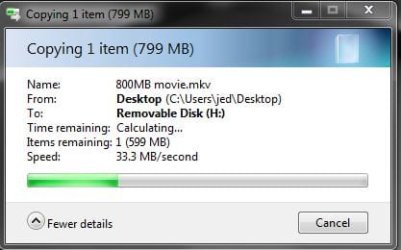
Snip of test writing 800MB movie to Sandisk Extreme usb3 32GB at 30+ MB/s -

sandisk_test.JPG

drops to about 29 MB/s near the end (exFAT btw)

edit : installing - for DVD install disks I use ImgBurn at 4X, but had to search for an older version since the latest one comes with unwanted 'extras'.

For non uefi usb install I use the diskpart method :

elevated cmd window -

diskpart
list disk
select disk 1 (or whatever number the usb is)
clean
create partition primary
select partition 1
active
format fs=fat32 label="windows 7" quick
assign
exit

then copy entire contents of the Windows 7 Digital River iso (unpacked with WinRar) to the pen drive
can substitute
fs=ntfs label ="windows 7" quick

diskpart info from gregrocker IIRC
 
Last edited:

My Computer My Computer

At a glance

Windows 7 pro x64 SP1Intel i7-2600k o/c to 4.6GHz8GB Mushkin 1866MHzNvidia GTX 750 Ti 2GB
Computer type
PC/Desktop
Computer Manufacturer/Model Number
self build
OS
Windows 7 pro x64 SP1
CPU
Intel i7-2600k o/c to 4.6GHz
Motherboard
MSI Z68-GD80
Memory
8GB Mushkin 1866MHz
Graphics Card(s)
Nvidia GTX 750 Ti 2GB
Sound Card
integrated
Monitor(s) Displays
Liyama ProLite 27"
Screen Resolution
1920*1080 px
Hard Drives
Seagate 2TB
PSU
Coolermaster GX 750W
Case
Antec 300 case + 5 fans
Cooling
Dark Rock Pro
Internet Speed
62Mbit down 18Mbit up
Antivirus
MSE
Browser
Firefox
Other Info
Blackgold BGT3650 Quad HD TV card. Also have various 3770 + 4770K render boxes.
I recently copied the same set of files from an internal HDD to a cheap USB 3.0 stick in 2 ways: through a USB 2.0 port and through a USB 3.0 port.

I expected to see a noticeably faster transfer rate through the 3.0 port.

I did not. It took 64 minutes through the 2.0 port and 63.3 minutes through the 3.0 port.

I take that to mean that the speed was ultimately governed by this cheap and slow stick rather than the port and that even the 2.0 port could feed the stick as quickly as it could accept data, even though it was allegedly a 3.0 drive.

The speed differences between various USB drives seems to me to be much more noticeable than differences in hard drive speeds.
 

My Computer My Computer

At a glance

Windows 7 Home Premium SP1, 64-bitIntel Skylake i5-6600K, not overclocked8 GB HyperX DDR4-2666 (2 x 4 GB)none; graphics are integrated on CPU
Computer type
PC/Desktop
Computer Manufacturer/Model Number
Ignatz Special; 4 speed manual gearbox; factory air conditioning; one of one
OS
Windows 7 Home Premium SP1, 64-bit
CPU
Intel Skylake i5-6600K, not overclocked
Motherboard
AsRock Z170M Extreme 4, micro ATX
Memory
8 GB HyperX DDR4-2666 (2 x 4 GB)
Graphics Card(s)
none; graphics are integrated on CPU
Sound Card
onboard: Realtek ALC1150; external: USB Behringer UF0-202
Monitor(s) Displays
Dell S2340M 23 inch IPS
Screen Resolution
1600 x 900
Hard Drives
System: Crucial MX100 series SSD, 128 GB;
Data: Samsung Spinpoint 103SJ, 1 TB;
Backup: WD Caviar Green WD30EZRX-00D8PB0, 3 TB
PSU
Rosewill SilentNight 500 watt fanless, semi-modular
Case
Antec Solo II
Cooling
Noctua NH-U12S; Noctua F12 intake, Noctua S12A exhaust
Keyboard
Microsoft 200 6JH-00001 USB
Mouse
Dell or Microsoft optical wired; USB
Antivirus
Microsoft Security Essentials and Malwarebytes Premium
Browser
Pale Moon
Other Info
All fans PWM; speeds at idle: CPU circa 500 rpm; intake circa 600 rpm; exhaust circa 600 rpm; CPU temps 27 idle and 47 C load in a warm room (27 C/81 F) when running Intel Extreme Tuning Utility stress test.
Back
Top