Corrupt Disk!!! Help!

tdk08

New member
Power User
Local time
8:36 AM
Messages
154
Location
New York
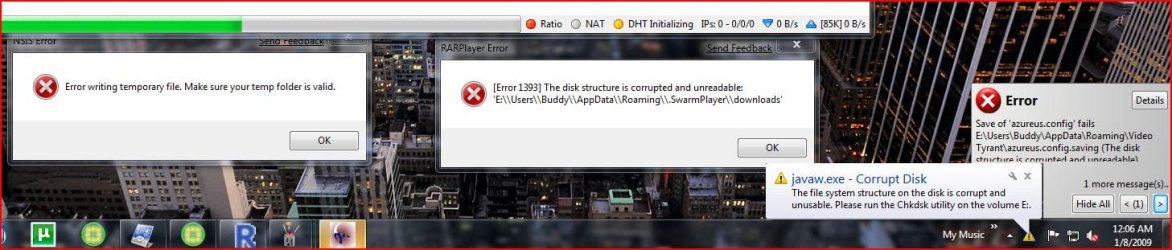
i dont understand what i manage to do wrong. i installed W7 on my laptop and everything went good (off flash drive) and after like 3 days of use i got a corrupt disk error from like 3 programs at once when i started up. okay, so i reformat and install this time from a mounted iso from vista that i wanted to dual boot with. went great and its working so far. i thought it was just a fluke thing and didnt think about it again. i then went and installed it on my desktop which is comlpetely unrelated to my laptop (amdvsintel idevssata asusvshp). went good, i installed off iso like before and after like 3-4 days it started doing the same thing!! i even avoided programs that i thought caused the problem. unless it was the iso i am using (how could it be, everything else downloads ok except for random corrupt disk problem?!?) i dont know wtf to do. i cant even uninstall programs without going into safe mode because they cant write to the temp folders for uninstall because its "corrupt". i thought maybe the original os might be a problem but the laptop had vista preinstalled and the desktop had xp. :confused:
 
Last edited by a moderator:

My Computer

OS
Windows 7 Ultimate Beta 7000
CPU
AMD Athlon 64 X2 5000+ Brisbane 2.6GHz Black Edition
Motherboard
ASUS M2A-VM
Memory
Kingston 2GB DDR2 667
Monitor(s) Displays
Acer AL2216Wbd 22" Widescreen
Screen Resolution
1680x1050
Hard Drives
HITACHI 500GB SATA
Other Info
Laptop: Compaq C700
i dont understand what i manage to do wrong. i installed W7 on my laptop and everything went good (off flash drive) and after like 3 days of use i got a corrupt disk error from like 3 programs at once when i started up. okay, so i reformat and install this time from a mounted iso from vista that i wanted to dual boot with. went great and its working so far. i thought it was just a fluke thing and didnt think about it again. i then went and installed it on my desktop which is comlpetely unrelated to my laptop (amdvsintel idevssata asusvshp). went good, i installed off iso like before and after like 3-4 days it started doing the same thing!! i even avoided programs that i thought caused the problem. unless it was the iso i am using (how could it be, everything else downloads ok except for random corrupt disk problem?!?) i dont know wtf to do. i cant even uninstall programs without going into safe mode because they cant write to the temp folders for uninstall because its "corrupt". i thought maybe the original os might be a problem but the laptop had vista preinstalled and the desktop had xp. :confused:

Please post a screen shot of the exact error message. We'll then direct you to the event viewer to search for possible causes.
 

My Computer

Computer type
Laptop
Computer Manufacturer/Model Number
Apple
OS
El Capitan / Windows 10
CPU
i7-4980HQ
Memory
16GB
Graphics Card(s)
Iris 5200
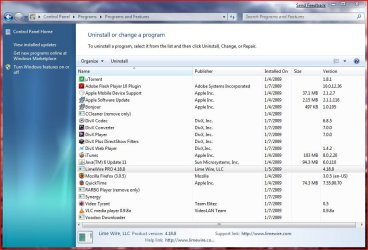
i tried to get as many errors at once to show the problem and i also included what programs i currently have installed. also i was thinking that if it were certain programs i was using then wouldn't more people be having this problem? i have only seen one other person on this forum with the problem.
 

Attachments

  • screen.JPG
    screen.JPG
    94.1 KB · Views: 462
  • screen2.JPG
    screen2.JPG
    15.7 KB · Views: 213
  • screen3.JPG
    screen3.JPG
    99.4 KB · Views: 454

My Computer

OS
Windows 7 Ultimate Beta 7000
CPU
AMD Athlon 64 X2 5000+ Brisbane 2.6GHz Black Edition
Motherboard
ASUS M2A-VM
Memory
Kingston 2GB DDR2 667
Monitor(s) Displays
Acer AL2216Wbd 22" Widescreen
Screen Resolution
1680x1050
Hard Drives
HITACHI 500GB SATA
Other Info
Laptop: Compaq C700
go into safe mode and there

do a chkdsk /r /f

it should tell you that in order to scan the disk you need to restart

restart and it should bootup saying it will scan the disk for errors leave it there

it will take a few hours.....

just leave there

if you cant even load up to that point then follow here....

http://www.sevenforums.com/tutorials/681-startup-repair.html

follow this until you get to the system recovery options

go to command prompt then do a chdsk there....
 

My Computer

Computer Manufacturer/Model Number
Tx2500z Tablet Pc/Homemade Server
OS
Windows 7 Ult x64(x2), HomePrem x32(x4), Server 08 (+VM), 08 R2 (VM) , SuSe 11.2 (VM), XP 32 (VM)
CPU
Turion X2 ultra (oh well came with laptop)/P4 @3.2 (yes P4)
Motherboard
IDK HP Motherboard / Intel DG965SS
Memory
OCZ Dual Channel 4GB kit/ 1gb Dual Channel
Graphics Card(s)
HD 3200 graphics /GMA x3100 (yay for intergrated!!)
Sound Card
Realtek HD Audio(mic working, well sort of)/Siig IC-70012
Monitor(s) Displays
built-in Hp 12" laptop screen/ Acer 19"
Screen Resolution
1280x800 /1440x900
Cooling
All Air Cooled
Mouse
Logi MX Rev. /MS Wheel Optical 1.1A /Logitech Optical Mouse
Internet Speed
College baby but its still routed through vpn to 1536k...
Other Info
love my wacom pen and pressure sensitivity...
wished it worked in 7, SUSE for that matter though
i dont get it, i restart into safe mode and do the chkdsk and when it restarts to do it it says volume clean immediately and starts back into windows... and i dont have any errors! but i dont think its over, windows is trying to trick me into thinking everything is fine and dandy and next time i restart... BAM it hits me with its stupid friggin errors again. thats what happened to my laptop before i reinstalled! but thanks darkassain for the help!
 

My Computer

OS
Windows 7 Ultimate Beta 7000
CPU
AMD Athlon 64 X2 5000+ Brisbane 2.6GHz Black Edition
Motherboard
ASUS M2A-VM
Memory
Kingston 2GB DDR2 667
Monitor(s) Displays
Acer AL2216Wbd 22" Widescreen
Screen Resolution
1680x1050
Hard Drives
HITACHI 500GB SATA
Other Info
Laptop: Compaq C700
hmmm

the best thing i can say is that is to wait until the public beta...
then we can see for sure if it is the disc or that your HDD's might be failing...
 

My Computer

Computer Manufacturer/Model Number
Tx2500z Tablet Pc/Homemade Server
OS
Windows 7 Ult x64(x2), HomePrem x32(x4), Server 08 (+VM), 08 R2 (VM) , SuSe 11.2 (VM), XP 32 (VM)
CPU
Turion X2 ultra (oh well came with laptop)/P4 @3.2 (yes P4)
Motherboard
IDK HP Motherboard / Intel DG965SS
Memory
OCZ Dual Channel 4GB kit/ 1gb Dual Channel
Graphics Card(s)
HD 3200 graphics /GMA x3100 (yay for intergrated!!)
Sound Card
Realtek HD Audio(mic working, well sort of)/Siig IC-70012
Monitor(s) Displays
built-in Hp 12" laptop screen/ Acer 19"
Screen Resolution
1280x800 /1440x900
Cooling
All Air Cooled
Mouse
Logi MX Rev. /MS Wheel Optical 1.1A /Logitech Optical Mouse
Internet Speed
College baby but its still routed through vpn to 1536k...
Other Info
love my wacom pen and pressure sensitivity...
wished it worked in 7, SUSE for that matter though
i had similar problems with disc corruption when i first installed the beta last week. i ended up deleting the partition, defragging, then remaking it again. after i installed 7 again, the problems stopped.
 

My Computer

OS
7600 x86
CPU
Core 2 Duo e7200, 2.53 ghz
Motherboard
Micro-Star MS-7529
Memory
2x DDR2 PC5300 1gb, 667 mhz
Graphics Card(s)
GeForce 9500gt, 512mb
Monitor(s) Displays
22" LG Flatron w2234s
Screen Resolution
1680x1050
Hard Drives
Excelstor SATA-II 250gb 7200rpm, 8mb cache
PSU
CoolerMaster M520
Internet Speed
30/20 mbits
Sounds like the HDD is failing yes... Check the MD5 hash of the iso and then you will know if its the iso or not, the md5 for x86 build 7000 is: F9DCE6EBD0A63930B44D8AE802B63825

If you have no way of finding the hash, google hastab.. nice freeware app :)
 

My Computer

Computer Manufacturer/Model Number
Advent Roma Laptop
OS
Windows 7 Enterprise SP1 x64 Windows 8 Enterprise RTM x64
CPU
Mobile DualCore Intel Pentium T4400, 2200 MHz (11 x 200)
Motherboard
Advent Roma (Intel Cantiga GL40)
Memory
4028 MB (DDR2-667 DDR2 SDRAM)
Graphics Card(s)
Mobile Intel(R) GMA 4500M
Sound Card
Realtek ALC662 @ Intel 82801IB ICH9 - High Definition Audio
Monitor(s) Displays
Generic PnP Monitor [NoDB]
Screen Resolution
1366x768
Hard Drives
TOSHIBA MK5065GSX ATA Device (500 GB, 5400 RPM, SATA-II)
Mouse
Mikomi 7 Button Laser Mouse w/DPi Switch
Internet Speed
Slow!!
most likely mft corruption caused by not allowing the windows 7 installer to create it's own partition. i do not trust third party partition managers to create partitions and format them for use with unreleased versions of windows. always let the windows installer partition the empty unpartitioned disc space you give it the way it wants to and then use the shrink volume feature in disc manager to go from there.
 

My Computer

Computer type
Laptop
Computer Manufacturer/Model Number
Apple
OS
El Capitan / Windows 10
CPU
i7-4980HQ
Memory
16GB
Graphics Card(s)
Iris 5200
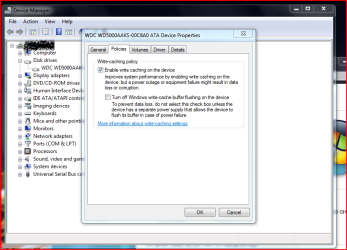
Can you post your hard disk Policies settings in Win7?
 

Attachments

  • expanded.PNG
    expanded.PNG
    39.9 KB · Views: 1,003

My Computer

Computer Manufacturer/Model Number
ENIAC
OS
Windows 7 RC 7100 32bit/64bit
CPU
Intel Core2Duo E4500 2.20 GHz
Motherboard
ASUS P5LD2-X/1333
Memory
2x1GB Kinsgston DDR2 800MHz
Graphics Card(s)
Nvidia 8500GT
Sound Card
Onboard High Definition Audio Device
Monitor(s) Displays
Sony Bravia 42"
Case
LINKW 2222
Cooling
Standard Intel
Keyboard
Some cheap one
Mouse
Microsoft Intellimouse something
Internet Speed
24MBps ADSL
yeah its the same as the one you posted on both my drives
 

My Computer

OS
Windows 7 Ultimate Beta 7000
CPU
AMD Athlon 64 X2 5000+ Brisbane 2.6GHz Black Edition
Motherboard
ASUS M2A-VM
Memory
Kingston 2GB DDR2 667
Monitor(s) Displays
Acer AL2216Wbd 22" Widescreen
Screen Resolution
1680x1050
Hard Drives
HITACHI 500GB SATA
Other Info
Laptop: Compaq C700
Sounds like the HDD is failing yes... Check the MD5 hash of the iso and then you will know if its the iso or not, the md5 for x86 build 7000 is: F9DCE6EBD0A63930B44D8AE802B63825

If you have no way of finding the hash, google hastab.. nice freeware app :)
yeah i checked mine and it is the same, although if it was the iso that would have been better than HDD failure. i dont think the odds of both my laptop and desktop's HDDs failing at the same time are very good though
 

My Computer

OS
Windows 7 Ultimate Beta 7000
CPU
AMD Athlon 64 X2 5000+ Brisbane 2.6GHz Black Edition
Motherboard
ASUS M2A-VM
Memory
Kingston 2GB DDR2 667
Monitor(s) Displays
Acer AL2216Wbd 22" Widescreen
Screen Resolution
1680x1050
Hard Drives
HITACHI 500GB SATA
Other Info
Laptop: Compaq C700
i dont think the odds of both my laptop and desktop's HDDs failing at the same time are very good though

It's clearly a case of MFT corruption that chkdsk has never been able to fix and that only 7 is sensitive to. You created these "corrupt" filesystems when? With what OS? Performing a "quick" format doesn't count as recreating the filesystem either -- all that does is clear a few structures that establish allocation. You'll need to perform a backup of the data on each filesystem and recreate the partition from scratch in 7. Try it with one of your failing volumes as a test and see if it doesn't clear it up!
 

My Computer

Computer type
Laptop
Computer Manufacturer/Model Number
Apple
OS
El Capitan / Windows 10
CPU
i7-4980HQ
Memory
16GB
Graphics Card(s)
Iris 5200
these corrupt filesystems only started showing up after i installed 7 and i never use quick format. i just dont understand why this isnt happening to more than 1 other person and by from scratch in 7, you mean to recreate the other partitions besides 7? i thought 7's partition would be the whole problem

EDIT: on top of that now i went back into XP for the first time in like 4 days and it loads a temporary profile and says something like "could not load local profile" and something about corruption!!
 

My Computer

OS
Windows 7 Ultimate Beta 7000
CPU
AMD Athlon 64 X2 5000+ Brisbane 2.6GHz Black Edition
Motherboard
ASUS M2A-VM
Memory
Kingston 2GB DDR2 667
Monitor(s) Displays
Acer AL2216Wbd 22" Widescreen
Screen Resolution
1680x1050
Hard Drives
HITACHI 500GB SATA
Other Info
Laptop: Compaq C700
these corrupt filesystems only started showing up after i installed 7 and i never use quick format. i just dont understand why this isnt happening to more than 1 other person and by from scratch in 7, you mean to recreate the other partitions besides 7? i thought 7's partition would be the whole problem

EDIT: on top of that now i went back into XP for the first time in like 4 days and it loads a temporary profile and says something like "could not load local profile" and something about corruption!!


check here....

User Profile Error - Logged on with a Temporary Profile - Vista Forums

i know its vista but it might help....

now this is making me think mft corruption....

i suggest you take your drive out and connect it to another machine (one you know is working) and try testdisk

TestDisk - CGSecurity

follow here
Advanced NTFS Boot and MFT Repair - CGSecurity
 

My Computer

Computer Manufacturer/Model Number
Tx2500z Tablet Pc/Homemade Server
OS
Windows 7 Ult x64(x2), HomePrem x32(x4), Server 08 (+VM), 08 R2 (VM) , SuSe 11.2 (VM), XP 32 (VM)
CPU
Turion X2 ultra (oh well came with laptop)/P4 @3.2 (yes P4)
Motherboard
IDK HP Motherboard / Intel DG965SS
Memory
OCZ Dual Channel 4GB kit/ 1gb Dual Channel
Graphics Card(s)
HD 3200 graphics /GMA x3100 (yay for intergrated!!)
Sound Card
Realtek HD Audio(mic working, well sort of)/Siig IC-70012
Monitor(s) Displays
built-in Hp 12" laptop screen/ Acer 19"
Screen Resolution
1280x800 /1440x900
Cooling
All Air Cooled
Mouse
Logi MX Rev. /MS Wheel Optical 1.1A /Logitech Optical Mouse
Internet Speed
College baby but its still routed through vpn to 1536k...
Other Info
love my wacom pen and pressure sensitivity...
wished it worked in 7, SUSE for that matter though
this problem has not reoccurred for me. i just had it the first day i installed 7, but after rebuilding the partition and reinstalling, all is well. the HDD is less than two months old, and has not been used very hard. i doubt it's failing. i've also heard at least two other stories of people with similar problems that always start when installing 7. cosmic coincidence? perhaps...
 

My Computer

OS
7600 x86
CPU
Core 2 Duo e7200, 2.53 ghz
Motherboard
Micro-Star MS-7529
Memory
2x DDR2 PC5300 1gb, 667 mhz
Graphics Card(s)
GeForce 9500gt, 512mb
Monitor(s) Displays
22" LG Flatron w2234s
Screen Resolution
1680x1050
Hard Drives
Excelstor SATA-II 250gb 7200rpm, 8mb cache
PSU
CoolerMaster M520
Internet Speed
30/20 mbits
if you dont have very important data dont do the what i said....

its better (and easier) to start over again (well xp is another story....)

reformatting your hardrive remakes the mft....

and should get rid of your problems....
 

My Computer

Computer Manufacturer/Model Number
Tx2500z Tablet Pc/Homemade Server
OS
Windows 7 Ult x64(x2), HomePrem x32(x4), Server 08 (+VM), 08 R2 (VM) , SuSe 11.2 (VM), XP 32 (VM)
CPU
Turion X2 ultra (oh well came with laptop)/P4 @3.2 (yes P4)
Motherboard
IDK HP Motherboard / Intel DG965SS
Memory
OCZ Dual Channel 4GB kit/ 1gb Dual Channel
Graphics Card(s)
HD 3200 graphics /GMA x3100 (yay for intergrated!!)
Sound Card
Realtek HD Audio(mic working, well sort of)/Siig IC-70012
Monitor(s) Displays
built-in Hp 12" laptop screen/ Acer 19"
Screen Resolution
1280x800 /1440x900
Cooling
All Air Cooled
Mouse
Logi MX Rev. /MS Wheel Optical 1.1A /Logitech Optical Mouse
Internet Speed
College baby but its still routed through vpn to 1536k...
Other Info
love my wacom pen and pressure sensitivity...
wished it worked in 7, SUSE for that matter though

My Computer

OS
Windows 7 Ultimate Beta 7000
CPU
AMD Athlon 64 X2 5000+ Brisbane 2.6GHz Black Edition
Motherboard
ASUS M2A-VM
Memory
Kingston 2GB DDR2 667
Monitor(s) Displays
Acer AL2216Wbd 22" Widescreen
Screen Resolution
1680x1050
Hard Drives
HITACHI 500GB SATA
Other Info
Laptop: Compaq C700
I'm using the public beta and personally I think Windows 7 is far from stable. I've tried installing it 4 times and tried everything from letting windows 7 create the partition itself, as well as using Acronis disk director. Every time it has corrupted the hard disk. It also seems to conflict with Vista and ends up corrupting that hard drive also. I've been using Windows XP, Windows XP 64 and Vista 64 and had no problems whatsoever with those operating systems, so the problem definitely lies with Windows 7.

It's definitely not my hard disks as I've just bought a samsung 1tb drive and after just 3 reboots, the hard drive became corrupt after trying to install x-fi drivers. It gave me a similar message to what TDK got, saying the installation files have become corrupt and needs to run chkdsk. I've just reinstalled Vista X64 and again it's corrupted the hard disk I have Vista on, as well as the hard disk that Windows 7 is installed on. I think I'll wait for the final version. The public beta is just too buggy.
 

My Computer

OS
Windows XP, Vista X64
I would be interested in this as to what was the platform? amd/intel? possible nforce? could you also be using a gigabyte MB as well? I have had the same problem pretty much since the install. I thought it was my disk (IDE WD250), but upon booting into XP, i do not have this issue as of now. However in the first few years of XP, i had this same issue. It was due to the IDE drivers for my nforce, in particular the SW IDE.

On Win 7 upon trying to unarc something or install something from another logical disk, i get corruption. Either on an install or on the unpack. Go into XP like i said, same files, no problem at all. Problem is, apparently the IDE drivers for the nforce4 platform are not working properly. I have had no luck with finding such a driver for win7. The drivers for vista only show a SM bus.... But a sata/ide driver is packaged, just not a selection to install under win7 it seems. Why this is, i have no idea, nor an answer at this time. :(
 

My Computer

Computer Manufacturer/Model Number
CUSTOM
OS
XP/win7 x86 build 7127
CPU
Athlon64 X2 DUAL 4200+ 2.21ghz
Motherboard
ASUS K8 PRO SLI
Memory
2GB Dual Chan DDR2 Corsair
Graphics Card(s)
Nvidia 6800GT
Sound Card
nvidia
Monitor(s) Displays
19' LCD
Screen Resolution
1280x1024
Hard Drives
WD 250, 2x500, 2x1TB IDE/USB
WD 250 SATA (system)
SEAGATE 120 Sata
PSU
coolermaster 450
Case
SUPERFLOWER
Cooling
1 HDD bay fan, 5x80mm Case Fans, AEROGATE II Fan/Temp
Keyboard
MS wireless
Mouse
MS Wireless
Internet Speed
fassssssssst
Back
Top