
Corrupt Registry

I think that the root cause of your problem is due to you running Little Registry Cleaner.

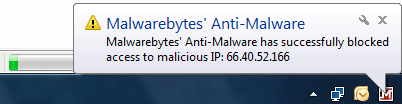
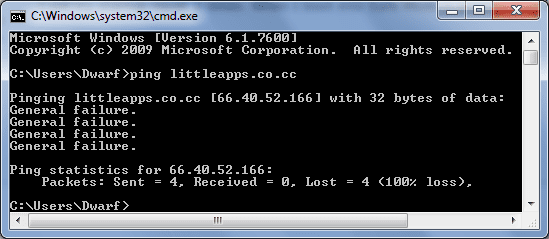
I have MbAM (Malwarebytes' Anti-Malware) installed, and it picks the root site of this program as being malicious.
Capture1.PNG

Pinging gives a General Failure, in other words MbAM is blocking the site.
Capture.PNG
 

My Computer

Computer type
PC/Desktop
Computer Manufacturer/Model Number
Dwarf Dwf/11/2012 r09/2013
OS
Windows 8.1 Pro RTM x64
CPU
Intel Core-i5-3570K 4-core @ 3.4GHz (Ivy Bridge) (OC 4.4GHz)
Motherboard
ASRock Z77 Extreme4-M
Memory
4 x 4GB DDR3-1600 Corsair Vengeance CMZ8GX3M2A1600C9B (16GB)
Graphics Card(s)
MSI GeForce GTX770 Gaming OC 2GB
Sound Card
Realtek High Definition on board solution (ALC 898)
Monitor(s) Displays
ViewSonic VA1912w Widescreen (VGA)
Screen Resolution
1440x900
Hard Drives
OCZ Agility 3 SSD 120GB SATA III x2 (RAID 0)
Samsung HD501LJ 500GB SATA II x2
Hitachi HDS721010CLA332 1TB SATA II
Iomega 1.5TB Ext USB 2.0
WD 2.0TB Ext USB 3.0
PSU
XFX Pro Series 850W Semi-Modular
Case
Gigabyte IF233
Cooling
1 x 120mm Front Inlet 1 x 120mm Rear Exhaust
Keyboard
Microsoft Comfort Curve Keyboard 3000 (USB)
Mouse
Microsoft Comfort Mouse 3000 for Business (USB)
Internet Speed
NetGear DG834Gv3 ADSL Modem/Router (Ethernet) ~4.0 Mb/s (O2)
Antivirus
Avast! 8.0.1497
Browser
IE 11
Other Info
Optical Drive: HL-DT-ST BD-RE BH10LS30 SATA Bluray
Lexmark S305 Printer/Scanner/Copier (USB)
WEI Score: 8.1/8.1/8.5/8.5/8.25
Asus Eee PC 1011PX Netbook (Windows 7 x86 Starter)

My Computer

Computer Manufacturer/Model Number
Lenovo ThinkPad T60
OS
Windows 7 Ultimate 64Bit
CPU
GenuineIntel Intel(R) Core(TM) DuoCore T2400 @ 1.83GHz
Motherboard
Intel(R) 82801G (ICH7 Family)
Memory
2.00 GB
Graphics Card(s)
Mobile Intel(R) 945 Express Chipset
Sound Card
SoundMAX Integrated Digital HD Audio
Monitor(s) Displays
ThinkPad Display
Screen Resolution
1400x1050
Hard Drives
100Gb SATA
Keyboard
Standard Keyboard
Mouse
HID-compliant Mouse
Internet Speed
Cable Broadband - 54Mbps
Other Info
Intel(R) PRO/1000 PL Network Connection
11a/b/g Wireless LAN Mini PCI Express Adapter
But I only ran Little Registry Cleaner after the registry was corrupt, as a Technet blog was describing how to use it to repair the registry.

Aem, I cant run this software with no desktop...
 

My Computer

OS
Windows 7 Ultimate x64
How did the Startup Repair go?

It is highly automated in Win7 but must be run repeatedly if there are multiple issues.
 
But I only ran Little Registry Cleaner after the registry was corrupt, as a Technet blog was describing how to use it to repair the registry.

Aem, I cant run this software with no desktop...

Indeed, my bad. I'm sure you can find find a DOS utility to try it with.
 

My Computer

Computer Manufacturer/Model Number
Lenovo ThinkPad T60
OS
Windows 7 Ultimate 64Bit
CPU
GenuineIntel Intel(R) Core(TM) DuoCore T2400 @ 1.83GHz
Motherboard
Intel(R) 82801G (ICH7 Family)
Memory
2.00 GB
Graphics Card(s)
Mobile Intel(R) 945 Express Chipset
Sound Card
SoundMAX Integrated Digital HD Audio
Monitor(s) Displays
ThinkPad Display
Screen Resolution
1400x1050
Hard Drives
100Gb SATA
Keyboard
Standard Keyboard
Mouse
HID-compliant Mouse
Internet Speed
Cable Broadband - 54Mbps
Other Info
Intel(R) PRO/1000 PL Network Connection
11a/b/g Wireless LAN Mini PCI Express Adapter
I must of ran it in excess of 10 times in total and no repairs have been made, the report always says 'Registry is corrupt'
 

My Computer

OS
Windows 7 Ultimate x64
How am I best to rescue my data so Windows doesent just blindly overwrite it all?


I know you don't want to reinstall if it was possible, but I don't think you have many options left to you.

Reinstall the OS and it will keep a folder called Windows old, all your files will be in there.
 

My Computer

Computer Manufacturer/Model Number
Self Build 64bit
OS
Vista Ult64, Win7600
CPU
Intel Core 2 Quad Q6600 @ 2400 MHz 64bit OS
Motherboard
Asus P5E3 Deluxe WiFi @p 64 bit OS
Memory
4096 MB DDR3-SDRAM
Graphics Card(s)
ATI Radeon HD 3870 Series x2 Crossfired
Sound Card
Realtek on board
Monitor(s) Displays
Samsung SyncMaster - 23 inches
Screen Resolution
1680x1050 pixels at 60 Hz in True Colors
Hard Drives
Hitachi (250 GB)/Samsung 750 GB. /Barracuda 160 GB.
My Book 1 TB external..
PSU
Cooler Master 1000w
Case
Cooler Master Cosmos 1000.
Cooling
Fans and fresh air,
Keyboard
Wireless
Mouse
Wireless
Internet Speed
Never fast enough
Other Info
I use a Magnum.
Sorry, Agri, but I think that the only option available is a clean install. You've already tried my earlier suggestion of Last Known Good Configuration, and are unable to boot to the desktop, which is required for the other suggestions, including Repair Install.
 

My Computer

Computer type
PC/Desktop
Computer Manufacturer/Model Number
Dwarf Dwf/11/2012 r09/2013
OS
Windows 8.1 Pro RTM x64
CPU
Intel Core-i5-3570K 4-core @ 3.4GHz (Ivy Bridge) (OC 4.4GHz)
Motherboard
ASRock Z77 Extreme4-M
Memory
4 x 4GB DDR3-1600 Corsair Vengeance CMZ8GX3M2A1600C9B (16GB)
Graphics Card(s)
MSI GeForce GTX770 Gaming OC 2GB
Sound Card
Realtek High Definition on board solution (ALC 898)
Monitor(s) Displays
ViewSonic VA1912w Widescreen (VGA)
Screen Resolution
1440x900
Hard Drives
OCZ Agility 3 SSD 120GB SATA III x2 (RAID 0)
Samsung HD501LJ 500GB SATA II x2
Hitachi HDS721010CLA332 1TB SATA II
Iomega 1.5TB Ext USB 2.0
WD 2.0TB Ext USB 3.0
PSU
XFX Pro Series 850W Semi-Modular
Case
Gigabyte IF233
Cooling
1 x 120mm Front Inlet 1 x 120mm Rear Exhaust
Keyboard
Microsoft Comfort Curve Keyboard 3000 (USB)
Mouse
Microsoft Comfort Mouse 3000 for Business (USB)
Internet Speed
NetGear DG834Gv3 ADSL Modem/Router (Ethernet) ~4.0 Mb/s (O2)
Antivirus
Avast! 8.0.1497
Browser
IE 11
Other Info
Optical Drive: HL-DT-ST BD-RE BH10LS30 SATA Bluray
Lexmark S305 Printer/Scanner/Copier (USB)
WEI Score: 8.1/8.1/8.5/8.5/8.25
Asus Eee PC 1011PX Netbook (Windows 7 x86 Starter)
The repair offered when you enter Repair console of the DVD, after it scans and finds an OS to repair, is not Startup Repair.

To run Startup Repair you have to click through to REcovery tools list and choose it. Then run it 3 separate times.

Just checking, because I don't want to give up on it either if it can be saved.

But If it won't start the OS, then it isn't going to start.

Boot from the DVD, select Custom install, use Drive Options to format and install.

Please avoid any Registry cleaners besides the industry standard CCleaner.
 
Gregrocker, i tried all the available options on the repair option - no success.

So if I go to Custom (Advanced) install and select my partition with Windows already on it will all my files appear in Windows.old?
 

My Computer

OS
Windows 7 Ultimate x64
The repair offered when you enter Repair console of the DVD, after it scans and finds an OS to repair, is not Startup Repair.

To run Startup Repair you have to click through to REcovery tools list and choose it. Then run it 3 separate times.

Just checking, because I don't want to give up on it either if it can be saved.

But If it won't start the OS, then it isn't going to start.

Boot from the DVD, select Custom install, use Drive Options to format and install.

Please avoid any Registry cleaners besides the industry standard CCleaner.

Wo,wo "Format and Install" - will that not erase everything?

So if I go to Custom (Advanced) install and select my partition with Windows already on it will all my files appear in Windows.old?
 

My Computer

OS
Windows 7 Ultimate x64
I do not think so, sorry to say.

I have only heard that windows.old folder is created when Win7 is run from the OS, not boot.

But there is a possibility that it might create Windows.old. Maybe others know.

Maybe you should not format the partition you select to install Win7 from boot, in case it does create a Windows.old folder as a result.

I pretty much assume everyone has files backed up at all times, or certainly when they are installing.
 
Was there an installation showing in the Repair console to repair when you booted into it?


There are a couple sets of commands you can run from the DVD repair console Command Line:

run "bootrec.exe /fixboot" and "bootrec.exe /fixmbr" then reboot, see if Startup Repair will now work

if those don't work "Bootsect.exe /nt60 all /force", reboot, try Startup Repair again.
 
I do not think so, sorry to say.

I have only heard that windows.old folder is created when Win7 is run from the OS, not boot.

But there is a possibility that it might create Windows.old. Maybe others know.

Maybe you should not format the partition you select to install Win7 from boot, in case it does create a Windows.old folder as a result.

I pretty much assume everyone has files backed up at all times, or certainly when they are installing.
That is not the case. Windows.old will be created from boot or Windows.
 

My Computer

Computer Manufacturer/Model Number
Custom
OS
Windows 7 Professional x64
CPU
Intel i7 2600K OC'd @ 4620 MHz
Motherboard
Asus P8Z68-V Pro
Memory
16GB GSkill Sniper 2133 Mhz (4x4GB)
Graphics Card(s)
EVGA GeForce GTX 480 SuperClocked+
Sound Card
Realtek High Definition Audio
Monitor(s) Displays
2x Acer S273HLbmii 27"
Screen Resolution
2 x 1920x1080
Hard Drives
64GB Crucial M4 SSD

Storage: Hitachi 1TB 5400RPM, Samsung 1.5TB 5400RPM
PSU
Corsair HW Series 750w (modular)
Case
Cooler Master HAF 932 Advanced Blue Edition
Cooling
CM Hyper 212+ CPU cooler, 3x 230mm + 1x 140mm case fans
Keyboard
Logitech MK320 (wireless)
Mouse
Logitech MK320 (wireless)
Internet Speed
30 Mb/s : 2 Mb/s
I do not think so, sorry to say.

I have only heard that windows.old folder is created when Win7 is run from the OS, not boot.

But there is a possibility that it might create Windows.old. Maybe others know.

Maybe you should not format the partition you select to install Win7 from boot, in case it does create a Windows.old folder as a result.

I pretty much assume everyone has files backed up at all times, or certainly when they are installing.
That is not the case. Windows.old will be created from boot or Windows.

Thank you.

Glad to be wrong on that.

Don't format that partition!
 
Whist I was offline I went to a shop and bought 120GB's worth of DVD's (Y).

I tried the bootec commands + start up repair, but I am still locked out of safe mode.

So you say that if I install over the current partition with my current installation, my files will be copied to Windows.old - and still by booting into the install disk. Perhaps that is a better plan than my current, which is to boot into a live cd file manager and burn my data to many DVD's (lol).

What do you think I should do? I think I can safely say so far that I cannot salvage the current install.
 

My Computer

OS
Windows 7 Ultimate x64
Whist I was offline I went to a shop and bought 120GB's worth of DVD's (Y).

I tried the bootec commands + start up repair, but I am still locked out of safe mode.

So you say that if I install over the current partition with my current installation, my files will be copied to Windows.old - and still by booting into the install disk. Perhaps that is a better plan than my current, which is to boot into a live cd file manager and burn my data to many DVD's (lol).

What do you think I should do? I think I can safely say so far that I cannot salvage the current install.
Hit it. I would recommend backing up your important files on an external HD (or DVD, if you find it cost-effective), but there is only a small chance that the Windows backup to Windows.old will fail. I have never seen a case where it failed, but you can never be too safe.
 

My Computer

Computer Manufacturer/Model Number
Custom
OS
Windows 7 Professional x64
CPU
Intel i7 2600K OC'd @ 4620 MHz
Motherboard
Asus P8Z68-V Pro
Memory
16GB GSkill Sniper 2133 Mhz (4x4GB)
Graphics Card(s)
EVGA GeForce GTX 480 SuperClocked+
Sound Card
Realtek High Definition Audio
Monitor(s) Displays
2x Acer S273HLbmii 27"
Screen Resolution
2 x 1920x1080
Hard Drives
64GB Crucial M4 SSD

Storage: Hitachi 1TB 5400RPM, Samsung 1.5TB 5400RPM
PSU
Corsair HW Series 750w (modular)
Case
Cooler Master HAF 932 Advanced Blue Edition
Cooling
CM Hyper 212+ CPU cooler, 3x 230mm + 1x 140mm case fans
Keyboard
Logitech MK320 (wireless)
Mouse
Logitech MK320 (wireless)
Internet Speed
30 Mb/s : 2 Mb/s
Ok. Plan is to salvage the files onto DVD first, via bootable program.
Then install over the installation and fingers crossed Windows.old will hold the old files.
I will report back with the result.

Cheers for all the help so far,
 

My Computer

OS
Windows 7 Ultimate x64
Don't worry about the bootable DVD. Just drag-n-drop the important ones onto the disc.
 

My Computer

Computer Manufacturer/Model Number
Custom
OS
Windows 7 Professional x64
CPU
Intel i7 2600K OC'd @ 4620 MHz
Motherboard
Asus P8Z68-V Pro
Memory
16GB GSkill Sniper 2133 Mhz (4x4GB)
Graphics Card(s)
EVGA GeForce GTX 480 SuperClocked+
Sound Card
Realtek High Definition Audio
Monitor(s) Displays
2x Acer S273HLbmii 27"
Screen Resolution
2 x 1920x1080
Hard Drives
64GB Crucial M4 SSD

Storage: Hitachi 1TB 5400RPM, Samsung 1.5TB 5400RPM
PSU
Corsair HW Series 750w (modular)
Case
Cooler Master HAF 932 Advanced Blue Edition
Cooling
CM Hyper 212+ CPU cooler, 3x 230mm + 1x 140mm case fans
Keyboard
Logitech MK320 (wireless)
Mouse
Logitech MK320 (wireless)
Internet Speed
30 Mb/s : 2 Mb/s
I do not think so, sorry to say.

I have only heard that windows.old folder is created when Win7 is run from the OS, not boot.

But there is a possibility that it might create Windows.old. Maybe others know.

Maybe you should not format the partition you select to install Win7 from boot, in case it does create a Windows.old folder as a result.

I pretty much assume everyone has files backed up at all times, or certainly when they are installing.
That is not the case. Windows.old will be created from boot or Windows.

Am i reading this wrong, if he is doing a clean install not an upgrade, there will NOT be a windows.old folder. As far as i know the only time you get the windows.old folder is doing an upgrade. Just trying to make sure he's not dissappointed if the files aren't there.

Smitty
 

My Computer

Computer Manufacturer/Model Number
Dell XPS 730
OS
Windows 7 Home Premium 64 bit
CPU
Intel Core 2 quad Extreme Q9770 @ 3.2 GHz
Memory
4x2 GB Muskin 1600 MHz ram
Graphics Card(s)
NVidia GTX 250
Sound Card
Soundblaster X-Fi Fatality Champion
Monitor(s) Displays
2 Dell 2007WFP Ultrascans
Screen Resolution
3360 x 1050
Hard Drives
WD Black 1TB sata, 2-WD Black 500 sata, 2-Seagate 500 Go external
PSU
1000 Watt
Cooling
air
Keyboard
MS Natrual Keyboard Pro
Mouse
Logitech Wireless Trackball
Internet Speed
DSL Elite
Back
Top