Corrupt Windows Installer entries

blinxwang

New member
Local time
7:55 PM
Messages
6
Hi everyone,

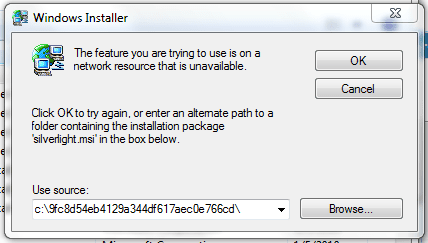
I recently discovered that all my MSI-installed programs cannot be changed, repaired, or removed from my hard drive.:cry:

This might be due to me accidentally clicking "remove all" in MSIZapper.

Any ways to fix this?

P.S. Take a look at the attached photo to get a better idea of my problem
 

Attachments
  • Capture.PNG
    Capture.PNG
    15.7 KB · Views: 32

My Computer

Computer Manufacturer/Model Number
HP Pavilion dv6t-1300
OS
Windows 7 64-bit and Ubuntu 9.10 dual-boot
CPU
Intel Dore 2 Duo T6600
Hi everyone,

I recently discovered that all my MSI-installed programs cannot be changed, repaired, or removed from my hard drive.:cry:

This might be due to me accidentally clicking "remove all" in MSIZapper.

Any ways to fix this?

P.S. Take a look at the attached photo to get a better idea of my problem


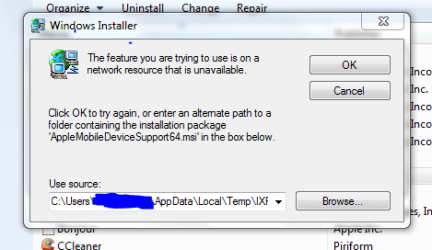
That error indicates that you C:\users......temp is a netowrked resource. Did you download it elsewhere then move it? did you move the User sub directory?

Ken
 

My Computer

Computer Manufacturer/Model Number
HP Pavillion dv-7 1005 Tx
OS
Win 8 Release candidate 8400
CPU
[email protected]
Memory
4 gigs
Graphics Card(s)
Nvidia 9600M
Sound Card
HD built-in
Monitor(s) Displays
17" Wxga
Screen Resolution
1440x900
Cooling
none
Internet Speed
45Mb down 5Mb up
No, This happens for every entry that was installed using MSI.
Take a look at the photo. there is no way that I could have moved the directory in the photo to an external resource. Also, I don't have any networked resources either.
 

Attachments

  • Capture2.PNG
    Capture2.PNG
    11.6 KB · Views: 9

My Computer

Computer Manufacturer/Model Number
HP Pavilion dv6t-1300
OS
Windows 7 64-bit and Ubuntu 9.10 dual-boot
CPU
Intel Dore 2 Duo T6600
Use system restore to go back before you ran the app.
 

My Computer

Computer Manufacturer/Model Number
Sony Vaio Z46GDU
OS
Windows 7 Ultimate x86-64
CPU
[email protected] 1066MHz FSB
Motherboard
Sony branded
Memory
6GB DDR3 1066MHz
Graphics Card(s)
9300M GS 256MB Dedicated (Speed) + Intel4500MHD (Stamina)
Sound Card
Realtek HD Audio
Monitor(s) Displays
13.1' WXGA
Screen Resolution
1600x900
Hard Drives
320GB 7200RPM w/ 16MB cache
Internet Speed
1MB/s
The problem is, I disabled system restore :o
 

My Computer

Computer Manufacturer/Model Number
HP Pavilion dv6t-1300
OS
Windows 7 64-bit and Ubuntu 9.10 dual-boot
CPU
Intel Dore 2 Duo T6600
That makes no sense but anyway run sfc /scannow at an elevated command prompt.
 

My Computer

Computer Manufacturer/Model Number
Sony Vaio Z46GDU
OS
Windows 7 Ultimate x86-64
CPU
[email protected] 1066MHz FSB
Motherboard
Sony branded
Memory
6GB DDR3 1066MHz
Graphics Card(s)
9300M GS 256MB Dedicated (Speed) + Intel4500MHD (Stamina)
Sound Card
Realtek HD Audio
Monitor(s) Displays
13.1' WXGA
Screen Resolution
1600x900
Hard Drives
320GB 7200RPM w/ 16MB cache
Internet Speed
1MB/s
Just curious, why do people disable system restore? I usually rely on ERUNT, but I have forgotten to run it before I tinkered too much, and Restore bailed my tail out.
 

My Computer

Computer type
PC/Desktop
Computer Manufacturer/Model Number
eMachines ET1810-03 (Acer) - single user
OS
Windows 7 Home Premium - always up to date
CPU
Intel E2210 2.2Ghz
Motherboard
(OEM) ECS MCP73VT-PM with AMI BIOS R01-A3 (4-29-2009)
Memory
3Gb DDR2
Graphics Card(s)
NVIDIA GeForce 7050/610I GPU
Sound Card
Realtek ALC888/1200 8-channel HD integrated
Monitor(s) Displays
AOC 22" LED
Screen Resolution
1920 x 1080
Hard Drives
Internal - Seagate 320Gb SATA; External - Western Digital 320Gb USB (3.5" internal drive inside a RocketFish USB enclosure)
Keyboard
Wireless
Mouse
Logitech M705 laser wireless
Internet Speed
TWC Cable Broadband ~ 15 Mbps Down/1 Mbps Up
Antivirus
NIS
Browser
Chrome
Other Info
Microsoft Office 2007, incl Outlook SP3; Netgear router; ubee modem
Just curious, why do people disable system restore? I usually rely on ERUNT, but I have forgotten to run it before I tinkered too much, and Restore bailed my tail out.

I agree. You can always delete old restore points if it becomes an issue.
And on that note, I need to do just that. Been over 2 months (I think). I know..*smack on the head*:huh:
 

My Computer

Computer Manufacturer/Model Number
Custom
OS
Windows 7 ultimate X64
CPU
Core i7 870 Lynnfield
Motherboard
MSI P55-GD55
Memory
4GB Corsair XMS 3 1600Mhz
Graphics Card(s)
GeForce 8800 GTS (for the time being)
Sound Card
Onboard 7.1 digital
Monitor(s) Displays
Dell 19"
Screen Resolution
1280x1024
Hard Drives
Barracuda 750Gb
PSU
Corsair TX 650w
Case
Thermaltake Armour Extreme Edition
Cooling
Corsair H50
Keyboard
Dell XPS slim
Mouse
Dell XPS mouse (only good product)
Internet Speed
100 Mbps +/-
Hi everyone,

I recently discovered that all my MSI-installed programs cannot be changed, repaired, or removed from my hard drive.:cry:

This might be due to me accidentally clicking "remove all" in MSIZapper.

Any ways to fix this?

P.S. Take a look at the attached photo to get a better idea of my problem

MSIZapper deletes all the MSI install packages from your machine. When you run this you are removing the ability to repair a software that used an MSI to install. The only way to go back is to boot your machine with a recovery disk and undelete the files if they are still there and the disk space as not been written over. If you cannot do that then you can reinstall the software and it will put the MSI file back. Most MSI installed software WILL NOT wipe out your settings.
 

My Computer

Computer type
PC/Desktop
Computer Manufacturer/Model Number
Dell OP7010
OS
Windows 7 Enterprise (x64); Windows Server 2008 R2 (x64)
Memory
16GB
Monitor(s) Displays
4 Dell 24" LCD
Screen Resolution
1280x1024
Keyboard
Dell
Mouse
Dell Optical
Internet Speed
40meg
Hi everyone,

I recently discovered that all my MSI-installed programs cannot be changed, repaired, or removed from my hard drive.:cry:

This might be due to me accidentally clicking "remove all" in MSIZapper.

Any ways to fix this?

P.S. Take a look at the attached photo to get a better idea of my problem

There was to be a "Microsoft Fix It" for windows XP...Maybe at Msdn, in their database you could have a look if it does exist for Vista/7 ?!?

http://support.microsoft.com/?LN=en-us&x=13&y=10

search Keyword like: MSI microsoft Fix It

This one is in French language but work in English either...
It's the one for XP, Microsoft Fix it 50123:

http://support.microsoft.com/kb/971187/fr
 

My Computer

Computer type
PC/Desktop
Computer Manufacturer/Model Number
Custom Build
OS
Windows 7 Professional SP1 - x64 [Non-UEFI Boot]
CPU
Ivy Bridge Core i5 3570K (Delidded)
Motherboard
Asus P8Z77-V LE PLUS
Memory
G.Skill "Ares" DDR3 PC3-12800 - 1600MHz (16Gb)
Graphics Card(s)
Asus Dual-RX480-O4G
Sound Card
Creative Sound Blaster Z w/5.1 sound system
Monitor(s) Displays
Asus IPS 23"
Screen Resolution
16/9
Hard Drives
Internal:
500Go Sata 6Gb/s (x2)
500Go Sata 3Gb/s (x2)
SSD 60Go Sata 6Gb/s
PSU
In Win C 900W Series 80+ Platinum
Case
Thermaltake Chaser A71
Cooling
Custom Water Cooling Loop
Keyboard
Cooler Master QuickFire XTi
Mouse
Razer Imperator 2012 (4G)
Antivirus
MSE
Browser
IE 11.0.xxx Rtm
Other Info
"Raid0" with Intel Smart Response Technology (HDD/SSD)
If I reinstall any MSI package it will display the same error message again, and the installation will fail. Is the only way to reinstall Windows 7?
 

My Computer

Computer Manufacturer/Model Number
HP Pavilion dv6t-1300
OS
Windows 7 64-bit and Ubuntu 9.10 dual-boot
CPU
Intel Dore 2 Duo T6600
If I reinstall any MSI package it will display the same error message again, and the installation will fail. Is the only way to reinstall Windows 7?

If you are getting an error on reinstall then there is something else wrong. You could go through the registry and delete all the registry keys for the software. However if you have more than 3 or 4 software installed I would just do a clean install of Windows 7. It will be faster and you will know that your machine is setup correctly. Windows 7 installs so fast and you will have to re-install the software anyway so a clean install is the best route.
 

My Computer

Computer type
PC/Desktop
Computer Manufacturer/Model Number
Dell OP7010
OS
Windows 7 Enterprise (x64); Windows Server 2008 R2 (x64)
Memory
16GB
Monitor(s) Displays
4 Dell 24" LCD
Screen Resolution
1280x1024
Keyboard
Dell
Mouse
Dell Optical
Internet Speed
40meg
If I reinstall any MSI package it will display the same error message again, and the installation will fail. Is the only way to reinstall Windows 7?

If you are getting an error on reinstall then there is something else wrong. You could go through the registry and delete all the registry keys for the software. However if you have more than 3 or 4 software installed I would just do a clean install of Windows 7. It will be faster and you will know that your machine is setup correctly. Windows 7 installs so fast and you will have to re-install the software anyway so a clean install is the best route.

If you do, get your setup in shape with the setting up windows guide in my sig, and then image your system!
 

My Computer

Computer Manufacturer/Model Number
Sony Vaio Z46GDU
OS
Windows 7 Ultimate x86-64
CPU
[email protected] 1066MHz FSB
Motherboard
Sony branded
Memory
6GB DDR3 1066MHz
Graphics Card(s)
9300M GS 256MB Dedicated (Speed) + Intel4500MHD (Stamina)
Sound Card
Realtek HD Audio
Monitor(s) Displays
13.1' WXGA
Screen Resolution
1600x900
Hard Drives
320GB 7200RPM w/ 16MB cache
Internet Speed
1MB/s
If I reinstall any MSI package it will display the same error message again, and the installation will fail. Is the only way to reinstall Windows 7?

You could reinstall Msi package to uninstall them afterward so it could clean any defective Msi Pack?
Then get your 7 Install?
 

My Computer

Computer type
PC/Desktop
Computer Manufacturer/Model Number
Custom Build
OS
Windows 7 Professional SP1 - x64 [Non-UEFI Boot]
CPU
Ivy Bridge Core i5 3570K (Delidded)
Motherboard
Asus P8Z77-V LE PLUS
Memory
G.Skill "Ares" DDR3 PC3-12800 - 1600MHz (16Gb)
Graphics Card(s)
Asus Dual-RX480-O4G
Sound Card
Creative Sound Blaster Z w/5.1 sound system
Monitor(s) Displays
Asus IPS 23"
Screen Resolution
16/9
Hard Drives
Internal:
500Go Sata 6Gb/s (x2)
500Go Sata 3Gb/s (x2)
SSD 60Go Sata 6Gb/s
PSU
In Win C 900W Series 80+ Platinum
Case
Thermaltake Chaser A71
Cooling
Custom Water Cooling Loop
Keyboard
Cooler Master QuickFire XTi
Mouse
Razer Imperator 2012 (4G)
Antivirus
MSE
Browser
IE 11.0.xxx Rtm
Other Info
"Raid0" with Intel Smart Response Technology (HDD/SSD)
Back
Top