Corrupted files found by sfc /scannow cannot be fixed.

testos59

New member
Local time
4:16 PM
Messages
4
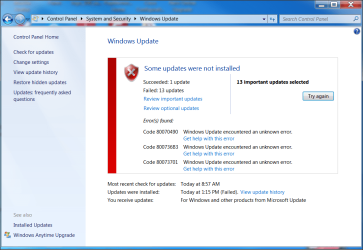
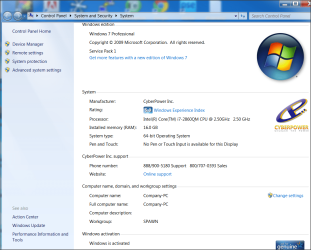
Corrupted files found by sfc /scannow cannot be fixed(please see attachment). Have gone through the sfc tutorial. The attached files cannot be fixed with chkdsk /r/f. I believe Windows7 SP1 is corrupted as my laptop cannot implement many of the current updates, and have errors when attempting to update (please see attachment). The laptop is from CyberpowerPC thus Microsoft will not allow me to download a Windows 7 SP1 ISO, which would allow me to perform repair install.

Any suggestion greatly appreciated.

Testos59
 

Attachments
  • sfcdetails.txt
    sfcdetails.txt
    125.8 KB · Views: 9
  • Testos59 hardward.png
    Testos59 hardward.png
    85.8 KB · Views: 1
  • Testos59 fail windows updates.png
    Testos59 fail windows updates.png
    63.4 KB · Views: 1

My Computer My Computer

At a glance

Window7 64 Proffessional
Computer type
Laptop
Computer Manufacturer/Model Number
Cyberpowerpc
OS
Window7 64 Proffessional
Run this command in CMD as administrator.

dism.exe /online /cleanup-image /restorehealth

This should repair the corruption.

Also when this is finished, perform a Disk Cleanup. Select "Clean System Files". Check the Windows Update box, and whatever boxes you feel need cleaned up. This may take a bit of time to complete if you've never performed this task, overnight while you sleep is not a bad option ;)

Please let us know if this gets you sorted.
 

My Computer My Computer

At a glance

Windows 8 ProIntel Centrino Dual Core P7450 2.13GHz4gbATI Mobility Raedon HD3650
Computer Manufacturer/Model Number
Toshiba P300
OS
Windows 8 Pro
CPU
Intel Centrino Dual Core P7450 2.13GHz
Memory
4gb
Graphics Card(s)
ATI Mobility Raedon HD3650
Hard Drives
Toshiba MK3252GSX ATA
Internet Speed
Wish it were faster
Tried to run the command (dism.exe /online /cleanup-image /restorehealth) as administrator, the following error occured...

Microsoft Windows [Version 6.1.7601]
Copyright (c) 2009 Microsoft Corporation. All rights reserved.

C:\Windows\system32>dism.exe /online /cleanup-image /restorehealth

Deployment Image Servicing and Management tool
Version: 6.1.7600.16385

Image Version: 6.1.7601.18489


Error: 87

The restorehealth option is not recognized in this context.
For more information, refer to the help.
 

My Computer My Computer

At a glance

Window7 64 Proffessional
Computer type
Laptop
Computer Manufacturer/Model Number
Cyberpowerpc
OS
Window7 64 Proffessional
Thanks Buzzbomb. I downloaded and ran the System Update Readiness tool, which installed fine. Unfortunately, Windows update shown above still fails, and the same 25 files listed in sfcdetails.txt are still corrupted.

Suggestions anyone?
 

My Computer My Computer

At a glance

Window7 64 Proffessional
Computer type
Laptop
Computer Manufacturer/Model Number
Cyberpowerpc
OS
Window7 64 Proffessional
Attached is the log from the "CheckSur".

Cheers!
 

Attachments

My Computer My Computer

At a glance

Window7 64 Proffessional
Computer type
Laptop
Computer Manufacturer/Model Number
Cyberpowerpc
OS
Window7 64 Proffessional
Back
Top