Corrupted images after copying them to hard disc

juuki

New member
Local time
12:14 PM
Messages
27
Helo. Long time ago my friend told me that pictures after some time on his laptop (acer aspire 5750zg with windows 7pro) get corrupted after some times (like one in attachment). So fey day ago he gave me his laptop and i copy all my stuff from external disc to local disc on his laptop and i notice that some pictures are also corrupted after copying them (on external disc (original) and on local disc (copy)). Some images are fine while others are cuted at half or corrupted like one in attachment.
Is there any way to prevent laptop from doing this? Is it problem with hard disc?
 

Attachments

  • P8070018.JPG
    P8070018.JPG
    352.4 KB · Views: 13

My Computer My Computer

At a glance

Windows 7 Ultimate, 32bit, SP1
OS
Windows 7 Ultimate, 32bit, SP1
Close all unnecessary running programs, then try copying the files again. Do not do anything else until it is finished.

Reply if the problem still exists.
 
Last edited:

My Computer My Computer

At a glance

w
Computer type
PC/Desktop
OS
w
Close all unnecessary running programs, then try copying the files again. Do not do anything else until it is finished.

Reply if the problem still exists.

I did it. Still same problem
 

My Computer My Computer

At a glance

Windows 7 Ultimate, 32bit, SP1
OS
Windows 7 Ultimate, 32bit, SP1
Is it problem with hard disc?
Or memory RAM I suppose, though if that the laptop should be crashing/BSODs etc. i.e. it would affect more than just jpgs.

But I would start with Disk Check and a thorough memory diagnostic on the laptop to make certain the hardware is OK.
 

My Computer My Computer

At a glance

Windows 7 Professional 64bitIntel Core i7 4600M @ 2.90GHz16.0GB Dual-Channel DDR3 @ 797MHz (11-11-11-28)Intel HD Graphics 4600 (Dell) 2048MB ATI AMD ...
Computer type
Laptop
Computer Manufacturer/Model Number
Dell Latitude E6540 Laptop
OS
Windows 7 Professional 64bit
CPU
Intel Core i7 4600M @ 2.90GHz
Motherboard
Dell Inc. 0CYT5F (SOCKET 0)
Memory
16.0GB Dual-Channel DDR3 @ 797MHz (11-11-11-28)
Graphics Card(s)
Intel HD Graphics 4600 (Dell) 2048MB ATI AMD Radeon HD 8790M
Sound Card
Realtek High Definition Audio
Monitor(s) Displays
HP ZR30w (2560x1600@60Hz)
Hard Drives
256GB LITEONIT LMT-256M6M-41 mm SATA (SSD)
1TB Samsung SSD 860 EVO mSATA SATA (SSD)
2TB USB 3.0 USB Device
115GB SanDisk Ultra Fit USB
Other Info
Multiple Dell E-Port Plus II Port Replicator/Docking Stations 0Y72NH USB 3.0 + 130W AC Adapters
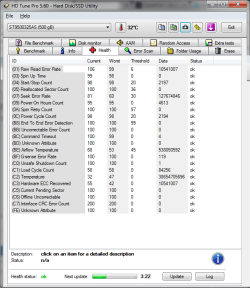
I did run Memory Diagnostics Tool, scan hard drive with Spinrite 6 and with HD tune 5.60 (error scan). No problems were found.
Here is health log (from HD tune 5.60).
 

Attachments

  • 03-travnja-2016_20-52.png
    03-travnja-2016_20-52.png
    29.7 KB · Views: 2

My Computer My Computer

At a glance

Windows 7 Ultimate, 32bit, SP1
OS
Windows 7 Ultimate, 32bit, SP1
Back
Top