
Solved Unknown/Corrupted archive after copying it on USB

Jonetsu

New member
Local time
4:18 PM
Messages
13
Hello whenever i put files either .txt or .rar they get corrupted after 10 minutes or so, i did formate my pc but before that i made backup files into my SD Card after i formated it i tried to open some rar files some of them were damaged and some of them were working but after like 8 minutes two of the working rar files got also corrupted and i get this message when trying to open them
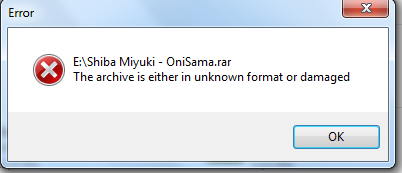
NuOvMUt.png


and for the .txt i sometimes get weird symbols but this time all the text changed to ÿ

GUSSYFm.png


i had this problem with my old usb and now i have this problem also with my knew SD Card but my dad also works on my laptop with mircosoft word and excel and he saves files and put them on his usb but they never get corrupted

i didnt try to put new files on my usb after formating my pc so i guess this problem was with my old windows Professional x32 bit idk anyhelp please ?
 

My Computer My Computer

At a glance

Windows 7 Professional 32bit
Computer type
Laptop
OS
Windows 7 Professional 32bit
Files can get corrupted if the USB drives are unplugged before Windows is through working with them, always best to right-click the drive in Windows Explorer and click Eject or use the icon in the Notification Area to eject them. If Windows is still using a drive there will be an error message saying so.
 

My Computer My Computer

At a glance

Windows 7 Ultimate 64-bit, Windows 8.1 64-bit...
Computer type
PC/Desktop
Computer Manufacturer/Model Number
Customs, Dell, Gateway, HP, Toshiba, Acer, ASUS
OS
Windows 7 Ultimate 64-bit, Windows 8.1 64-bit, Mac OS X 10.10, Linux Mint 17, Windows 10 Pro TP
Keyboard
Microsoft
Mouse
Microsoft
Files can get corrupted if the USB drives are unplugged before Windows is through working with them, always best to right-click the drive in Windows Explorer and click Eject or use the icon in the Notification Area to eject them. If Windows is still using a drive there will be an error message saying so.
but i'm using a Micro SD Adapter there is no eject option like using a usb driver
 

My Computer My Computer

At a glance

Windows 7 Professional 32bit
Computer type
Laptop
OS
Windows 7 Professional 32bit
My SD/SDHC/microSD card reader does have the Eject on the right-mouse click of that drive in Windows Explorer. The microSD card uses an adapter for the SD/SDHC slot, the adapter usually comes with the microSD card.
 

My Computer My Computer

At a glance

Windows 7 Ultimate 64-bit, Windows 8.1 64-bit...
Computer type
PC/Desktop
Computer Manufacturer/Model Number
Customs, Dell, Gateway, HP, Toshiba, Acer, ASUS
OS
Windows 7 Ultimate 64-bit, Windows 8.1 64-bit, Mac OS X 10.10, Linux Mint 17, Windows 10 Pro TP
Keyboard
Microsoft
Mouse
Microsoft
My SD/SDHC/microSD card reader does have the Eject on the right-mouse click of that drive in Windows Explorer. The microSD card uses an adapter for the SD/SDHC slot, the adapter usually comes with the microSD card.
ok so i did eject it by right clicking on usb drive => clicked on eject got the message to safely remove , everything works fine :) even thought it didnt work before before formating my pc
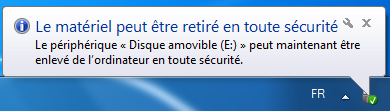
aCmyf1L.png
 

My Computer My Computer

At a glance

Windows 7 Professional 32bit
Computer type
Laptop
OS
Windows 7 Professional 32bit
Can't read French [was only in NAS Port Lyautey for 4 days back on '60]. What I'd do is shut the computer down, pull the power cord from the back then using canned air blow out the slots on the reader. Then put the cord back and start up to try again. Another thing would be to try different SD/SDHC/microSD cards, could be the one with a problem is corrupted. The difference between an SD card and an SDHC card is capacity, it's SD up to 2GB and SDHC from 4GB on up and an SDHC card won't be recognized in an older reader. Another diagnostic would be to reformat the bad card in a different computer, most Notebooks of the last several years have an SD slot.
 

My Computer My Computer

At a glance

Windows 7 Ultimate 64-bit, Windows 8.1 64-bit...
Computer type
PC/Desktop
Computer Manufacturer/Model Number
Customs, Dell, Gateway, HP, Toshiba, Acer, ASUS
OS
Windows 7 Ultimate 64-bit, Windows 8.1 64-bit, Mac OS X 10.10, Linux Mint 17, Windows 10 Pro TP
Keyboard
Microsoft
Mouse
Microsoft
Back
Top