Corrupted jpg? Best program to view?

mrbongo

New member
Power User
Local time
5:26 AM
Messages
120
Location
Edinburgh, UK
So I'm having a clean up of my laptop files and have a folder of photos from when I did a recovery last year after a failed hard drive. I have never been able to view these images since I recovered them and now am attempting to save them.

I have images set to open with Windows Photo Viewer which tells me it can't open as it doesn't support the file format.

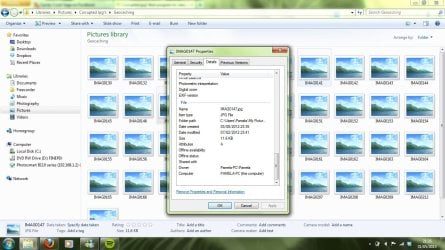
Having looked into the properties of the photos, there is no exif data from the image so I'm not too hopeful about saving them.

Wondered if there's any tried and tested programs out there that are able to do anything with these or are they bound for the recycle bin?

Thanks in advance.
 

My Computer My Computer

Computer Manufacturer/Model Number
Samsung R530
OS
Windows 7 Home Premium 32bit
CPU
Pentium Dual-Core CPU T4300 2.10GHz
Memory
3.00GB
Hard Drives
Hitachi Travelstar SATA 2.5" 750GB
Have you given the free google Picasa a try?

If not, that may help you.
Picasa
 

My Computer My Computer

Computer type
PC/Desktop
Computer Manufacturer/Model Number
My Own Build
OS
Windows 10 64 bit
CPU
Intel i7 6700K
Motherboard
ASUS ROG Maximus VIII Hero
Memory
16GB Corsair Dominator
Graphics Card(s)
Intel CPU Graphics
Sound Card
RealTek
Monitor(s) Displays
27" Dell S2719dgf
Screen Resolution
2560X1440
Hard Drives
1 TB Samsung 850 EVO SSD for Win 10 Pro
500GB Samsung 850 EVO SSD for Win 10 Insider
2 TB drive for backup
PSU
EVGA Supernova 750G2
Case
BeQuiet Silent Base 600
Cooling
Deepcool Captain 120EX
Keyboard
Microsoft Wireless 2000
Mouse
Microsoft wireless
Internet Speed
100 MB/sec (Cable)
Antivirus
Microsoft Defender and Malwarebytes
Browser
Edge/Firefox
Other Info
Cakewalk (Sonar) by BandLab and Studio One 4.1 Pro recording studio software. MOTU 896Mk3 Hybrid recording interface, Frontier Tranzport wireless control unit, Behringer X-Touch Control Surface.
Five USB connected optical drives for CD Audio production using Nero BurningROM
Have you given the free google Picasa a try?

If not, that may help you.
Picasa

Hi, thanks, but in Picasa it doesn't find the jpg's, have tried adding from the folder they are in but nothing happened.
 

My Computer My Computer

Computer Manufacturer/Model Number
Samsung R530
OS
Windows 7 Home Premium 32bit
CPU
Pentium Dual-Core CPU T4300 2.10GHz
Memory
3.00GB
Hard Drives
Hitachi Travelstar SATA 2.5" 750GB
Try this - open one of the pictures with Paint and 'save as' in .jpg or .png.
 

My Computer My Computer

Computer Manufacturer/Model Number
HP, Dell, Gateway, Toshiba - 4 laptops and 2 desktops
OS
Vista, Windows7, Mint Mate, Zorin, Windows 8
CPU
from 1.6GHz Duo to i7
Monitor(s) Displays
2x HP w2207
Hard Drives
5x HDD, 7x SSD, 12x Externals
Keyboard
with trackball - no mices
Mouse
Trackball mice
Internet Speed
DSL 6000
Try this - open one of the pictures with Paint and 'save as' in .jpg or .png.

"Paint cannot read this file.
This is not a valid bitmap file, or its format is not currently supported."
 

My Computer My Computer

Computer Manufacturer/Model Number
Samsung R530
OS
Windows 7 Home Premium 32bit
CPU
Pentium Dual-Core CPU T4300 2.10GHz
Memory
3.00GB
Hard Drives
Hitachi Travelstar SATA 2.5" 750GB
Hmm, sorry. I guess it was worth a try. Looks like those files are really shot.
 

My Computer My Computer

Computer Manufacturer/Model Number
HP, Dell, Gateway, Toshiba - 4 laptops and 2 desktops
OS
Vista, Windows7, Mint Mate, Zorin, Windows 8
CPU
from 1.6GHz Duo to i7
Monitor(s) Displays
2x HP w2207
Hard Drives
5x HDD, 7x SSD, 12x Externals
Keyboard
with trackball - no mices
Mouse
Trackball mice
Internet Speed
DSL 6000
This is all the info found in Properties>Details when I right click on thumbnails:
 

Attachments

  • corruptedjpg.jpg
    corruptedjpg.jpg
    139 KB · Views: 12

My Computer My Computer

Computer Manufacturer/Model Number
Samsung R530
OS
Windows 7 Home Premium 32bit
CPU
Pentium Dual-Core CPU T4300 2.10GHz
Memory
3.00GB
Hard Drives
Hitachi Travelstar SATA 2.5" 750GB
This file is extremely small. 11.6KB is too few bytes for a picture. There must be a lot of bits missing.
 

My Computer My Computer

Computer Manufacturer/Model Number
HP, Dell, Gateway, Toshiba - 4 laptops and 2 desktops
OS
Vista, Windows7, Mint Mate, Zorin, Windows 8
CPU
from 1.6GHz Duo to i7
Monitor(s) Displays
2x HP w2207
Hard Drives
5x HDD, 7x SSD, 12x Externals
Keyboard
with trackball - no mices
Mouse
Trackball mice
Internet Speed
DSL 6000
I wondered that too.

I think when I recovered all the stuff from my broken hard drive that it compressed stuff or something, can't quite recall, think I used a Ubuntu boot disk and transferred out most of it onto a small drive. I may still have them on there 'undisturbed', so to speak.
 

My Computer My Computer

Computer Manufacturer/Model Number
Samsung R530
OS
Windows 7 Home Premium 32bit
CPU
Pentium Dual-Core CPU T4300 2.10GHz
Memory
3.00GB
Hard Drives
Hitachi Travelstar SATA 2.5" 750GB
There's a small possibility the extension, .jpg, is incorrectly attached. I use XnView which has a high range of format-viewing abilities. Viewing Properties through XnView might reveal the actual format. I lucked out one time when a common extension, .jpg, of a picture file I had viewed and downloaded wouldn't show. When Properties indicated a different format, I changed the extension to that and the picture showed up. You can, of course, change the extension without the need to install XnView.
 

My Computer My Computer

OS
Windows 7 Home Premium x64
Do you mean changing it to a .png or something? They are all definitely photos and as far as I'm aware were all taken as jpg as my camera at the time didn't have RAW capability. I will try changing and let you know.
 

My Computer My Computer

Computer Manufacturer/Model Number
Samsung R530
OS
Windows 7 Home Premium 32bit
CPU
Pentium Dual-Core CPU T4300 2.10GHz
Memory
3.00GB
Hard Drives
Hitachi Travelstar SATA 2.5" 750GB
Scan all of your .JPG file with your virus software. Some nasty people embed bad stuff in them.
 

My Computer My Computer

Computer type
PC/Desktop
Computer Manufacturer/Model Number
Custom Build
OS
Win 10 Pro 64
CPU
Intel Core i7 960 @3.20 GHz
Motherboard
MSI MS7522
Memory
24.0 GB DDR3
Graphics Card(s)
EVGA GTX 750Ti
Monitor(s) Displays
LG E2341 23 Inch
Screen Resolution
1920x1080
Hard Drives
1TB Western Dgital 1002FAEX-00Y9A0
1TB Hitachi HDS721010CLA322
PSU
700 Watt
Case
Haf 912
Cooling
Fans
Keyboard
Logitech MK710
Mouse
Logitech M705
Internet Speed
Cable
Antivirus
AIS 2015 .10.0.2225
Browser
Firefox 49
Other Info
MalwareBytes Anti-Rootkit utility
Back
Top