Corrupted pictures and document files on system restore - help!

fuzzled

New member
Local time
11:12 AM
Messages
19
Hello,

I recently performed a rather roughshod update of hardware on a PC running windows 7. Basically the motherboard was fried, and we updated the system to a new motherboard rather painfully. You can follow the exploits here : New motherboard; system will not boot; cannot find windows; no BCD Solved - Page 2 - Windows 7 Help Forums

Anyway, now windows 7 is back up.. new drivers are installed etc. PC is running.

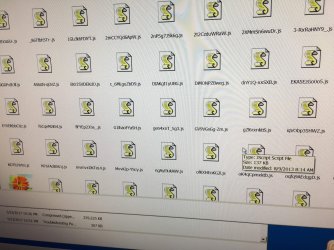
However, the user files are "corrupted" or unreadable. All system files, files in downloads dirs, temp dirs etc seem to be fine and intact and readable. However files in Users/USERNAME/My Pictures and Users/USERNAME/My Documents are "garbled" in that the files in those dirs are all renamed with a string of random chars, with .js extension. ALL of them, ex: fiFYEp2J0a_.js, DIAKgt1yUBG.js ...

I'll attach a picture.

Any idea how this could happen, and more importantly, how I may recover them?

Note: In the process of getting back up, I had the "User Profile service failed the login, user profile cannot be loaded" error and couldn't log in at all. I booted to safe mode and did a system restore. This let me log in with my profile again.
 

My Computer My Computer

At a glance

windows 7intel i38gb
Computer type
PC/Desktop
Computer Manufacturer/Model Number
custom
OS
windows 7
CPU
intel i3
Motherboard
gigabyte
Memory
8gb
.js files are JavaScript files normally it sounds very much that you have had a ransomware attack which has encrypted the files. Can you open any with notepad if they are JavaScript they should be txt. I would run virus scan ASAP
 

My Computer My Computer

At a glance

win 8 32 bit
Computer type
PC/Desktop
OS
win 8 32 bit
Virus scan doesn't show anything. I used the installed antivirus program as well as reimage repair tool.
 

My Computer My Computer

At a glance

windows 7intel i38gb
Computer type
PC/Desktop
Computer Manufacturer/Model Number
custom
OS
windows 7
CPU
intel i3
Motherboard
gigabyte
Memory
8gb
Found some more time to look into this today.

Opened some of the files, and all have this as the first few lines:
/*1371503166,173214305*/

if (self.CavalryLogger) { CavalryLogger.start_js(["hYPx+"]); }

__d("UIThumbPager",["CSS","DOM","Event","Style","URI","$","copyProperties","emptyFunc
All the files seem to be text and javascript code.

What the heck is this?
 

My Computer My Computer

At a glance

windows 7intel i38gb
Computer type
PC/Desktop
Computer Manufacturer/Model Number
custom
OS
windows 7
CPU
intel i3
Motherboard
gigabyte
Memory
8gb
Thanks for your replies and attention samuria.

I poked around this computer a bit more, and I think I see what has happened.

As I mentioned earlier, I had the "User Profile service failed the login, user profile cannot be loaded following which I managed to get back via a system restore in safe mode.

Then we found that the pictures and documents folders in C:\Users\USERNAME were either empty or had lots of these .js files.

Well, it turns out that pictures and docs in question are in C:\ProgramData\Users\USERNAME not C:\Users\USERNAME - where we have been expecting them to reside.

Did the files get moved there on system restore, or are they always in C:\ProgramData, and the ones in C:\Users just a shadow/shortcut?

Phew.. Anyway.. Now I need some understanding of what to do? All the programs expect files in C:\Users\USERNAME. Do I copy these files back, or create a link or fix some profile somewhere ? Change the programs to find data in this other location... ?

Puzzled but glad my data is still on the drive!!!
 

My Computer My Computer

At a glance

windows 7intel i38gb
Computer type
PC/Desktop
Computer Manufacturer/Model Number
custom
OS
windows 7
CPU
intel i3
Motherboard
gigabyte
Memory
8gb
Now I need some understanding of what to do? All the programs expect files in C:\Users\USERNAME. Do I copy these files back, or create a link or fix some profile somewhere ? Change the programs to find data in this other location... ?

Anyone have any idea or hints as to what I should do?

Googling around I see references to corrupted user profile and registries. Is there a process/program that can detect problems and repair this?
 

My Computer My Computer

At a glance

windows 7intel i38gb
Computer type
PC/Desktop
Computer Manufacturer/Model Number
custom
OS
windows 7
CPU
intel i3
Motherboard
gigabyte
Memory
8gb
Have a read through this Forum tutorial on how to change where the User Profiles are.

The User profiles should not be in C:\Program files, they should be under C:\Users

User Profile - Change Default Location - Windows 7 Help Forums

In your situation you are not intending to transfer the User Profiles to another partition or drive but to relocate them to their correct position on the existing drive.
 

My Computer My Computer

At a glance

Windows 7 Home Premium 64 bit sp1Intel i5 3570 3.4Ghz Ivy Bridge SKT 1155 quad...G-Skill Rip Jaws 16Gb (8x2) DDR3 -1600 PC3 12...Gigabyte NVIDIA GT610 1Gb DDR3 810/1200 PCI-E...
Computer type
PC/Desktop
Computer Manufacturer/Model Number
Self built using existing case
OS
Windows 7 Home Premium 64 bit sp1
CPU
Intel i5 3570 3.4Ghz Ivy Bridge SKT 1155 quad core
Motherboard
Gigabyte Z77-HD3 SKT 1155 2xSata 3, 4x USB 3.0
Memory
G-Skill Rip Jaws 16Gb (8x2) DDR3 -1600 PC3 12800 CL 10 red
Graphics Card(s)
Gigabyte NVIDIA GT610 1Gb DDR3 810/1200 PCI-E 2.0 Silent
Sound Card
NVIDIA High Definition & Realtech High Definition Audio
Monitor(s) Displays
2 x Philips 226V4L 16:9 aspect ratio
Screen Resolution
1920 x 1080 HD
Hard Drives
Samsung 840 Pro 256gb SSD, SATA 3.
Hitachi Touro Portable 1tb, USB 3.0 HDD used for image b/ups.
PSU
Corsair VS450
Case
Codeng
Cooling
PSU fan & CPU fan
Keyboard
Logitech
Mouse
Logitech Wireless trackball M570
Internet Speed
Wireless 3G. 3mg down & 550kb up.
Antivirus
Bitdefender Internet Security 2020
Browser
Opera (Current Version) & Firefox
Other Info
MS Office 2013 Pro. Davis weather station software. MGE Nova 600 avr UPS.
Back
Top